快速开始
选择最合适的版本
Edge、Tier0 云服务版或 Enterprise:通过定位、套餐和能力矩阵选择适合你的 Tier0 版本。
查看 这里 了解每个产品的详细功能,并选择最适合你的版本。
- 在工厂数据上构建应用 - 构建并在 Enterprise 上部署 Tier0 应用
- 安装 — 按所选版本完成设置。
按版本安装 Tier0。
Tier0 提供三个版本:
请参阅 选择最合适的版本 来判断哪个版本最符合用户需求。
在体验 Tier0 云服务版之前,需要申请试用账号。
sha256sum -c tier0-enterprise-offline-standard-YYYYmmddTHHMMSS.tar.gz.sha256tar -xzf tier0-enterprise-offline-standard-YYYYmmddTHHMMSS.tar.gzcd tier0-enterprise-offline-standard-YYYYmmddTHHMMSSinstall.env,然后开始部署。
vi install.envbash install.sh./install.sh --check-only./full-cleanup.sh --env install.env --yes此命令会清除全部 Tier0 运行时数据和数据库备份,但会保留虚拟机、操作系统以及已安装的 Docker 软件。
runtime/install-reports/<timestamp>/deployment-report.md如果报告中包含任何 FAIL 项,请不要交付项目,请先联系支持团队。
选择最合适的版本 - 比较各个版本并选择最适合你的版本。
Unified Namespace 模型:Metric、State、Action,以及 UNS 如何存储工厂数据。
在 Tier0 中,工厂数据会基于 UNS(Unified Namespace)方法组织成清晰的树形模型,形成统一的数据基础。
  %%{init: {"flowchart": {"defaultRenderer": "elk", "nodeSpacing": 32, "rankSpacing": 48, "diagramPadding": 8}}}%%
  flowchart TB
  source["数据源 / 消费者"]
  subgraph UNS["Unified Namespace"]
      direction LR
      Model["模型<br/>定义路径、topic 和 payload"]
      Broker["Broker<br/>处理数据交换"]
      Storage["存储<br/>持久化数据"]
      Model <--> Broker
      Broker --> Storage
  end
  source <-- "MQTT / API" --> UNS
  classDef broker fill:#F7FAF2,stroke:#D8E6B8,stroke-width:1px,color:#2A2A2A,stroke-dasharray:5 5
class Broker broker %%{init: {
"themeVariables": {
"fontSize": "14pt"
},
"flowchart": {
"defaultRenderer": "elk",
"nodeSpacing": 40,
"rankSpacing": 56,
"diagramPadding": 8
}
}}%%
flowchart LR
subgraph Model["模型类型"]
direction TB
metric["Metric<br/>高频数值数据"]
state["State<br/>当前事实或状态"]
action["Action<br/>命令或请求操作"]
end
subgraph Storage["存储"]
direction TB
tsdb["TSDB<br/>Metric 历史的时序存储"]
jsonb["JSONB<br/>State 和 Action 的文档存储"]
end
metric --> tsdb
state --> jsonb
action --> jsonb在 Tier0 中,broker 是平台组件,它会基于数据模型,通过 MQTT 或 OpenAPI 接收和发送数据。
工业数据变化频率不同,目的也不同,因此 Tier0 将 UNS 模型固定分为三类。
| 类型 | 对象 | 示例 |
|---|---|---|
METRIC |
面向连续采集、需要时序存储的高频数据。 | 设备温度/压力/电压 |
STATE |
面向变化频率较低、用于描述对象当前状态或事实的数据。 | 设备运行状态 |
ACTION |
面向低频命令数据,用于记录外部系统或操作员应执行的动作。 | 启动批次、停止设备 |
每个 UNS 模型都包含 path、topic 和消息内容。它们共同形成一棵树,既承载业务上下文,也传输工业数据。
例如,UNS 中的模型可以像下面这样表示:
Factory_A └── Site_01 └── SMT_Line_1 └── Metric └── Machine_001Factory_A/Site_01/SMT_Line_1/Metric/Machine_001。{ "temperature": 85, "vibration": 2.8} Factory_A └── ERP └── ProductionOrders └── State └── OrderListFactory_A/ERP/ProductionOrders/State/OrderList。{ "orders": "0123569876", "updated_at": "2026-07-13"}Tier0 使用 PostgreSQL 存储数据。不同数据类型变化频率不同,也有不同的存储要求。
| 数据类型 | 存储 | 说明 |
|---|---|---|
METRIC |
TSDB | 针对温度、压力等高频测量数据优化。每个 topic 默认包含 timestamp 和 quality 字段。 |
STATE |
PostgreSQL | 以灵活的 JSONB 格式存储设备或系统状态。 |
ACTION |
PostgreSQL | 以灵活的 JSONB 格式存储命令或动作。 |
为应用连接外部数据,并在 Tier0 中建模与集成。
Tier0 为自定义应用建立数据基础:接收应用业务数据、连接现有系统和设备的数据源,并将数据集成到统一模型供应用使用。
所有数据都建模到 Namespace 下的 Tables,并按数据类型组织。
flowchart TB
  namespace["Namespace"] --> table["Table"]
  table --> record["Record 表<br/>关系数据"]
  table --> sample["Sample 表<br/>时序数据"]
  classDef t0accent fill:#B2ED1D,stroke:#73B200,color:#171717
  class table t0accent
业务数据可来自应用操作或外部系统;时序数据主要来自已连接的设备。
flowchart LR
  app["应用"] -->|"业务数据"| record["Record"]
  stream["数据流"] -->|"设备数据"| sample["Sample"]
  classDef t0accent fill:#B2ED1D,stroke:#73B200,color:#171717
  class record,sample t0accent
flowchart LR
  source["数据源<br/>连接服务器"] --> stream["数据流<br/>采集并处理"]
  classDef t0accent fill:#B2ED1D,stroke:#73B200,color:#171717
  class source,stream t0accent
除非 Prompt 明确指定,否则 Agent 会根据应用业务逻辑自动生成数据模型。
从中心节点无缝管理已连接边缘节点上的数据。
通过 Tier0 的边缘与中心协作,你可以在边缘设备上采集数据,并在中心平台上管理数据。
先在中心节点上创建 Fleet 节点。
使用中心节点生成的 Token 连接每个边缘节点。
通过 MQTT 和 API 操作 UNS 数据,并查看 API 参考。
你可以通过 MQTT 和 API 操作 UNS 数据。
Tier0 生成的凭据可用于让 MQTT 客户端连接 UNS broker。
在 Connect > 数据源 > MQTT Device 中生成 MQTT 凭据并记录。
{ "Host": "mqtt.tier0.dev", "Port": 1883, "Client ID": "<generated client ID>", "Username": "<generated username>", "Password": "<generated password>"}{ "Protocol": "mqtt://", "Host": "mqtt.tier0.dev", "Port": 1883, "Username": "<generated username>", "Password": "<generated password>"}使用 Event Flow:Tier0 中基于 Node-RED 的数据处理模块。
mqtt in 节点开始。使用独立的 Node-RED 实例
mqtt in 节点中使用以下信息添加服务器。{ {/* under Connection */} "Server": "mqtt://mqtt.tier0.dev", "Port": 1883, "Client ID": "<generated clientId>", {/* under Security */} "Username": "<generated username>", "Password": "<generated password>"}https://<your-tier0-host>/openapi/v2x-api-key 请求头中。POST /uns/metadata:find — 列出 Tables 并获取 Table ID
const base = "https://your-tier0-host/openapi/v2";const response = await fetch(`${base}/uns/metadata:find`, { method: "POST", headers: { "content-type": "application/json", "x-api-key": "your-api-key" }, body: JSON.stringify({"kind": "collection", "filter": {}, "page": {"mode": "offset", "page": 1, "size": 20}}),});const result = await response.json();if (!response.ok || result.code !== 0) throw new Error(result.error?.code || result.msg);console.log(result.data.items);import requests
response = requests.post( "https://your-tier0-host/openapi/v2/uns/metadata:find", headers={"x-api-key": "your-api-key"}, json={"kind": "collection", "filter": {}, "page": {"mode": "offset", "page": 1, "size": 20}}, timeout=30,)response.raise_for_status()result = response.json()if result["code"] != 0: raise RuntimeError(result.get("error", result.get("msg")))print(result["data"]["items"])curl --fail-with-body -X POST "https://your-tier0-host/openapi/v2/uns/metadata:find" \ -H "content-type: application/json" \ -H "x-api-key: your-api-key" \ -d '{"kind": "collection", "filter": {}, "page": {"mode": "offset", "page": 1, "size": 20}}'POST /uns/collections/{collectionId}/records:find — 列出 Records 并获取 Record ID
const base = "https://your-tier0-host/openapi/v2";const collectionId = "your-collection-id";const response = await fetch(`${base}/uns/collections/${encodeURIComponent(collectionId)}/records:find`, { method: "POST", headers: { "content-type": "application/json", "x-api-key": "your-api-key" }, body: JSON.stringify({"limit": 20}),});const result = await response.json();if (!response.ok || result.code !== 0) throw new Error(result.error?.code || result.msg);console.log(result.data);import requests
response = requests.post( "https://your-tier0-host/openapi/v2/uns/collections/your-collection-id/records:find", headers={"x-api-key": "your-api-key"}, json={"limit": 20}, timeout=30,)response.raise_for_status()result = response.json()if result["code"] != 0: raise RuntimeError(result.get("error", result.get("msg")))print(result["data"])curl --fail-with-body -X POST "https://your-tier0-host/openapi/v2/uns/collections/your-collection-id/records:find" \ -H "content-type: application/json" \ -H "x-api-key: your-api-key" \ -d '{"limit": 20}'POST /uns/collections/{collectionId}/samples:latest — 获取 Record 的最新 Sample
const base = "https://your-tier0-host/openapi/v2";const collectionId = "your-collection-id";const response = await fetch(`${base}/uns/collections/${encodeURIComponent(collectionId)}/samples:latest`, { method: "POST", headers: { "content-type": "application/json", "x-api-key": "your-api-key" }, body: JSON.stringify({"recordIds": ["record_123"]}),});const result = await response.json();if (!response.ok || result.code !== 0) throw new Error(result.error?.code || result.msg);console.log(result.data);import requests
response = requests.post( "https://your-tier0-host/openapi/v2/uns/collections/your-collection-id/samples:latest", headers={"x-api-key": "your-api-key"}, json={"recordIds": ["record_123"]}, timeout=30,)response.raise_for_status()result = response.json()if result["code"] != 0: raise RuntimeError(result.get("error", result.get("msg")))print(result["data"])curl --fail-with-body -X POST "https://your-tier0-host/openapi/v2/uns/collections/your-collection-id/samples:latest" \ -H "content-type: application/json" \ -H "x-api-key: your-api-key" \ -d '{"recordIds": ["record_123"]}'POST /uns/collections/{collectionId}/samples:find — 获取指定时间范围内的 Samples
const base = "https://your-tier0-host/openapi/v2";const collectionId = "your-collection-id";const response = await fetch(`${base}/uns/collections/${encodeURIComponent(collectionId)}/samples:find`, { method: "POST", headers: { "content-type": "application/json", "x-api-key": "your-api-key" }, body: JSON.stringify({"recordIds": ["record_123"], "from": 1792454400000, "to": 1792540800000, "filter": {"temperature": {"$gt": 20}}, "limit": 20}),});const result = await response.json();if (!response.ok || result.code !== 0) throw new Error(result.error?.code || result.msg);console.log(result.data);import requests
response = requests.post( "https://your-tier0-host/openapi/v2/uns/collections/your-collection-id/samples:find", headers={"x-api-key": "your-api-key"}, json={"recordIds": ["record_123"], "from": 1792454400000, "to": 1792540800000, "filter": {"temperature": {"$gt": 20}}, "limit": 20}, timeout=30,)response.raise_for_status()result = response.json()if result["code"] != 0: raise RuntimeError(result.get("error", result.get("msg")))print(result["data"])curl --fail-with-body -X POST "https://your-tier0-host/openapi/v2/uns/collections/your-collection-id/samples:find" \ -H "content-type: application/json" \ -H "x-api-key: your-api-key" \ -d '{"recordIds": ["record_123"], "from": 1792454400000, "to": 1792540800000, "filter": {"temperature": {"$gt": 20}}, "limit": 20}'通过 AI 对话构建自定义工业应用。
通过 AI 对话构建自定义工业应用。应用可以使用工厂数据,并提供基于角色的访问控制、版本管理和外部部署能力。
说明应用的目标、功能及是否需要外部数据。
为工厂技术人员创建一个设备维护应用。允许用户监控设备状态、提交维护请求并跟踪维修进度。应用应使用 xxx table 中的报警记录和维护历史。应用采用基于角色的访问控制(RBAC),管理成员访问和允许执行的操作。
应用准备就绪后,可从 Preview 页面导出至第三方环境或 Tier0 Enterprise。
构建数字孪生 — 将工厂数据转为可视化运营视图。
将实时 UNS 数据绑定到 3D 模型,并组合成完整的工厂场景进行数字孪生可视化。
连接到 Tier0 的工厂数据可以通过 Digital Twin 可视化为具有真实动作和环境的 3D 场景。整体流程是先把数据映射到 3D 模型,再把多个模型组合起来,构建完整的工厂场景。
只有实例可以按模型或按场景分享。
通过 MCP 将 AI Agent 连接到 Tier0。
通过 MCP 将 AI Agent 连接到 Tier0。Agent 可以在你授予的权限范围内查找并调用平台 API。
 WorkBuddy
{ "Authorization": "Bearer <your-personal-api-key>" }whoami,检查连接。codex mcp add tier0 --url https://your-tier0-url/mcp --oauth-client-registration dcrcodex mcp login tier0 --oauth-client-registration dcrwhoami,检查连接。| MCP 工具 | 用途 |
|---|---|
whoami |
检查身份和权限。 |
docs |
阅读 API 文档。 |
search |
查找 API 操作。 |
execute |
调用 API 操作。 |
先让 Agent 使用 docs 和 search 找到所需操作,再使用 execute 调用。例如:
读取我的 Workspace 中 `Plant/Line1/Metric/Temperature` 的当前值。操作工厂数据 — 了解 Tier0 如何组织和提供工厂数据。
Demo UNS 设计:避免 topic explosion 和 payload structure 的最佳实践。
来自有物理位置的机器和设备的工业数据,通常基于 ISA-95 标准建模。
Enterprise (Level 4)└── Site (Level 3/4) └── Area (Level 3) └── Work Center / Process Cell (Level 2/3) └── Equipment / Unit (Level 1/2) └── Control Module / Device (Level 0/1)DemoFactory└── Site_01 └── Production └── Line_01 └── WorkOrderExecution ├── Metric │ ├── Target_Qty │ ├── Produced_Qty │ ├── Defect_Qty │ └── Completion_Rate └── State ├── CurrentWorkOrder └── WorkOrderStatus{ "namespace": [ { "name": "DemoFactory", "alias": "DemoFactory_9e50bbcd833d", "type": "PATH", "children": [ { "name": "Site_01", "alias": "DemoFactory__6d1fcad14e86", "type": "PATH", "children": [ { "name": "Production", "alias": "__Site_01_Pro_91523d2ad304", "type": "PATH", "children": [ { "name": "Line_01", "alias": "__Production__acd5841c1ada", "type": "PATH", "children": [ { "name": "WorkOrderExecution", "alias": "__Line_01_Wor_54904ff56e91", "type": "PATH", "children": [ { "name": "Metric", "alias": "metric_233fd84305c4", "type": "PATH", "children": [ { "name": "Target_Qty", "alias": "Target_Qty_8646b092e543", "type": "TOPIC", "topicType": "METRIC", "description": "Target quantity for the current Work Order.", "fields": [ { "name": "production_order_id", "type": "STRING" }, { "name": "plan_id", "type": "STRING" }, { "name": "plan_number", "type": "STRING" }, { "name": "work_order_id", "type": "STRING" }, { "name": "value", "type": "DOUBLE" }, { "name": "unit", "type": "STRING" }, { "name": "timestamp", "type": "DATETIME" } ], "enableHistory": "TRUE", "mockData": "FALSE" }, { "name": "Produced_Qty", "alias": "Produced_Qty_1f8cd3e11f77", "type": "TOPIC", "topicType": "METRIC", "description": "Produced quantity for the current Work Order.", "fields": [ { "name": "production_order_id", "type": "STRING" }, { "name": "plan_id", "type": "STRING" }, { "name": "plan_number", "type": "STRING" }, { "name": "work_order_id", "type": "STRING" }, { "name": "value", "type": "DOUBLE" }, { "name": "unit", "type": "STRING" }, { "name": "timestamp", "type": "DATETIME" } ], "enableHistory": "TRUE", "mockData": "FALSE" }, { "name": "Defect_Qty", "alias": "Defect_Qty_b48fb3563ec1", "type": "TOPIC", "topicType": "METRIC", "description": "Defect quantity for the current Work Order.", "fields": [ { "name": "production_order_id", "type": "STRING" }, { "name": "plan_id", "type": "STRING" }, { "name": "plan_number", "type": "STRING" }, { "name": "work_order_id", "type": "STRING" }, { "name": "value", "type": "DOUBLE" }, { "name": "unit", "type": "STRING" }, { "name": "timestamp", "type": "DATETIME" } ], "enableHistory": "TRUE", "mockData": "FALSE" }, { "name": "Completion_Rate", "alias": "Completion_R_7294e38e1530", "type": "TOPIC", "topicType": "METRIC", "description": "Completion percentage for the current Work Order.", "fields": [ { "name": "production_order_id", "type": "STRING" }, { "name": "plan_id", "type": "STRING" }, { "name": "plan_number", "type": "STRING" }, { "name": "work_order_id", "type": "STRING" }, { "name": "value", "type": "DOUBLE" }, { "name": "unit", "type": "STRING" }, { "name": "timestamp", "type": "DATETIME" } ], "enableHistory": "TRUE", "mockData": "FALSE" } ] }, { "name": "State", "alias": "state_539a0f331fe0", "type": "PATH", "children": [ { "name": "CurrentWorkOrder", "alias": "CurrentWorkO_a638320784dd", "type": "TOPIC", "topicType": "STATE", "description": "Current active Work Order on Line_01.", "fields": [ { "name": "production_order_id", "type": "STRING" }, { "name": "plan_id", "type": "STRING" }, { "name": "plan_number", "type": "STRING" }, { "name": "work_order_id", "type": "STRING" }, { "name": "target_line", "type": "STRING" }, { "name": "workstation", "type": "STRING" }, { "name": "product_code", "type": "STRING" }, { "name": "target_qty", "type": "DOUBLE" }, { "name": "unit", "type": "STRING" }, { "name": "started_at", "type": "DATETIME" }, { "name": "updated_at", "type": "DATETIME" } ], "enableHistory": "TRUE", "mockData": "FALSE" }, { "name": "WorkOrderStatus", "alias": "WorkOrderSta_e24e3bf113d1", "type": "TOPIC", "topicType": "STATE", "description": "Execution status of the current Work Order.", "fields": [ { "name": "production_order_id", "type": "STRING" }, { "name": "plan_id", "type": "STRING" }, { "name": "plan_number", "type": "STRING" }, { "name": "work_order_id", "type": "STRING" }, { "name": "status", "type": "STRING" }, { "name": "reason", "type": "STRING" }, { "name": "updated_at", "type": "DATETIME" } ], "enableHistory": "TRUE", "mockData": "FALSE" } ] } ] } ] } ] } ] } ] } ]}对于 ERP 中的生产订单、工单计划等业务计划和流程对象,应根据业务上下文进行建模。
Factory / Business Domain / Business Object / Topic Type / Topic业务域:确认数据所属的业务流程或系统。
ERPMESWMSQMSEAMLIMSPlanningInventoryMaintenanceQualityLogistics...业务对象:业务域中被管理的核心对象。
ProductionOrdersWorkOrderPlanMaterialInventoryQualityInspectionMaintenanceOrdersPurchaseOrdersShipments...Topic 类型:从 Metric、Action 和 State 中选择数据类型。
| Topic 类型 | 用途 | 示例 |
|---|---|---|
| STATE | 当前状态或当前事实 | 工单状态、订单状态、设备状态 |
| METRIC | 连续变化的数值 | 温度、速度、产量、OEE、能耗 |
| ACTION | 给外部执行者的命令 | 启动设备、停止设备、重置报警、请求下发工单 |
DemoFactory└── ERP ├── ProductionOrders │ └── State │ ├── UpsertProductionOrder │ └── OrderList └── WorkOrderPlan ├── Metric │ └── SplitCount └── State ├── PlanStatus └── WorkOrderList{ "namespace": [ { "name": "DemoFactory", "alias": "DemoFactory_f925c1ec5041", "type": "PATH", "children": [ { "name": "ERP", "alias": "DemoFactory__e504805b1973", "type": "PATH", "children": [ { "name": "ProductionOrders", "alias": "__ERP_Product_1e7984ac3a1d", "type": "PATH", "children": [ { "name": "State", "alias": "state_c2616c8698fa", "type": "PATH", "children": [ { "name": "UpsertProductionOrder", "alias": "UpsertProduc_d5f166da35c6", "type": "TOPIC", "topicType": "STATE", "description": "Event for creating or updating a Production Order from WOM or ERP simulation.", "fields": [ { "name": "event_id", "type": "STRING" }, { "name": "event_type", "type": "STRING" }, { "name": "source", "type": "STRING" }, { "name": "production_order_id", "type": "STRING" }, { "name": "order_number", "type": "STRING" }, { "name": "product_code", "type": "STRING" }, { "name": "planned_qty", "type": "DOUBLE" }, { "name": "unit", "type": "STRING" }, { "name": "status", "type": "STRING" }, { "name": "due_date", "type": "DATETIME" }, { "name": "updated_at", "type": "DATETIME" } ], "enableHistory": "TRUE", "mockData": "FALSE" }, { "name": "OrderList", "alias": "OrderList_11fbca51a2bd", "type": "TOPIC", "topicType": "STATE", "description": "Retained compatibility snapshot of current Production Orders.", "fields": [ { "name": "orders", "type": "STRING" }, { "name": "updated_at", "type": "DATETIME" } ], "enableHistory": "TRUE", "mockData": "FALSE" } ] } ] }, { "name": "WorkOrderPlan", "alias": "__ERP_WorkOrd_19f04960daf5", "type": "PATH", "children": [ { "name": "Metric", "alias": "metric_17258b809a4f", "type": "PATH", "children": [ { "name": "SplitCount", "alias": "SplitCount_032e86f5fbfc", "type": "TOPIC", "topicType": "METRIC", "description": "Number of executable Work Orders generated from a Work Order Plan.", "fields": [ { "name": "production_order_id", "type": "STRING" }, { "name": "plan_id", "type": "STRING" }, { "name": "plan_number", "type": "STRING" }, { "name": "split_count", "type": "INTEGER" }, { "name": "updated_at", "type": "DATETIME" } ], "enableHistory": "TRUE", "mockData": "FALSE" } ] }, { "name": "State", "alias": "state_884cee548bf7", "type": "PATH", "children": [ { "name": "PlanStatus", "alias": "PlanStatus_2e21c1327c49", "type": "TOPIC", "topicType": "STATE", "description": "Current lifecycle status of a Work Order Plan.", "fields": [ { "name": "production_order_id", "type": "STRING" }, { "name": "plan_id", "type": "STRING" }, { "name": "plan_number", "type": "STRING" }, { "name": "status", "type": "STRING" }, { "name": "updated_at", "type": "DATETIME" } ], "enableHistory": "TRUE", "mockData": "FALSE" }, { "name": "WorkOrderList", "alias": "WorkOrderLis_887b92f26fc2", "type": "TOPIC", "topicType": "STATE", "description": "Split result list generated from a sent Work Order Plan.", "fields": [ { "name": "production_order_id", "type": "STRING" }, { "name": "plan_id", "type": "STRING" }, { "name": "plan_number", "type": "STRING" }, { "name": "split_count", "type": "INTEGER" }, { "name": "lines", "type": "STRING" }, { "name": "updated_at", "type": "DATETIME" } ], "enableHistory": "TRUE", "mockData": "FALSE" } ] } ] } ] } ] } ]}设计 topic 消息内容时,需要同时考虑要消费的数据和要回写的数据。
Action
Action 消息内容会自动包含 _timestamp,用于记录数据存入 Tier0 数据库的时间。
{ "light_turn_on": true, "height_adjust": 12.5, "_timestamp": "2026-07-10T10:00:00Z"}{ "water_pump_off": true, "window_close": true, "_timestamp": "2026-07-10T10:00:00Z"}Metric
Metric 消息内容会自动包含 _timestamp 和 _quality:前者记录数据存入 Tier0 数据库的时间,后者用于映射数据质量。
{ "production_order_id": "PO-20260710-001", "plan_id": "PLAN-001", "plan_number": "WOP-20260710-001", "split_count": 3, "updated_at": "2026-07-10T10:00:00Z", "_timestamp": "2026-07-10T10:00:00Z", "_quality": "Good"}{ "production_order_id": "PO-20260710-001", "plan_id": "PLAN-001", "plan_number": "WOP-20260710-001", "work_order_id": "WO-001", "value": 1200, "unit": "pcs", "timestamp": "2026-07-10T10:00:00Z", "_timestamp": "2026-07-10T10:00:00Z", "_quality": "Good"}State
State 消息内容会自动包含 _timestamp,用于记录数据存入 Tier0 数据库的时间。
{ "event_id": "EVT-001", "event_type": "UPSERT", "source": "ERP", "production_order_id": "PO-20260710-001", "order_number": "PO-001", "product_code": "SKU-1001", "planned_qty": 1200, "unit": "pcs", "status": "Released", "due_date": "2026-07-12T00:00:00Z", "updated_at": "2026-07-10T10:00:00Z", "_timestamp": "2026-07-10T10:00:00Z"}{ "production_order_id": "PO-20260710-001", "plan_id": "PLAN-001", "plan_number": "WOP-20260710-001", "work_order_id": "WO-001", "status": "Running", "reason": "In production", "updated_at": "2026-07-10T10:00:00Z", "_timestamp": "2026-07-10T10:00:00Z"}Tier0 设计了三种固定的 Topic 类型, Metric, Action 和 State 来避免 topic 爆炸.
将 Metric 用于高频实时数据
将高频测量值和遥测数据统一放在 Metric 下,而不是为每个信号细节创建 topic。
Factory_A└── SMT_Line_1 └── Machine_001 ├── Temperature_Value ├── Temperature_Unit ├── Temperature_Status └── Speed_ValueFactory_A└── SMT_Line_1 └── Metric └── Machine_001消息内容:
{ "temperature": 80, "temperature_unit": "Celsius", "temperature_status": "Normal", "speed": 300}将 State 用于低频状态数据
将低频状态、快照和当前业务状态放在 State 下。避免为作业、批次或订单等变化实体分别创建新 topic。
将 Action 用于低频动作数据
将命令、请求和操作员动作放在 Action 下。动作输入应作为 topic 的字段,而不是为每个参数创建一个 topic。
Tier0 支持连接多种工业协议,包括 OPC UA、Modbus、MQTT 等。
{ "name": "ua", "description": "", "protocol": "opcua", "endpoint": "opc.tcp://220.184.175.73:4841/demo/", "runtimeLocation": "local", "opcua": { "securityMode": "None", "securityPolicy": "None" }}只需提供服务器地址和单元 ID。
{ "name": "modbus", "description": "", "protocol": "modbus-tcp", "endpoint": "tcp://220.184.175.73:1502", "runtimeLocation": "local", "modbus": { "unitId": 1 }}Tier0 既可以作为 MQTT Broker 接收设备数据,也可以作为客户端连接外部 MQTT Broker。
作为 Broker:
作为客户端:连接第三方 Broker。
{"name": "111","description": "","protocol": "mqtt","endpoint": "mqtt://220.184.175.73:1883","runtimeLocation": "local","mqtt": { "clientId": "tier0UxxxxxxxxuwQVfi"}}Tier0 既可以作为 HTTP 服务器供第三方访问,也可以作为客户端调用其他 HTTP 服务器的 API。
作为服务器:
作为客户端:连接第三方 HTTP 服务器。
{ "name": "222", "description": "", "protocol": "http-api", "endpoint": "http://220.184.175.73:8088/api/telemetry", "runtimeLocation": "local", "role": "client", "http": { "authentication": "none" }}{ "name": "eee", "description": "", "protocol": "edge-sql", "endpoint": "mysql://hzoffice.tier0.dev:3307/demo_factory", "runtimeLocation": "local", "sql": { "queries": { "query1": "SELECT * FROM telemetry ORDER BY id DESC LIMIT 5" }, "tlsMode": "verify-full" }, "credentialRef": "ref_9ce47b8778xxxxxxxx7dad49a86dbad"}Tier0 身份认证、数据访问、部署可用性与恢复机制概览。
Tier0 支持从安全和可靠性两个方面来确保数据安全。
| 版本 | 安全能力范围 |
|---|---|
| 云服务版 | 提供平台访问控制,以及需要身份认证的 MQTT 和 API 数据访问。 |
| 企业版 | 除平台和数据访问控制外,还提供适用于私有部署的部署可用性、备份与恢复方案。 |
| Edge(开源版) | 用于本地数据连接与建模,内置 MQTT Broker 支持匿名订阅。 |
各版本定位请参阅选择合适的产品版本。
| 范围 | Tier0 机制 | 详情 |
|---|---|---|
| 平台访问 |
|
用户管理 |
| Agent 访问 | Agent 通过 MCP 连接,并在获得的权限范围内操作平台。 | 连接 Agent |
| 应用访问 | Tier0 基于 RBAC 实现应用访问控制。 | 访问控制 |
| 访问方式 | Tier0 机制 | 详情 |
|---|---|---|
| MQTT |
|
MQTT 凭据与连接 |
| REST API | 必须使用 Tier0 生成的 Key 才能访问数据。 | API 参考 |
企业版目前为中心节点提供两种部署方案:
| 方案 | 可用性边界 | 详情 |
|---|---|---|
| 标准部署 |
|
标准部署方案 |
| 高可用部署 |
|
高可用部署方案 |
企业版提供数据库备份和恢复。恢复后需要检查部署状态、执行基础功能验证,并确认能够正常登录平台。
使用 UNS Agent 构建覆盖数据建模、数据连接和数据事件的工作流。
UNS Agent 支持通过自然语言对话简单快速对工厂数据进行建模,连接机器数据并针对数据构建报警事件。
一个搅拌罐在加热材料的同时完成混合。构建数据模型并采集温度、水位和加热器状态,用于判断搅拌罐是否过热并触发报警。
flowchart RL
  source["数据连接<br/>(连接数据源)"]
  event["事件流程<br/>(事件逻辑与报警)"]
  uns["UNS<br/>(建模)"]

  source -->|"搅拌罐数据"| uns
  event -->|"报警数据"| uns

  classDef t0accent fill:#EFFFD2,stroke:#8AC926,stroke-width:1px,color:#18230B
  classDef t0node fill:#F8FAFC,stroke:#CBD5E1,stroke-width:1px,color:#111827
  class uns t0accent
  class source,event t0node
在 UNS 中使用 full_access 与 UNS Agent 开始对话。
输入提示词来构建 UNS 模型。
创建一个表示搅拌罐温度、水位和加热器状态的数据模型,温度和水位放在一个 metric topic 中,加热器状态放在一个 state topic 中。确认模型完整后,输入提示词,让 Agent 将对应数据连接到模型。
创建一个数据连接,向这 2 个 topic 发送数据,并模拟合理的数据。输入提示词,按照以下逻辑创建事件。
为以下报警逻辑创建一个事件流程: - Warning:当 level < 20 且 heater_status = true 时触发。 - Critical:当 level < 15、temperature > 90 且 heater_status = true 时触发。 - 当 level > 25 或 heater_status = false 时清除当前报警。在现有 UNS 模型下创建一个新 topic 来接收报警结果。输出中包含报警等级、消息、是否激活和时间戳。在 UNS 中检查结果。
在 3D 模型和场景中实时查看 UNS 数据。
Tier0 的数字孪生功能用于在逼真的 3D 模型和场景中实时查看 UNS 数据。 本节会把一个车间场景构建出来。该车间包含以下设备:
将所有数据采集到 UNS,包括控制机器动作的数据、表示机器状态的数据,以及车间环境数据。
在 UNS 中构建数据模型。
{"namespace": [ { "name": "Metric", "alias": "metric_151a7edd68bf4269a229", "type": "PATH", "children": [ { "name": "RobotArm", "alias": "Robot_0_9d5dc450dc1f4c0c9a86", "type": "TOPIC", "topicType": "METRIC", "extendProperties": { "J0_Cur": "0" }, "fields": [ { "name": "J1_Cur", "type": "FLOAT" }, { "name": "J1_Init", "type": "FLOAT" }, { "name": "J2_Cur", "type": "FLOAT" }, { "name": "J2_Init", "type": "FLOAT" }, { "name": "J3_Cur", "type": "FLOAT" }, { "name": "J3_Init", "type": "FLOAT" }, { "name": "J4_Cur", "type": "FLOAT" }, { "name": "J4_Init", "type": "FLOAT" }, { "name": "J5_Cur", "type": "FLOAT" }, { "name": "J5_Init", "type": "FLOAT" }, { "name": "J6_Cur", "type": "FLOAT" }, { "name": "J6_Init", "type": "FLOAT" }, { "name": "Model_Name", "type": "STRING" }, { "name": "Max_Payload_kg", "type": "FLOAT" }, { "name": "Reach_Radius_mm", "type": "FLOAT" }, { "name": "Gripper_Force_N", "type": "FLOAT" } ], "enableHistory": "TRUE", "mockData": "FALSE" }, { "name": "ProLathe-01", "alias": "ProLathe_ef325e0a9db047d6abac", "type": "TOPIC", "topicType": "METRIC", "fields": [ { "name": "J_Changer_Cur", "type": "FLOAT" }, { "name": "J_Door_Cur", "type": "FLOAT" }, { "name": "J_Finger_Cur", "type": "FLOAT" }, { "name": "J_Spindle_Cur", "type": "FLOAT" }, { "name": "J_TailStock_Cur", "type": "FLOAT" }, { "name": "J_X_Cur", "type": "FLOAT" }, { "name": "J_Y_Cur", "type": "FLOAT" }, { "name": "J_Z_Cur", "type": "FLOAT" }, { "name": "Model_Name", "type": "STRING" }, { "name": "Max_Placement_Rate_cph", "type": "INTEGER" }, { "name": "Placement_Speed_cph", "type": "INTEGER" }, { "name": "Feeder_Usage_pct", "type": "INTEGER" }, { "name": "Machine_State_code", "type": "INTEGER" } ], "enableHistory": "FALSE", "mockData": "FALSE" }, { "name": "ProLathe-02", "alias": "ProLathe2_ef325e0a9db047d6abac", "type": "TOPIC", "topicType": "METRIC", "fields": [ { "name": "J_Changer_Cur", "type": "FLOAT" }, { "name": "J_Door_Cur", "type": "FLOAT" }, { "name": "J_Finger_Cur", "type": "FLOAT" }, { "name": "J_Spindle_Cur", "type": "FLOAT" }, { "name": "J_TailStock_Cur", "type": "FLOAT" }, { "name": "J_X_Cur", "type": "FLOAT" }, { "name": "J_Y_Cur", "type": "FLOAT" }, { "name": "J_Z_Cur", "type": "FLOAT" }, { "name": "Model_Name", "type": "STRING" }, { "name": "Max_Placement_Rate_cph", "type": "INTEGER" }, { "name": "Placement_Speed_cph", "type": "INTEGER" }, { "name": "Feeder_Usage_pct", "type": "INTEGER" }, { "name": "Machine_State_code", "type": "INTEGER" } ], "enableHistory": "FALSE", "mockData": "FALSE" }, { "name": "AGV", "alias": "AGV_7eddee0054a0", "type": "TOPIC", "topicType": "METRIC", "fields": [ { "name": "Position_X_Cur", "type": "FLOAT" }, { "name": "Position_X_Init", "type": "FLOAT" }, { "name": "Position_Y_Cur", "type": "FLOAT" }, { "name": "Position_Y_Init", "type": "FLOAT" }, { "name": "Rotation_Y_Cur", "type": "FLOAT" }, { "name": "Rotation_Y_Init", "type": "FLOAT" }, { "name": "Tray_Height_Cur", "type": "FLOAT" }, { "name": "Tray_Height_Init", "type": "FLOAT" }, { "name": "State_Cur", "type": "STRING" }, { "name": "State_Init", "type": "STRING" }, { "name": "Position_Z_Cur", "type": "FLOAT" }, { "name": "Position_Z_Init", "type": "FLOAT" }, { "name": "Model_Name", "type": "STRING" }, { "name": "Max_Load_kg", "type": "FLOAT" }, { "name": "Task_Progress_pct", "type": "INTEGER" }, { "name": "Remaining_Distance_m", "type": "FLOAT" }, { "name": "AGV_State_code", "type": "INTEGER" } ], "enableHistory": "FALSE", "mockData": "FALSE" }, { "name": "RobotArm-1", "alias": "RobotArm_1_b9f06e21346d", "type": "TOPIC", "topicType": "METRIC", "fields": [ { "name": "J1_Cur", "type": "FLOAT" }, { "name": "J1_Init", "type": "FLOAT" }, { "name": "J2_Cur", "type": "FLOAT" }, { "name": "J2_Init", "type": "FLOAT" }, { "name": "J3_Cur", "type": "FLOAT" }, { "name": "J3_Init", "type": "FLOAT" }, { "name": "J4_Cur", "type": "FLOAT" }, { "name": "J4_Init", "type": "FLOAT" }, { "name": "J5_Cur", "type": "FLOAT" }, { "name": "J5_Init", "type": "FLOAT" }, { "name": "J6_Cur", "type": "FLOAT" }, { "name": "J6_Init", "type": "FLOAT" } ], "enableHistory": "TRUE", "mockData": "FALSE" } ] }, { "name": "State", "alias": "state_3912d0df3fee", "type": "PATH", "children": [ { "name": "RawMaterialStorage", "alias": "RawMaterialS_c3307f680405", "type": "TOPIC", "topicType": "STATE", "fields": [ { "name": "StockAmount", "type": "INTEGER" } ], "enableHistory": "FALSE", "mockData": "FALSE" }, { "name": "ProductStorage", "alias": "ProductStora_3c145f140bd9", "type": "TOPIC", "topicType": "STATE", "fields": [ { "name": "StockAmount", "type": "INTEGER" } ], "enableHistory": "FALSE", "mockData": "FALSE" }, { "name": "InboundBuffer", "alias": "LoaderBuffer_9feece9b3231", "type": "TOPIC", "topicType": "STATE", "fields": [ { "name": "Amount", "type": "INTEGER" } ], "enableHistory": "FALSE", "mockData": "FALSE" }, { "name": "OutboundBuffer", "alias": "OutboundBuff_75433b98fde6", "type": "TOPIC", "topicType": "STATE", "fields": [ { "name": "Amount", "type": "INTEGER" } ], "enableHistory": "FALSE", "mockData": "FALSE" } ] }]}使用 数据连接 将数据源连接到 UNS 模型。
[ { "id": "03933a7eb1a7b992", "type": "function", "z": "8daeb61ebd9e5f52", "name": "Cache Data", "func": "const CONFIG = {\n fields: ['Joint_1', 'Joint_2', 'Joint_3', 'Joint_4', 'Joint_5', 'Joint_6'],\n payloadFields: {\n value: 'CurrentValue',\n initialValue: 'InitialValue',\n name: 'Name',\n timeStamp: 'timeStamp',\n time_stamp: 'time_stamp',\n quality: 'quality'\n }\n};\n\nlet cache = flow.get('dataCache') || { instant: {}, metadata: {} };\n\nconst topicParts = msg.topic.split('/');\nconst fieldName = topicParts[topicParts.length - 1];\n\nlet payload = msg.payload;\nif (typeof payload === 'string') {\n try {\n payload = JSON.parse(payload);\n } catch (e) {\n return null;\n }\n}\n\nlet value = payload[CONFIG.payloadFields.value];\nif (value === undefined) return null;\n\nconst metadata = {\n timeStamp: payload[CONFIG.payloadFields.timeStamp],\n time_stamp: payload[CONFIG.payloadFields.time_stamp],\n quality: payload[CONFIG.payloadFields.quality],\n name: payload[CONFIG.payloadFields.name],\n initialValue: payload[CONFIG.payloadFields.initialValue]\n};\n\nif (CONFIG.fields.includes(fieldName)) {\n cache.instant[fieldName] = value;\n cache.metadata[fieldName] = metadata;\n} else {\n return null;\n}\n\nflow.set('dataCache', cache);\nreturn null;", "outputs": 0, "timeout": "", "noerr": 0, "initialize": "", "finalize": "", "libs": [], "x": 880, "y": 500, "wires": [] }, { "id": "0c4dbdcbe5e3db92", "type": "mqtt in", "z": "8daeb61ebd9e5f52", "name": "Subscribe Joint_1~6", "topic": "FactorySim_Supos/Flow_Group__1/MechEquips/Transporter_Kawasaki_BX100N/Motor_Joints/+", "qos": "1", "datatype": "auto", "broker": "c11decb07a68083d", "nl": false, "rap": true, "rh": 0, "inputs": 0, "x": 610, "y": 480, "wires": [ [ "03933a7eb1a7b992" ] ] }, { "id": "ba42bca5aa9dc561", "type": "inject", "z": "8daeb61ebd9e5f52", "name": "100ms Timer", "props": [ { "p": "payload" }, { "vt": "str", "p": "topic" } ], "repeat": "0.1", "crontab": "", "once": true, "onceDelay": "0.1", "topic": "", "payload": "", "payloadType": "date", "x": 520, "y": 600, "wires": [ [ "0fc94449c377ad9a" ] ] }, { "id": "0fc94449c377ad9a", "type": "function", "z": "8daeb61ebd9e5f52", "name": "Aggregate & Publish (Flat)", "func": "const CONFIG = {\n fieldMapping: {\n 'Joint_1': 'J1',\n 'Joint_2': 'J2',\n 'Joint_3': 'J3',\n 'Joint_4': 'J4',\n 'Joint_5': 'J5',\n 'Joint_6': 'J6'\n },\n missingStrategy: 'lastValue',\n outputTopic: 'robot/state',\n windowMs: 100\n};\n\nconst FIELDS = Object.keys(CONFIG.fieldMapping);\n\nlet cache = flow.get('dataCache') || { instant: {}, metadata: {} };\nlet lastValues = flow.get('lastValues') || {};\nlet lastMetadata = flow.get('lastMetadata') || {};\n\nlet output = {\n timestamp: new Date().toISOString()\n};\n\nfor (const field of FIELDS) {\n const shortName = CONFIG.fieldMapping[field];\n \n if (cache.instant[field] !== undefined) {\n output[shortName + '_Cur'] = cache.instant[field];\n output[shortName + '_Init'] = cache.metadata[field] ? cache.metadata[field].initialValue : 0;\n output[shortName + '_Qly'] = cache.metadata[field] ? cache.metadata[field].quality : 0;\n \n lastValues[field] = cache.instant[field];\n lastMetadata[field] = cache.metadata[field];\n } else {\n let fallbackValue = CONFIG.missingStrategy === 'lastValue' \n ? (lastValues[field] !== undefined ? lastValues[field] : 0) \n : 0;\n \n output[shortName + '_Cur'] = fallbackValue;\n output[shortName + '_Init'] = lastMetadata[field] ? lastMetadata[field].initialValue : 0;\n output[shortName + '_Qly'] = -1;\n }\n}\n\nmsg.payload = output;\nmsg.topic = CONFIG.outputTopic;\n\nflow.set('dataCache', { instant: {}, metadata: {} });\nflow.set('lastValues', lastValues);\nflow.set('lastMetadata', lastMetadata);\n\nreturn msg;", "outputs": 1, "timeout": "", "noerr": 0, "initialize": "", "finalize": "", "libs": [], "x": 760, "y": 600, "wires": [ [ "c9eee2264fe78846", "a685279629e73d9a", "4ce075fda1d3d993", "8e8779918eab6f89" ] ] }, { "id": "c9eee2264fe78846", "type": "mqtt out", "z": "8daeb61ebd9e5f52", "name": "Publish robot/state", "topic": "Metric/RobotArm", "qos": "1", "retain": "false", "respTopic": "", "contentType": "", "userProps": "", "correl": "", "expiry": "", "broker": "9836929a70c74929", "x": 1070, "y": 540, "wires": [] }, { "id": "c11decb07a68083d", "type": "mqtt-broker", "name": "supos-demo.supos.app", "broker": "supos-demo.supos.app", "port": 1883, "clientid": "", "autoConnect": true, "usetls": false, "protocolVersion": 4, "keepalive": 60, "cleansession": true, "autoUnsubscribe": true, "birthTopic": "", "birthQos": "0", "birthRetain": "false", "birthPayload": "", "birthMsg": {}, "closeTopic": "", "closeQos": "0", "closeRetain": "false", "closePayload": "", "closeMsg": {}, "willTopic": "", "willQos": "0", "willRetain": "false", "willPayload": "", "willMsg": {}, "userProps": "", "sessionExpiry": "" }, { "id": "9836929a70c74929", "type": "mqtt-broker", "z": "8daeb61ebd9e5f52", "name": "emqx", "broker": "mqtt.pre.tier0.dev", "port": "1883", "clientid": "336462685553088&336463047745872", "autoConnect": true, "usetls": false, "protocolVersion": "4", "keepalive": "60", "cleansession": true, "autoUnsubscribe": true, "birthTopic": "", "birthQos": "0", "birthRetain": "false", "birthPayload": "", "birthMsg": {}, "closeTopic": "", "closeQos": "0", "closeRetain": "false", "closePayload": "", "closeMsg": {}, "willTopic": "", "willQos": "0", "willRetain": "false", "willPayload": "", "willMsg": {}, "userProps": "", "sessionExpiry": "" }][ { "id": "fa46cf31be8d751e", "type": "tab", "label": "Metric/AGV", "disabled": false, "info": "" }, { "id": "1f0e9d8c7b6a5a41", "type": "mqtt in", "z": "fa46cf31be8d751e", "name": "Subscribe AGV telemetry", "topic": "FactorySim_Supos/Flow_Group__1/MechEquips/AGV_zOnron/Motor_Joints/+", "qos": "1", "datatype": "auto", "broker": "c11decb07a68083d", "nl": false, "rap": true, "rh": 0, "inputs": 0, "x": 190, "y": 380, "wires": [ [ "2a1b3c4d5e6f7081" ] ] }, { "id": "2a1b3c4d5e6f7081", "type": "function", "z": "fa46cf31be8d751e", "name": "Cache AGV telemetry", "func": "const CONFIG = {\n fields: [\n 'Position_X',\n 'Position_Y',\n 'Position_Z',\n 'Rotation_Y',\n 'Tray_Height',\n 'State'\n ],\n payloadFields: {\n value: 'CurrentValue',\n initialValue: 'InitialValue',\n name: 'Name',\n timeStamp: 'timeStamp',\n timeStampAlt: 'time_stamp'\n }\n};\n\nlet cache = flow.get('agvDataCache') || { instant: {}, metadata: {} };\n\nconst topicParts = (msg.topic || '').split('/');\nconst fieldName = topicParts[topicParts.length - 1];\nif (!CONFIG.fields.includes(fieldName)) {\n return null;\n}\n\nlet payload = msg.payload;\nif (typeof payload === 'string') {\n try {\n payload = JSON.parse(payload);\n } catch (error) {\n return null;\n }\n}\n\nif (typeof payload !== 'object' || payload === null) {\n return null;\n}\n\nconst currentValue = payload[CONFIG.payloadFields.value];\nif (currentValue === undefined) {\n return null;\n}\n\ncache.instant[fieldName] = currentValue;\ncache.metadata[fieldName] = {\n name: payload[CONFIG.payloadFields.name] || fieldName,\n initialValue: payload[CONFIG.payloadFields.initialValue],\n timeStamp: payload[CONFIG.payloadFields.timeStampAlt] ?? payload[CONFIG.payloadFields.timeStamp] ?? 0\n};\n\nflow.set('agvDataCache', cache);\nreturn null;", "outputs": 0, "timeout": "", "noerr": 0, "initialize": "", "finalize": "", "libs": [], "x": 470, "y": 380, "wires": [] }, { "id": "3b2c1d0e9f8a7b61", "type": "inject", "z": "fa46cf31be8d751e", "name": "100ms Timer", "props": [ { "p": "payload" }, { "p": "topic", "vt": "str" } ], "repeat": "0.1", "crontab": "", "once": true, "onceDelay": "0.1", "topic": "", "payload": "", "payloadType": "date", "x": 150, "y": 500, "wires": [ [ "4c3d2e1f0a9b8c71" ] ] }, { "id": "4c3d2e1f0a9b8c71", "type": "function", "z": "fa46cf31be8d751e", "name": "Aggregate AGV UNS payload", "func": "const CONFIG = {\n fields: [\n 'Position_X',\n 'Position_Y',\n 'Position_Z',\n 'Rotation_Y',\n 'Tray_Height',\n 'State'\n ],\n outputTopic: 'Metric/AGV',\n defaultNumeric: 0,\n defaultString: ''\n};\n\nlet cache = flow.get('agvDataCache') || { instant: {}, metadata: {} };\nlet lastValues = flow.get('agvLastValues') || {};\nlet lastMetadata = flow.get('agvLastMetadata') || {};\nlet lastTimestamp = flow.get('agvLastTimestamp') || 0;\n\nlet output = {};\nlet candidateTimestamps = [];\n\nfor (const field of CONFIG.fields) {\n const hasCurrentFrameValue = Object.prototype.hasOwnProperty.call(cache.instant, field);\n const metadata = hasCurrentFrameValue ? cache.metadata[field] : lastMetadata[field];\n const currentValue = hasCurrentFrameValue ? cache.instant[field] : lastValues[field];\n const isStringField = field === 'State';\n\n output[field + '_Cur'] = currentValue !== undefined\n ? currentValue\n : (isStringField ? CONFIG.defaultString : CONFIG.defaultNumeric);\n output[field + '_Init'] = metadata && metadata.initialValue !== undefined\n ? metadata.initialValue\n : (isStringField ? CONFIG.defaultString : CONFIG.defaultNumeric);\n\n if (hasCurrentFrameValue) {\n lastValues[field] = cache.instant[field];\n lastMetadata[field] = cache.metadata[field];\n\n const rawTime = cache.metadata[field] ? Number(cache.metadata[field].timeStamp) : NaN;\n if (!Number.isNaN(rawTime)) {\n candidateTimestamps.push(rawTime);\n }\n }\n}\n\nif (candidateTimestamps.length > 0) {\n lastTimestamp = Math.max(...candidateTimestamps);\n}\n\noutput.timestamp = lastTimestamp;\n\nmsg.topic = CONFIG.outputTopic;\nmsg.payload = output;\n\nflow.set('agvDataCache', { instant: {}, metadata: {} });\nflow.set('agvLastValues', lastValues);\nflow.set('agvLastMetadata', lastMetadata);\nflow.set('agvLastTimestamp', lastTimestamp);\n\nreturn msg;", "outputs": 1, "timeout": "", "noerr": 0, "initialize": "", "finalize": "", "libs": [], "x": 460, "y": 500, "wires": [ [ "6d5e4f3a2b1c0d91", "7c6b5a4d3e2f1098" ] ] }, { "id": "6d5e4f3a2b1c0d91", "type": "mqtt out", "z": "fa46cf31be8d751e", "name": "Publish Metric/AGV", "topic": "Metric/AGV", "qos": "1", "retain": "false", "respTopic": "", "contentType": "", "userProps": "", "correl": "", "expiry": "", "broker": "f2d431c2d2264341", "x": 710, "y": 400, "wires": [] }, { "id": "7c6b5a4d3e2f1098", "type": "debug", "z": "fa46cf31be8d751e", "name": "Debug AGV payload", "active": true, "tosidebar": true, "console": false, "complete": "payload", "targetType": "msg", "statusVal": "", "statusType": "auto", "x": 740, "y": 580, "wires": [] }, { "id": "c11decb07a68083d", "type": "mqtt-broker", "name": "supos-demo.supos.app", "broker": "supos-demo.supos.app", "port": 1883, "clientid": "", "autoConnect": true, "usetls": false, "protocolVersion": 4, "keepalive": 60, "cleansession": true, "autoUnsubscribe": true, "birthTopic": "", "birthQos": "0", "birthRetain": "false", "birthPayload": "", "birthMsg": {}, "closeTopic": "", "closeQos": "0", "closeRetain": "false", "closePayload": "", "closeMsg": {}, "willTopic": "", "willQos": "0", "willRetain": "false", "willPayload": "", "willMsg": {}, "userProps": "", "sessionExpiry": "" }, { "id": "f2d431c2d2264341", "type": "mqtt-broker", "z": "fa46cf31be8d751e", "name": "emqx", "broker": "mqtt.pre.tier0.dev", "port": "1883", "clientid": "336462685553088&341668146888752", "autoConnect": true, "usetls": false, "protocolVersion": "4", "keepalive": "60", "cleansession": true, "autoUnsubscribe": true, "birthTopic": "", "birthQos": "0", "birthRetain": "false", "birthPayload": "", "birthMsg": {}, "closeTopic": "", "closeQos": "0", "closeRetain": "false", "closePayload": "", "closeMsg": {}, "willTopic": "", "willQos": "0", "willRetain": "false", "willPayload": "", "willMsg": {}, "userProps": "", "sessionExpiry": "" }][ { "id": "88fed08889390f28", "type": "tab", "label": "Metric/ProLathe-01", "disabled": false, "info": "" }, { "id": "f2bae08de3b55bb0", "type": "mqtt in", "z": "88fed08889390f28", "name": "Subscribe ProLathe joints", "topic": "FactorySim_Supos/Flow_Group__1/MechEquips/porcess_prolathe_gs_260ms_1/Motor_Joints/+", "qos": "1", "datatype": "auto", "broker": "6f8ade8021b85933", "nl": false, "rap": true, "rh": 0, "inputs": 0, "x": 590, "y": 340, "wires": [ [ "ac84eab3cf5bb664", "8a8a5572465dac5b" ] ] }, { "id": "ac84eab3cf5bb664", "type": "function", "z": "88fed08889390f28", "name": "Cache Data", "func": "const CONFIG = {\n fields: [\"JointChanger\", \"JointDoors\", \"JointFinger\", \"JointSpindle\", \"JointTailStock\", \"Joint_X\", \"Joint_Y\", \"Joint_Z\"],\n payloadFields: {\n value: 'CurrentValue',\n initialValue: 'InitialValue',\n name: 'Name',\n timeStamp: 'timeStamp',\n time_stamp: 'time_stamp',\n quality: 'quality'\n }\n};\n\nlet cache = flow.get('dataCache') || { instant: {}, metadata: {} };\n\nconst topicParts = msg.topic.split('/');\nconst fieldName = topicParts[topicParts.length - 1];\n\nlet payload = msg.payload;\nif (typeof payload === 'string') {\n try {\n payload = JSON.parse(payload);\n } catch (e) {\n return null;\n }\n}\n\nlet value = payload[CONFIG.payloadFields.value];\nif (value === undefined) return null;\n\nconst metadata = {\n timeStamp: payload[CONFIG.payloadFields.timeStamp],\n time_stamp: payload[CONFIG.payloadFields.time_stamp],\n quality: payload[CONFIG.payloadFields.quality],\n name: payload[CONFIG.payloadFields.name],\n initialValue: payload[CONFIG.payloadFields.initialValue]\n};\n\nif (CONFIG.fields.includes(fieldName)) {\n cache.instant[fieldName] = value;\n cache.metadata[fieldName] = metadata;\n} else {\n return null;\n}\n\nflow.set('dataCache', cache);\nreturn null;", "outputs": 0, "timeout": "", "noerr": 0, "initialize": "", "finalize": "", "libs": [], "x": 860, "y": 360, "wires": [] }, { "id": "ca4b6b2146df5093", "type": "inject", "z": "88fed08889390f28", "name": "100ms Timer", "props": [ { "p": "payload" }, { "vt": "str", "p": "topic" } ], "repeat": "0.1", "crontab": "", "once": true, "onceDelay": "0.1", "topic": "", "payload": "", "payloadType": "date", "x": 500, "y": 460, "wires": [ [ "e47cbdc7b7dae23f" ] ] }, { "id": "e47cbdc7b7dae23f", "type": "function", "z": "88fed08889390f28", "name": "Aggregate & Publish (Flat)", "func": "const CONFIG = {\n fieldMapping: {\n \"JointChanger\": \"J_Changer\",\n \"JointDoors\": \"J_Door\",\n \"JointFinger\": \"J_Finger\",\n \"JointSpindle\": \"J_Spindle\",\n \"JointTailStock\": \"J_TailStock\",\n \"Joint_X\": \"J_X\",\n \"Joint_Y\": \"J_Y\",\n \"Joint_Z\": \"J_Z\"\n},\n missingStrategy: 'lastValue',\n outputTopic: \"Metric/porcess_prolathe_gs_260ms_1\",\n windowMs: 100\n};\n\nconst FIELDS = Object.keys(CONFIG.fieldMapping);\n\nlet cache = flow.get('dataCache') || { instant: {}, metadata: {} };\nlet lastValues = flow.get('lastValues') || {};\nlet lastMetadata = flow.get('lastMetadata') || {};\nlet output = {};\n\noutput.timestamp = new Date().toISOString();\n\nfor (const field of FIELDS) {\n const shortName = CONFIG.fieldMapping[field];\n\n if (cache.instant[field] !== undefined) {\n output[shortName + '_Cur'] = Number(cache.instant[field]);\n output[shortName + '_Init'] = cache.metadata[field] && cache.metadata[field].initialValue !== undefined\n ? Number(cache.metadata[field].initialValue)\n : 0;\n lastValues[field] = cache.instant[field];\n lastMetadata[field] = cache.metadata[field] || {};\n } else {\n let fallbackValue = CONFIG.missingStrategy === 'lastValue'\n ? (lastValues[field] !== undefined ? lastValues[field] : 0)\n : 0;\n output[shortName + '_Cur'] = Number(fallbackValue);\n output[shortName + '_Init'] = lastMetadata[field] && lastMetadata[field].initialValue !== undefined\n ? Number(lastMetadata[field].initialValue)\n : 0;\n }\n}\n\nmsg.payload = output;\nmsg.topic = CONFIG.outputTopic;\n\nflow.set('dataCache', { instant: {}, metadata: {} });\nflow.set('lastValues', lastValues);\nflow.set('lastMetadata', lastMetadata);\n\nreturn msg;", "outputs": 1, "timeout": "", "noerr": 0, "initialize": "", "finalize": "", "libs": [], "x": 740, "y": 460, "wires": [ [ "ad22bd2f8b228324" ] ] }, { "id": "ad22bd2f8b228324", "type": "mqtt out", "z": "88fed08889390f28", "name": "Metric/Prolathe", "topic": "Metric/ProLathe-01", "qos": "1", "retain": "false", "respTopic": "", "contentType": "", "userProps": "", "correl": "", "expiry": "", "broker": "c14ef68b0e3b48ac", "x": 1060, "y": 360, "wires": [] }, { "id": "8a8a5572465dac5b", "type": "debug", "z": "88fed08889390f28", "name": "Debug Output", "active": true, "tosidebar": true, "console": false, "complete": "payload", "statusVal": "", "statusType": "auto", "x": 980, "y": 540, "wires": [] }, { "id": "6f8ade8021b85933", "type": "mqtt-broker", "name": "supos-demo.supos.app", "broker": "supos-demo.supos.app", "port": 1883, "clientid": "", "autoConnect": true, "usetls": false, "protocolVersion": 4, "keepalive": 60, "cleansession": true, "autoUnsubscribe": true, "birthTopic": "", "birthQos": "0", "birthRetain": "false", "birthPayload": "", "birthMsg": {}, "closeTopic": "", "closeQos": "0", "closeRetain": "false", "closePayload": "", "closeMsg": {}, "willTopic": "", "willQos": "0", "willRetain": "false", "willPayload": "", "willMsg": {}, "userProps": "", "sessionExpiry": "" }, { "id": "c14ef68b0e3b48ac", "type": "mqtt-broker", "z": "88fed08889390f28", "name": "emqx", "broker": "mqtt.pre.tier0.dev", "port": "1883", "clientid": "336462685553088&337035452420768", "autoConnect": true, "usetls": false, "protocolVersion": "4", "keepalive": "60", "cleansession": true, "autoUnsubscribe": true, "birthTopic": "", "birthQos": "0", "birthRetain": "false", "birthPayload": "", "birthMsg": {}, "closeTopic": "", "closeQos": "0", "closeRetain": "false", "closePayload": "", "closeMsg": {}, "willTopic": "", "willQos": "0", "willRetain": "false", "willPayload": "", "willMsg": {}, "userProps": "", "sessionExpiry": "" }][ { "id": "c974bfc5fbc79b0e", "type": "tab", "label": "Metric/ProLathe-02", "disabled": false, "info": "" }, { "id": "2ff367f08cbe470f", "type": "mqtt in", "z": "c974bfc5fbc79b0e", "name": "Subscribe ProLathe joints", "topic": "FactorySim_Supos/Flow_Group__1/MechEquips/porcess_prolathe_gs_260ms_2/Motor_Joints/+", "qos": "1", "datatype": "auto", "broker": "6f8ade8021b85933", "nl": false, "rap": true, "rh": 0, "inputs": 0, "x": 590, "y": 340, "wires": [ [ "7c54f7852fb5430e" ] ] }, { "id": "7c54f7852fb5430e", "type": "function", "z": "c974bfc5fbc79b0e", "name": "Cache Data", "func": "const CONFIG = {\n fields: [\"JointChanger\", \"JointDoors\", \"JointFinger\", \"JointSpindle\", \"JointTailStock\", \"Joint_X\", \"Joint_Y\", \"Joint_Z\"],\n payloadFields: {\n value: 'CurrentValue',\n initialValue: 'InitialValue',\n name: 'Name',\n timeStamp: 'timeStamp',\n time_stamp: 'time_stamp',\n quality: 'quality'\n }\n};\n\nlet cache = flow.get('dataCache') || { instant: {}, metadata: {} };\n\nconst topicParts = msg.topic.split('/');\nconst fieldName = topicParts[topicParts.length - 1];\n\nlet payload = msg.payload;\nif (typeof payload === 'string') {\n try {\n payload = JSON.parse(payload);\n } catch (e) {\n return null;\n }\n}\n\nlet value = payload[CONFIG.payloadFields.value];\nif (value === undefined) return null;\n\nconst metadata = {\n timeStamp: payload[CONFIG.payloadFields.timeStamp],\n time_stamp: payload[CONFIG.payloadFields.time_stamp],\n quality: payload[CONFIG.payloadFields.quality],\n name: payload[CONFIG.payloadFields.name],\n initialValue: payload[CONFIG.payloadFields.initialValue]\n};\n\nif (CONFIG.fields.includes(fieldName)) {\n cache.instant[fieldName] = value;\n cache.metadata[fieldName] = metadata;\n} else {\n return null;\n}\n\nflow.set('dataCache', cache);\nreturn null;", "outputs": 0, "timeout": "", "noerr": 0, "initialize": "", "finalize": "", "libs": [], "x": 860, "y": 360, "wires": [] }, { "id": "a69b0f994c614213", "type": "inject", "z": "c974bfc5fbc79b0e", "name": "100ms Timer", "props": [ { "p": "payload" }, { "vt": "str", "p": "topic" } ], "repeat": "0.1", "crontab": "", "once": true, "onceDelay": "0.1", "topic": "", "payload": "", "payloadType": "date", "x": 500, "y": 460, "wires": [ [ "a182dc40725e4801" ] ] }, { "id": "a182dc40725e4801", "type": "function", "z": "c974bfc5fbc79b0e", "name": "Aggregate & Publish (Flat)", "func": "const CONFIG = {\n fieldMapping: {\n \"JointChanger\": \"J_Changer\",\n \"JointDoors\": \"J_Door\",\n \"JointFinger\": \"J_Finger\",\n \"JointSpindle\": \"J_Spindle\",\n \"JointTailStock\": \"J_TailStock\",\n \"Joint_X\": \"J_X\",\n \"Joint_Y\": \"J_Y\",\n \"Joint_Z\": \"J_Z\"\n},\n missingStrategy: 'lastValue',\n outputTopic: \"Metric/porcess_prolathe_gs_260ms_2\",\n windowMs: 100\n};\n\nconst FIELDS = Object.keys(CONFIG.fieldMapping);\n\nlet cache = flow.get('dataCache') || { instant: {}, metadata: {} };\nlet lastValues = flow.get('lastValues') || {};\nlet lastMetadata = flow.get('lastMetadata') || {};\nlet output = {};\n\noutput.timestamp = new Date().toISOString();\n\nfor (const field of FIELDS) {\n const shortName = CONFIG.fieldMapping[field];\n\n if (cache.instant[field] !== undefined) {\n output[shortName + '_Cur'] = Number(cache.instant[field]);\n output[shortName + '_Init'] = cache.metadata[field] && cache.metadata[field].initialValue !== undefined\n ? Number(cache.metadata[field].initialValue)\n : 0;\n lastValues[field] = cache.instant[field];\n lastMetadata[field] = cache.metadata[field] || {};\n } else {\n let fallbackValue = CONFIG.missingStrategy === 'lastValue'\n ? (lastValues[field] !== undefined ? lastValues[field] : 0)\n : 0;\n output[shortName + '_Cur'] = Number(fallbackValue);\n output[shortName + '_Init'] = lastMetadata[field] && lastMetadata[field].initialValue !== undefined\n ? Number(lastMetadata[field].initialValue)\n : 0;\n }\n}\n\nmsg.payload = output;\n\nmsg.payload.Model_Name = \"Turbo\";\nmsg.payload.Max_Carry_Weight_kg = 15.0;\n\nmsg.topic = CONFIG.outputTopic;\n\nflow.set('dataCache', { instant: {}, metadata: {} });\nflow.set('lastValues', lastValues);\nflow.set('lastMetadata', lastMetadata);\n\nreturn msg;", "outputs": 1, "timeout": "", "noerr": 0, "initialize": "", "finalize": "", "libs": [], "x": 740, "y": 460, "wires": [ [ "b4e1817aa3744ab9", "84c88149d8d24eae" ] ] }, { "id": "b4e1817aa3744ab9", "type": "mqtt out", "z": "c974bfc5fbc79b0e", "name": "Metric/Prolathe2", "topic": "Metric/ProLathe-02", "qos": "1", "retain": "false", "respTopic": "", "contentType": "", "userProps": "", "correl": "", "expiry": "", "broker": "6befe0f78bf64759", "x": 1060, "y": 360, "wires": [] }, { "id": "84c88149d8d24eae", "type": "debug", "z": "c974bfc5fbc79b0e", "name": "Debug Output", "active": true, "tosidebar": true, "console": false, "complete": "payload", "statusVal": "", "statusType": "auto", "x": 980, "y": 540, "wires": [] }, { "id": "6f8ade8021b85933", "type": "mqtt-broker", "name": "supos-demo.supos.app", "broker": "supos-demo.supos.app", "port": 1883, "clientid": "", "autoConnect": true, "usetls": false, "protocolVersion": 4, "keepalive": 60, "cleansession": true, "autoUnsubscribe": true, "birthTopic": "", "birthQos": "0", "birthRetain": "false", "birthPayload": "", "birthMsg": {}, "closeTopic": "", "closeQos": "0", "closeRetain": "false", "closePayload": "", "closeMsg": {}, "willTopic": "", "willQos": "0", "willRetain": "false", "willPayload": "", "willMsg": {}, "userProps": "", "sessionExpiry": "" }, { "id": "6befe0f78bf64759", "type": "mqtt-broker", "z": "c974bfc5fbc79b0e", "name": "emqx", "broker": "mqtt.pre.tier0.dev", "port": "1883", "clientid": "336462685553088&338098843755632", "autoConnect": true, "usetls": false, "protocolVersion": "4", "keepalive": "60", "cleansession": true, "autoUnsubscribe": true, "birthTopic": "", "birthQos": "0", "birthRetain": "false", "birthPayload": "", "birthMsg": {}, "closeTopic": "", "closeQos": "0", "closeRetain": "false", "closePayload": "", "closeMsg": {}, "willTopic": "", "willQos": "0", "willRetain": "false", "willPayload": "", "willMsg": {}, "userProps": "", "sessionExpiry": "" }]连接 Tier0 API、检查响应,并安全地重试写入。
https://<your-tier0-host>/openapi/v2x-api-key 请求头中发送 Tier0 API Key。/uns/ 请求同时检查 HTTP 状态和响应体。成功响应的状态为 2xx 且 code: 0,结果在 data 中。error.code,并保留 requestId 以便排查。200,也要逐项检查,部分项目可能失败。error.execution,判断写入是否未开始、已回滚、已提交或结果未知。error.retry.safe 为 true 时,才使用相同幂等键重试同一请求。如果给出等待时间,至少等待 error.retry.afterMs 或 Retry-After 响应头指定的时长。CLI 和 Agent Skill 命令参考。
tier0 命令。--json输出原始 JSON--debug打印 HTTP 请求/响应详情tier0 doctor诊断本地 Tier0 CLI 连接和认证tier0 doctortier0 doctortier0 config查看或更新配置tier0 config--base-url--api-key--langtier0 configtier0 config --base-url https://tier0.devtier0 config --api-key sk-per-xxxxxxtier0 login通过 Device Flow 认证tier0 login--no-wait--setup-code--base-url--no-wait 时,CLI 每 5 秒轮询一次,最长 10 分钟。--no-wait --json 时,CLI 会返回 verification_url、setup_code 和 expires_in。tier0 logintier0 login --no-wait --jsontier0 login --setup-code <setup_code>tier0 api直接调用 API endpointtier0 api <endpoint>--body--body-file--method--dry-run--body 和 --body-file 互斥。tier0 api /openapi/v1/uns/browse --body '{"path":"/"}'tier0 api /openapi/v1/uns/read --body '{"topics":["demo"]}'tier0 api /openapi/v1/uns/write --body-file body.jsontier0 upgrade将 CLI 升级到最新版本tier0 upgrade--dry-run-v, --versiontier0 upgradetier0 upgrade --dry-runtier0 uninstall卸载 tier0 CLItier0 uninstall--purge--remove-skills--keep-skillstier0 uninstalltier0 uninstall --purgetier0 uninstall --remove-skillstier0 uninstall --purge --remove-skillstier0 version显示版本tier0 versiontier0 versiontier0 skills install安装或修复 CLI 内置的 Skilltier0 skills install--force--no-synctier0 skills installtier0 skills install --forcetier0 skills list列出已安装的 skills别名: lstier0 skills listtier0 skills listtier0 skills update将 skills 升级到最新版本别名: upgradetier0 skills update--dry-runtier0 skills updatetier0 skills update --dry-runtier0 skills version显示 skills 版本信息别名: vertier0 skills versiontier0 skills versiontier0 skills status显示当前启用和内置 Skill 状态tier0 skills statustier0 skills statustier0 skills sync将当前启用的 Skill 同步到检测到的 AI agentstier0 skills synctier0 skills synctier0 auth whoami显示当前 API key 身份tier0 auth whoamitier0 auth whoamitier0 auth whoami --jsontier0 uns browse浏览 UNS namespace 树tier0 uns browse-p, --path-d, --max-depth--include-metadata--include-leaf-valuetier0 uns browsetier0 uns browse --path /devicestier0 uns browse --path / --max-depth 2tier0 uns search搜索 UNS topicstier0 uns search-k, --keyword--path-prefix--topic-type--page-l, --size--include-metadata--include-leaf-valuetier0 uns search --keyword temptier0 uns search --path-prefix /devices --size 50tier0 uns search --keyword temp --include-metadatatier0 uns read读取 UNS topics 的当前值tier0 uns read [topic...]tier0 uns read --topic <topic>-t, --topic--include-metadata--include-leaf-value--topic 提供至少一个 topic。tier0 uns read demotier0 uns read --topic demotier0 uns read temp humiditytier0 uns read --topic sensor1 --include-metadatatier0 uns write向 UNS topic 写入值tier0 uns write-t, --topic-v, --value-f, --file--qos--retain--dry-run--value 和 --file 互斥。tier0 uns write --topic demo --value '{"temp":25}'tier0 uns write --topic demo --file payload.jsontier0 uns write --topic sensor1 --value '{"on":true}' --qos 1 --retaintier0 uns history查询 topics 历史数据tier0 uns history-t, --topic--start--end--page-l, --size--interval--fn--fieldtier0 uns history -t demo --start -1htier0 uns history -t demo --start -24h --end now --fn avg --interval 1htier0 uns history -t demo --start 2026-01-01T00:00:00Z --end 2026-01-02T00:00:00Ztier0 uns create创建 UNS namespace 节点tier0 uns create-t, --topic--parent--type-d, --display-name--description--alias-f, --file--topic-type--fields--fields-file--dry-run--file 时,必须提供 --topic 和 --type。--fields 和 --fields-file 互斥。tier0 uns create --topic Plant/Line1/Metric/Temperature --type topictier0 uns create --parent Factory1/Line1/Station1 --topic Metric/ProductionCount --type topictier0 uns create --topic Plant/Line1 --type path --display-name 'Line 1'tier0 uns create --file namespace.jsontier0 uns update更新 UNS topic 元数据tier0 uns update-p, --path-n, --name--alias--description--clear-description-d, --display-name--extend-properties--fields--fields-file--update-mask--dry-run--description 和 --clear-description 互斥。--fields 和 --fields-file 互斥。tier0 uns update --path Plant/Line1/Metric/Temperature --display-name 'Line 1 Temp'tier0 uns update --path Plant/Line1 --description 'Production line 1' --update-mask descriptiontier0 uns update --path Plant/Line1/Metric/Temperature --fields '[{"name":"temp","type":"float","unit":"C"}]' --update-mask fieldstier0 uns delete删除 UNS 节点tier0 uns delete-p, --path--hard-y, --yes--dry-run--hard 不可恢复。--yes,除非使用 --dry-run。tier0 uns delete --path factory/line1/sensor/temp --yestier0 uns delete --path factory/line1/sensor/temp --path factory/line1/sensor/humi --yestier0 uns delete --path factory/line1/sensor/temp --hard --yestier0 uns restore从历史记录恢复 topictier0 uns restore-p, --path-y, --yes--dry-run--yes,除非使用 --dry-run。tier0 uns restore --path Plant/Line1/Metric/Temperature --yestier0 flow list列出 flows别名: lstier0 flow list-k, --keyword-t, --type--source--event--source 和 --event 互斥。--type 不能与 --source 或 --event 同时使用。tier0 flow listtier0 flow list --source --jsontier0 flow get获取 flow 详情tier0 flow get --id <id>tier0 flow get <id>--id--id 或位置参数提供正数 Flow ID。tier0 flow get --id 1 --jsontier0 flow get 1 --jsontier0 flow create创建新 flowtier0 flow create-n, --name-t, --type--source--event--desc--template--template-file--dry-run--type、--source 或 --event 之一选择 Flow 类型。--template 和 --template-file 互斥。tier0 flow create --name "modbus-collector" --source --desc "Modbus TCP collector"tier0 flow create --name "alert-handler" --event --desc "Temperature alarm processor"tier0 flow update更新 flow 元数据tier0 flow update --id <id>tier0 flow update <id>--id-n, --name--desc--template--template-file--favorite--unfavorite--dry-run--id 或位置参数提供正数 Flow ID。--template 和 --template-file 互斥。--favorite 和 --unfavorite 互斥。tier0 flow update --id 1 --name "line1-collector"tier0 flow update --id 1 --favoritetier0 flow data获取 Node-RED canvas JSONtier0 flow data --id <id>tier0 flow data <id>--id-o, --out--id 或位置参数提供正数 Flow ID。tier0 flow data --id 1 --out flows.jsontier0 flow deploy部署 Node-RED canvas JSONtier0 flow deploy --id <id>tier0 flow deploy <id>--id--flows-json-f, --flows-file-y, --yes--dry-run--id 或位置参数提供正数 Flow ID。--flows-json 和 --flows-file 互斥。--yes,除非使用 --dry-run。tier0 flow deploy --id 1 -f flows.json --dry-run --jsontier0 flow deploy --id 1 -f flows.json --yestier0 flow delete删除 flow别名: del, rmtier0 flow delete --id <id>tier0 flow delete <id>[,<id>...]--id-y, --yes--dry-run--yes,除非使用 --dry-run。tier0 flow delete --id 1 --yestier0 flow nodes列出可用的 Node-RED 节点类型tier0 flow nodes [source|event]tier0 flow nodes --type <SourceFlow|EventFlow>tier0 flow nodes --sourcetier0 flow nodes --event-t, --type--source--event--source 和 --event 互斥。--source 或 --event 同时使用。tier0 flow nodes source --jsontier0 flow nodes --source --jsontier0 flow nodes --event --jsontier0 assets upload上传文件到 Tier0 object storagetier0 assets upload <local-file>--business--use-by--visibility--app-instance-id--session-id--multipart-size--concurrency--resume--aborttier0 assets upload ./report.csvtier0 assets upload ./report.csv --visibility public --business attachmenttier0 assets upload ./report.csv --use-by workspace --visibility privatetier0 assets upload ./large-backup.tar.gztier0 assets upload ./large-backup.tar.gz --resumetier0 assets upload ./large-backup.tar.gz --aborttier0 assets upload ./large-backup.tar.gz --multipart-size 20MB --concurrency 8tier0 assets download从 Tier0 object storage 下载文件tier0 assets download--file-path-o, --output--content-dispositiontier0 assets download --file-path workspace/.../report.csv -o ./report.csvtier0 assets download --file-path workspace/.../report.csvtier0 assets url获取 Tier0 object storage 文件访问 URLtier0 assets url--file-path--expired-sec--content-dispositiontier0 assets url --file-path workspace/.../report.csvtier0 assets url --file-path workspace/.../report.csv --expired-sec 300tier0 assets delete删除 Tier0 object storage 文件tier0 assets delete--file-path-y, --yes--dry-run--yes,除非使用 --dry-run。tier0 assets delete --file-path workspace/.../report.csv --dry-run --jsontier0 assets delete --file-path workspace/.../report.csv --yesTier0 Builder 内置 AI Skills 的参考。
Tier0 Builder Skills 仓库的 feature/cloud-new-architecture-migration 分支目前包含 6 个 Skill,分别处理需求、应用构建、平台对齐、浏览器能力、响应式设计和预览故障。
app-srs用于创建、转换或修订工业企业应用的需求规格说明(SRS)。它梳理业务角色、流程、状态、校验和异常,限定首版范围,默认保存到 specs/spec.md。首次构建应用时,除非用户只要求需求文档或仍需澄清,它会继续交给 app-builder。
使用 $app-srs 为汽车零部件工厂设计质量异常管理系统。app-builder根据需求或 specs/spec.md 构建可运行的首版应用,或为现有应用增加重要业务模块。首次构建时,必要情况下先调用 app-srs。普通字段、文案、样式和局部 UI 修复无需完整 Builder 流程。
它会检查功能入口与可执行路径、真实数据和状态变化、校验与角色权限,以及构建、预览和交互验证。列表页面适用时会采用目标脚手架的 MetaListPage,并连接真实服务和权限。
使用 $app-builder 根据 specs/spec.md 构建首版应用。align-platform-app将导入的应用迁移到 Tier0 脚手架,或使现有应用与当前脚手架契约一致。适用于旧版 Tier0 应用、自有 SQL 数据库或浏览器存储的应用,以及需要完整更新或局部平台修复的脚手架应用。
它以云架构脚手架的精确提交为基准,对齐运行时、路由、Gateway 角色和平台契约,同时保留业务行为。完整云迁移会通过 @tier0/sdk-v2 将应用自有的持久记录迁至 Tier0 UNS tables;原数据库的历史记录如需保留,还要单独导入 UNS。完成构建和运行验证后才写入 package.json 中的脚手架版本标记。
使用 $align-platform-app 将此应用对齐最新 Tier0 脚手架,并保留业务代码。browser-platform-capabilities指导二维码/条码扫描、拍照、定位、录音、文件读取和剪贴板访问。它按目标设备选择浏览器 API 和后备方案,检查安全上下文、权限及 iframe/WebView 限制;取消或失败时保留表单输入,并区分后备数据与实时采集数据。实现后验证成功、拒绝、重试和清理路径。
使用 $browser-platform-capabilities 为巡检表单添加拍照功能,并提供文件上传后备方案。responsive-craft处理复杂断点、协同的固定与滚动区域,以及多视口审查和预览。局部溢出或控件裁切可直接修复。audit 审查并修复现有布局;build 从零构建响应式页面;preview 启动多断点实时预览。
使用 $responsive-craft audit 修复此仪表板的移动端布局。使用 $responsive-craft preview 预览 375、768、1024 和 1440 px 断点。preview-runtime-stability诊断托管预览的安装、启动、就绪状态、角色、端口和 HMR 故障,不负责构建业务功能。适用于依赖或锁文件错误(包括 npm ERESOLVE)、Vite/TanStack Start 启动故障、5173 端口冲突、/api/health 或预览角色错误、artifact.toml 不匹配,以及 HMR 频繁整页重载。先读取相关错误,修复有证据支持的原因,仅在必要时重启,并验证原故障、健康检查和受影响路由。
使用 $preview-runtime-stability 诊断“Preview loading timed out”。app-srs,首次构建通常再交给 app-builder。app-builder。align-platform-app。browser-platform-capabilities。responsive-craft;托管预览故障:preview-runtime-stability。Tier0 通过成员资格、License 和自定义用户账号,由购买方管理平台使用资格与访问权限。
Tier0 用户权限管理和访问控制依据不同版本通过不同方式实现。
Workspace 创建者或现有成员通过电话或邮箱向新成员发起邀请。新成员收到邀请码或邀请链接后,注册账号并加入 Workspace。
发起邀请时配置新成员的坐席类型(Operator 或 Builder),决定新成员可访问的功能范围。
账号注册须经过双重验证。
管理员使用默认账号首次登录后,修改密码,并在设置中添加用户账号、配置角色。
企业通过分配账号决定谁可以使用平台,通过角色决定用户可访问的功能范围:
| 操作 | 谁 | 描述 |
|---|---|---|
| 更改席位 | 创建者 / Builder |
|
| 删除 Workspace | 创建者 | 删除 Workspace 后,所有数据立即清除且无法恢复。 |
| 转移 Workspace | 创建者 | — |
| 移除成员 | 创建者 / Builder |
|
| 删除账号 | 所有成员 |
|
Tier0 云服务版生产 SaaS 服务的网络边界、租户隔离、数据保护与安全运维措施。
适用范围: Tier0 云服务版生产 SaaS 服务,部署于 AWS 新加坡区域。
文档日期: 2026 年 10 月 22 日
Tier0 云服务版通过网络访问控制、租户隔离、身份权限管理、数据加密及备份恢复等措施,降低网络攻击和未经授权访问的风险。本说明介绍平台的安全防护措施,以及限制安全事件向其他租户、平台内部服务和客户网络扩散的控制边界。
Tier0 云服务版面向公网的 Web 与 API 访问采用 TLS 加密,并通过统一的边缘入口和应用网关接入平台。核心服务入口配置源站访问校验,对不符合校验要求的直接访问请求予以拒绝,降低绕过边缘入口访问源站的风险。
生产环境与开发、预发布环境在云账号、网络、集群和数据库等层面实施隔离,并分别管理访问凭据。生产管理访问通过经过身份认证的专用网络通道进行。
租户工作负载运行在独立的 Kubernetes 命名空间中,并通过专用节点池和调度约束,与平台服务及管理组件分离。该机制用于限制租户应用与平台组件之间的直接接触范围,降低单个应用发生安全事件时对其他服务的影响。
租户命名空间的入站和出站通信采用默认拒绝、显式放行的网络策略。策略由平台自动配置并同步,由集群网络组件执行。
入站通信仅向同租户工作负载及承担必要业务功能的平台服务开放。出站通信按规则开放集群域名解析、同租户服务、指定平台网关、消息服务及所分配的数据库端点。公网访问受网络策略约束;除明确放行的业务依赖外,策略限制对私有网络地址的访问,并阻断对云实例元数据地址的直接访问。
上述措施用于限制未经授权的跨租户连接,以及从租户工作负载向平台内部网络的横向移动。单个租户应用发生安全事件,不会因此自动获得访问其他租户或平台管理组件的权限。已获授权的业务连接仍受相应网络规则和身份权限约束。
租户应用数据在数据库层面实施逻辑隔离。分配独立数据库单元的场景,同时通过网络访问规则限制连接来源。
平台按服务职责配置访问权限,将工作负载的资源访问范围限定于所需功能。网络隔离与身份授权共同限制受影响工作负载能够访问的资源范围。
本节所述租户隔离措施适用于 Tier0 云服务版平台内部。客户通过连接器、网关或其他集成方式接入内部系统时,客户网络的访问边界还取决于实际接入方式、路由、防火墙规则及所授予的凭据权限。
客户接入时应仅开放业务必需的目标地址、端口和账户权限,并对接入组件与其他内部系统实施网络分区。平台内部隔离不能替代客户侧的网络访问控制;双方应结合具体接入方案确定并核验访问范围,以限制经由已授权连接向客户其他系统扩散的风险。
平台对数据传输、存储和访问实施相应保护:
Tier0 云服务版对生产数据库及纳入备份范围的服务级数据库执行备份,备份数据存储于专用、访问受限的对象存储中,并按相应保留策略管理。
备份任务使用独立身份,权限限定于指定存储位置所需的读写操作,不授予备份对象删除权限。备份到期清理由存储生命周期规则执行,以减少备份任务凭据泄露后被用于删除恢复数据的风险。
备份完成后执行完整性校验,并通过隔离环境中的恢复验证检查备份可用性。应用配置纳入版本控制,构建产物保存在私有镜像仓库,为服务恢复和版本回退提供支持。
生产管理访问使用具名身份,并按最小权限原则分配授权。涉及敏感操作的控制台身份实施强制多因素认证。
日常巡检使用受限的只读身份,可查看工作负载状态、日志和事件,不能读取敏感凭据、修改资源或执行远程命令。生产变更通过单独授权的身份和流程执行。
基础设施配置、部署清单和运维脚本纳入版本控制。生产变更需明确目标、影响范围、验证步骤和回滚方案,并记录执行身份、配置差异及验证结果,以支持追溯和恢复。
平台集中采集生产环境的运行指标、日志和健康状态,并将异常告警发送至运维响应渠道。监控范围包括服务可用性、错误率、数据库健康、证书有效期、备份任务状态及集群运行状态。
发生安全事件时,处置工作以控制影响范围为优先,并保留相关日志、配置和事件时间线。在完成必要的隔离与排查后恢复服务,随后开展事件复盘并跟踪整改。事件处置期间的生产变更按既定流程授权和留痕。
有关安全评估、客户尽调或疑似漏洞,请联系 Tier0 客户经理或安全团队。涉及非公开的架构与控制细节,可在适当的保密安排下提供。首次联系时,请勿发送访问凭据、私钥或客户敏感数据。
使用 ISA-95 建模物理资产和控制系统时的参考层级。
ISA-95 设备层级描述了组织内物理资产和控制系统的结构方式。
它分为以下层级:
Tier0 Enterprise 四虚拟机标准部署参考方案。
简化版不使用 Docker Swarm,只部署单台 enterprise 应用节点,总计 4 台虚拟机:
1 台 enterprise 节点承载 tier0-enterprise + EMQX2 台数据库节点组成 PostgreSQL + TimescaleDB 主从集群1 台 Witness 节点参与数据库监督、仲裁和故障切换简化版目标是降低部署复杂度。代价是应用层和 EMQX 均为单点,只有数据库层保留 DB VIP + Witness 高可用。
以下 IP 为规划占位,实施前必须替换为现场真实网段。
| 类型 | 名称 | 规划 IP | 说明 |
|---|---|---|---|
| 应用节点 | ent-enterprise-01 |
10.60.10.11 |
单台 enterprise,承载 tier0-enterprise + EMQX |
| 逻辑入口 | DB VIP |
10.60.20.10 |
数据库统一入口,只指向当前主库 |
| 数据库节点 | ent-db-01 |
10.60.20.11 |
PostgreSQL + TimescaleDB 主库候选 |
| 数据库节点 | ent-db-02 |
10.60.20.12 |
PostgreSQL + TimescaleDB 备库候选 |
| 仲裁节点 | ent-db-witness-01 |
10.60.20.13 |
repmgr witness / 仲裁监督节点 |
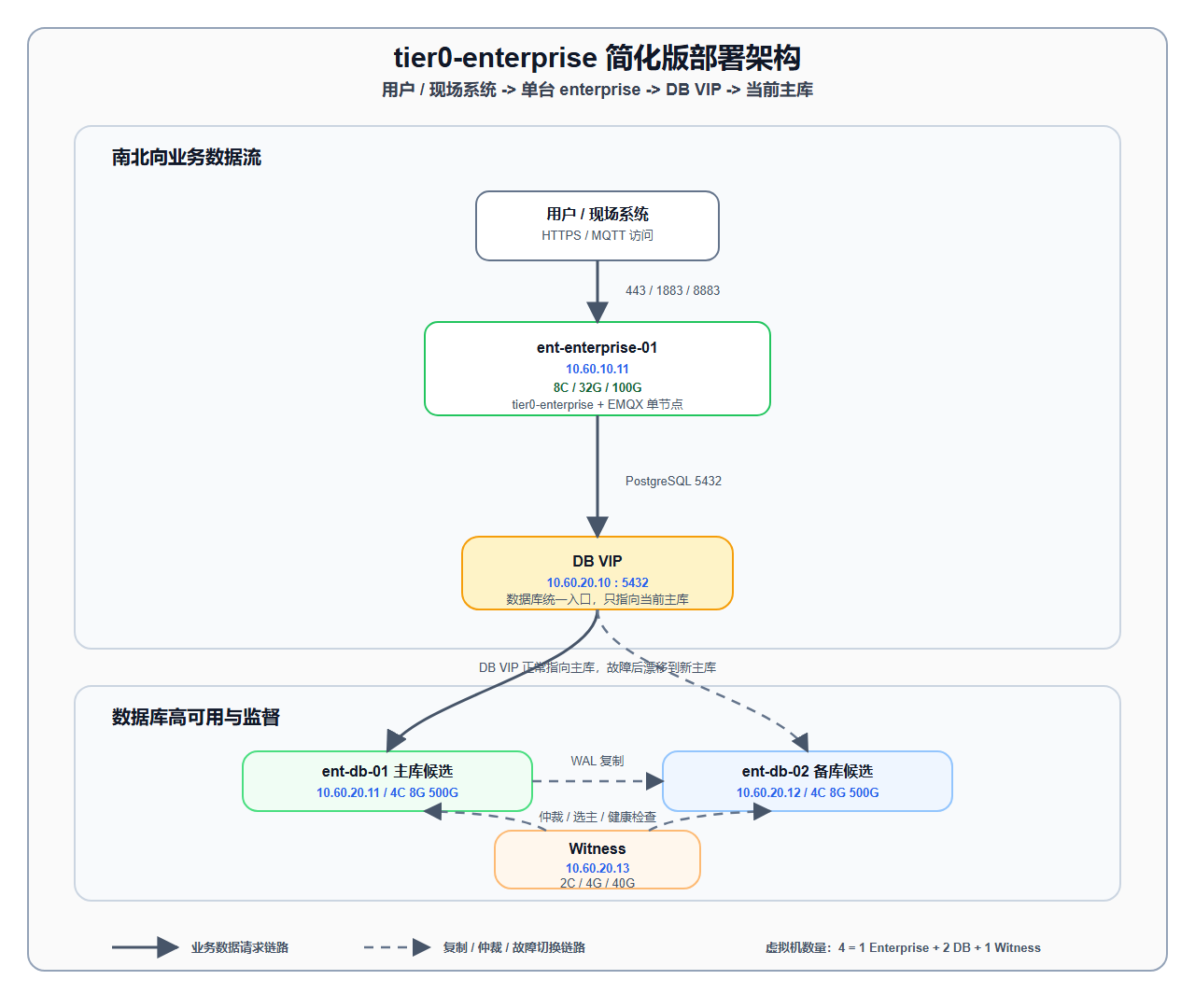
核心链路:
ent-enterprise-01 -> DB VIP -> 当前主库tier0-enterprise 和 EMQX 均部署在 ent-enterprise-01DB VIP 访问,不直连 ent-db-01/02Witness 只参与数据库仲裁、选主和健康检查,不进入业务访问链路| 阶段 | 链路 | 说明 |
|---|---|---|
| 正常访问 | ent-enterprise-01 -> DB VIP -> 当前主库 |
应用始终只连接 10.60.20.10:5432 |
| 正常复制 | 当前主库 -> 当前备库 |
PostgreSQL WAL 流复制 |
| 正常监督 | DB-01/DB-02 -> Witness |
repmgrd 上报状态,Witness 参与仲裁 |
| 主库故障 | 备库 -> Witness |
备库请求仲裁,避免脑裂 |
| 备库提升 | 备库 promote |
Witness 确认后,备库提升为新主库 |
| VIP 漂移 | DB VIP -> 新主库 |
10.60.20.10 绑定到新主库 |
| 应用恢复 | ent-enterprise-01 -> DB VIP -> 新主库 |
应用连接池重连后恢复读写 |
| 节点 | 角色 | vCPU | 内存 | 存储 | 系统盘建议 | 数据盘建议 | 主要组件 |
|---|---|---|---|---|---|---|---|
ent-enterprise-01 |
单节点 enterprise | 8 |
32G |
100G |
单块系统盘 / 100G |
不单独拆分 | tier0-enterprise、EMQX、Nginx/HAProxy 可选 |
ent-db-01 |
PostgreSQL/TSDB 主库候选 | 4 |
8G |
500G |
/ 80G |
/pgdata 360G、/pgwal 40G、/backup-staging 20G |
PostgreSQL、TimescaleDB、repmgr、keepalived |
ent-db-02 |
PostgreSQL/TSDB 备库候选 | 4 |
8G |
500G |
/ 80G |
/pgdata 360G、/pgwal 40G、/backup-staging 20G |
PostgreSQL、TimescaleDB、repmgr、keepalived |
ent-db-witness-01 |
Witness/仲裁监督 | 2 |
4G |
40G |
/ 40G |
不单独规划 | repmgr witness、监控 agent、审计日志 |
| 类别 | 数量 | 单台规格 | 小计 vCPU | 小计内存 | 小计存储 |
|---|---|---|---|---|---|
| enterprise 应用节点 | 1 |
8C / 32G / 100G |
8C |
32G |
100G |
| PostgreSQL + TimescaleDB 节点 | 2 |
4C / 8G / 500G |
8C |
16G |
1000G |
| Witness 节点 | 1 |
2C / 4G / 40G |
2C |
4G |
40G |
| 合计 | 4 |
- | 18C |
52G |
1140G |
换算:
4 台1852G1.14T| 目标 | 方式 | 端口 | 说明 |
|---|---|---|---|
| 所有虚拟机 | ssh -i ~/.ssh/chen-rsa ops@<IP> |
22/TCP |
统一免密实施后使用;未实施前以现场账号为准 |
ent-enterprise-01 |
https://10.60.10.11 |
443/TCP |
业务入口 |
DB VIP |
psql -h 10.60.20.10 -p 5432 |
5432/TCP |
只允许 enterprise 节点和运维白名单访问 |
| 源 | 目标 | 端口 | 用途 |
|---|---|---|---|
| 用户 / 现场系统 | ent-enterprise-01 |
80/TCP |
HTTP 入口或跳转 HTTPS,可选 |
| 用户 / 现场系统 | ent-enterprise-01 |
443/TCP |
HTTPS 业务入口 |
| 设备 / 现场系统 | ent-enterprise-01 |
1883/TCP |
EMQX MQTT 明文,可选 |
| 设备 / 现场系统 | ent-enterprise-01 |
8883/TCP |
EMQX MQTT TLS,建议 |
| 设备 / 现场系统 | ent-enterprise-01 |
8083/TCP |
MQTT WebSocket,可选 |
| 设备 / 现场系统 | ent-enterprise-01 |
8084/TCP |
MQTT WebSocket TLS,可选 |
| 运维网段 | ent-enterprise-01 |
18083/TCP |
EMQX Dashboard,仅允许运维白名单 |
ent-enterprise-01 |
DB VIP |
5432/TCP |
PostgreSQL 业务访问 |
| 源 | 目标 | 端口 | 用途 |
|---|---|---|---|
ent-db-01 |
ent-db-02 |
5432/TCP |
PostgreSQL WAL 流复制 |
ent-db-02 |
ent-db-01 |
5432/TCP |
故障恢复后反向复制 |
ent-db-01/02 |
ent-db-witness-01 |
5432/TCP |
repmgr metadata / witness 通信 |
ent-db-01 |
ent-db-02 |
VRRP |
DB VIP 漂移,需允许协议 112 |
tier0-enterprise 和 EMQX 部署在同一台 ent-enterprise-01ent-enterprise-01 是应用层单点,故障时需要人工恢复或从备份重建100G 单系统盘,不适合承载长期业务数据tier0-enterprise 业务数据必须进入 PostgreSQL/TimescaleDBent-enterprise-01 本地盘,例如 /data/emqx16 或现场认证版本repmgrd + witnessDB VIPent-enterprise-01 部署 PgBouncer,避免数据库连接数过高repmgr witness 元数据和监督逻辑| 端口/协议 | 放行范围 | 用途 |
|---|---|---|
22/TCP |
运维网段到 4 台 VM | SSH |
80/TCP |
用户网段到 ent-enterprise-01 |
HTTP 跳转或内网明文入口 |
443/TCP |
用户网段到 ent-enterprise-01 |
HTTPS 业务入口 |
1883/TCP |
设备 / 现场系统到 ent-enterprise-01 |
EMQX MQTT 明文,可选 |
8883/TCP |
设备 / 现场系统到 ent-enterprise-01 |
EMQX MQTT TLS,建议 |
8083/TCP |
设备 / 现场系统到 ent-enterprise-01 |
EMQX WebSocket,可选 |
8084/TCP |
设备 / 现场系统到 ent-enterprise-01 |
EMQX WebSocket TLS,可选 |
18083/TCP |
运维网段到 ent-enterprise-01 |
EMQX Dashboard,仅白名单 |
5432/TCP |
enterprise 到 DB VIP;DB/Witness 内部互通 |
PostgreSQL / repmgr |
112/VRRP |
DB 节点间 | DB VIP 漂移 |
9100/TCP |
监控系统到 4 台 VM | node exporter,可选 |
| 故障场景 | 预期行为 | 业务影响 |
|---|---|---|
ent-enterprise-01 故障 |
应用和 EMQX 均中断,需要人工恢复或从备份重建 | 应用层整体中断 |
| 当前数据库主库故障 | 备库经 Witness 仲裁后提升,DB VIP 漂移 | 秒级到分钟级写入中断,应用需重连 |
| 数据库备库故障 | 主库继续服务,复制中断告警 | 无直接业务中断,但失去数据库热备 |
| Witness 故障 | 当前主库继续服务,自动切换能力下降 | 无直接业务中断,需优先恢复 |
| DB VIP 漂移失败 | 数据库实际已切主但入口不可达 | 业务中断,需手动绑定 VIP |
| 检查项 | 通过标准 |
|---|---|
| 4 台 VM 主机名固定 | hostnamectl 与规划一致 |
| 统一 SSH 可用 | 运维终端可免密访问 4 台 VM |
| 时间同步 | 4 台 VM 时间偏差小于 1s |
| 防火墙放行 | 第 9 节端口按范围放行 |
| enterprise 服务正常 | tier0-enterprise 健康检查通过 |
| EMQX 状态确认 | EMQX 节点、监听端口和持久化目录正常 |
| enterprise 磁盘水位正常 | / 使用率低于 70%,日志和缓存清理策略已配置 |
| DB 主从正常 | repmgr cluster show 主备和 witness 正常 |
| DB VIP 正常 | enterprise 节点连接 10.60.20.10:5432 成功 |
| 主库故障演练 | 备库可提升,DB VIP 可漂移 |
| 备份恢复演练 | 可从备份恢复到测试库 |
ent-enterprise-01 部署 tier0-enterpriseent-enterprise-01 部署单节点 EMQXent-enterprise-01 故障会导致业务整体不可用ent-enterprise-01 只有 100G 单系统盘,必须控制日志、缓存、附件和临时文件DB VIP 漂移脚本需要在现场验证,特别是虚拟化平台是否允许 VRRPEnterprise Fleet Center 六机单活主备容灾方案。
文档状态:当前实现方案 适用范围:Enterprise Fleet Center 中心节点 部署形态:六台业务机器 + 一台独立部署器控制机 + 四个同网段 VIP 方案定位:单活主备容灾,不是跨机房、共识选主或零数据丢失的严格高可用集群
本方案用于在离线或私有化环境中部署一套逻辑上的 Tier0 Enterprise Fleet Center。六台机器 共同承担业务、中间件和代理职责,用户及 Enterprise 内部服务始终访问固定 VIP;单台机器 或单个代理故障后,由 Keepalived、HAProxy、repmgr、RustFS 和 Fleet Agent 分别完成对应 层级的接管。
方案目标如下:
Fleet Center 中心节点发生单机故障后,业务入口能够漂移到健康 Standby;
PostgreSQL、Redis、RustFS 均提供固定访问地址,后端节点切换不要求修改 Enterprise .env;
App、Flow、Marimo、License 等本地业务文件能够由 Active 增量同步到 Standby;
一份 Cluster License 对应一个逻辑安装实例,切换 Enterprise 节点后不重复激活;
通过独立部署器完成六台机器的初始化、角色编排、部署、监控和故障验证;
明确数据保护边界,避免把 VIP 漂移、文件同步或双实例误认为完整的数据高可用。
本方案只用于 Fleet Center。Branch Enterprise 仍按普通单机方式安装,不参与六机主备。
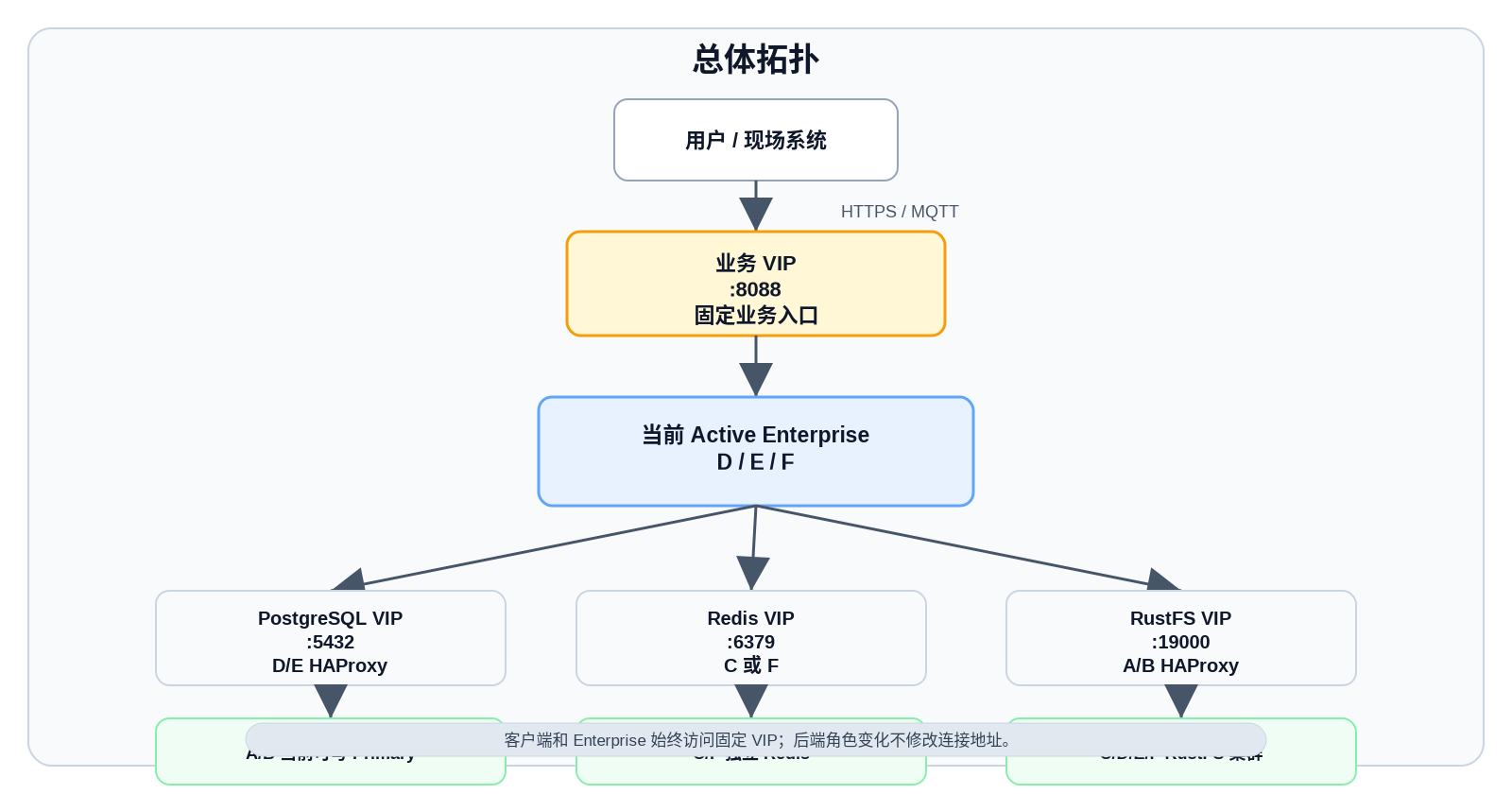
核心请求链路为:
用户/现场系统 ↓业务 VIP :8088 ↓当前 Active Enterprise(D / E / F) ├─ PostgreSQL VIP :5432 → D/E HAProxy → A/B 当前可写 Primary ├─ Redis VIP :6379 → C 或 F 独立 Redis └─ RustFS VIP :19000 → A/B HAProxy → C/D/E/F RustFS 集群四个 VIP 是业务配置中的固定入口。Enterprise 切换或中间件后端角色变化后,客户端和 Enterprise 均不修改连接地址。
以下地址只用于展示规划格式,实施时必须替换为现场同一 IPv4 子网中的实际地址。四个 VIP 必须未被 DHCP、静态主机或其他 VRRP 实例占用。
| 名称 | 示例 IP | 说明 |
|---|---|---|
| deployer-controller | 10.60.10.20 |
独立部署器,不计入六台业务机器 |
| ent-ha-01 / A | 10.60.10.11 |
PostgreSQL Primary 等职责 |
| ent-ha-02 / B | 10.60.10.12 |
PostgreSQL Standby 等职责 |
| ent-ha-03 / C | 10.60.10.13 |
Witness、Redis-1、RustFS-1 |
| ent-ha-04 / D | 10.60.10.14 |
Enterprise 初始 Active 等职责 |
| ent-ha-05 / E | 10.60.10.15 |
Enterprise Standby 等职责 |
| ent-ha-06 / F | 10.60.10.16 |
Enterprise Standby 等职责 |
| Business VIP | 10.60.10.101 |
Enterprise 统一入口,默认 8088 |
| PostgreSQL VIP | 10.60.10.102 |
数据库统一入口,默认 5432 |
| Redis VIP | 10.60.10.103 |
Redis 统一入口,默认 6379 |
| RustFS VIP | 10.60.10.104 |
S3 统一入口,默认 19000 |
实施前还需要确认:业务网卡名称、IPv4 前缀长度、网关、DNS、NTP、主机名、SSH 用户、 磁盘挂载点和防火墙放行范围。VIP、节点 IP 和网卡不能靠脚本猜测后直接用于生产。
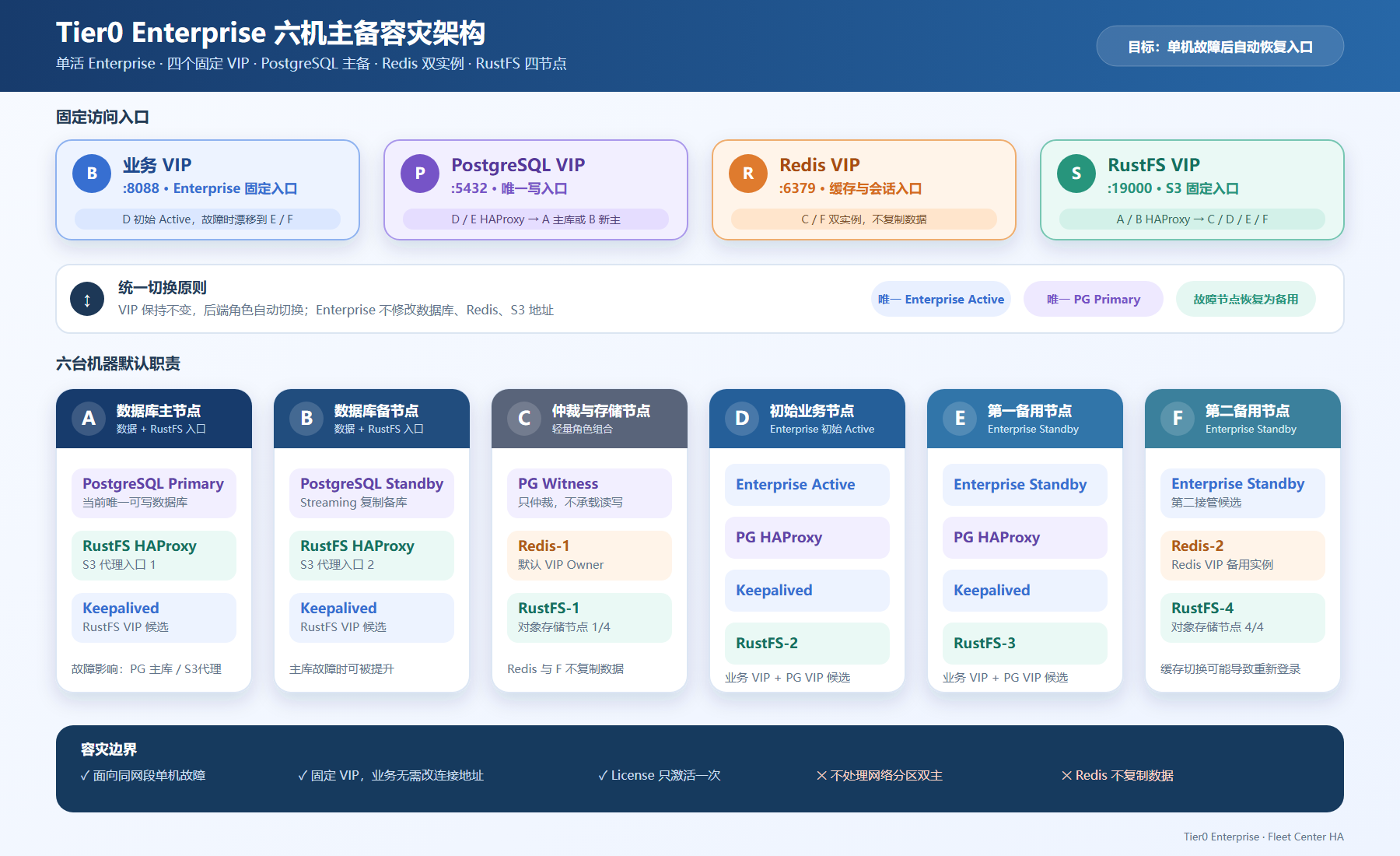
| 机器 | 默认部署内容 | 关键职责 |
|---|---|---|
| A | PostgreSQL Primary、RustFS HAProxy、Keepalived | 初始数据库主库;RustFS 代理候选一 |
| B | PostgreSQL Standby、RustFS HAProxy、Keepalived | 数据库流复制备库;RustFS 代理候选二 |
| C | PostgreSQL Witness、Redis-1、RustFS-1 | 数据库仲裁/状态记录;Redis 与 RustFS 数据节点 |
| D | PG HAProxy、Keepalived、RustFS-2、Enterprise、Fleet Agent、rsync | 初始业务 Active;PostgreSQL 代理候选一 |
| E | PG HAProxy、Keepalived、RustFS-3、Enterprise、Fleet Agent、rsync | 业务 Standby;PostgreSQL 代理候选二 |
| F | Redis-2、RustFS-4、Enterprise、Fleet Agent、rsync | 业务 Standby;第二 Redis 实例 |
该分配面向单机故障和六机资源均衡。部署器按环境内机器名称/IP 的自然顺序映射 A-F 并 默认勾选角色,提交前仍必须结合现场磁盘和故障域人工复核。
**扩展能力说明:**当前 Enterprise 业务层采用单活主备模式,同一时刻只有业务 VIP 所在节点承载业务请求。当前只支持通过提升单个业务节点的 CPU、内存和磁盘规格进行纵向扩容,不支持通过增加 Enterprise 节点实现多节点负载均衡,也不应按节点数量估算并发能力的线性提升。
六台机器按以下配置准备:A、B 两台 PostgreSQL 数据库节点各配置 1T,C、D、E、F 四台中间件/业务节点各配置 500G。
| 机器 | 节点类型 | vCPU | 内存 | 基础存储 | 系统盘和数据盘建议 |
|---|---|---|---|---|---|
| A | PostgreSQL Primary 节点 | 8C | 16G | 1T | / 建议 80G;其余空间用于 PostgreSQL 数据、WAL 和备份暂存 |
| B | PostgreSQL Standby 节点 | 8C | 16G | 1T | / 建议 80G;其余空间用于 PostgreSQL 数据、WAL 和备份暂存 |
| C | Witness / 中间件节点 | 4C | 8G | 500G | 系统、Redis 和 RustFS 数据按固定挂载点分配 |
| D | Enterprise 初始 Active 业务节点 | 8C | 32G | 500G | 系统、容器、Enterprise 本地同步目录和 RustFS 数据按固定挂载点分配 |
| E | Enterprise Standby 业务节点 | 8C | 32G | 500G | 系统、容器、Enterprise 本地同步目录和 RustFS 数据按固定挂载点分配 |
| F | Enterprise Standby 业务节点 | 8C | 32G | 500G | 系统、容器、Enterprise 本地同步目录和 RustFS 数据按固定挂载点分配 |
基础机器资源汇总如下:
| 类别 | 数量 | 单台规格 | 小计 vCPU | 小计内存 | 小计基础存储 |
|---|---|---|---|---|---|
| PostgreSQL 数据库节点 | 2 | 8C / 16G / 1T |
16C | 32G | 2T |
| Witness / 中间件节点 | 1 | 4C / 8G / 500G |
4C | 8G | 500G |
| Enterprise 业务节点 | 3 | 8C / 32G / 500G |
24C | 96G | 1.5T |
| 合计 | 6 | - | 44C | 136G | 4T |
A、B 的 16G 内存用于 PostgreSQL/TimescaleDB/pgvector 的缓存和查询,是当前规模的生产基线;数据库量、时序查询或向量检索负载明显增加时再扩到 32G。C 同时承载 Witness、Redis 和 RustFS,因此配置 4C / 8G,不再按纯 Witness 的轻量规格准备。D、E、F 保持 8C / 32G 作为 Enterprise 生产基线,实际并发或 App 负载超出基线时再通过压测扩容。
C、D、E、F 组成 RustFS 四节点集群,四台机器均配置 500G。实施时仍需根据文件容量、增长率、保留周期和实际纠删码要求,为系统、Enterprise 本地文件与 RustFS 数据设置固定挂载点和容量预留,并在部署前验证容量、inode、吞吐和重启后自动挂载。
D、E、F 的 Enterprise 配置保持一致:
| 依赖 | 配置原则 |
|---|---|
| PostgreSQL | 连接 PostgreSQL VIP,不写 A/B 节点 IP |
| Redis | 连接 Redis VIP,不写 C/F 节点 IP |
| 文件存储 | FILESTORE_DRIVER=s3,S3 Endpoint 指向 RustFS VIP |
| Fleet 身份 | 三台共享一个逻辑 installationId,各自使用独立 memberId |
| Fleet Agent | 每套 Enterprise 对应本机一个进程级 Fleet Agent |
| License | 通过业务 VIP 激活一次,Bundle 纳入 HA fileset 同步 |
installationId 和 memberId 由安装流程生成和持久化,普通实施人员不应手工编造或在
三台机器间复制 memberId。
| VIP | 候选节点 | 健康依据 | 接管结果 |
|---|---|---|---|
| 业务 VIP | D、E、F | Fleet Agent readiness、业务容器状态、同步 generation | 仅 Owner 启动 Enterprise HA 业务组 |
| PostgreSQL VIP | D、E | HAProxy/Keepalived 状态,HAProxy 只路由可写 Primary | Enterprise 仍使用原 DB 地址 |
| Redis VIP | C、F | Redis PING 和本机服务状态 |
切换到另一独立实例,缓存/会话可能丢失 |
| RustFS VIP | A、B | HAProxy 和 RustFS 后端健康 | 代理入口漂移,S3 地址不变 |
D、E、F 安装同一版本的完整 Enterprise 离线 ZIP;
Fleet Agent 是宿主机进程级服务,不是业务容器;
Keepalived 管理业务 VIP,调用 Fleet Agent 的 readiness 接口判断本机是否可以持有 VIP;
只有业务 VIP Owner 运行业务组,另外两台保持 Standby;
Owner 丢失 VIP 后必须停止业务组,恢复节点只能先以 Standby 加入;
EMQX 随业务组单活运行,不允许绕过 Agent 单独重启或在三台机器上组成另一套选主逻辑。
A 初始为 Primary,B 为 Streaming Standby,C 为 repmgr Witness;
Witness 记录集群状态并参与故障判断,不保存完整业务数据,也不承载业务读写;
主库故障时,由 repmgr 流程将健康 Standby 提升为新 Primary;
D/E HAProxy 根据数据库实际角色,仅把 5432 流量发送到当前可写 Primary;
PostgreSQL VIP 在 D/E 两个代理间漂移,代理故障与数据库主备切换相互解耦;
验收必须同时证明“唯一可写 Primary”和“Standby 恢复 streaming”。
Witness 位于只读备库之外,因此不受 Standby 不可写的限制;它参与的是集群观察与仲裁, 不是由 Fleet Agent 向备库写入一套额外的 lease/epoch。
C、F 各运行一个 Redis 单实例;
两个 Redis 不组成 Sentinel、Cluster 或主从复制;
Redis VIP 只提供连接入口切换;当前实例故障后,VIP 漂移到另一健康实例;
Redis 中只允许保存可丢失或可重建的数据。切换后缓存为空、用户重新登录属于当前设计边界;
如果未来 Redis 承载不可丢失状态,必须升级为复制/仲裁方案,不能继续沿用双独立实例假设。
C、D、E、F 组成 RustFS 四节点分布式对象存储;
A、B 上的 HAProxy 代理全部健康 RustFS 后端;
RustFS VIP 在 A/B 之间漂移,Enterprise 始终通过该 VIP 使用 S3;
单个 RustFS 节点故障时由集群机制维持服务,单个代理故障时由 VIP 漂移恢复入口;
禁止通过 rsync、热拷贝或直接编辑 RustFS 挂载目录来“同步”对象数据;
RustFS 节点数量、磁盘数和纠删码可用边界以实际部署版本的集群检查结果为准。
Fleet Agent 只同步不能直接放入 PostgreSQL/RustFS、但新 Active 又必须拥有的本地业务文件:
App 运行目录及 node_modules;
Flow、Marimo、Notebook 等本地运行文件;
License Bundle;
当前实现明确登记的其他 HA fileset。
同步使用系统 rsync,通过部署器管理的业务节点专用 SSH 信任网,从 Active 增量发送到
两个 Standby。每次发布生成完整 generation/manifest,Standby 只有确认 generation 完整后
才具备接管资格。VIP 刚切换时,新 Active 不得用旧 generation 反向覆盖其他节点。
PostgreSQL 数据目录、Redis 数据目录和 RustFS 数据目录均不在该同步范围内。
| 来源 | 目标 | 用途 |
|---|---|---|
| 用户/现场系统 | 业务 VIP | Web/API 业务访问 |
| D/E/F Enterprise | PostgreSQL VIP | 业务数据库读写 |
| D/E/F Enterprise | Redis VIP | 缓存和会话 |
| D/E/F Enterprise | RustFS VIP | S3 对象读写 |
| 部署器控制机 | A-F | SSH、部署、状态采集和运维操作 |
| D/E/F | D/E/F | rsync/SSH 文件增量同步 |
| A/B/C | A/B/C | PostgreSQL 流复制、repmgr 和 Witness 通信 |
| RustFS 成员/代理 | C/D/E/F | RustFS 集群和 S3 后端通信 |
| 同一 VIP 候选节点 | 对应候选节点 | VRRP 通告与 VIP 漂移 |
端口应按“来源→目标”最小化放行,禁止直接把全部管理端口暴露到用户网段。
| 端口/协议 | 建议放行范围 | 用途 |
|---|---|---|
22/TCP |
部署器→A-F;D/E/F 业务同步互访 | SSH、部署、rsync |
8088/TCP |
用户网段→业务 VIP | Enterprise 业务入口 |
5432/TCP |
D/E/F→PostgreSQL VIP;PG/代理内部互访 | PostgreSQL、流复制和代理 |
6379/TCP |
D/E/F→Redis VIP;健康检查节点→C/F | Redis 访问和健康检查 |
19000/TCP |
D/E/F→RustFS VIP | Enterprise S3 固定入口 |
9000/TCP |
A/B→C/D/E/F;RustFS 成员互访 | RustFS S3 后端/集群通信,按实际版本确认 |
9001/TCP |
运维受控网段→RustFS 管理入口 | RustFS 管理端,可选且不得暴露用户网 |
19731/TCP |
本机/Keepalived/受控运维网段 | Fleet Agent HTTP 健康与控制接口 |
18080/TCP |
运维网段→部署器控制机 | 部署器 HTTPS 页面 |
112/VRRP |
对应 VIP 候选节点互通 | Keepalived VIP 漂移,注意它是 IP 协议号而非 TCP/UDP 端口 |
1883/8883 |
现场设备网段→业务入口,按产品配置选择 | MQTT/MQTTS |
HAProxy 管理/统计端口、PostgreSQL 角色探测端口及 RustFS 内部端口应以最终部署器生成配置为准,并仅在集群内部按实际需要放行。
| 故障场景 | 预期行为 | 数据影响/限制 |
|---|---|---|
| 当前 Enterprise Active 故障 | 业务 VIP 漂移;健康 Standby 校验 generation 后启动业务组 | 最近一次成功同步后的未同步文件可能丢失 |
| Fleet Agent 故障 | readiness 失败,旧业务组停止,业务 VIP 迁移 | 禁止手工绕过 Agent 启动容器 |
| PostgreSQL Primary 故障 | Standby 提升;HAProxy 自动路由新主;PG VIP 不变 | 切换窗口内连接短暂失败;需确认新备库恢复 |
| 一个 PG HAProxy 故障 | PostgreSQL VIP 漂移到另一个代理 | 数据库角色不因此改变 |
| 当前 Redis 故障 | Redis VIP 漂移到另一独立实例 | 缓存丢失、会话失效可发生 |
| 一个 RustFS 节点故障 | 其余集群节点继续服务 | 可容忍范围取决于实际纠删码和磁盘状态 |
| 一个 RustFS HAProxy 故障 | RustFS VIP 漂移到另一代理 | S3 地址不变,存量连接可能重连 |
| 部署器控制机故障 | 已运行数据面继续工作 | 暂时无法部署、集中监控和运维;控制机本身无自动主备 |
| 网络分区 | 当前方案不保证安全自动选主 | 可能出现双 VIP/双 Active,必须隔离故障侧并人工处理 |
| 任意两台同时故障 | 不作统一可用性承诺 | 结果取决于两台的角色组合,需逐场景验证 |
当前方案没有共识系统、租约、leaderEpoch 或 fencing,因此不宣称网络分区下的严格 HA。
它解决的是同一二层网络内的常见单机故障和人工恢复成本问题,产品口径应称为“主备容灾”。
VIP 漂移和 rsync 都不能替代备份。生产环境至少需要:
PostgreSQL:独立定时备份、保留策略和恢复演练;
RustFS:按实际集群版本设计对象数据保护、磁盘监控和恢复流程;
Redis:确认其中仅保存可丢失数据;如果不是,先升级架构再上线;
Enterprise 本地 fileset:监控最近成功 generation、同步延迟、失败次数和 Standby 完整性;
部署器:备份数据卷、TLS/登录材料、SSH/Host Key 配置、完整交付包和校验文件;
通用指标:CPU、内存、磁盘容量、inode、磁盘 I/O、网卡错误、容器/服务重启次数;
HA 指标:四个 VIP Owner、唯一 Enterprise Active、唯一 PostgreSQL Primary、Standby streaming;
审计:记录部署、切换、重启、密码查看、License 操作和失败恢复。
日常操作和故障处理见 HA 日常运维手册(仓库 doc/ha/operations-guide.md)。
| 检查项 | 通过标准 |
|---|---|
| 机器数量和角色 | 六台业务机器 A-F 与计划一致,部署器未混入业务节点 |
| SSH 和 sudo | 部署器可使用受控账号免交互访问 A-F,Host Key 已核验 |
| 网络与时间 | 六台同网段,四 VIP 未占用,网卡/前缀正确,时间偏差满足要求 |
| Docker/Compose | 六台初始化成功;无旧容器、端口、网络和数据目录冲突 |
| 磁盘 | PostgreSQL、RustFS、Enterprise fileset 使用计划挂载点,容量和 inode 正常 |
| PostgreSQL | 唯一 Primary、Standby streaming、Witness 在线、通过 PG VIP 可读写 |
| Redis | C/F 实例健康,通过 Redis VIP 可 PING,已接受切换后数据不复制的边界 |
| RustFS | 四节点均健康,通过 RustFS VIP 可完成对象写入、读取和删除 |
| Enterprise | D/E/F 版本一致,仅业务 VIP Owner 运行业务组 |
| Fleet Agent | 三台 Agent 在线,readiness、同步历史和 generation 状态可检查 |
| License | 业务 VIP 激活一次;切换后无需重新激活 |
| App 同步 | 导入包含 node_modules 的 App,同步完成后切换仍可运行 |
| 防火墙 | 只放行本方案所需来源、目标和协议 |
| 备份 | PostgreSQL、RustFS 和部署器备份方案已落地并至少完成一次恢复验证 |
准备独立部署器控制机、六台业务机器、四个 VIP、网卡和磁盘规划;
校验完整交付包和 Enterprise 离线 ZIP 的 SHA256;
启动部署器,录入 SSH 凭据和六台机器并完成连通性检查;
初始化六台目标机的 Docker/Compose 和离线镜像环境;
创建“标准部署”,确认 A-F 角色分配和四个 VIP;
依次部署 PostgreSQL、Redis、RustFS、HAProxy 和 Keepalived;
建立 D/E/F 专用 rsync 账号和 SSH 信任网;
部署 D/E/F Enterprise 与 Fleet Agent,确认只有 D 初始 Active;
通过业务 VIP 完成一次 License 激活并等待 License 同步成功;
导入测试 App,验证 App、node_modules、Flow/Marimo 和 License fileset 同步;
分别执行 Enterprise、PostgreSQL、Redis、RustFS 单节点故障演练;
恢复节点并确认唯一 VIP Owner、唯一 Active、唯一 Primary 和完整同步状态;
完成备份恢复演练、运维交接和现场参数归档。
具体页面操作见 HA 部署安装流程(仓库 doc/ha/deployment-guide.md),AI 自动化验证用例见 HA 环境测试指南(仓库 doc/fleet/ha-test-guide.md)。
用户仅通过业务 VIP 登录和使用 Enterprise;
Enterprise 仅通过 PostgreSQL、Redis、RustFS VIP 访问中间件;
D/E/F 任意时刻只有一个 Active,失去业务 VIP 的节点不运行业务组;
PostgreSQL 任意时刻只有一个可写 Primary,Witness 不承载业务读写;
Redis 和 RustFS 后端切换后,Enterprise 无需修改 .env;
License 只激活一次,业务节点切换后不进入激活页;
已完成 generation 的 App、Flow、Marimo 和 License 在新 Active 可用;
故障恢复节点以 Standby 加入,不用旧数据覆盖新 Active。
Enterprise Active 单机故障后,业务 VIP 自动漂移并恢复访问;
PostgreSQL Primary 故障后,Standby 成为唯一新主,PG VIP 仍可读写;
当前 PG HAProxy 故障后,PG VIP 漂移,Enterprise 数据库连接恢复;
当前 Redis 实例故障后,Redis VIP 漂移,业务能够在允许的数据丢失边界内恢复;
一个 RustFS 节点或一个 RustFS HAProxy 故障后,通过 RustFS VIP 的对象读写恢复;
每次演练后均恢复稳定基线,不遗留双 VIP、双 Active 或双 Primary。
四个 VIP 是否确实位于六台机器可共同持有的同一二层网络;
网络设备是否允许 VRRP/GARP,安全策略是否会阻断 VIP 漂移;
现场是否完全断网;当前部署器仍有 Harbor 可达性检查,需提前验证路由或代理;
PostgreSQL、RustFS 和 Enterprise fileset 的容量、增长率、RPO/RTO 目标;
Redis 中是否存在不能丢失的数据;若存在,当前双独立实例方案不满足要求;
App/Flow/Marimo 的最大文件量、单次变更量和可接受同步延迟;
是否存在跨网段、跨机房、网络分区或任意双机故障的强制可用性要求;
生产证书、域名、密码、License、SSH Key 和审计保管责任人;
部署器控制机的恢复方式、备份周期和替代运维通道。
上述任一项改变,都可能影响 VIP、角色分配、存储和故障边界,必须先更新方案再实施。
当前方案以六台机器、四个固定 VIP 和单活 Enterprise 为核心,把业务入口、数据库入口、 缓存入口和对象存储入口分别解耦。它能够覆盖同网段内常见的单机故障,并显著减少切换后 修改连接配置、重新激活 License 和手工复制 App 文件的工作量。
同时必须接受三个边界:Redis 不复制数据、业务 fileset 为异步同步、网络分区没有共识仲裁。 因此本方案适合定义为 Fleet Center 六机单活主备容灾方案,不应对外承诺零中断、零数据 丢失或跨机房严格高可用。
标准 Tier0 Enterprise 部署的 SLA 建议、高可用边界、验收门槛、演练和加固项。
本文档适用于六虚拟机全离线部署:三台应用 / Swarm 节点、两台 PostgreSQL 高可用节点和一台 witness 节点。
| 层级 | 当前设计 | 高可用边界 |
|---|---|---|
| 应用运行时 | Enterprise New compose 在固定的 tier0_app_active_node 上运行。 |
backend、redis、EMQX、SourceFlow、EventFlow、Marimo 和 OPC UA Server 尚未自动多副本化。 |
| HTTP 入口 | 三台应用节点运行 keepalived APP VIP + HAProxy。 | VIP 可漂移。HAProxy 转发到活动节点的 8088/TCP,并检查 /healthz。 |
| MQTT / OPC UA | EMQX 使用 1883/8883/8083/8084;OPC UA 使用 4840。 |
这些端口直接连接活动节点,不包含在 TCP VIP 代理中,因此不承诺协议入口高可用。 |
| 数据库 | PostgreSQL / TimescaleDB 流复制 + repmgr + witness + DB VIP。 | primary 故障时 standby 可自动提升。异步复制不能承诺严格零 RPO。 |
| 备份与恢复 | backup-db.sh / restore-db.sh。 |
提供可恢复性,但不等同于在线高可用。 |
| 服务对象 | 推荐表述 | 约束 |
|---|---|---|
| 平台 HTTP 入口 | 从月可用性 99.5% 开始。 |
VIP 故障切换不等同于活动应用节点自动迁移。 |
| 数据库访问 | 运维目标:RTO <= 2 minutes。 |
RPO 取决于复制延迟。同架构历史故障切换测试约为 59-64 秒。 |
| MQTT / OPC UA | 当前设计不承诺 HA SLA。 | 必须先增加 HAProxy TCP 代理、独立 VIP 或服务集群。 |
| 备份与恢复 | 每日备份;重大变更前必须备份。 | 恢复时间取决于数据量和现场 I/O。 |
在声明 99.9% 或更高可用性之前,需要完成应用自动迁移或多副本部署、协议入口高可用、监控告警和恢复演练。不要把规划能力描述为已交付能力。
每次部署或升级至少需要满足以下条件:
verify-materials.sh 通过,交付包 SHA256 校验通过。Ready。APP VIP /healthz 和 /readyz 返回 200,首页和 /uns 可访问。DB VIP:5432 可访问,primary、standby 和 witness 拓扑正常。每天运行以下命令:
./bin/verify.sh --site config/site.conf./bin/smoke-business-emqx.sh --site config/site.conf至少配置以下告警:
/healthz 或 /readyz 失败。backend、redis、EMQX 等关键容器退出或频繁重启。80% / 90%。| 演练 | 频率 | 验证标准 |
|---|---|---|
| APP VIP 故障切换 | 交付前和每季度。 | 停止当前 VIP 节点上的 keepalived 后,/healthz 和 /readyz 恢复。 |
| DB primary 故障 | 交付前和每半年。 | standby 被提升,DB VIP 恢复,旧 primary 被重建为 standby。 |
| 数据库恢复 | 每月抽样,并在重大变更前执行。 | 备份可恢复。恢复后 verify、冒烟检查和登录验证通过。 |
| 物料验证 | 每次打包构建。 | 源物料、包 SHA 和解包验证通过。 |
verify、冒烟检查和实际登录验证。相关流程:运维 Runbook 和 标准端口清单。
标准六虚拟机离线 Tier0 Enterprise 部署的防火墙端口清单。
下表基于 Enterprise New 六虚拟机离线部署。客户防火墙应只允许来自最小必要源网段的流量,不要将这些端口直接暴露到公网。
| 来源 | 目标 | 端口 | 协议 | 用途 |
|---|---|---|---|---|
| 控制主机 | 六台目标 VM | 22 | TCP | SSH / Ansible |
| 三台应用节点互通 | 三台应用节点 | 2377 | TCP | Docker Swarm 管理平面 |
| 三台应用节点互通 | 三台应用节点 | 7946 | TCP/UDP | Swarm 节点发现 |
| 三台应用节点互通 | 三台应用节点 | 4789 | UDP | Swarm overlay 网络 |
| 三台应用节点 | 活动应用节点 | 8088 | TCP | HAProxy 转发到 Enterprise New 后端;仅限应用网段 |
| 业务网段 | APP VIP | 80 | TCP | 平台 HTTP 入口、/healthz、/readyz |
| 业务网段 | APP VIP / 活动应用节点 | 1883 | TCP | MQTT |
| 业务网段 | APP VIP / 活动应用节点 | 8883 | TCP | MQTT TLS |
| 业务网段 | APP VIP / 活动应用节点 | 8083 | TCP | MQTT WebSocket |
| 业务网段 | APP VIP / 活动应用节点 | 8084 | TCP | MQTT WebSocket TLS |
| 业务网段 | APP VIP / 活动应用节点 | 4840 | TCP | OPC UA Server |
| 受控应用网段 | 活动应用节点 | 8089 | TCP | 操作台 |
| 动态应用访问网段 | 活动应用节点 | 30000-30199 | TCP | App Gateway / 动态应用主机端口 |
| 应用节点、DB 节点和 Witness | DB VIP / DB 节点 | 5432 | TCP | PostgreSQL / TimescaleDB |
| DB1、DB2 和 Witness | DB1、DB2 和 Witness | 5432 | TCP | Streaming replication / repmgr |
| 应用节点 | NFS server | 2049 | TCP/UDP | NFS_ENABLED=true 时使用 |
当前 compose 部署不会对外暴露 Redis、SourceFlow、EventFlow、Marimo 或 EMQX Dashboard。这些服务只由 Docker runtime 网络内的后端调用。
标准 Tier0 Enterprise 部署的日常巡检、故障切换、备份、恢复、清理和故障排查流程。
本文档基于 Enterprise New 离线应用。
./bin/verify.sh --site config/site.conf./bin/smoke-business-emqx.sh --site config/site.confReady。APP VIP /healthz 和 /readyz 返回 200。DB VIP:5432 可访问。backend、redis、emqx、sourceflow、eventflow、marimo 和 opcua-server 都运行在活动应用节点上。在活动应用节点上运行以下命令:
cd /opt/tier0-enterprise/tier0-deploybash bin/compose.sh psbash bin/compose.sh logs --tail=200 backendcurl -fsS http://127.0.0.1:8088/healthzcurl -fsS http://127.0.0.1:8088/readyz健康检查解读:
healthz 失败:先检查 backend 进程、镜像和容器日志。readyz 失败:同时检查 DB VIP、Redis 和数据库迁移日志。.env 中的 ADMIN_INITIAL_PASSWORD,然后检查 backend IAM migration 日志和用户表。不要只根据 HTTP 端口判断部署成功。nc -vz <APP_VIP> 1883nc -vz <APP_VIP> 8883nc -vz <APP_VIP> 8083nc -vz <APP_VIP> 8084nc -vz <APP_VIP> 4840在数据库节点上运行:
systemctl status tier0-postgresqlsystemctl status tier0-repmgrdsudo -iu postgres psql -Atqc 'select pg_is_in_recovery();'sudo -iu postgres /usr/local/bin/repmgr -f /etc/repmgr.conf cluster showpg_is_in_recovery=false 表示 primary。pg_is_in_recovery=true 表示 standby。测试前,记录当前持有 VIP 的节点并验证:
curl -fsS http://<APP_VIP>/healthzcurl -fsS http://<APP_VIP>/readyz停止当前 VIP 节点上的 keepalived 后,确认 VIP 被其他应用节点接管,然后重新测试两个 URL。HAProxy backend 指向活动应用节点的 8088/TCP,因此三台应用节点都必须能访问活动节点的 8088 端口。
恢复 keepalived 后,再次运行 verify.sh 和 smoke checks。演练期间不要停止活动应用容器。
故障演练前,创建备份并确认复制健康:
./bin/backup-db.sh --site config/site.conf停止当前 primary 上的 tier0-postgresql 后,观察 repmgr 提升 standby,并确认 DB VIP 接管。目标 RTO 为 2 分钟内。同架构历史测试约为 59-64 秒。
备份:
./bin/backup-db.sh --site config/site.conf恢复:
./bin/restore-db.sh --site config/site.conf --restore-file /backup/tier0-db/postgres-YYYYmmddTHHMMSS.dump./full-cleanup.sh --env install.env --yes./install.sh --auto --yescd /opt/tier0-enterprise/tier0-deploybash bin/compose.sh logs --tail=300 backendbash bin/compose.sh pscd /opt/tier0-enterprise/tier0-deploybash bin/compose.sh logs --tail=200 emqxsystemctl status tier0-repmgrdtail -100 /var/log/repmgr/repmgr.logsudo -iu postgres psql -Atqc 'show shared_preload_libraries;'./bin/verify-materials.shTier0 OpenAPI v1 · 操作: 36 · 架构: 85
API 字段名、示例及源描述沿用随附的英文 OpenAPI 规范。
读取、写入和管理统一命名空间数据。
Upload a UNS attachment
Uploads a multipart attachment for a UNS node. Supply a file and at least one of unsId or topic; a valid unsId takes precedence.
curl --request POST 'https://<tier0-host>/openapi/v1/uns/attachments' \
  --header 'x-api-key: <api-key>'
multipart/form-data
| 字段 | 类型 | 必填 | 描述 |
|---|---|---|---|
unsId | integer (int64) | 否 | Numeric owner node ID. Supply unsId or topic; a valid unsId takes precedence. |
topic | string | 否 | Full owner node path, used when a valid unsId is not supplied. |
fileName | string | 否 | Original file name. |
sha256 | string | 否 | SHA-256 checksum of the file contents. |
file | string (binary) | 是 | Binary file contents. The multipart field name must be file. |
200 · application/json
{
  "code": 0,
  "msg": "string",
  "data": {
    "unsId": 0,
    "fileName": "string",
    "filePath": "string",
    "fileUrl": "string",
    "contentType": "string"
  }
}200 · application/json
| 字段 | 类型 | 必填 | 描述 |
|---|---|---|---|
code | integer | 否 | Response code |
msg | string | 否 | Response message |
data | object | 否 | UnsAttachmentUploadResp. 请参阅架构章节中的引用架构。 |
| 状态 | 含义 | 媒体类型 |
|---|---|---|
200 | A successful response. | application/json |
400 | Correct the request parameters or Content-Type before retrying. | application/json |
401 | Authentication middleware returns plain-text unauthorized. Check API key validity, scope, and owner roles. | text/plain |
403 | Authentication middleware returns plain-text forbidden. Check API key validity, scope, and owner roles. | text/plain |
404 | Resource not found. Verify paths, IDs, and current resource state. | — |
409 | Resource state conflict. Verify paths, IDs, and current resource state. | — |
413 | Request too large. Reduce the request before retrying. | — |
500 | Service error. Investigate the service and confirm the outcome before retrying. | — |
List UNS attachments
Lists attachments for a UNS node or topic. Temporary file URLs can expire and must then be requested again.
curl --request POST 'https://<tier0-host>/openapi/v1/uns/attachments/list' \
  --header 'x-api-key: <api-key>' \
  --header 'Content-Type: application/json' \
  --data '{"unsId":0,"topic":"string","page":0,"size":0,"includeFileUrl":false}'
application/json
| 字段 | 类型 | 必填 | 描述 |
|---|---|---|---|
unsId | integer (int64) | 否 | Numeric UNS node ID. |
topic | string | 否 | Full UNS topic path. |
page | integer (int64) | 否 | Page number, starting at 1. |
size | integer (int64) | 否 | Number of attachments per page. |
includeFileUrl | boolean (boolean) | 否 | Whether to return temporary file URLs. Defaults to true. |
200 · application/json
{
  "code": 0,
  "msg": "string",
  "data": {
    "unsId": 0,
    "list": [
      "value"
    ],
    "total": 0,
    "page": 0,
    "size": 0
  }
}200 · application/json
| 字段 | 类型 | 必填 | 描述 |
|---|---|---|---|
code | integer | 否 | Response code |
msg | string | 否 | Response message |
data | object | 否 | UnsAttachmentListResp. 请参阅架构章节中的引用架构。 |
| 状态 | 含义 | 媒体类型 |
|---|---|---|
200 | A successful response. | application/json |
400 | Correct the request parameters or Content-Type before retrying. | application/json |
401 | Authentication middleware returns plain-text unauthorized. Check API key validity, scope, and owner roles. | text/plain |
403 | Authentication middleware returns plain-text forbidden. Check API key validity, scope, and owner roles. | text/plain |
404 | Resource not found. Verify paths, IDs, and current resource state. | — |
409 | Resource state conflict. Verify paths, IDs, and current resource state. | — |
413 | Request too large. Reduce the request before retrying. | — |
500 | Service error. Investigate the service and confirm the outcome before retrying. | — |
Browse the UNS tree
Returns a UNS subtree. Use an empty path for the workspace root.
curl --request POST 'https://<tier0-host>/openapi/v1/uns/browse' \
  --header 'x-api-key: <api-key>' \
  --header 'Content-Type: application/json' \
  --data '{"path":"string","max_depth":0,"include_metadata":false,"include_leaf_value":false}'
application/json
| 字段 | 类型 | 必填 | 描述 |
|---|---|---|---|
path | string | 否 | Root UNS path. Empty means the workspace root. |
max_depth | integer (int64) | 否 | Maximum tree depth. Omit or use 0 for the server default. |
include_metadata | boolean (boolean) | 否 | Whether returned nodes should include metadata. |
include_leaf_value | boolean (boolean) | 否 | Whether returned leaf nodes should include their latest payload. |
200 · application/json
{
  "code": 0,
  "msg": "string",
  "data": {
    "tree": [
      "value"
    ]
  }
}200 · application/json
| 字段 | 类型 | 必填 | 描述 |
|---|---|---|---|
code | integer | 否 | Response code |
msg | string | 否 | Response message |
data | object | 否 | BrowseResp. 请参阅架构章节中的引用架构。 |
| 状态 | 含义 | 媒体类型 |
|---|---|---|
200 | A successful response. | application/json |
400 | Correct the request parameters or Content-Type before retrying. | application/json |
401 | Authentication middleware returns plain-text unauthorized. Check API key validity, scope, and owner roles. | text/plain |
403 | Authentication middleware returns plain-text forbidden. Check API key validity, scope, and owner roles. | text/plain |
404 | Resource not found. Verify paths, IDs, and current resource state. | — |
409 | Resource state conflict. Verify paths, IDs, and current resource state. | — |
413 | Request too large. Reduce the request before retrying. | — |
500 | Service error. Investigate the service and confirm the outcome before retrying. | — |
Create UNS nodes
Creates UNS nodes and nested subtrees. Check each item result and use the returned topic in subsequent calls.
curl --request POST 'https://<tier0-host>/openapi/v1/uns/create' \
  --header 'x-api-key: <api-key>' \
  --header 'Content-Type: application/json' \
  --data '{"namespace":[{"name":"value","type":"value","children":"value","topicType":"value","fields":"value"}]}'
application/json
| 字段 | 类型 | 必填 | 描述 |
|---|---|---|---|
namespace | array<object> | 是 | UNS nodes to create. Nest children to create a subtree. |
200 · application/json
{
  "code": 0,
  "msg": "string",
  "data": {
    "success": false,
    "results": [
      "value"
    ]
  }
}200 · application/json
| 字段 | 类型 | 必填 | 描述 |
|---|---|---|---|
code | integer | 否 | Response code |
msg | string | 否 | Response message |
data | object | 否 | CreateResp. 请参阅架构章节中的引用架构。 |
| 状态 | 含义 | 媒体类型 |
|---|---|---|
200 | A successful response. | application/json |
400 | Correct the request parameters or Content-Type before retrying. | application/json |
401 | Authentication middleware returns plain-text unauthorized. Check API key validity, scope, and owner roles. | text/plain |
403 | Authentication middleware returns plain-text forbidden. Check API key validity, scope, and owner roles. | text/plain |
404 | Resource not found. Verify paths, IDs, and current resource state. | — |
409 | Resource state conflict. Verify paths, IDs, and current resource state. | — |
413 | Request too large. Reduce the request before retrying. | — |
500 | Service error. Investigate the service and confirm the outcome before retrying. | — |
Delete UNS nodes
Deletes the listed nodes sequentially. By default this is a soft delete; the batch is not rolled back when a later item fails.
curl --request POST 'https://<tier0-host>/openapi/v1/uns/delete' \
  --header 'x-api-key: <api-key>' \
  --header 'Content-Type: application/json' \
  --data '{"topics":["string"],"hard_delete":false}'
application/json
| 字段 | 类型 | 必填 | 描述 |
|---|---|---|---|
topics | array<string> | 是 | UNS topic or path node paths to delete. |
hard_delete | boolean (boolean) | 否 | Permanently delete instead of moving nodes to the recycle state. |
200 · application/json
{
  "code": 0,
  "msg": "string",
  "data": {
    "success": false
  }
}200 · application/json
| 字段 | 类型 | 必填 | 描述 |
|---|---|---|---|
code | integer | 否 | Response code |
msg | string | 否 | Response message |
data | object | 否 | OpenapiEmptyResp. 请参阅架构章节中的引用架构。 |
| 状态 | 含义 | 媒体类型 |
|---|---|---|
200 | A successful response. | application/json |
400 | Correct the request parameters or Content-Type before retrying. | application/json |
401 | Authentication middleware returns plain-text unauthorized. Check API key validity, scope, and owner roles. | text/plain |
403 | Authentication middleware returns plain-text forbidden. Check API key validity, scope, and owner roles. | text/plain |
404 | Resource not found. Verify paths, IDs, and current resource state. | — |
409 | Resource state conflict. Verify paths, IDs, and current resource state. | — |
413 | Request too large. Reduce the request before retrying. | — |
500 | Service error. Investigate the service and confirm the outcome before retrying. | — |
Query UNS history
Queries historical topic values over an inclusive RFC 3339 time range. Results can be aggregated or sampled.
curl --request POST 'https://<tier0-host>/openapi/v1/uns/history' \
  --header 'x-api-key: <api-key>' \
  --header 'Content-Type: application/json' \
  --data '{"topics":["string"],"start_time":"string","end_time":"string","aggregation":{"interval":"string","function":"string","field":"string","fields":["value"]},"page":0}'
application/json
| 字段 | 类型 | 必填 | 描述 |
|---|---|---|---|
topics | array<string> | 是 | UNS topic paths whose history should be queried. |
start_time | string | 是 | Inclusive query start in RFC 3339 format. |
end_time | string | 是 | Inclusive query end in RFC 3339 format. |
aggregation | object | 否 | HistoryAggregation. 请参阅架构章节中的引用架构。 |
page | integer (int64) | 否 | Page number, starting from 1. |
size | integer (int64) | 否 | Page size; values above the server maximum are capped. |
200 · application/json
{
  "code": 0,
  "msg": "string",
  "data": {
    "success": false,
    "results": [
      "value"
    ],
    "page": 0,
    "size": 0,
    "total": 0
  }
}200 · application/json
| 字段 | 类型 | 必填 | 描述 |
|---|---|---|---|
code | integer | 否 | Response code |
msg | string | 否 | Response message |
data | object | 否 | HistoryResp. 请参阅架构章节中的引用架构。 |
| 状态 | 含义 | 媒体类型 |
|---|---|---|
200 | A successful response. | application/json |
400 | Correct the request parameters or Content-Type before retrying. | application/json |
401 | Authentication middleware returns plain-text unauthorized. Check API key validity, scope, and owner roles. | text/plain |
403 | Authentication middleware returns plain-text forbidden. Check API key validity, scope, and owner roles. | text/plain |
404 | Resource not found. Verify paths, IDs, and current resource state. | — |
409 | Resource state conflict. Verify paths, IDs, and current resource state. | — |
413 | Request too large. Reduce the request before retrying. | — |
500 | Service error. Investigate the service and confirm the outcome before retrying. | — |
Read UNS values
Returns value, quality, and timeStamp (VQT) for each requested topic. A failed topic does not discard successful items in the same batch.
curl --request POST 'https://<tier0-host>/openapi/v1/uns/read' \
  --header 'x-api-key: <api-key>' \
  --header 'Content-Type: application/json' \
  --data '{"topics":["string"],"include_metadata":false,"include_leaf_value":false}'
application/json
| 字段 | 类型 | 必填 | 描述 |
|---|---|---|---|
topics | array<string> | 是 | UNS topic paths to read. |
include_metadata | boolean (boolean) | 否 | Whether each result should include UNS node metadata. |
include_leaf_value | boolean (boolean) | 否 | Whether leaf nodes should include their latest payload. |
200 · application/json
{
  "code": 0,
  "msg": "string",
  "data": {
    "success": false,
    "results": [
      "value"
    ]
  }
}200 · application/json
| 字段 | 类型 | 必填 | 描述 |
|---|---|---|---|
code | integer | 否 | Response code |
msg | string | 否 | Response message |
data | object | 否 | ReadResp. 请参阅架构章节中的引用架构。 |
| 状态 | 含义 | 媒体类型 |
|---|---|---|
200 | A successful response. | application/json |
400 | Correct the request parameters or Content-Type before retrying. | application/json |
401 | Authentication middleware returns plain-text unauthorized. Check API key validity, scope, and owner roles. | text/plain |
403 | Authentication middleware returns plain-text forbidden. Check API key validity, scope, and owner roles. | text/plain |
404 | Resource not found. Verify paths, IDs, and current resource state. | — |
409 | Resource state conflict. Verify paths, IDs, and current resource state. | — |
413 | Request too large. Reduce the request before retrying. | — |
500 | Service error. Investigate the service and confirm the outcome before retrying. | — |
Restore a deleted UNS node
Restores a soft-deleted UNS node. Permanently deleted nodes cannot be restored.
curl --request POST 'https://<tier0-host>/openapi/v1/uns/restore' \
  --header 'x-api-key: <api-key>' \
  --header 'Content-Type: application/json' \
  --data '{"path":"string"}'
application/json
| 字段 | 类型 | 必填 | 描述 |
|---|---|---|---|
path | string | 是 | Full UNS path of the node to restore. Use its path before deletion, not a node ID or HTTP URL. |
200 · application/json
{
  "code": 0,
  "msg": "string",
  "data": {
    "success": false
  }
}200 · application/json
| 字段 | 类型 | 必填 | 描述 |
|---|---|---|---|
code | integer | 否 | Response code |
msg | string | 否 | Response message |
data | object | 否 | OpenapiEmptyResp. 请参阅架构章节中的引用架构。 |
| 状态 | 含义 | 媒体类型 |
|---|---|---|
200 | A successful response. | application/json |
400 | Correct the request parameters or Content-Type before retrying. | application/json |
401 | Authentication middleware returns plain-text unauthorized. Check API key validity, scope, and owner roles. | text/plain |
403 | Authentication middleware returns plain-text forbidden. Check API key validity, scope, and owner roles. | text/plain |
404 | Resource not found. Verify paths, IDs, and current resource state. | — |
409 | Resource state conflict. Verify paths, IDs, and current resource state. | — |
413 | Request too large. Reduce the request before retrying. | — |
500 | Service error. Investigate the service and confirm the outcome before retrying. | — |
Search UNS nodes
Searches UNS node names, aliases, and paths, with optional type and path filters.
curl --request POST 'https://<tier0-host>/openapi/v1/uns/search' \
  --header 'x-api-key: <api-key>' \
  --header 'Content-Type: application/json' \
  --data '{"keyword":"string","topicType":"string","path_prefix":"string","include_metadata":false,"include_leaf_value":false}'
application/json
| 字段 | 类型 | 必填 | 描述 |
|---|---|---|---|
keyword | string | 否 | Keyword matched against UNS node names, aliases, and paths. |
topicType | string | 否 | Topic data category filter: STATE, ACTION, or METRIC. |
path_prefix | string | 否 | Only return nodes under this UNS path prefix. |
include_metadata | boolean (boolean) | 否 | Whether returned nodes should include metadata. |
include_leaf_value | boolean (boolean) | 否 | Whether returned leaf nodes should include their latest payload. |
page | integer (int64) | 否 | Page number, starting from 1. |
size | integer (int64) | 否 | Page size. |
200 · application/json
{
  "code": 0,
  "msg": "string",
  "data": {
    "objects": [
      "value"
    ],
    "page": 0,
    "size": 0,
    "total": 0
  }
}200 · application/json
| 字段 | 类型 | 必填 | 描述 |
|---|---|---|---|
code | integer | 否 | Response code |
msg | string | 否 | Response message |
data | object | 否 | SearchResp. 请参阅架构章节中的引用架构。 |
| 状态 | 含义 | 媒体类型 |
|---|---|---|
200 | A successful response. | application/json |
400 | Correct the request parameters or Content-Type before retrying. | application/json |
401 | Authentication middleware returns plain-text unauthorized. Check API key validity, scope, and owner roles. | text/plain |
403 | Authentication middleware returns plain-text forbidden. Check API key validity, scope, and owner roles. | text/plain |
404 | Resource not found. Verify paths, IDs, and current resource state. | — |
409 | Resource state conflict. Verify paths, IDs, and current resource state. | — |
413 | Request too large. Reduce the request before retrying. | — |
500 | Service error. Investigate the service and confirm the outcome before retrying. | — |
Bind a flow to a UNS node
Binds a flow ID to a UNS node ID.
curl --request POST 'https://<tier0-host>/openapi/v1/uns/unsBindFlow' \
  --header 'x-api-key: <api-key>' \
  --header 'Content-Type: application/json' \
  --data '{"unsId":0,"flowId":0}'
application/json
| 字段 | 类型 | 必填 | 描述 |
|---|---|---|---|
unsId | integer (int64) | 是 | UNS node ID to bind. |
flowId | integer (int64) | 是 | Flow ID to bind. |
200 · application/json
{
  "code": 0,
  "msg": "string",
  "data": {
    "success": false,
    "unsId": 0,
    "flowId": 0
  }
}200 · application/json
| 字段 | 类型 | 必填 | 描述 |
|---|---|---|---|
code | integer | 否 | Response code |
msg | string | 否 | Response message |
data | object | 否 | UnsBindFlowResp. 请参阅架构章节中的引用架构。 |
| 状态 | 含义 | 媒体类型 |
|---|---|---|
200 | A successful response. | application/json |
400 | Correct the request parameters or Content-Type before retrying. | application/json |
401 | Authentication middleware returns plain-text unauthorized. Check API key validity, scope, and owner roles. | text/plain |
403 | Authentication middleware returns plain-text forbidden. Check API key validity, scope, and owner roles. | text/plain |
404 | Resource not found. Verify paths, IDs, and current resource state. | — |
409 | Resource state conflict. Verify paths, IDs, and current resource state. | — |
413 | Request too large. Reduce the request before retrying. | — |
500 | Service error. Investigate the service and confirm the outcome before retrying. | — |
Update a UNS node
Updates an existing UNS node. Empty strings, an empty fields array, and an empty extendProperties object retain existing values.
curl --request POST 'https://<tier0-host>/openapi/v1/uns/update' \
  --header 'x-api-key: <api-key>' \
  --header 'Content-Type: application/json' \
  --data '{"path":"string","name":"string","description":"string","displayName":"string","extendProperties":{}}'
application/json
| 字段 | 类型 | 必填 | 描述 |
|---|---|---|---|
path | string | 是 | Existing UNS topic or path node to update. |
name | string | 否 | New node name. |
description | string | 否 | Updated node description. |
displayName | string | 否 | Updated display name. |
extendProperties | object | 否 | Updated custom metadata key-value pairs. |
fields | array<object> | 否 | Updated payload schema fields. |
alias | string | 否 | Updated topic alias. |
enableHistory | boolean (boolean) | 否 | Supply true or false to change history storage. Omit to keep the existing setting. |
updateMask | array<string> | 否 | Compatibility field ignored by the current Enterprise implementation. It cannot be used to clear fields. |
200 · application/json
{
  "code": 0,
  "msg": "string",
  "data": {
    "success": false
  }
}200 · application/json
| 字段 | 类型 | 必填 | 描述 |
|---|---|---|---|
code | integer | 否 | Response code |
msg | string | 否 | Response message |
data | object | 否 | OpenapiEmptyResp. 请参阅架构章节中的引用架构。 |
| 状态 | 含义 | 媒体类型 |
|---|---|---|
200 | A successful response. | application/json |
400 | Correct the request parameters or Content-Type before retrying. | application/json |
401 | Authentication middleware returns plain-text unauthorized. Check API key validity, scope, and owner roles. | text/plain |
403 | Authentication middleware returns plain-text forbidden. Check API key validity, scope, and owner roles. | text/plain |
404 | Resource not found. Verify paths, IDs, and current resource state. | — |
409 | Resource state conflict. Verify paths, IDs, and current resource state. | — |
413 | Request too large. Reduce the request before retrying. | — |
500 | Service error. Investigate the service and confirm the outcome before retrying. | — |
Write UNS values
Writes values to existing TOPIC nodes; wildcards are not supported. `value` must match the node payload schema. **Batch results:** check each `data.results` item, not only HTTP 200. **Retry:** confirm the outcome before retrying a write.
curl --request POST 'https://<tier0-host>/openapi/v1/uns/write' \
  --header 'x-api-key: <api-key>' \
  --header 'Content-Type: application/json' \
  --data '{"writes":[{"topic":"value","value":"value","timeStamp":"value"}],"qos":0,"retain":false}'
application/json
| 字段 | 类型 | 必填 | 描述 |
|---|---|---|---|
writes | array<object> | 是 | Write operations to apply. |
qos | integer (int64) | 否 | MQTT QoS: 0, 1, or 2. |
retain | boolean (boolean) | 否 | Whether the MQTT message should be retained. |
200 · application/json
{
  "code": 0,
  "msg": "string",
  "data": {
    "success": false,
    "results": [
      "value"
    ]
  }
}200 · application/json
| 字段 | 类型 | 必填 | 描述 |
|---|---|---|---|
code | integer | 否 | Response code |
msg | string | 否 | Response message |
data | object | 否 | WriteResp. 请参阅架构章节中的引用架构。 |
| 状态 | 含义 | 媒体类型 |
|---|---|---|
200 | Inspect the success flag of each `data.results` item. HTTP 200 alone does not confirm that every write succeeded. | application/json |
400 | Correct the request parameters or Content-Type before retrying. | application/json |
401 | Authentication middleware returns plain-text unauthorized. Check API key validity, scope, and owner roles. | text/plain |
403 | Authentication middleware returns plain-text forbidden. Check API key validity, scope, and owner roles. | text/plain |
404 | Resource not found. Verify paths, IDs, and current resource state. | — |
409 | Resource state conflict. Verify paths, IDs, and current resource state. | — |
413 | Request too large. Reduce the request before retrying. | — |
500 | Service error. Investigate the service and confirm the outcome before retrying. | — |
上传、下载和管理存储文件。
Create a direct-upload form
Issues an object-store upload form; it does not transfer file contents. Submit every returned post field unchanged with the file.
curl --request POST 'https://<tier0-host>/openapi/v1/assets/files' \
  --header 'x-api-key: <api-key>' \
  --header 'Content-Type: application/json' \
  --data '{"fileName":"string","contentType":"string","size":0,"business":"string","useBy":"string"}'
application/json
| 字段 | 类型 | 必填 | 描述 |
|---|---|---|---|
fileName | string | 是 | Original file name. |
contentType | string | 否 | MIME content type. |
size | integer (int64) | 是 | File size in bytes. Business validation requires a value greater than 0 and at most 1 GiB. |
business | string | 否 | Business domain or feature associated with the file. |
useBy | string | 否 | Optional usage category: user, workspace, or platform. |
visibility | string | 否 | File visibility, such as private or public. |
appInstanceId | string | 否 | Associated application instance ID. |
sessionId | string | 否 | Caller session ID. |
200 · application/json
{
  "code": 0,
  "data": {
    "fileId": 0,
    "filePath": "string",
    "fileUrl": "string",
    "uploadUrl": "string",
    "expiresAt": 0
  },
  "msg": "string"
}200 · application/json
| 字段 | 类型 | 必填 | 描述 |
|---|---|---|---|
code | integer | 否 | Response code |
data | object | 否 | AssetFileUploadResp. 请参阅架构章节中的引用架构。 |
msg | string | 否 | Response message |
| 状态 | 含义 | 媒体类型 |
|---|---|---|
200 | A successful response. | application/json |
400 | Correct the request parameters or Content-Type before retrying. | application/json |
401 | Authentication middleware returns plain-text unauthorized. Check API key validity, scope, and owner roles. | text/plain |
403 | Authentication middleware returns plain-text forbidden. Check API key validity, scope, and owner roles. | text/plain |
404 | Resource not found. Verify paths, IDs, and current resource state. | — |
409 | Resource state conflict. Verify paths, IDs, and current resource state. | — |
413 | Request too large. Reduce the request before retrying. | — |
500 | Service error. Investigate the service and confirm the outcome before retrying. | — |
Delete a file
Deletes a file identified by its server-issued storage path.
curl --request POST 'https://<tier0-host>/openapi/v1/assets/files/delete' \
  --header 'x-api-key: <api-key>' \
  --header 'Content-Type: application/json' \
  --data '{"filePath":"string"}'
application/json
| 字段 | 类型 | 必填 | 描述 |
|---|---|---|---|
filePath | string | 是 | Server-issued storage path returned by an upload API. |
200 · application/json
{
  "code": 0,
  "data": {
    "deleted": false
  },
  "msg": "string"
}200 · application/json
| 字段 | 类型 | 必填 | 描述 |
|---|---|---|---|
code | integer | 否 | Response code |
data | object | 否 | AssetFileDeleteResp. 请参阅架构章节中的引用架构。 |
msg | string | 否 | Response message |
| 状态 | 含义 | 媒体类型 |
|---|---|---|
200 | A successful response. | application/json |
400 | Correct the request parameters or Content-Type before retrying. | application/json |
401 | Authentication middleware returns plain-text unauthorized. Check API key validity, scope, and owner roles. | text/plain |
403 | Authentication middleware returns plain-text forbidden. Check API key validity, scope, and owner roles. | text/plain |
404 | Resource not found. Verify paths, IDs, and current resource state. | — |
409 | Resource state conflict. Verify paths, IDs, and current resource state. | — |
413 | Request too large. Reduce the request before retrying. | — |
500 | Service error. Investigate the service and confirm the outcome before retrying. | — |
Download a private file
Returns file bytes directly. Do not forward x-api-key or other credentials when a client follows a redirect to a cross-origin storage URL.
| 名称 | 位置 | 类型 | 必填 | 描述 |
|---|---|---|---|---|
filePath | query | string | 是 | Server-issued storage path returned by an upload API. |
responseContentDisposition | query | string | 否 | Optional Content-Disposition value for the download response. |
| 状态 | 含义 | 媒体类型 |
|---|---|---|
302 | Redirect to the final download URL. | — |
400 | Correct the request parameters or Content-Type before retrying. | application/json |
401 | Authentication middleware returns plain-text unauthorized. Check API key validity, scope, and owner roles. | text/plain |
403 | Authentication middleware returns plain-text forbidden. Check API key validity, scope, and owner roles. | text/plain |
404 | Resource not found. Verify paths, IDs, and current resource state. | — |
409 | Resource state conflict. Verify paths, IDs, and current resource state. | — |
413 | Request too large. Reduce the request before retrying. | — |
500 | Service error. Investigate the service and confirm the outcome before retrying. | — |
Abort a multipart upload
Cancels a multipart upload session.
curl --request POST 'https://<tier0-host>/openapi/v1/assets/files/multipart/abort' \
  --header 'x-api-key: <api-key>' \
  --header 'Content-Type: application/json' \
  --data '{"fileKey":"string","uploadId":"string"}'
application/json
| 字段 | 类型 | 必填 | 描述 |
|---|---|---|---|
fileKey | string | 是 | Object-store key used for the multipart upload. |
uploadId | string | 是 | Object-store multipart upload session ID. |
200 · application/json
{
  "code": 0,
  "data": {
    "aborted": 1
  },
  "msg": "string"
}200 · application/json
| 字段 | 类型 | 必填 | 描述 |
|---|---|---|---|
code | integer | 否 | Response code |
data | object | 否 | AssetFileMultipartAbortResp. 请参阅架构章节中的引用架构。 |
msg | string | 否 | Response message |
| 状态 | 含义 | 媒体类型 |
|---|---|---|
200 | A successful response. | application/json |
400 | Correct the request parameters or Content-Type before retrying. | application/json |
401 | Authentication middleware returns plain-text unauthorized. Check API key validity, scope, and owner roles. | text/plain |
403 | Authentication middleware returns plain-text forbidden. Check API key validity, scope, and owner roles. | text/plain |
404 | Resource not found. Verify paths, IDs, and current resource state. | — |
409 | Resource state conflict. Verify paths, IDs, and current resource state. | — |
413 | Request too large. Reduce the request before retrying. | — |
500 | Service error. Investigate the service and confirm the outcome before retrying. | — |
Complete a multipart upload
Completes a multipart upload after every uploaded part number and ETag have been supplied.
curl --request POST 'https://<tier0-host>/openapi/v1/assets/files/multipart/complete' \
  --header 'x-api-key: <api-key>' \
  --header 'Content-Type: application/json' \
  --data '{"fileKey":"string","uploadId":"string","parts":[{"partNumber":"value","etag":"value"}]}'
application/json
| 字段 | 类型 | 必填 | 描述 |
|---|---|---|---|
fileKey | string | 是 | Object-store key used for the multipart upload. |
uploadId | string | 是 | Object-store multipart upload session ID. |
parts | array<object> | 是 | Uploaded part numbers and their ETags. |
200 · application/json
{
  "code": 0,
  "data": {
    "filePath": "string",
    "fileUrl": "string",
    "sizeBytes": 0,
    "expiresAt": 0
  },
  "msg": "string"
}200 · application/json
| 字段 | 类型 | 必填 | 描述 |
|---|---|---|---|
code | integer | 否 | Response code |
data | object | 否 | AssetFileMultipartCompleteResp. 请参阅架构章节中的引用架构。 |
msg | string | 否 | Response message |
| 状态 | 含义 | 媒体类型 |
|---|---|---|
200 | A successful response. | application/json |
400 | Correct the request parameters or Content-Type before retrying. | application/json |
401 | Authentication middleware returns plain-text unauthorized. Check API key validity, scope, and owner roles. | text/plain |
403 | Authentication middleware returns plain-text forbidden. Check API key validity, scope, and owner roles. | text/plain |
404 | Resource not found. Verify paths, IDs, and current resource state. | — |
409 | Resource state conflict. Verify paths, IDs, and current resource state. | — |
413 | Request too large. Reduce the request before retrying. | — |
500 | Service error. Investigate the service and confirm the outcome before retrying. | — |
Initialize a multipart upload
Creates a multipart upload session and returns its ID, part size, and part count.
curl --request POST 'https://<tier0-host>/openapi/v1/assets/files/multipart/init' \
  --header 'x-api-key: <api-key>' \
  --header 'Content-Type: application/json' \
  --data '{"fileName":"string","contentType":"string","size":0,"partSize":0,"business":"string"}'
application/json
| 字段 | 类型 | 必填 | 描述 |
|---|---|---|---|
fileName | string | 是 | Original file name. |
contentType | string | 否 | File MIME type, for example application/octet-stream. |
size | integer (int64) | 是 | Total file size in bytes, greater than 0 and at most 1 GiB. |
partSize | integer (int64) | 否 | Preferred part size in bytes. The server may normalize it. |
business | string | 否 | Business domain or feature associated with the file. |
useBy | string | 否 | Optional usage category: user, workspace, or platform. |
visibility | string | 否 | File visibility: private or public. |
appInstanceId | string | 否 | Associated application instance ID. |
sessionId | string | 否 | Caller session ID. |
bizId | string | 否 | Associated business identifier. |
200 · application/json
{
  "code": 0,
  "data": {
    "fileKey": "string",
    "filePath": "string",
    "uploadId": "string",
    "partSize": 0,
    "partCount": 0
  },
  "msg": "string"
}200 · application/json
| 字段 | 类型 | 必填 | 描述 |
|---|---|---|---|
code | integer | 否 | Response code |
data | object | 否 | AssetFileMultipartInitResp. 请参阅架构章节中的引用架构。 |
msg | string | 否 | Response message |
| 状态 | 含义 | 媒体类型 |
|---|---|---|
200 | A successful response. | application/json |
400 | Correct the request parameters or Content-Type before retrying. | application/json |
401 | Authentication middleware returns plain-text unauthorized. Check API key validity, scope, and owner roles. | text/plain |
403 | Authentication middleware returns plain-text forbidden. Check API key validity, scope, and owner roles. | text/plain |
404 | Resource not found. Verify paths, IDs, and current resource state. | — |
409 | Resource state conflict. Verify paths, IDs, and current resource state. | — |
413 | Request too large. Reduce the request before retrying. | — |
500 | Service error. Investigate the service and confirm the outcome before retrying. | — |
Create multipart upload URLs
Returns presigned PUT URLs for the requested one-based part numbers.
curl --request POST 'https://<tier0-host>/openapi/v1/assets/files/multipart/part-urls' \
  --header 'x-api-key: <api-key>' \
  --header 'Content-Type: application/json' \
  --data '{"fileKey":"string","uploadId":"string","partNumbers":[0]}'
application/json
| 字段 | 类型 | 必填 | 描述 |
|---|---|---|---|
fileKey | string | 是 | Object-store key used for the multipart upload. |
uploadId | string | 是 | Object-store multipart upload session ID. |
partNumbers | array<integer (int32)> | 是 | One-based part numbers to sign. |
200 · application/json
{
  "code": 0,
  "data": {
    "partUrls": [
      "value"
    ]
  },
  "msg": "string"
}200 · application/json
| 字段 | 类型 | 必填 | 描述 |
|---|---|---|---|
code | integer | 否 | Response code |
data | object | 否 | AssetFileMultipartPartUrlsResp. 请参阅架构章节中的引用架构。 |
msg | string | 否 | Response message |
| 状态 | 含义 | 媒体类型 |
|---|---|---|
200 | A successful response. | application/json |
400 | Correct the request parameters or Content-Type before retrying. | application/json |
401 | Authentication middleware returns plain-text unauthorized. Check API key validity, scope, and owner roles. | text/plain |
403 | Authentication middleware returns plain-text forbidden. Check API key validity, scope, and owner roles. | text/plain |
404 | Resource not found. Verify paths, IDs, and current resource state. | — |
409 | Resource state conflict. Verify paths, IDs, and current resource state. | — |
413 | Request too large. Reduce the request before retrying. | — |
500 | Service error. Investigate the service and confirm the outcome before retrying. | — |
Download a public file
Downloads bytes for a file explicitly marked public. An unguessable path is not authorization; do not mark sensitive files public.
| 名称 | 位置 | 类型 | 必填 | 描述 |
|---|---|---|---|---|
filePath | query | string | 是 | Server-issued storage path returned by an upload API. |
responseContentDisposition | query | string | 否 | Optional Content-Disposition value for the download response. |
| 状态 | 含义 | 媒体类型 |
|---|---|---|
200 | Returns file bytes directly. Content-Type depends on the file type; no JSON envelope is used. | — |
400 | Correct the request parameters or Content-Type before retrying. | application/json |
404 | Resource not found. Verify paths, IDs, and current resource state. | — |
409 | Resource state conflict. Verify paths, IDs, and current resource state. | — |
413 | Request too large. Reduce the request before retrying. | — |
500 | Service error. Investigate the service and confirm the outcome before retrying. | — |
Create a temporary file URL
Creates a temporary URL for a file.
| 名称 | 位置 | 类型 | 必填 | 描述 |
|---|---|---|---|---|
filePath | query | string | 是 | Server-issued storage path returned by an upload API. |
expiredSec | query | integer (int64) | 否 | Requested temporary URL lifetime in seconds. |
200 · application/json
{
  "code": 0,
  "data": {
    "fileUrl": "string",
    "expiresAt": 0
  },
  "msg": "string"
}200 · application/json
| 字段 | 类型 | 必填 | 描述 |
|---|---|---|---|
code | integer | 否 | Response code |
data | object | 否 | AssetFileUrlResp. 请参阅架构章节中的引用架构。 |
msg | string | 否 | Response message |
| 状态 | 含义 | 媒体类型 |
|---|---|---|
200 | A successful response. | application/json |
400 | Correct the request parameters or Content-Type before retrying. | application/json |
401 | Authentication middleware returns plain-text unauthorized. Check API key validity, scope, and owner roles. | text/plain |
403 | Authentication middleware returns plain-text forbidden. Check API key validity, scope, and owner roles. | text/plain |
404 | Resource not found. Verify paths, IDs, and current resource state. | — |
409 | Resource state conflict. Verify paths, IDs, and current resource state. | — |
413 | Request too large. Reduce the request before retrying. | — |
500 | Service error. Investigate the service and confirm the outcome before retrying. | — |
Create a legacy asset upload URL
Legacy compatibility endpoint. The current Enterprise implementation returns an empty uploadUrl; use /assets/files for new integrations.
curl --request POST 'https://<tier0-host>/openapi/v1/assets/upload' \
  --header 'x-api-key: <api-key>' \
  --header 'Content-Type: application/json' \
  --data '{"fileName":"string","sizeBytes":0,"contentType":"string","size":0,"sha256":"string"}'
application/json
| 字段 | 类型 | 必填 | 描述 |
|---|---|---|---|
fileName | string | 是 | Original file name. |
sizeBytes | integer (int64) | 是 | File size in bytes. |
contentType | string | 否 | File MIME type, for example application/octet-stream. |
size | integer (int64) | 否 | File size in bytes. |
sha256 | string | 否 | Optional SHA-256 checksum of the file content. |
storageKey | string | 否 | Optional object-store key. Omit it to let the server generate one. |
isPublic | boolean (boolean) | 否 | Whether the file should be accessible through the public download endpoint. |
business | string | 否 | Business domain or feature that owns the uploaded file. |
useBy | string | 否 | Usage scenario or owner category for the uploaded file. |
200 · application/json
{
  "code": 0,
  "msg": "string",
  "data": {
    "uploadUrl": "string",
    "filePath": "string",
    "fileUrl": "string"
  }
}200 · application/json
| 字段 | 类型 | 必填 | 描述 |
|---|---|---|---|
code | integer | 否 | Response code |
msg | string | 否 | Response message |
data | object | 否 | AssetUploadResp. 请参阅架构章节中的引用架构。 |
| 状态 | 含义 | 媒体类型 |
|---|---|---|
200 | Legacy upload response. The current Enterprise implementation returns an empty uploadUrl; use /assets/files for new integrations. | application/json |
400 | Correct the request parameters or Content-Type before retrying. | application/json |
401 | Authentication middleware returns plain-text unauthorized. Check API key validity, scope, and owner roles. | text/plain |
403 | Authentication middleware returns plain-text forbidden. Check API key validity, scope, and owner roles. | text/plain |
404 | Resource not found. Verify paths, IDs, and current resource state. | — |
409 | Resource state conflict. Verify paths, IDs, and current resource state. | — |
413 | Request too large. Reduce the request before retrying. | — |
500 | Service error. Investigate the service and confirm the outcome before retrying. | — |
验证当前 OpenAPI 身份与权限。
Inspect the current API key identity
Returns the current API-key identity and its effective permissions. Call this before integration work to verify access.
200 · application/json
{
  "code": 0,
  "data": {
    "userID": 0,
    "userName": "string",
    "email": "string",
    "workspaceID": 0,
    "workspaceName": "string"
  },
  "msg": "string"
}200 · application/json
| 字段 | 类型 | 必填 | 描述 |
|---|---|---|---|
code | integer | 否 | Response code |
data | object | 否 | AuthWhoamiResp. 请参阅架构章节中的引用架构。 |
msg | string | 否 | Response message |
| 状态 | 含义 | 媒体类型 |
|---|---|---|
200 | A successful response. | application/json |
400 | Correct the request parameters or Content-Type before retrying. | application/json |
401 | Authentication middleware returns plain-text unauthorized. Check API key validity, scope, and owner roles. | text/plain |
403 | Authentication middleware returns plain-text forbidden. Check API key validity, scope, and owner roles. | text/plain |
404 | Resource not found. Verify paths, IDs, and current resource state. | — |
409 | Resource state conflict. Verify paths, IDs, and current resource state. | — |
413 | Request too large. Reduce the request before retrying. | — |
500 | Service error. Investigate the service and confirm the outcome before retrying. | — |
管理 Source Flow 与 Event Flow 定义。
Create a flow
Creates a SourceFlow or EventFlow and returns its numeric resource ID.
curl --request POST 'https://<tier0-host>/openapi/v1/flow/create' \
  --header 'x-api-key: <api-key>' \
  --header 'Content-Type: application/json' \
  --data '{"flowName":"string","flowType":"string","description":"string","template":"string"}'
application/json
| 字段 | 类型 | 必填 | 描述 |
|---|---|---|---|
flowName | string | 是 | Flow name, up to 63 Unicode characters. |
flowType | string | 是 | Flow category: SourceFlow or EventFlow. |
description | string | 否 | Flow description. |
template | string | 否 | Optional flow template JSON. |
200 · application/json
{
  "code": 0,
  "data": {
    "id": 0,
    "brokerID": "string"
  },
  "msg": "string"
}200 · application/json
| 字段 | 类型 | 必填 | 描述 |
|---|---|---|---|
code | integer | 否 | Response code |
data | object | 否 | FlowCreateResp. 请参阅架构章节中的引用架构。 |
msg | string | 否 | Response message |
| 状态 | 含义 | 媒体类型 |
|---|---|---|
200 | A successful response. | application/json |
400 | Correct the request parameters or Content-Type before retrying. | application/json |
401 | Authentication middleware returns plain-text unauthorized. Check API key validity, scope, and owner roles. | text/plain |
403 | Authentication middleware returns plain-text forbidden. Check API key validity, scope, and owner roles. | text/plain |
404 | Resource not found. Verify paths, IDs, and current resource state. | — |
409 | Resource state conflict. Verify paths, IDs, and current resource state. | — |
413 | Request too large. Reduce the request before retrying. | — |
500 | Service error. Investigate the service and confirm the outcome before retrying. | — |
Delete flows
Deletes the listed flows sequentially; earlier deletions are not rolled back when a later item fails.
curl --request POST 'https://<tier0-host>/openapi/v1/flow/delete' \
  --header 'x-api-key: <api-key>' \
  --header 'Content-Type: application/json' \
  --data '{"ids":[0]}'
application/json
| 字段 | 类型 | 必填 | 描述 |
|---|---|---|---|
ids | array<integer (int64)> | 是 | Flow IDs to delete. |
200 · application/json
{
  "code": 0,
  "data": {
    "success": false
  },
  "msg": "string"
}200 · application/json
| 字段 | 类型 | 必填 | 描述 |
|---|---|---|---|
code | integer | 否 | Response code |
data | object | 否 | FlowEmptyResp. 请参阅架构章节中的引用架构。 |
msg | string | 否 | Response message |
| 状态 | 含义 | 媒体类型 |
|---|---|---|
200 | A successful response. | application/json |
400 | Correct the request parameters or Content-Type before retrying. | application/json |
401 | Authentication middleware returns plain-text unauthorized. Check API key validity, scope, and owner roles. | text/plain |
403 | Authentication middleware returns plain-text forbidden. Check API key validity, scope, and owner roles. | text/plain |
404 | Resource not found. Verify paths, IDs, and current resource state. | — |
409 | Resource state conflict. Verify paths, IDs, and current resource state. | — |
413 | Request too large. Reduce the request before retrying. | — |
500 | Service error. Investigate the service and confirm the outcome before retrying. | — |
Deploy a flow
Deploys a complete Node-RED canvas JSON string to a flow.
curl --request POST 'https://<tier0-host>/openapi/v1/flow/deploy' \
  --header 'x-api-key: <api-key>' \
  --header 'Content-Type: application/json' \
  --data '{"id":0,"flowsJson":"string"}'
application/json
| 字段 | 类型 | 必填 | 描述 |
|---|---|---|---|
id | integer (int64) | 是 | Flow ID to deploy. |
flowsJson | string | 是 | Node-RED canvas JSON to deploy. |
200 · application/json
{
  "code": 0,
  "data": {
    "flowId": "string"
  },
  "msg": "string"
}200 · application/json
| 字段 | 类型 | 必填 | 描述 |
|---|---|---|---|
code | integer | 否 | Response code |
data | object | 否 | FlowDeployResp. 请参阅架构章节中的引用架构。 |
msg | string | 否 | Response message |
| 状态 | 含义 | 媒体类型 |
|---|---|---|
200 | A successful response. | application/json |
400 | Correct the request parameters or Content-Type before retrying. | application/json |
401 | Authentication middleware returns plain-text unauthorized. Check API key validity, scope, and owner roles. | text/plain |
403 | Authentication middleware returns plain-text forbidden. Check API key validity, scope, and owner roles. | text/plain |
404 | Resource not found. Verify paths, IDs, and current resource state. | — |
409 | Resource state conflict. Verify paths, IDs, and current resource state. | — |
413 | Request too large. Reduce the request before retrying. | — |
500 | Service error. Investigate the service and confirm the outcome before retrying. | — |
Get flow canvas data
Returns the Node-RED canvas revision and node objects for a flow.
curl --request POST 'https://<tier0-host>/openapi/v1/flow/flowdata' \
  --header 'x-api-key: <api-key>' \
  --header 'Content-Type: application/json' \
  --data '{"id":0}'
application/json
| 字段 | 类型 | 必填 | 描述 |
|---|---|---|---|
id | integer (int64) | 是 | Flow ID. |
200 · application/json
{
  "code": 0,
  "data": {
    "rev": "string",
    "flows": [
      "value"
    ]
  },
  "msg": "string"
}200 · application/json
| 字段 | 类型 | 必填 | 描述 |
|---|---|---|---|
code | integer | 否 | Response code |
data | object | 否 | FlowDataResp. 请参阅架构章节中的引用架构。 |
msg | string | 否 | Response message |
| 状态 | 含义 | 媒体类型 |
|---|---|---|
200 | A successful response. | application/json |
400 | Correct the request parameters or Content-Type before retrying. | application/json |
401 | Authentication middleware returns plain-text unauthorized. Check API key validity, scope, and owner roles. | text/plain |
403 | Authentication middleware returns plain-text forbidden. Check API key validity, scope, and owner roles. | text/plain |
404 | Resource not found. Verify paths, IDs, and current resource state. | — |
409 | Resource state conflict. Verify paths, IDs, and current resource state. | — |
413 | Request too large. Reduce the request before retrying. | — |
500 | Service error. Investigate the service and confirm the outcome before retrying. | — |
Get a flow
Returns flow metadata for a numeric flow ID.
curl --request POST 'https://<tier0-host>/openapi/v1/flow/get' \
  --header 'x-api-key: <api-key>' \
  --header 'Content-Type: application/json' \
  --data '{"id":0}'
application/json
| 字段 | 类型 | 必填 | 描述 |
|---|---|---|---|
id | integer (int64) | 是 | Flow ID. |
200 · application/json
{
  "code": 0,
  "data": {
    "id": 0,
    "flowId": "string",
    "flowName": "string",
    "flowType": "string",
    "flowStatus": "string"
  },
  "msg": "string"
}200 · application/json
| 字段 | 类型 | 必填 | 描述 |
|---|---|---|---|
code | integer | 否 | Response code |
data | object | 否 | FlowInfo. 请参阅架构章节中的引用架构。 |
msg | string | 否 | Response message |
| 状态 | 含义 | 媒体类型 |
|---|---|---|
200 | A successful response. | application/json |
400 | Correct the request parameters or Content-Type before retrying. | application/json |
401 | Authentication middleware returns plain-text unauthorized. Check API key validity, scope, and owner roles. | text/plain |
403 | Authentication middleware returns plain-text forbidden. Check API key validity, scope, and owner roles. | text/plain |
404 | Resource not found. Verify paths, IDs, and current resource state. | — |
409 | Resource state conflict. Verify paths, IDs, and current resource state. | — |
413 | Request too large. Reduce the request before retrying. | — |
500 | Service error. Investigate the service and confirm the outcome before retrying. | — |
List flows
Lists flows, optionally filtered by a keyword or flow category.
curl --request POST 'https://<tier0-host>/openapi/v1/flow/list' \
  --header 'x-api-key: <api-key>' \
  --header 'Content-Type: application/json' \
  --data '{"keyword":"string","flowType":"string"}'
application/json
| 字段 | 类型 | 必填 | 描述 |
|---|---|---|---|
keyword | string | 否 | Keyword matched against flow names and descriptions. |
flowType | string | 否 | Flow category filter: SourceFlow or EventFlow. |
200 · application/json
{
  "code": 200,
  "msg": "success",
  "data": {
    "list": [
      {
        "id": 101,
        "flowId": "flow-101",
        "flowName": "Line 1 collector",
        "flowType": "source",
        "flowStatus": "draft",
        "template": "[]",
        "description": "Collects line telemetry",
        "isFavorite": 2,
        "currentVersionId": 0,
        "currentVersionName": "",
        "currentVersionType": "",
        "createdTime": 1788134400000,
        "updatedTime": 1788134400000
      }
    ]
  }
}200 · application/json
| 字段 | 类型 | 必填 | 描述 |
|---|---|---|---|
code | integer | 否 | Response code |
data | object | 否 | FlowListResp. 请参阅架构章节中的引用架构。 |
msg | string | 否 | Response message |
| 状态 | 含义 | 媒体类型 |
|---|---|---|
200 | A successful response. | application/json |
400 | Correct the request parameters or Content-Type before retrying. | application/json |
401 | Authentication middleware returns plain-text unauthorized. Check API key validity, scope, and owner roles. | text/plain |
403 | Authentication middleware returns plain-text forbidden. Check API key validity, scope, and owner roles. | text/plain |
404 | Resource not found. Verify paths, IDs, and current resource state. | — |
409 | Resource state conflict. Verify paths, IDs, and current resource state. | — |
413 | Request too large. Reduce the request before retrying. | — |
500 | Service error. Investigate the service and confirm the outcome before retrying. | — |
List available flow node types
Returns the Node-RED node sets available for a flow category.
curl --request POST 'https://<tier0-host>/openapi/v1/flow/nodes' \
  --header 'x-api-key: <api-key>' \
  --header 'Content-Type: application/json' \
  --data '{"flowType":"string"}'
application/json
| 字段 | 类型 | 必填 | 描述 |
|---|---|---|---|
flowType | string | 是 | Flow category whose Node-RED node catalog should be returned. |
200 · application/json
{
  "code": 0,
  "data": {
    "nodes": [
      "value"
    ]
  },
  "msg": "string"
}200 · application/json
| 字段 | 类型 | 必填 | 描述 |
|---|---|---|---|
code | integer | 否 | Response code |
data | object | 否 | FlowNodesResp. 请参阅架构章节中的引用架构。 |
msg | string | 否 | Response message |
| 状态 | 含义 | 媒体类型 |
|---|---|---|
200 | A successful response. | application/json |
400 | Correct the request parameters or Content-Type before retrying. | application/json |
401 | Authentication middleware returns plain-text unauthorized. Check API key validity, scope, and owner roles. | text/plain |
403 | Authentication middleware returns plain-text forbidden. Check API key validity, scope, and owner roles. | text/plain |
404 | Resource not found. Verify paths, IDs, and current resource state. | — |
409 | Resource state conflict. Verify paths, IDs, and current resource state. | — |
413 | Request too large. Reduce the request before retrying. | — |
500 | Service error. Investigate the service and confirm the outcome before retrying. | — |
Update a flow
Updates flow metadata and settings for a numeric flow ID.
curl --request POST 'https://<tier0-host>/openapi/v1/flow/update' \
  --header 'x-api-key: <api-key>' \
  --header 'Content-Type: application/json' \
  --data '{"id":0,"flowName":"string","description":"string","template":"string","isFavorite":0}'
application/json
| 字段 | 类型 | 必填 | 描述 |
|---|---|---|---|
id | integer (int64) | 是 | Flow ID to update. |
flowName | string | 否 | Updated flow name. |
description | string | 否 | Updated flow description. |
template | string | 否 | Updated flow template JSON. |
isFavorite | integer (int64) | 否 | Favorite state: 1 for favorite, 2 for not favorite. |
200 · application/json
{
  "code": 0,
  "data": {
    "success": false
  },
  "msg": "string"
}200 · application/json
| 字段 | 类型 | 必填 | 描述 |
|---|---|---|---|
code | integer | 否 | Response code |
data | object | 否 | FlowEmptyResp. 请参阅架构章节中的引用架构。 |
msg | string | 否 | Response message |
| 状态 | 含义 | 媒体类型 |
|---|---|---|
200 | A successful response. | application/json |
400 | Correct the request parameters or Content-Type before retrying. | application/json |
401 | Authentication middleware returns plain-text unauthorized. Check API key validity, scope, and owner roles. | text/plain |
403 | Authentication middleware returns plain-text forbidden. Check API key validity, scope, and owner roles. | text/plain |
404 | Resource not found. Verify paths, IDs, and current resource state. | — |
409 | Resource state conflict. Verify paths, IDs, and current resource state. | — |
413 | Request too large. Reduce the request before retrying. | — |
500 | Service error. Investigate the service and confirm the outcome before retrying. | — |
读取平台信息并管理项目。
Get service information
Returns the service name, version, reported capabilities, and configured MQTT broker.
curl --request POST 'https://<tier0-host>/openapi/v1/info' \
  --header 'x-api-key: <api-key>' \
  --header 'Content-Type: application/json' \
  --data '{}'
application/json
OpenAPI 未声明此请求体的对象字段。
| 状态 | 含义 | 媒体类型 |
|---|---|---|
200 | A successful response. | — |
400 | Correct the request parameters or Content-Type before retrying. | application/json |
401 | Authentication middleware returns plain-text unauthorized. Check API key validity, scope, and owner roles. | text/plain |
403 | Authentication middleware returns plain-text forbidden. Check API key validity, scope, and owner roles. | text/plain |
404 | Resource not found. Verify paths, IDs, and current resource state. | — |
409 | Resource state conflict. Verify paths, IDs, and current resource state. | — |
413 | Request too large. Reduce the request before retrying. | — |
500 | Service error. Investigate the service and confirm the outcome before retrying. | — |
List project members
Lists Launchpad project members. URL-encode projectName when it contains special characters.
| 名称 | 位置 | 类型 | 必填 | 描述 |
|---|---|---|---|---|
projectName | path | string | 是 | Project name in the Launchpad URL. URL-encode special characters. |
curl --request POST 'https://<tier0-host>/openapi/v1/launchpad/{projectName}/getMembers' \
  --header 'x-api-key: <api-key>' \
  --header 'Content-Type: application/json' \
  --data '{"roleKey":"string","roles":["string"],"updatedAtStart":"string","updatedAtEnd":"string","page":0}'
application/json
| 字段 | 类型 | 必填 | 描述 |
|---|---|---|---|
roleKey | string | 否 | Role key filter. |
roles | array<string> | 否 | Role filters or the returned role list, depending on the model. |
updatedAtStart | string | 否 | Inclusive update-time lower bound in RFC 3339 format. |
updatedAtEnd | string | 否 | Inclusive update-time upper bound in RFC 3339 format. |
page | integer (int64) | 否 | Page number, starting at 1. |
size | integer (int64) | 否 | Number of members per page. |
200 · application/json
{
  "code": 0,
  "data": {
    "list": [
      "value"
    ],
    "total": 0,
    "page": 0,
    "size": 0
  },
  "msg": "string"
}200 · application/json
| 字段 | 类型 | 必填 | 描述 |
|---|---|---|---|
code | integer | 否 | Response code |
data | object | 否 | LaunchpadMembersResp. 请参阅架构章节中的引用架构。 |
msg | string | 否 | Response message |
| 状态 | 含义 | 媒体类型 |
|---|---|---|
200 | A successful response. | application/json |
400 | Correct the request parameters or Content-Type before retrying. | application/json |
401 | Authentication middleware returns plain-text unauthorized. Check API key validity, scope, and owner roles. | text/plain |
403 | Authentication middleware returns plain-text forbidden. Check API key validity, scope, and owner roles. | text/plain |
404 | Resource not found. Verify paths, IDs, and current resource state. | — |
409 | Resource state conflict. Verify paths, IDs, and current resource state. | — |
413 | Request too large. Reduce the request before retrying. | — |
500 | Service error. Investigate the service and confirm the outcome before retrying. | — |
List platform members
Lists platform members with optional keyword, role, status, and update-time filters.
curl --request POST 'https://<tier0-host>/openapi/v1/platform/getMembers' \
  --header 'x-api-key: <api-key>' \
  --header 'Content-Type: application/json' \
  --data '{"keyword":"string","roleKey":"string","roles":["string"],"statuses":["string"],"updatedAtStart":"string"}'
application/json
| 字段 | 类型 | 必填 | 描述 |
|---|---|---|---|
keyword | string | 否 | Search keyword. |
roleKey | string | 否 | Role key filter. |
roles | array<string> | 否 | Role filters or the returned role list, depending on the model. |
statuses | array<string> | 否 | Member status filters: active or disabled. |
updatedAtStart | string | 否 | Inclusive update-time lower bound in RFC 3339 format. |
updatedAtEnd | string | 否 | Inclusive update-time upper bound in RFC 3339 format. |
page | integer (int64) | 否 | Page number, starting at 1. |
size | integer (int64) | 否 | Number of members per page. |
200 · application/json
{
  "code": 0,
  "data": {
    "list": [
      "value"
    ],
    "total": 0,
    "page": 0,
    "size": 0
  },
  "msg": "string"
}200 · application/json
| 字段 | 类型 | 必填 | 描述 |
|---|---|---|---|
code | integer | 否 | Response code |
data | object | 否 | PlatformMembersResp. 请参阅架构章节中的引用架构。 |
msg | string | 否 | Response message |
| 状态 | 含义 | 媒体类型 |
|---|---|---|
200 | A successful response. | application/json |
400 | Correct the request parameters or Content-Type before retrying. | application/json |
401 | Authentication middleware returns plain-text unauthorized. Check API key validity, scope, and owner roles. | text/plain |
403 | Authentication middleware returns plain-text forbidden. Check API key validity, scope, and owner roles. | text/plain |
404 | Resource not found. Verify paths, IDs, and current resource state. | — |
409 | Resource state conflict. Verify paths, IDs, and current resource state. | — |
413 | Request too large. Reduce the request before retrying. | — |
500 | Service error. Investigate the service and confirm the outcome before retrying. | — |
创建和删除 MQTT 凭据。
Create an MQTT credential
Creates a normal MQTT credential. The returned password is available only once and must be stored securely immediately.
curl --request POST 'https://<tier0-host>/openapi/v1/mqtt-auth/create' \
  --header 'x-api-key: <api-key>' \
  --header 'Content-Type: application/json' \
  --data '{"name":"string","description":"string","clientIDRandomSuffixEnabled":false}'
application/json
| 字段 | 类型 | 必填 | 描述 |
|---|---|---|---|
name | string | 是 | MQTT credential name. |
description | string | 否 | Description of the MQTT credential. |
clientIDRandomSuffixEnabled | boolean | 否 | Whether to append a random suffix to the MQTT client ID. |
200 · application/json
{
  "code": 0,
  "data": {
    "id": 0,
    "name": "string",
    "clientID": "string",
    "username": "string",
    "password": "string"
  },
  "msg": "string"
}200 · application/json
| 字段 | 类型 | 必填 | 描述 |
|---|---|---|---|
code | integer | 否 | Response code |
data | object | 否 | MqttAuthCreateResp. 请参阅架构章节中的引用架构。 |
msg | string | 否 | Response message |
| 状态 | 含义 | 媒体类型 |
|---|---|---|
200 | A successful response. | application/json |
400 | Correct the request parameters or Content-Type before retrying. | application/json |
401 | Authentication middleware returns plain-text unauthorized. Check API key validity, scope, and owner roles. | text/plain |
403 | Authentication middleware returns plain-text forbidden. Check API key validity, scope, and owner roles. | text/plain |
404 | Resource not found. Verify paths, IDs, and current resource state. | — |
409 | Resource state conflict. Verify paths, IDs, and current resource state. | — |
413 | Request too large. Reduce the request before retrying. | — |
500 | Service error. Investigate the service and confirm the outcome before retrying. | — |
Delete an MQTT credential
Idempotently deletes a normal MQTT credential. System credentials are not deleted.
curl --request POST 'https://<tier0-host>/openapi/v1/mqtt-auth/delete' \
  --header 'x-api-key: <api-key>' \
  --header 'Content-Type: application/json' \
  --data '{"id":0}'
application/json
| 字段 | 类型 | 必填 | 描述 |
|---|---|---|---|
id | integer (int64) | 是 | Resource ID. |
200 · application/json
{
  "code": 0,
  "data": {
    "success": false
  },
  "msg": "string"
}200 · application/json
| 字段 | 类型 | 必填 | 描述 |
|---|---|---|---|
code | integer | 否 | Response code |
data | object | 否 | MqttAuthDeleteResp. 请参阅架构章节中的引用架构。 |
msg | string | 否 | Response message |
| 状态 | 含义 | 媒体类型 |
|---|---|---|
200 | A successful response. | application/json |
400 | Correct the request parameters or Content-Type before retrying. | application/json |
401 | Authentication middleware returns plain-text unauthorized. Check API key validity, scope, and owner roles. | text/plain |
403 | Authentication middleware returns plain-text forbidden. Check API key validity, scope, and owner roles. | text/plain |
404 | Resource not found. Verify paths, IDs, and current resource state. | — |
409 | Resource state conflict. Verify paths, IDs, and current resource state. | — |
413 | Request too large. Reduce the request before retrying. | — |
500 | Service error. Investigate the service and confirm the outcome before retrying. | — |
API 字段名、示例及源描述沿用随附的英文 OpenAPI 规范。
| 字段 | 类型 | 必填 | 描述 |
|---|---|---|---|
filePath | string | 是 | Server-issued storage path returned by an upload API. |
| 字段 | 类型 | 必填 | 描述 |
|---|---|---|---|
deleted | boolean | 是 | Whether the file was deleted. |
| 字段 | 类型 | 必填 | 描述 |
|---|---|---|---|
fileKey | string | 是 | Object-store key used for the multipart upload. |
uploadId | string | 是 | Object-store multipart upload session ID. |
| 字段 | 类型 | 必填 | 描述 |
|---|---|---|---|
aborted | integer (int32) | 是 | Abort result: 1 = aborted (including idempotent replay success), 2 = not aborted. |
| 字段 | 类型 | 必填 | 描述 |
|---|---|---|---|
fileKey | string | 是 | Object-store key used for the multipart upload. |
uploadId | string | 是 | Object-store multipart upload session ID. |
parts | array<object> | 是 | Uploaded part numbers and their ETags. |
| 字段 | 类型 | 必填 | 描述 |
|---|---|---|---|
filePath | string | 是 | Server-issued storage path returned by an upload API. |
fileUrl | string | 否 | File access URL. |
sizeBytes | integer (int64) | 是 | File size in bytes. |
expiresAt | integer (int64) | 否 | Expiration time, in Unix milliseconds. |
| 字段 | 类型 | 必填 | 描述 |
|---|---|---|---|
fileName | string | 是 | Original file name. |
contentType | string | 否 | File MIME type, for example application/octet-stream. |
size | integer (int64) | 是 | Total file size in bytes, greater than 0 and at most 1 GiB. |
partSize | integer (int64) | 否 | Preferred part size in bytes. The server may normalize it. |
business | string | 否 | Business domain or feature associated with the file. |
useBy | string | 否 | Optional usage category: user, workspace, or platform. |
visibility | string | 否 | File visibility: private or public. |
appInstanceId | string | 否 | Associated application instance ID. |
sessionId | string | 否 | Caller session ID. |
bizId | string | 否 | Associated business identifier. |
| 字段 | 类型 | 必填 | 描述 |
|---|---|---|---|
fileKey | string | 是 | Object-store key used for the multipart upload. |
filePath | string | 是 | Server-issued storage path returned by an upload API. |
uploadId | string | 是 | Object-store multipart upload session ID. |
partSize | integer (int64) | 是 | Part size in bytes; the server may normalize it. |
partCount | integer (int64) | 是 | Total number of upload parts. |
expiresAt | integer (int64) | 是 | Expiration time, in Unix milliseconds. |
| 字段 | 类型 | 必填 | 描述 |
|---|---|---|---|
partNumber | integer (int32) | 是 | Part number, starting at 1. |
etag | string | 是 | ETag returned after uploading this part. |
| 字段 | 类型 | 必填 | 描述 |
|---|---|---|---|
partNumber | integer (int32) | 是 | Part number, starting at 1. |
url | string | 是 | Presigned PUT URL for this part. |
expiresAt | integer (int64) | 是 | Expiration time, in Unix milliseconds. |
| 字段 | 类型 | 必填 | 描述 |
|---|---|---|---|
fileKey | string | 是 | Object-store key used for the multipart upload. |
uploadId | string | 是 | Object-store multipart upload session ID. |
partNumbers | array<integer (int32)> | 是 | One-based part numbers to sign. |
| 字段 | 类型 | 必填 | 描述 |
|---|---|---|---|
partUrls | array<object> | 是 | Presigned URLs for the requested parts. |
| 字段 | 类型 | 必填 | 描述 |
|---|---|---|---|
fileName | string | 是 | Original file name. |
contentType | string | 否 | MIME content type. |
size | integer (int64) | 是 | File size in bytes. Business validation requires a value greater than 0 and at most 1 GiB. |
business | string | 否 | Business domain or feature associated with the file. |
useBy | string | 否 | Optional usage category: user, workspace, or platform. |
visibility | string | 否 | File visibility, such as private or public. |
appInstanceId | string | 否 | Associated application instance ID. |
sessionId | string | 否 | Caller session ID. |
| 字段 | 类型 | 必填 | 描述 |
|---|---|---|---|
fileId | integer (int64) | 否 | File ID. |
filePath | string | 是 | Server-issued storage path returned by an upload API. |
fileUrl | string | 否 | File access URL. |
uploadUrl | string | 是 | Upload URL; the legacy Enterprise endpoint currently returns an empty string. |
expiresAt | integer (int64) | 否 | Expiration time, in Unix milliseconds. |
| 字段 | 类型 | 必填 | 描述 |
|---|---|---|---|
fileUrl | string | 是 | File access URL. |
expiresAt | integer (int64) | 否 | Expiration time, in Unix milliseconds. |
AssetUploadReq
| 字段 | 类型 | 必填 | 描述 |
|---|---|---|---|
fileName | string | 是 | Original file name. |
sizeBytes | integer (int64) | 是 | File size in bytes. |
contentType | string | 否 | File MIME type, for example application/octet-stream. |
size | integer (int64) | 否 | File size in bytes. |
sha256 | string | 否 | Optional SHA-256 checksum of the file content. |
storageKey | string | 否 | Optional object-store key. Omit it to let the server generate one. |
isPublic | boolean (boolean) | 否 | Whether the file should be accessible through the public download endpoint. |
business | string | 否 | Business domain or feature that owns the uploaded file. |
useBy | string | 否 | Usage scenario or owner category for the uploaded file. |
AssetUploadResp
| 字段 | 类型 | 必填 | 描述 |
|---|---|---|---|
uploadUrl | string | 是 | Upload URL; the legacy Enterprise endpoint currently returns an empty string. |
filePath | string | 是 | Server-issued storage path returned by an upload API. |
fileUrl | string | 否 | File access URL. |
| 字段 | 类型 | 必填 | 描述 |
|---|---|---|---|
userID | integer (int64) | 是 | Numeric ID of the API key owner. |
userName | string | 是 | User name. |
email | string | 是 | Email address. |
workspaceID | integer (int64) | 是 | Platform workspace ID. |
workspaceName | string | 是 | Workspace name; may be empty in Enterprise. |
apiKeyName | string | 是 | Name of the current API key. |
keyPrefix | string | 是 | API key prefix. |
permissions | array<string> | 是 | Effective permissions of the current identity. |
roles | array<string> | 是 | Role filters or the returned role list, depending on the model. |
keyType | string | 是 | API key ownership type, for example personal. |
BrowseReq
| 字段 | 类型 | 必填 | 描述 |
|---|---|---|---|
path | string | 否 | Root UNS path. Empty means the workspace root. |
max_depth | integer (int64) | 否 | Maximum tree depth. Omit or use 0 for the server default. |
include_metadata | boolean (boolean) | 否 | Whether returned nodes should include metadata. |
include_leaf_value | boolean (boolean) | 否 | Whether returned leaf nodes should include their latest payload. |
BrowseResp
| 字段 | 类型 | 必填 | 描述 |
|---|---|---|---|
tree | array<object> | 是 | UNS node tree. |
CreateResp
| 字段 | 类型 | 必填 | 描述 |
|---|---|---|---|
success | boolean (boolean) | 是 | Whether the operation succeeded. |
results | array<object> | 是 | Per-item results. Check success and error for each item. |
| 字段 | 类型 | 必填 | 描述 |
|---|---|---|---|
flowName | string | 是 | Flow name, up to 63 Unicode characters. |
flowType | string | 是 | Flow category: SourceFlow or EventFlow. |
description | string | 否 | Flow description. |
template | string | 否 | Optional flow template JSON. |
| 字段 | 类型 | 必填 | 描述 |
|---|---|---|---|
id | integer (int64) | 是 | Resource ID. |
brokerID | string | 是 | ID of the MQTT broker configuration node injected when the flow is created. |
| 字段 | 类型 | 必填 | 描述 |
|---|---|---|---|
rev | string | 是 | Node-RED canvas revision; may be an empty string. |
flows | array<object> | 是 | Array of Node-RED canvas node objects. |
| 字段 | 类型 | 必填 | 描述 |
|---|---|---|---|
ids | array<integer (int64)> | 是 | Flow IDs to delete. |
| 字段 | 类型 | 必填 | 描述 |
|---|---|---|---|
id | integer (int64) | 是 | Flow ID to deploy. |
flowsJson | string | 是 | Node-RED canvas JSON to deploy. |
| 字段 | 类型 | 必填 | 描述 |
|---|---|---|---|
flowId | string | 是 | Flow identifier. |
| 字段 | 类型 | 必填 | 描述 |
|---|---|---|---|
success | boolean | 是 | Whether the operation succeeded. |
| 字段 | 类型 | 必填 | 描述 |
|---|---|---|---|
id | integer (int64) | 是 | Flow ID. |
| 字段 | 类型 | 必填 | 描述 |
|---|---|---|---|
id | integer (int64) | 是 | Resource ID. |
flowId | string | 是 | Flow identifier. |
flowName | string | 是 | Flow name. |
flowType | string | 是 | Response flow type: source or event. |
flowStatus | string | 是 | Current flow status, for example draft. |
template | string | 是 | Flow template JSON, encoded as a string. |
description | string | 是 | Description. |
isFavorite | integer (int64) | 是 | Favorite state: 1 for favorite, 2 for not favorite. |
currentVersionId | integer (int64) | 是 | Current version ID; 0 if unset. |
currentVersionName | string | 是 | Current version name; empty if unset. |
currentVersionType | string | 是 | Current version type; empty if unset. |
createdTime | integer (int64) | 是 | Creation time, in Unix milliseconds. |
updatedTime | integer (int64) | 是 | Last update time, in Unix milliseconds. |
| 字段 | 类型 | 必填 | 描述 |
|---|---|---|---|
keyword | string | 否 | Keyword matched against flow names and descriptions. |
flowType | string | 否 | Flow category filter: SourceFlow or EventFlow. |
| 字段 | 类型 | 必填 | 描述 |
|---|---|---|---|
list | array<object> | 是 | Result list. |
| 字段 | 类型 | 必填 | 描述 |
|---|---|---|---|
flowType | string | 是 | Flow category whose Node-RED node catalog should be returned. |
| 字段 | 类型 | 必填 | 描述 |
|---|---|---|---|
nodes | array<object> | 是 | Available Node-RED node sets. |
| 字段 | 类型 | 必填 | 描述 |
|---|---|---|---|
id | integer (int64) | 是 | Flow ID to update. |
flowName | string | 否 | Updated flow name. |
description | string | 否 | Updated flow description. |
template | string | 否 | Updated flow template JSON. |
isFavorite | integer (int64) | 否 | Favorite state: 1 for favorite, 2 for not favorite. |
HistoryAggregation
| 字段 | 类型 | 必填 | 描述 |
|---|---|---|---|
interval | string | 是 | Positive aggregation window, such as 1m, 5m, 1h, or 1d. |
function | string | 否 | Aggregation function: avg, min, max, sum, count, first, or last. |
field | string | 否 | First-level payload field to aggregate. |
fields | array<object> | 否 | Per-field aggregation settings. |
HistoryAggregationField
| 字段 | 类型 | 必填 | 描述 |
|---|---|---|---|
name | string | 是 | Payload field to aggregate. |
function | string | 否 | Function for this field; defaults to the outer aggregation function. |
HistoryQueryMeta
| 字段 | 类型 | 必填 | 描述 |
|---|---|---|---|
aggregated | boolean (boolean) | 是 | Whether the result was aggregated. |
sampled | boolean (boolean) | 是 | Whether the result was sampled. |
rawTotal | integer (int64) | 是 | Total number of raw records. |
returnedTotal | integer (int64) | 是 | Number of records returned in this response. |
requestedIntervalMs | integer (int64) | 否 | Requested aggregation interval in milliseconds. |
actualIntervalMs | integer (int64) | 否 | Actual aggregation interval in milliseconds. |
strategy | string | 否 | Processing strategy used for the query. |
HistoryReq
| 字段 | 类型 | 必填 | 描述 |
|---|---|---|---|
topics | array<string> | 是 | UNS topic paths whose history should be queried. |
start_time | string | 是 | Inclusive query start in RFC 3339 format. |
end_time | string | 是 | Inclusive query end in RFC 3339 format. |
aggregation | object | 否 | HistoryAggregation. 请参阅架构章节中的引用架构。 |
page | integer (int64) | 否 | Page number, starting from 1. |
size | integer (int64) | 否 | Page size; values above the server maximum are capped. |
HistoryResp
| 字段 | 类型 | 必填 | 描述 |
|---|---|---|---|
success | boolean (boolean) | 是 | Whether the operation succeeded. |
results | array<object> | 是 | Per-item results. Check success and error for each item. |
page | integer (int64) | 是 | Page number, starting at 1. |
size | integer (int64) | 是 | File size in bytes. |
total | integer (int64) | 是 | Total number of matching records. |
{
  "type": "object",
  "properties": {}
}| 字段 | 类型 | 必填 | 描述 |
|---|---|---|---|
roleKey | string | 否 | Role key filter. |
roles | array<string> | 否 | Role filters or the returned role list, depending on the model. |
updatedAtStart | string | 否 | Inclusive update-time lower bound in RFC 3339 format. |
updatedAtEnd | string | 否 | Inclusive update-time upper bound in RFC 3339 format. |
page | integer (int64) | 否 | Page number, starting at 1. |
size | integer (int64) | 否 | Number of members per page. |
| 字段 | 类型 | 必填 | 描述 |
|---|---|---|---|
memberId | string | 是 | Member identifier. |
userId | string | 是 | User ID. |
userName | string | 否 | User name. |
email | string | 否 | Email address. |
roles | array<object> | 是 | Role filters or the returned role list, depending on the model. |
updatedAt | string | 否 | Last update time. |
| 字段 | 类型 | 必填 | 描述 |
|---|---|---|---|
appId | string | 是 | Application ID, represented as a string. |
appName | string | 是 | Application name. |
| 字段 | 类型 | 必填 | 描述 |
|---|---|---|---|
roleId | string | 是 | Role ID, represented as a string. |
roleKey | string | 是 | Role key filter. |
roleName | string | 否 | Role display name. |
description | string | 否 | Description. |
memberCount | integer (int64) | 是 | Number of members assigned to the role. |
apps | array<object> | 否 | Applications associated with the role. |
| 字段 | 类型 | 必填 | 描述 |
|---|---|---|---|
list | array<object> | 是 | Result list. |
total | integer (int64) | 是 | Total number of matching records. |
page | integer (int64) | 是 | Page number, starting at 1. |
size | integer (int64) | 是 | File size in bytes. |
| 字段 | 类型 | 必填 | 描述 |
|---|---|---|---|
name | string | 是 | MQTT credential name. |
description | string | 否 | Description of the MQTT credential. |
clientIDRandomSuffixEnabled | boolean | 否 | Whether to append a random suffix to the MQTT client ID. |
| 字段 | 类型 | 必填 | 描述 |
|---|---|---|---|
id | integer (int64) | 是 | Resource ID. |
name | string | 是 | Name. |
clientID | string | 是 | MQTT client ID. |
username | string | 是 | MQTT user name. |
password | string | 是 | Plaintext password. Save it now; it cannot be retrieved again. |
clientIDRandomSuffixEnabled | boolean | 是 | Whether to append a random suffix to the MQTT client ID. |
| 字段 | 类型 | 必填 | 描述 |
|---|---|---|---|
id | integer (int64) | 是 | Resource ID. |
| 字段 | 类型 | 必填 | 描述 |
|---|---|---|---|
success | boolean | 是 | Whether the operation succeeded. |
NamespaceNode
| 字段 | 类型 | 必填 | 描述 |
|---|---|---|---|
name | string | 是 | Node name, up to 63 Unicode characters. In a nested request, this is the name under its parent. |
type | string | 否 | Node type: PATH or TOPIC. |
children | array<object> | 否 | Child nodes to create under this node. |
topicType | string | 否 | Topic data category: STATE, ACTION, or METRIC. |
fields | array<object> | 否 | Payload schema fields for TOPIC nodes. |
description | string | 否 | Node description, up to 512 Unicode characters. |
displayName | string | 否 | Display name shown in clients. |
extendProperties | object | 否 | Custom metadata key-value pairs. |
alias | string | 否 | Optional topic alias. |
enableHistory | boolean (boolean) | 否 | Whether history storage is enabled for this topic. |
NodeCreateReq
| 字段 | 类型 | 必填 | 描述 |
|---|---|---|---|
namespace | array<object> | 是 | UNS nodes to create. Nest children to create a subtree. |
NodeDeleteReq
| 字段 | 类型 | 必填 | 描述 |
|---|---|---|---|
topics | array<string> | 是 | UNS topic or path node paths to delete. |
hard_delete | boolean (boolean) | 否 | Permanently delete instead of moving nodes to the recycle state. |
| 字段 | 类型 | 必填 | 描述 |
|---|---|---|---|
id | string | 是 | Resource ID. |
name | string | 是 | Name. |
types | array<string> | 是 | Node-RED node types provided by the node set. |
enabled | boolean | 是 | Whether the node set is enabled. |
module | string | 是 | Node-RED module name. |
version | string | 是 | Service or node module version. |
NodeRestoreReq
| 字段 | 类型 | 必填 | 描述 |
|---|---|---|---|
path | string | 是 | Full UNS path of the node to restore. Use its path before deletion, not a node ID or HTTP URL. |
NodeUpdateReq
| 字段 | 类型 | 必填 | 描述 |
|---|---|---|---|
path | string | 是 | Existing UNS topic or path node to update. |
name | string | 否 | New node name. |
description | string | 否 | Updated node description. |
displayName | string | 否 | Updated display name. |
extendProperties | object | 否 | Updated custom metadata key-value pairs. |
fields | array<object> | 否 | Updated payload schema fields. |
alias | string | 否 | Updated topic alias. |
enableHistory | boolean (boolean) | 否 | Supply true or false to change history storage. Omit to keep the existing setting. |
updateMask | array<string> | 否 | Compatibility field ignored by the current Enterprise implementation. It cannot be used to clear fields. |
OpenapiCreateResult
| 字段 | 类型 | 必填 | 描述 |
|---|---|---|---|
success | boolean (boolean) | 是 | Whether the operation succeeded. |
topic | string | 是 | Full UNS topic path. |
error | object | 否 | OpenapiItemError. 请参阅架构章节中的引用架构。 |
OpenapiEmptyResp
| 字段 | 类型 | 必填 | 描述 |
|---|---|---|---|
success | boolean (boolean) | 是 | Whether the operation succeeded. |
OpenapiHistoryItem
| 字段 | 类型 | 必填 | 描述 |
|---|---|---|---|
success | boolean (boolean) | 是 | Whether the operation succeeded. |
topic | string | 是 | Full UNS topic path. |
result | object | 否 | OpenapiHistoryResult. 请参阅架构章节中的引用架构。 |
error | object | 否 | OpenapiItemError. 请参阅架构章节中的引用架构。 |
OpenapiHistoryResult
| 字段 | 类型 | 必填 | 描述 |
|---|---|---|---|
values | array<object> | 是 | Historical VQT records. |
meta | object | 否 | HistoryQueryMeta. 请参阅架构章节中的引用架构。 |
OpenapiHistoryValue
| 字段 | 类型 | 必填 | 描述 |
|---|---|---|---|
value | object | 否 | Payload value. |
quality | string | 是 | Data quality: Good, GoodNoData, Uncertain, or Bad. |
timeStamp | integer (int64) | 是 | Unix timestamp in milliseconds. Writes use server time when omitted. |
OpenapiItemError
| 字段 | 类型 | 必填 | 描述 |
|---|---|---|---|
code | integer (int64) | 是 | Status code; in an item error, identifies the failure. |
message | string | 是 | Item-level error message. |
OpenapiNodeInfo
| 字段 | 类型 | 必填 | 描述 |
|---|---|---|---|
id | integer (int64) | 是 | Resource ID. |
path | string | 是 | Full UNS node path. |
name | string | 是 | Name. |
type | string | 是 | Node type: PATH or TOPIC. |
topicType | string | 是 | Topic category: STATE, ACTION, or METRIC. |
description | string | 否 | Description. |
displayName | string | 否 | Display name. |
extendProperties | object | 否 | Custom node metadata as key-value pairs. |
fields | array<object> | 否 | Payload field definitions. |
children | array<object> | 否 | Child nodes under this node. |
alias | string | 否 | Node alias. |
enableHistory | boolean (boolean) | 否 | Whether history storage is enabled. |
bindFlowID | integer (int64) | 否 | Bound Source Flow ID. 0 means no Source Flow is bound. |
bindEventFlowID | integer (int64) | 否 | Bound Event Flow ID. 0 means no Event Flow is bound. |
payload | object | 否 | OpenapiVQT. 请参阅架构章节中的引用架构。 |
OpenapiReadItem
| 字段 | 类型 | 必填 | 描述 |
|---|---|---|---|
success | boolean (boolean) | 是 | Whether the operation succeeded. |
topic | string | 是 | Full UNS topic path. |
result | object | 否 | OpenapiVQT. 请参阅架构章节中的引用架构。 |
error | object | 否 | OpenapiItemError. 请参阅架构章节中的引用架构。 |
metadata | object | 否 | OpenapiNodeInfo. 请参阅架构章节中的引用架构。 |
OpenapiVQT
| 字段 | 类型 | 必填 | 描述 |
|---|---|---|---|
value | object | 否 | Payload value. |
quality | string | 是 | Data quality: Good, GoodNoData, Uncertain, or Bad. |
timeStamp | integer (int64) | 是 | Unix timestamp in milliseconds. Writes use server time when omitted. |
OpenapiWriteResult
| 字段 | 类型 | 必填 | 描述 |
|---|---|---|---|
success | boolean (boolean) | 是 | Whether the operation succeeded. |
topic | string | 是 | Full UNS topic path. |
error | object | 否 | OpenapiItemError. 请参阅架构章节中的引用架构。 |
| 字段 | 类型 | 必填 | 描述 |
|---|---|---|---|
keyword | string | 否 | Search keyword. |
roleKey | string | 否 | Role key filter. |
roles | array<string> | 否 | Role filters or the returned role list, depending on the model. |
statuses | array<string> | 否 | Member status filters: active or disabled. |
updatedAtStart | string | 否 | Inclusive update-time lower bound in RFC 3339 format. |
updatedAtEnd | string | 否 | Inclusive update-time upper bound in RFC 3339 format. |
page | integer (int64) | 否 | Page number, starting at 1. |
size | integer (int64) | 否 | Number of members per page. |
| 字段 | 类型 | 必填 | 描述 |
|---|---|---|---|
userId | string | 是 | User ID. |
userName | string | 否 | User name. |
nickName | string | 否 | User nickname. |
email | string | 否 | Email address. |
status | string | 是 | Platform member status: active or disabled. |
roles | array<object> | 是 | Role filters or the returned role list, depending on the model. |
updatedAt | string | 是 | Last update time. |
| 字段 | 类型 | 必填 | 描述 |
|---|---|---|---|
roleId | string | 是 | Role ID, represented as a string. |
roleKey | string | 是 | Role key filter. |
roleName | string | 否 | Role display name. |
description | string | 否 | Description. |
| 字段 | 类型 | 必填 | 描述 |
|---|---|---|---|
list | array<object> | 是 | Result list. |
total | integer (int64) | 是 | Total number of matching records. |
page | integer (int64) | 是 | Page number, starting at 1. |
size | integer (int64) | 是 | File size in bytes. |
ReadReq
| 字段 | 类型 | 必填 | 描述 |
|---|---|---|---|
topics | array<string> | 是 | UNS topic paths to read. |
include_metadata | boolean (boolean) | 否 | Whether each result should include UNS node metadata. |
include_leaf_value | boolean (boolean) | 否 | Whether leaf nodes should include their latest payload. |
ReadResp
| 字段 | 类型 | 必填 | 描述 |
|---|---|---|---|
success | boolean (boolean) | 是 | Whether the operation succeeded. |
results | array<object> | 是 | Per-item results. Check success and error for each item. |
SchemaField
| 字段 | 类型 | 必填 | 描述 |
|---|---|---|---|
name | string | 是 | Payload field name. |
type | string | 是 | Payload field type: INTEGER, LONG, DOUBLE, FLOAT, STRING, BOOLEAN, or DATETIME. |
unit | string | 否 | Optional engineering unit. |
SearchReq
| 字段 | 类型 | 必填 | 描述 |
|---|---|---|---|
keyword | string | 否 | Keyword matched against UNS node names, aliases, and paths. |
topicType | string | 否 | Topic data category filter: STATE, ACTION, or METRIC. |
path_prefix | string | 否 | Only return nodes under this UNS path prefix. |
include_metadata | boolean (boolean) | 否 | Whether returned nodes should include metadata. |
include_leaf_value | boolean (boolean) | 否 | Whether returned leaf nodes should include their latest payload. |
page | integer (int64) | 否 | Page number, starting from 1. |
size | integer (int64) | 否 | Page size. |
SearchResp
| 字段 | 类型 | 必填 | 描述 |
|---|---|---|---|
objects | array<object> | 是 | Matching UNS nodes. |
page | integer (int64) | 是 | Page number, starting at 1. |
size | integer (int64) | 是 | File size in bytes. |
total | integer (int64) | 是 | Total number of matching records. |
UnsAttachmentInfo
| 字段 | 类型 | 必填 | 描述 |
|---|---|---|---|
unsId | integer (int64) | 是 | Numeric UNS node ID. |
fileName | string | 否 | Original file name. |
filePath | string | 是 | Server-issued storage path returned by an upload API. |
fileUrl | string | 否 | File access URL. |
contentType | string | 否 | File MIME type, for example application/octet-stream. |
size | integer (int64) | 否 | File size in bytes. |
sha256 | string | 否 | SHA-256 checksum of the file contents. |
createdAt | integer (int64) | 否 | Creation time, in Unix milliseconds. |
fileUrlExpiresAt | integer (int64) | 否 | File URL expiration time, in Unix milliseconds. |
UnsAttachmentListReq
| 字段 | 类型 | 必填 | 描述 |
|---|---|---|---|
unsId | integer (int64) | 否 | Numeric UNS node ID. |
topic | string | 否 | Full UNS topic path. |
page | integer (int64) | 否 | Page number, starting at 1. |
size | integer (int64) | 否 | Number of attachments per page. |
includeFileUrl | boolean (boolean) | 否 | Whether to return temporary file URLs. Defaults to true. |
UnsAttachmentListResp
| 字段 | 类型 | 必填 | 描述 |
|---|---|---|---|
unsId | integer (int64) | 是 | Numeric UNS node ID. |
list | array<object> | 是 | Result list. |
total | integer (int64) | 是 | Total number of matching records. |
page | integer (int64) | 是 | Page number, starting at 1. |
size | integer (int64) | 是 | File size in bytes. |
UnsAttachmentUploadReq
| 字段 | 类型 | 必填 | 描述 |
|---|---|---|---|
unsId | integer (int64) | 否 | Numeric owner node ID. Supply unsId or topic; a valid unsId takes precedence. |
topic | string | 否 | Full owner node path, used when a valid unsId is not supplied. |
fileName | string | 否 | Original file name. |
sha256 | string | 否 | SHA-256 checksum of the file contents. |
file | string (binary) | 是 | Binary file contents. The multipart field name must be file. |
UnsAttachmentUploadResp
| 字段 | 类型 | 必填 | 描述 |
|---|---|---|---|
unsId | integer (int64) | 是 | Numeric UNS node ID. |
fileName | string | 否 | Original file name. |
filePath | string | 是 | Server-issued storage path returned by an upload API. |
fileUrl | string | 否 | File access URL. |
contentType | string | 否 | File MIME type, for example application/octet-stream. |
size | integer (int64) | 否 | File size in bytes. |
sha256 | string | 否 | SHA-256 checksum of the file contents. |
createdAt | integer (int64) | 否 | Creation time, in Unix milliseconds. |
fileUrlExpiresAt | integer (int64) | 否 | File URL expiration time, in Unix milliseconds. |
UnsBindFlowReq
| 字段 | 类型 | 必填 | 描述 |
|---|---|---|---|
unsId | integer (int64) | 是 | UNS node ID to bind. |
flowId | integer (int64) | 是 | Flow ID to bind. |
UnsBindFlowResp
| 字段 | 类型 | 必填 | 描述 |
|---|---|---|---|
success | boolean (boolean) | 是 | Whether the operation succeeded. |
unsId | integer (int64) | 是 | Numeric UNS node ID. |
flowId | integer (int64) | 是 | Flow identifier. |
WriteItem
| 字段 | 类型 | 必填 | 描述 |
|---|---|---|---|
topic | string | 是 | UNS topic path to write. |
value | object | 否 | Payload value to write. |
timeStamp | integer (int64) | 否 | Optional Unix timestamp in milliseconds. Omit it to use server time. |
WriteReq
| 字段 | 类型 | 必填 | 描述 |
|---|---|---|---|
writes | array<object> | 是 | Write operations to apply. |
qos | integer (int64) | 否 | MQTT QoS: 0, 1, or 2. |
retain | boolean (boolean) | 否 | Whether the MQTT message should be retained. |
WriteResp
| 字段 | 类型 | 必填 | 描述 |
|---|---|---|---|
success | boolean (boolean) | 是 | Whether the operation succeeded. |
results | array<object> | 是 | Per-item results. Check success and error for each item. |