

High Availability Deployment Plan
Plan Objective
Section titled “Plan Objective”This V2 plan deploys a logical Tier0 Enterprise Fleet Center in an offline or private environment. Six machines share the business, middleware, database, storage, and agent roles. Users and internal Enterprise services always connect through fixed VIP addresses. After one machine or one proxy fails, Keepalived, HAProxy, repmgr, RustFS, and Fleet Agent take over at their own layers.
The plan targets single-machine failure recovery in one network segment. It is an active-standby disaster recovery design, not a multi-data-center, consensus-election, or zero-data-loss high availability cluster.
The design goals are:
- The Fleet Center entry can move to a healthy Standby node after the current business node fails.
- PostgreSQL, Redis, and RustFS use fixed VIP addresses, so Enterprise does not need to change
.envwhen backend roles change. - Local business files for App, Flow, Marimo, License, and similar runtime assets can be synchronized from Active to Standby.
- One Cluster License maps to one logical installation and is not activated again after Enterprise switches nodes.
- A separate deployer initializes the six machines, assigns roles, deploys services, monitors status, and validates failover.
- VIP failover, file synchronization, independent Redis instances, database replication, and object-storage redundancy are clearly separated.
This plan applies only to Fleet Center. Branch Enterprise nodes are still installed as normal single-machine deployments and do not join this six-machine active-standby design.
Overall Topology
Section titled “Overall Topology”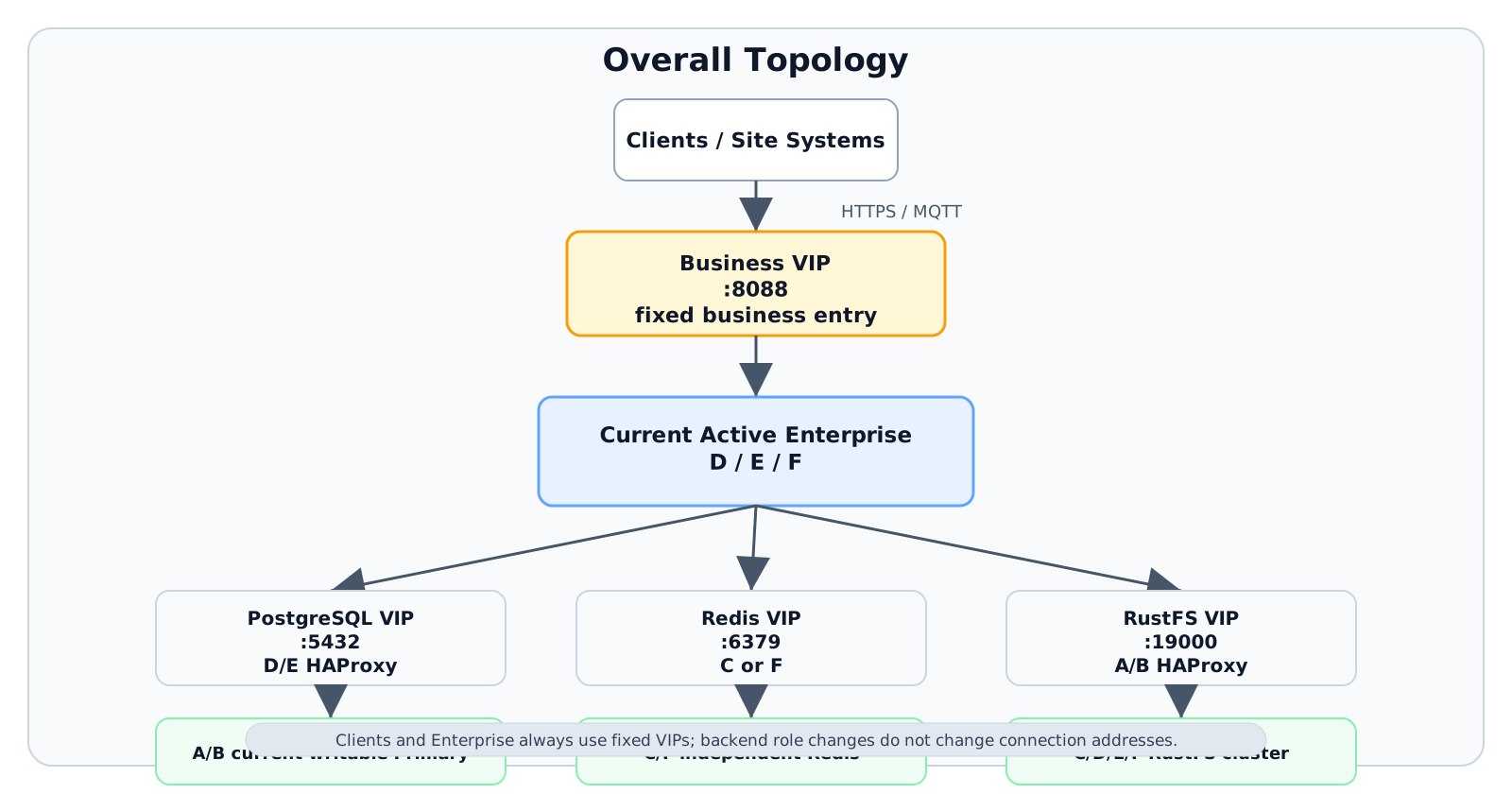
The core request path is:
Clients / site systems -> Business VIP :8088 -> Current Active Enterprise (D / E / F) |-- PostgreSQL VIP :5432 -> D/E HAProxy -> A/B current writable Primary |-- Redis VIP :6379 -> C or F independent Redis `-- RustFS VIP :19000 -> A/B HAProxy -> C/D/E/F RustFS clusterThe four VIPs are fixed entries in the business configuration. When Enterprise switches nodes or middleware backend roles change, clients and Enterprise do not change connection addresses.
Planned IP Addresses
Section titled “Planned IP Addresses”The following addresses are examples only. Replace them with real addresses from the same on-site IPv4 subnet before implementation. The four VIPs must not be occupied by DHCP, static hosts, or other VRRP instances.
| Name | Example IP | Description |
|---|---|---|
| deployer-controller | 10.60.10.20 |
Independent deployer; not counted as one of the six business machines |
| ent-ha-01 / A | 10.60.10.11 |
PostgreSQL Primary and related roles |
| ent-ha-02 / B | 10.60.10.12 |
PostgreSQL Standby and related roles |
| ent-ha-03 / C | 10.60.10.13 |
Witness, Redis-1, RustFS-1 |
| ent-ha-04 / D | 10.60.10.14 |
Initial Active Enterprise and related roles |
| ent-ha-05 / E | 10.60.10.15 |
Enterprise Standby and related roles |
| ent-ha-06 / F | 10.60.10.16 |
Enterprise Standby and related roles |
| Business VIP | 10.60.10.101 |
Unified Enterprise entry, default 8088 |
| PostgreSQL VIP | 10.60.10.102 |
Unified database entry, default 5432 |
| Redis VIP | 10.60.10.103 |
Unified Redis entry, default 6379 |
| RustFS VIP | 10.60.10.104 |
Unified S3 entry, default 19000 |
Before implementation, confirm the business NIC name, IPv4 prefix, gateway, DNS, NTP, hostnames, SSH user, disk mount points, and firewall allowlist. VIPs, node IPs, and NICs must not be guessed by scripts and used directly in production.
Six-Machine Responsibilities
Section titled “Six-Machine Responsibilities”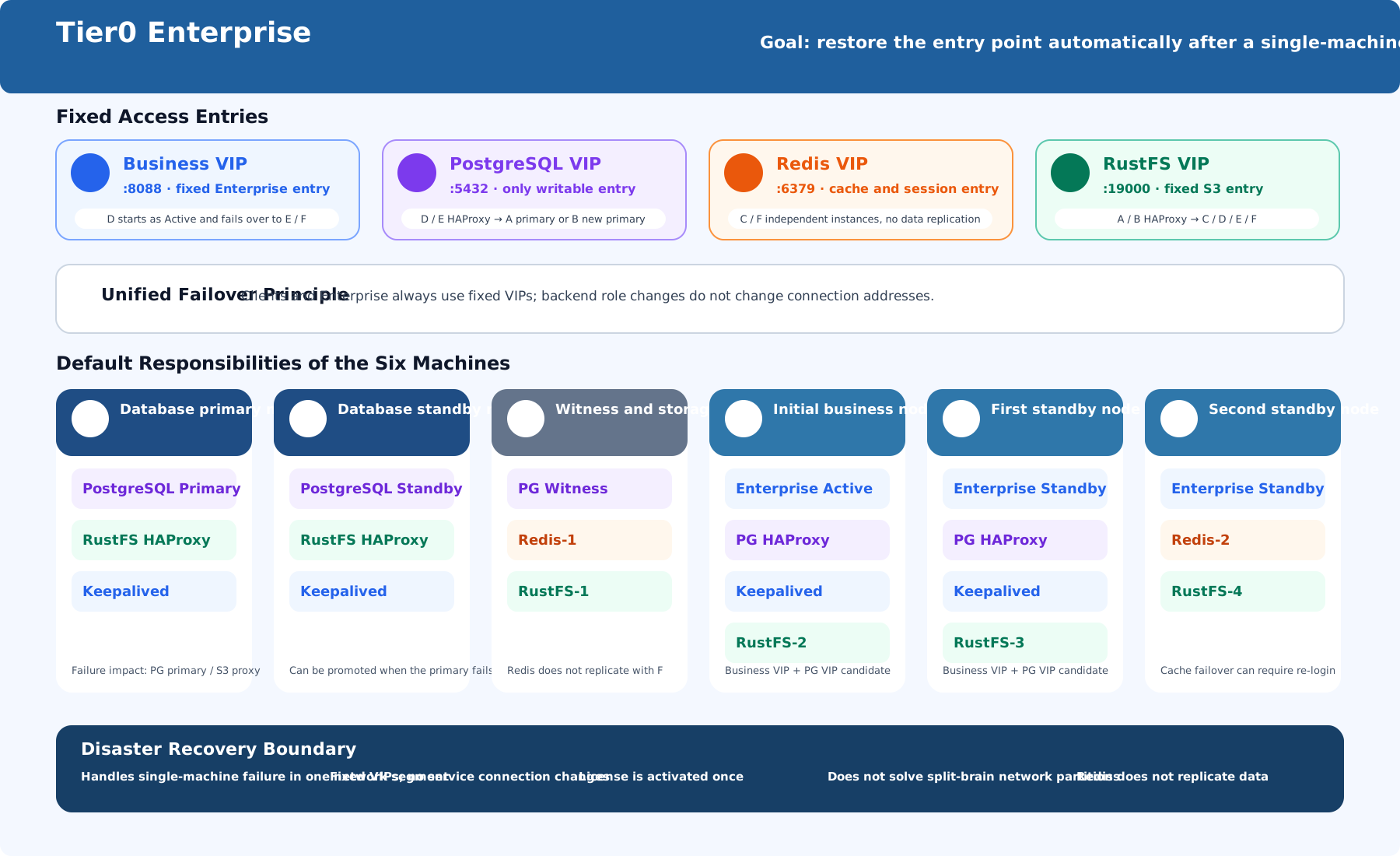
| Machine | Default deployed components | Key responsibility |
|---|---|---|
| A | PostgreSQL Primary, RustFS HAProxy, Keepalived | Initial database primary; first RustFS proxy candidate |
| B | PostgreSQL Standby, RustFS HAProxy, Keepalived | Streaming database standby; second RustFS proxy candidate |
| C | PostgreSQL Witness, Redis-1, RustFS-1 | Database witness/status record; Redis and RustFS data node |
| D | PG HAProxy, Keepalived, RustFS-2, Enterprise, Fleet Agent, rsync | Initial business Active; first PostgreSQL proxy candidate |
| E | PG HAProxy, Keepalived, RustFS-3, Enterprise, Fleet Agent, rsync | Business Standby; second PostgreSQL proxy candidate |
| F | Redis-2, RustFS-4, Enterprise, Fleet Agent, rsync | Business Standby; second Redis instance |
This allocation is for single-machine failure tolerance and balanced resource usage across the six machines. The deployer maps machines to A-F by the natural order of hostnames/IP addresses and selects default roles, but the final assignment must still be reviewed against the on-site disk layout and failure domains.
Machine Configuration Checklist
Section titled “Machine Configuration Checklist”The Enterprise business layer is single-active/standby. At any time, only the node holding the Business VIP serves business requests. Scale the business layer vertically by increasing CPU, memory, and disk on one business node. Do not estimate concurrency by multiplying the number of Enterprise nodes.
| Machine | Node type | vCPU | Memory | Base storage | Disk recommendation |
|---|---|---|---|---|---|
| A | PostgreSQL Primary node | 8C | 16G | 1T | / about 80G; remaining space for PostgreSQL data, WAL, and backup staging |
| B | PostgreSQL Standby node | 8C | 16G | 1T | / about 80G; remaining space for PostgreSQL data, WAL, and backup staging |
| C | Witness / middleware node | 4C | 8G | 500G | Allocate fixed mount points for system, Redis, and RustFS data |
| D | Initial Active Enterprise node | 8C | 32G | 500G | Allocate fixed mount points for system, containers, Enterprise synced files, and RustFS data |
| E | Standby Enterprise node | 8C | 32G | 500G | Same as D |
| F | Standby Enterprise node | 8C | 32G | 500G | Same as D |
| Category | Count | Per-node spec | vCPU subtotal | Memory subtotal | Storage subtotal |
|---|---|---|---|---|---|
| PostgreSQL database nodes | 2 | 8C / 16G / 1T |
16C | 32G | 2T |
| Witness / middleware node | 1 | 4C / 8G / 500G |
4C | 8G | 500G |
| Enterprise business nodes | 3 | 8C / 32G / 500G |
24C | 96G | 1.5T |
| Total | 6 | - | 44C | 136G | 4T |
Configuration Summary
Section titled “Configuration Summary”Unified Enterprise Connection Configuration
Section titled “Unified Enterprise Connection Configuration”D, E, and F keep the same Enterprise configuration.
| Dependency | Configuration principle |
|---|---|
| PostgreSQL | Connect to PostgreSQL VIP, not A/B node IPs |
| Redis | Connect to Redis VIP, not C/F node IPs |
| File storage | Use FILESTORE_DRIVER=s3; point the S3 endpoint to RustFS VIP |
| Fleet identity | Three nodes share one logical installationId; each node has its own memberId |
| Fleet Agent | One process-level Fleet Agent runs on each Enterprise node |
| License | Activate once through the Business VIP; include the Bundle in the HA fileset |
installationId and memberId are generated and persisted by the installation process. Operators should not invent them manually or copy memberId between machines.
VIP and Candidate Nodes
Section titled “VIP and Candidate Nodes”| VIP | Candidate nodes | Health basis | Takeover result |
|---|---|---|---|
| Business VIP | D, E, F | Fleet Agent readiness, business container state, sync generation | Only the Owner starts the Enterprise HA business group |
| PostgreSQL VIP | D, E | HAProxy/Keepalived state; HAProxy routes only to the writable Primary | Enterprise keeps the same database address |
| Redis VIP | C, F | Redis PING and local service state |
Switches to the other independent instance; cache/session may be lost |
| RustFS VIP | A, B | HAProxy and RustFS backend health | Proxy entry moves while the S3 address stays unchanged |
Component Deployment Design
Section titled “Component Deployment Design”Enterprise, Fleet Agent, and Business VIP
Section titled “Enterprise, Fleet Agent, and Business VIP”- D, E, and F install the same full Enterprise offline ZIP.
- Fleet Agent is a host-level process service, not a business container.
- Keepalived manages the Business VIP and calls the Fleet Agent readiness endpoint to decide whether the local node can hold the VIP.
- Only the Business VIP Owner runs the business group; the other two nodes stay Standby.
- A node that loses the VIP must stop the business group. A recovered node must rejoin as Standby first.
- EMQX runs as part of the single-active business group. Do not restart it outside Agent control or build a separate election mechanism across the three machines.
PostgreSQL Primary/Standby, Witness, and Unified Entry
Section titled “PostgreSQL Primary/Standby, Witness, and Unified Entry”- A starts as Primary, B starts as Streaming Standby, and C runs repmgr Witness.
- Witness records cluster state and participates in failure decisions. It does not store full business data and does not serve reads or writes.
- When the primary fails, repmgr promotes a healthy Standby to the new Primary.
- D/E HAProxy routes
5432traffic only to the current writable Primary. - PostgreSQL VIP floats between the D/E proxy nodes. Proxy failover and database primary/standby failover are decoupled.
- Acceptance must prove both “only one writable Primary” and “Standby resumes streaming”.
Redis Independent Instances
Section titled “Redis Independent Instances”- C and F each run one standalone Redis instance.
- The two Redis instances do not form Sentinel, Cluster, or primary/replica replication.
- Redis VIP only switches the connection entry. When the current instance fails, the VIP moves to the other healthy instance.
- Redis may only store data that can be lost or rebuilt. Empty cache and user re-login after switching are within the design boundary.
- If Redis later stores non-discardable state, upgrade to a replication/arbitration design instead of keeping the independent-instance assumption.
RustFS Four-Node Cluster
Section titled “RustFS Four-Node Cluster”- C, D, E, and F form a four-node distributed RustFS object storage cluster.
- HAProxy on A and B proxies all healthy RustFS backends.
- RustFS VIP floats between A and B. Enterprise always accesses S3 through this VIP.
- A single RustFS node failure is handled by the cluster mechanism; a single proxy failure is handled by VIP failover.
- Do not synchronize object data with rsync, hot copy, or direct edits to RustFS mount directories.
- RustFS node count, disk count, and erasure-coding availability boundaries must follow the cluster check results of the deployed version.
App, Flow, Marimo, and License File Synchronization
Section titled “App, Flow, Marimo, and License File Synchronization”Fleet Agent synchronizes only local business files that cannot be placed directly in PostgreSQL/RustFS but must exist on the new Active node:
- App runtime directories and
node_modules - Flow, Marimo, Notebook, and related local runtime files
- License Bundle
- Other HA filesets explicitly registered by the current implementation
Synchronization uses system rsync over deployer-managed SSH trust between business nodes. Each release creates a complete generation/manifest. A Standby node can take over only after confirming that the generation is complete. PostgreSQL data directories, Redis data directories, and RustFS data directories are not part of this synchronization scope.
Connection Methods and Network Baseline
Section titled “Connection Methods and Network Baseline”Access Relationships
Section titled “Access Relationships”| Source | Target | Purpose |
|---|---|---|
| Users / site systems | Business VIP | Web/API business access |
| D/E/F Enterprise | PostgreSQL VIP | Business database reads/writes |
| D/E/F Enterprise | Redis VIP | Cache and session |
| D/E/F Enterprise | RustFS VIP | S3 object reads/writes |
| Deployer controller | A-F | SSH, deployment, status collection, operations |
| D/E/F | D/E/F | rsync/SSH file synchronization |
| A/B/C | A/B/C | PostgreSQL streaming replication, repmgr, Witness communication |
| RustFS members/proxies | C/D/E/F | RustFS cluster and S3 backend communication |
| Nodes sharing a VIP | Corresponding candidates | VRRP advertisement and VIP movement |
Ports and Protocols
Section titled “Ports and Protocols”Allow ports by minimum required source-to-target relationships. Do not expose all management ports directly to the user network.
| Port / protocol | Suggested allowlist | Purpose |
|---|---|---|
22/TCP |
Deployer -> A-F; D/E/F mutual sync | SSH, deployment, rsync |
8088/TCP |
User network -> Business VIP | Enterprise business entry |
5432/TCP |
D/E/F -> PostgreSQL VIP; PG/proxy internal access | PostgreSQL, streaming replication, proxy |
6379/TCP |
D/E/F -> Redis VIP; health-check nodes -> C/F | Redis access and health checks |
19000/TCP |
D/E/F -> RustFS VIP | Enterprise fixed S3 entry |
9000/TCP |
A/B -> C/D/E/F; RustFS members | RustFS S3 backend/cluster communication; confirm by version |
9001/TCP |
Controlled operations network -> RustFS admin entry | Optional RustFS admin endpoint; do not expose to user network |
19731/TCP |
Localhost / Keepalived / controlled operations network | Fleet Agent HTTP health and control interface |
18080/TCP |
Operations network -> deployer controller | Deployer HTTPS UI |
112/VRRP |
Candidate nodes for each VIP | Keepalived VIP movement; this is an IP protocol number, not TCP/UDP |
1883/8883 |
Site device network -> business entry, per product configuration | MQTT/MQTTS |
Failover and Capability Boundaries
Section titled “Failover and Capability Boundaries”| Failure scenario | Expected behavior | Boundary |
|---|---|---|
| D Active business node fails | Business VIP moves to E or F; the new Owner starts the business group after readiness passes | Requires the latest HA fileset generation to be complete on Standby |
| PostgreSQL A Primary fails | B is promoted to Primary; PostgreSQL VIP continues routing to the writable Primary through D/E proxy | Data loss depends on streaming replication state |
| Redis current node fails | Redis VIP moves to the other independent Redis instance | Cache/session may be lost |
| RustFS proxy A or B fails | RustFS VIP moves to the other proxy | RustFS data still depends on the four-node cluster health |
| Single RustFS data node fails | RustFS cluster continues service if its redundancy conditions are met | Actual boundary depends on disk count and erasure-coding configuration |
Network partition, simultaneous multi-node failure, incorrect VRRP priority, full disks, clock drift, and manual changes outside the deployer are outside the normal automatic recovery promise and must be covered by operations procedures.
Backup, Monitoring, and Inspection
Section titled “Backup, Monitoring, and Inspection”- PostgreSQL requires independent logical or physical backup and restore verification.
- RustFS requires capacity, disk, and cluster health monitoring.
- Redis must be treated as cache/session unless a future replication design is introduced.
- Fleet Agent and Keepalived state must be monitored on D/E/F.
- rsync generation lag must be monitored. A Standby with stale generation must not take over business traffic.
- Regular failover drills must include business VIP, PostgreSQL promotion, Redis VIP switch, RustFS proxy switch, and restore from backup.
Pre-Go-Live Checks
Section titled “Pre-Go-Live Checks”- All six machines can be reached by SSH from the deployer controller.
- Hostnames, IP addresses, NIC names, NTP, DNS, and firewall rules are fixed and recorded.
- The four VIPs are unused and can move between their candidate nodes.
- Disk mount points are fixed and survive reboot.
- Enterprise, PostgreSQL, Redis, RustFS, Keepalived, HAProxy, repmgr, Fleet Agent, and rsync configurations are generated by the deployer and reviewed.
- The Cluster License is activated once through the Business VIP.
- Backup and restore steps are rehearsed before production traffic is introduced.
Implementation Sequence
Section titled “Implementation Sequence”- Prepare the deployer controller and the six machines.
- Confirm IP, VIP, NIC, disk, DNS, NTP, SSH, and firewall information.
- Upload the Enterprise offline package and configuration material.
- Deploy PostgreSQL primary/standby and Witness.
- Deploy Redis independent instances and Redis VIP.
- Deploy RustFS four-node cluster and RustFS VIP.
- Deploy Enterprise on D/E/F, Fleet Agent, rsync filesets, and Business VIP.
- Activate License through the Business VIP.
- Run functional validation and failover drills.
- Record final topology, passwords/keys, backup policy, monitoring targets, and recovery procedures.
Acceptance Criteria
Section titled “Acceptance Criteria”Functional Acceptance
Section titled “Functional Acceptance”- Users can access Enterprise through the Business VIP.
- Enterprise reads and writes PostgreSQL only through PostgreSQL VIP.
- Enterprise uses Redis only through Redis VIP.
- Enterprise uses RustFS only through RustFS VIP.
- App, Flow, Marimo, Notebook, and License files are present on the Active node after failover.
- Branch Enterprise can still be installed independently and does not join this six-machine HA group.
Failover Drill Acceptance
Section titled “Failover Drill Acceptance”- Stop the Active business node: Business VIP moves to a healthy Standby and the business group starts only there.
- Stop PostgreSQL Primary: Standby is promoted and PostgreSQL VIP continues pointing to the writable Primary.
- Stop the Redis VIP owner: Redis VIP moves to the other instance, with cache/session loss accepted.
- Stop the RustFS proxy owner: RustFS VIP moves to the other proxy.
- Stop one RustFS data node: object access remains within the actual RustFS redundancy boundary.
- Recover failed nodes: they return as Standby or healthy members and do not overwrite newer data or files.
Risks and Items to Confirm On Site
Section titled “Risks and Items to Confirm On Site”- Whether the network allows VRRP protocol
112. - Whether the four VIP addresses are truly unused.
- Whether the disk mount layout and capacity meet actual file retention and RustFS redundancy requirements.
- Whether Redis only stores disposable data.
- Whether PostgreSQL replication lag and backup policy meet the business RPO.
- Whether operations staff understand the difference between VIP failover, file synchronization, database replication, and object storage redundancy.
Conclusion
Section titled “Conclusion”The current plan centers on six machines, four fixed VIPs, and single-active Enterprise. It decouples the business entry, database entry, cache entry, and object storage entry. It can cover common single-machine failures within the same network segment and significantly reduces the work required after failover to change connection configuration, reactivate License, and manually copy App files.
At the same time, three boundaries must be accepted: Redis does not replicate data, business filesets are synchronized asynchronously, and network partition has no consensus arbitration. Therefore, this plan is suitable to define as a Fleet Center six-machine single-active active-standby disaster recovery plan. It should not promise zero interruption, zero data loss, or strict cross-data-center high availability.