시작하기
적합한 제품 선택
Edge, Cloud, Enterprise 중 적합한 Tier0 에디션을 선택합니다.
각 제품의 자세한 기능은 요금 페이지에서 확인하고 필요에 맞는 에디션을 선택하세요.
다음 단계
섹션 제목: “다음 단계”- UNS 기반 앱 만들기 — Enterprise에서 Tier0 앱을 만들고 배포합니다.
- 설치 — 선택한 에디션의 설정 단계를 따릅니다.
Tier0 설치 옵션을 선택하고 시작합니다.
Tier0는 세 가지 에디션으로 제공됩니다.
어떤 edition을 선택해야 할지 확실하지 않다면 최적의 버전 선택을 먼저 확인하세요.
Tier0 Cloud를 사용하려면 먼저 체험 계정을 신청하세요.
sha256sum -c tier0-enterprise-offline-standard-YYYYmmddTHHMMSS.tar.gz.sha256tar -xzf tier0-enterprise-offline-standard-YYYYmmddTHHMMSS.tar.gzcd tier0-enterprise-offline-standard-YYYYmmddTHHMMSSinstall.env를 수정한 뒤 deployment를 시작합니다.
vi install.envbash install.sh./install.sh --check-only./full-cleanup.sh --env install.env --yes이 명령은 VM, 운영체제, 설치 패키지, Docker 소프트웨어는 유지하지만 Tier0 런타임 데이터와 데이터베이스 백업을 삭제합니다.
runtime/install-reports/<timestamp>/deployment-report.md보고서에 FAIL 항목이 있으면 프로젝트를 인도하지 말고 먼저 지원팀에 문의하세요.
최적의 버전 선택 - requirement에 맞는 edition을 선택합니다.
Unified Namespace model: Metric, State, Action, 그리고 UNS가 공장 데이터를 저장하는 방식.
Tier0에서 공장 데이터는 UNS(Unified Namespace) 방법론을 기반으로 명확한 트리 구조의 모델로 구성되어 통합 데이터 기반을 형성합니다.
  %%{init: {"flowchart": {"defaultRenderer": "elk", "nodeSpacing": 32, "rankSpacing": 48, "diagramPadding": 8}}}%%
  flowchart TB
  source["데이터 소스 / 소비자"]
  subgraph UNS["Unified Namespace"]
      direction LR
      Model["Model<br/>path, topic, payload 정의"]
      Broker["Broker<br/>데이터 교환 처리"]
      Storage["스토리지<br/>데이터 영구 저장"]
      Model <--> Broker
      Broker --> Storage
  end
  source <-- "MQTT / API" --> UNS
  classDef broker fill:#F7FAF2,stroke:#D8E6B8,stroke-width:1px,color:#2A2A2A,stroke-dasharray:5 5
class Broker broker %%{init: {
"themeVariables": {
"fontSize": "14pt"
},
"flowchart": {
"defaultRenderer": "elk",
"nodeSpacing": 40,
"rankSpacing": 56,
"diagramPadding": 8
}
}}%%
flowchart LR
subgraph Model["모델 타입"]
direction TB
metric["Metric<br/>고빈도 숫자 데이터"]
state["State<br/>현재 사실 또는 상태"]
action["Action<br/>명령 또는 요청 작업"]
end
subgraph Storage["스토리지"]
direction TB
tsdb["TSDB<br/>Metric 이력을 위한 시계열 저장소"]
jsonb["JSONB<br/>State와 Action을 위한 문서 저장소"]
end
metric --> tsdb
state --> jsonb
action --> jsonbTier0에서 broker는 data model을 기반으로 MQTT 또는 OpenAPI를 통해 데이터를 수신하고 전송하는 platform component입니다.
산업 데이터는 collection frequency와 목적이 서로 다르기 때문에 Tier0는 UNS model을 세 가지 고정 type으로 구분합니다.
| Type | Why | Example |
|---|---|---|
METRIC |
지속적으로 수집되고 time-series storage가 필요한 고빈도 데이터를 위해 설계되었습니다. | machine temperature / pressure / voltage |
STATE |
더 낮은 빈도로 변경되며 object의 현재 condition 또는 fact를 설명하는 데이터를 위해 설계되었습니다. | machine operational status |
ACTION |
외부 system 또는 operator가 실행해야 하는 command를 기록하는 저빈도 command data를 위해 설계되었습니다. | start batch, stop machine |
각 UNS model은 path, topic, payload로 구성됩니다. 이들은 함께 business context를 담고 산업 데이터를 전달하는 tree 구조를 이룹니다.
예를 들어 UNS의 model은 아래 tree처럼 보입니다.
Factory_A └── Site_01 └── SMT_Line_1 └── Metric └── Machine_001Factory_A/Site_01/SMT_Line_1/Metric/Machine_001.{ "temperature": 85, "vibration": 2.8} Factory_A └── ERP └── ProductionOrders └── State └── OrderListFactory_A/ERP/ProductionOrders/State/OrderList.{ "orders": "0123569876", "updated_at": "2026-07-13"}Tier0는 PostgreSQL을 사용해 데이터를 저장합니다. data type마다 변경 빈도와 storage requirement가 다릅니다.
| Data Type | Storage | Description |
|---|---|---|
METRIC |
Time-series database | temperature, pressure 같은 고빈도 measurement에 최적화되어 있습니다. 각 topic에는 기본 field timestamp와 quality가 포함됩니다. |
STATE |
PostgreSQL | machine 또는 system state를 유연한 JSONB format으로 저장합니다. |
ACTION |
PostgreSQL | command 또는 action payload를 유연한 JSONB format으로 저장합니다. |
앱을 위해 외부 데이터를 Tier0에 연결하고 모델링하여 통합합니다.
Tier0는 맞춤형 앱을 위한 데이터 기반을 만듭니다. 앱의 비즈니스 데이터를 받고, 기존 시스템과 장치의 외부 데이터 소스를 연결하며, 앱이 사용할 수 있는 통합 모델로 데이터를 모읍니다.
모든 데이터는 Namespace 아래 Tables에 모델링되고 데이터 유형별로 구성됩니다.
flowchart TB
  namespace["Namespace"] --> table["Table"]
  table --> record["Record 테이블<br/>관계형 데이터"]
  table --> sample["Sample 테이블<br/>시계열 데이터"]
  classDef t0accent fill:#B2ED1D,stroke:#73B200,color:#171717
  class table t0accent
비즈니스 데이터는 앱 사용이나 외부 시스템에서 올 수 있습니다. 시계열 데이터는 주로 연결된 장치에서 옵니다.
flowchart LR
  app["앱"] -->|"비즈니스 데이터"| record["Record"]
  stream["Stream"] -->|"장치 데이터"| sample["Sample"]
  classDef t0accent fill:#B2ED1D,stroke:#73B200,color:#171717
  class record,sample t0accent
flowchart LR
  source["Source<br/>서버 연결"] --> stream["Stream<br/>수집 및 처리"]
  classDef t0accent fill:#B2ED1D,stroke:#73B200,color:#171717
  class source,stream t0accent
프롬프트에 명시하지 않으면 Agent가 앱의 비즈니스 로직에 맞춰 데이터 모델을 자동 생성합니다.
중앙 노드에서 연결된 엣지 노드의 데이터를 원활하게 관리합니다.
Tier0의 엣지-센터 협업을 통해 엣지 디바이스에서 데이터를 수집하고 중앙 플랫폼에서 관리할 수 있습니다.
먼저 중앙 노드에서 Fleet 노드를 생성합니다.
중앙 노드에서 생성된 토큰을 사용하여 각 엣지 노드를 연결합니다.
MQTT와 API로 UNS 데이터를 조작하고 API 레퍼런스를 확인합니다.
MQTT와 API를 통해 UNS 데이터를 조작할 수 있습니다.
Tier0에서 생성한 자격 증명으로 MQTT 클라이언트를 UNS broker에 연결할 수 있습니다.
Connect > Source > MQTT Device에서 MQTT 자격 증명을 생성하고 기록합니다.
{ "Host": "mqtt.tier0.dev", "Port": 1883, "Client ID": "<generated client ID>", "Username": "<generated username>", "Password": "<generated password>"}{ "Protocol": "mqtt://", "Host": "mqtt.tier0.dev", "Port": 1883, "Username": "<generated username>", "Password": "<generated password>"}mqtt in 노드에 다음 정보로 서버를 추가합니다.
{ {/* under Connection */} "Server": "mqtt://mqtt.tier0.dev", "Port": 1883, "Client ID": "<generated clientId>", {/* under Security */} "Username": "<generated username>", "Password": "<generated password>"}https://<your-tier0-host>/openapi/v2x-api-key 헤더에 넣습니다.POST /uns/metadata:find — Tables 목록과 Table ID 가져오기
const base = "https://your-tier0-host/openapi/v2";const response = await fetch(`${base}/uns/metadata:find`, { method: "POST", headers: { "content-type": "application/json", "x-api-key": "your-api-key" }, body: JSON.stringify({"kind": "collection", "filter": {}, "page": {"mode": "offset", "page": 1, "size": 20}}),});const result = await response.json();if (!response.ok || result.code !== 0) throw new Error(result.error?.code || result.msg);console.log(result.data.items);import requests
response = requests.post( "https://your-tier0-host/openapi/v2/uns/metadata:find", headers={"x-api-key": "your-api-key"}, json={"kind": "collection", "filter": {}, "page": {"mode": "offset", "page": 1, "size": 20}}, timeout=30,)response.raise_for_status()result = response.json()if result["code"] != 0: raise RuntimeError(result.get("error", result.get("msg")))print(result["data"]["items"])curl --fail-with-body -X POST "https://your-tier0-host/openapi/v2/uns/metadata:find" \ -H "content-type: application/json" \ -H "x-api-key: your-api-key" \ -d '{"kind": "collection", "filter": {}, "page": {"mode": "offset", "page": 1, "size": 20}}'POST /uns/collections/{collectionId}/records:find — Records 목록과 Record ID 가져오기
const base = "https://your-tier0-host/openapi/v2";const collectionId = "your-collection-id";const response = await fetch(`${base}/uns/collections/${encodeURIComponent(collectionId)}/records:find`, { method: "POST", headers: { "content-type": "application/json", "x-api-key": "your-api-key" }, body: JSON.stringify({"limit": 20}),});const result = await response.json();if (!response.ok || result.code !== 0) throw new Error(result.error?.code || result.msg);console.log(result.data);import requests
response = requests.post( "https://your-tier0-host/openapi/v2/uns/collections/your-collection-id/records:find", headers={"x-api-key": "your-api-key"}, json={"limit": 20}, timeout=30,)response.raise_for_status()result = response.json()if result["code"] != 0: raise RuntimeError(result.get("error", result.get("msg")))print(result["data"])curl --fail-with-body -X POST "https://your-tier0-host/openapi/v2/uns/collections/your-collection-id/records:find" \ -H "content-type: application/json" \ -H "x-api-key: your-api-key" \ -d '{"limit": 20}'POST /uns/collections/{collectionId}/samples:latest — Record의 최신 Sample 가져오기
const base = "https://your-tier0-host/openapi/v2";const collectionId = "your-collection-id";const response = await fetch(`${base}/uns/collections/${encodeURIComponent(collectionId)}/samples:latest`, { method: "POST", headers: { "content-type": "application/json", "x-api-key": "your-api-key" }, body: JSON.stringify({"recordIds": ["record_123"]}),});const result = await response.json();if (!response.ok || result.code !== 0) throw new Error(result.error?.code || result.msg);console.log(result.data);import requests
response = requests.post( "https://your-tier0-host/openapi/v2/uns/collections/your-collection-id/samples:latest", headers={"x-api-key": "your-api-key"}, json={"recordIds": ["record_123"]}, timeout=30,)response.raise_for_status()result = response.json()if result["code"] != 0: raise RuntimeError(result.get("error", result.get("msg")))print(result["data"])curl --fail-with-body -X POST "https://your-tier0-host/openapi/v2/uns/collections/your-collection-id/samples:latest" \ -H "content-type: application/json" \ -H "x-api-key: your-api-key" \ -d '{"recordIds": ["record_123"]}'POST /uns/collections/{collectionId}/samples:find — 기간 내 Samples 가져오기
const base = "https://your-tier0-host/openapi/v2";const collectionId = "your-collection-id";const response = await fetch(`${base}/uns/collections/${encodeURIComponent(collectionId)}/samples:find`, { method: "POST", headers: { "content-type": "application/json", "x-api-key": "your-api-key" }, body: JSON.stringify({"recordIds": ["record_123"], "from": 1792454400000, "to": 1792540800000, "filter": {"temperature": {"$gt": 20}}, "limit": 20}),});const result = await response.json();if (!response.ok || result.code !== 0) throw new Error(result.error?.code || result.msg);console.log(result.data);import requests
response = requests.post( "https://your-tier0-host/openapi/v2/uns/collections/your-collection-id/samples:find", headers={"x-api-key": "your-api-key"}, json={"recordIds": ["record_123"], "from": 1792454400000, "to": 1792540800000, "filter": {"temperature": {"$gt": 20}}, "limit": 20}, timeout=30,)response.raise_for_status()result = response.json()if result["code"] != 0: raise RuntimeError(result.get("error", result.get("msg")))print(result["data"])curl --fail-with-body -X POST "https://your-tier0-host/openapi/v2/uns/collections/your-collection-id/samples:find" \ -H "content-type: application/json" \ -H "x-api-key: your-api-key" \ -d '{"recordIds": ["record_123"], "from": 1792454400000, "to": 1792540800000, "filter": {"temperature": {"$gt": 20}}, "limit": 20}'AI와 대화하여 맞춤형 산업용 앱을 만듭니다.
AI와 대화하여 맞춤형 산업용 앱을 만듭니다. 앱은 공장 데이터를 사용하며 역할 기반 접근 제어, 버전 관리, 외부 배포 기능을 제공합니다.
앱의 목적, 기능, 외부 데이터 필요 여부를 설명합니다.
공장 기술자를 위한 설비 유지보수 앱을 만들어 줘.설비 상태 확인, 유지보수 요청 제출, 수리 진행 상황 추적을 지원해 줘.xxx table의 경보 기록과 유지보수 이력을 사용해 줘.앱은 역할 기반 접근 제어(RBAC)로 멤버의 접근과 허용 작업을 관리합니다.
앱이 준비되면 Preview 페이지에서 타사 환경이나 Tier0 Enterprise용으로 내보낼 수 있습니다.
디지털 트윈 만들기 — 공장 데이터를 운영 시각화에 활용합니다.
실시간 UNS 데이터를 3D 모델에 바인딩하고 완전한 공장 장면으로 조합해 Digital Twin 시각화를 구성합니다.
Tier0에 연결된 공장 데이터는 실제와 유사한 동작과 환경을 갖춘 Digital Twin으로 시각화할 수 있습니다. 전체 과정은 데이터를 3D 모델에 매핑한 뒤 여러 모델을 조합해 완전한 공장 장면을 만드는 흐름입니다.
인스턴스만 모델 단위 또는 장면 단위로 공유할 수 있습니다.
MCP를 통해 AI Agent를 Tier0에 연결합니다.
MCP를 통해 AI Agent를 Tier0에 연결합니다. Agent는 부여된 권한 범위에서 플랫폼 API를 찾아 사용할 수 있습니다.
 WorkBuddy
{ "Authorization": "Bearer <your-personal-api-key>" }whoami를 실행하여 연결을 확인하도록 요청합니다.codex mcp add tier0 --url https://your-tier0-url/mcp --oauth-client-registration dcrcodex mcp login tier0 --oauth-client-registration dcrwhoami를 실행하여 연결을 확인하도록 요청합니다.| MCP 도구 | 용도 |
|---|---|
whoami |
신원과 권한을 확인합니다. |
docs |
API 문서를 읽습니다. |
search |
API 작업을 찾습니다. |
execute |
API 작업을 호출합니다. |
먼저 Agent에게 docs와 search로 작업을 찾고 execute로 호출하도록 요청합니다. 예:
내 Workspace의 `Plant/Line1/Metric/Temperature` 현재 값을 읽어 줘.공장 데이터 작업 — Tier0가 공장 데이터를 구성하고 제공하는 방법을 알아봅니다.
Demo UNS 설계: topic 폭증 방지와 payload 구조 베스트 프랙티스.
물리적 위치가 있는 기계와 설비의 산업 데이터는 일반적으로 ISA-95 표준을 기반으로 모델링합니다.
Enterprise (Level 4)└── Site (Level 3/4) └── Area (Level 3) └── Work Center / Process Cell (Level 2/3) └── Equipment / Unit (Level 1/2) └── Control Module / Device (Level 0/1)DemoFactory└── Site_01 └── Production └── Line_01 └── WorkOrderExecution ├── Metric │ ├── Target_Qty │ ├── Produced_Qty │ ├── Defect_Qty │ └── Completion_Rate └── State ├── CurrentWorkOrder └── WorkOrderStatus{ "namespace": [ { "name": "DemoFactory", "alias": "DemoFactory_9e50bbcd833d", "type": "PATH", "children": [ { "name": "Site_01", "alias": "DemoFactory__6d1fcad14e86", "type": "PATH", "children": [ { "name": "Production", "alias": "__Site_01_Pro_91523d2ad304", "type": "PATH", "children": [ { "name": "Line_01", "alias": "__Production__acd5841c1ada", "type": "PATH", "children": [ { "name": "WorkOrderExecution", "alias": "__Line_01_Wor_54904ff56e91", "type": "PATH", "children": [ { "name": "Metric", "alias": "metric_233fd84305c4", "type": "PATH", "children": [ { "name": "Target_Qty", "alias": "Target_Qty_8646b092e543", "type": "TOPIC", "topicType": "METRIC", "description": "Target quantity for the current Work Order.", "fields": [ { "name": "production_order_id", "type": "STRING" }, { "name": "plan_id", "type": "STRING" }, { "name": "plan_number", "type": "STRING" }, { "name": "work_order_id", "type": "STRING" }, { "name": "value", "type": "DOUBLE" }, { "name": "unit", "type": "STRING" }, { "name": "timestamp", "type": "DATETIME" } ], "enableHistory": "TRUE", "mockData": "FALSE" }, { "name": "Produced_Qty", "alias": "Produced_Qty_1f8cd3e11f77", "type": "TOPIC", "topicType": "METRIC", "description": "Produced quantity for the current Work Order.", "fields": [ { "name": "production_order_id", "type": "STRING" }, { "name": "plan_id", "type": "STRING" }, { "name": "plan_number", "type": "STRING" }, { "name": "work_order_id", "type": "STRING" }, { "name": "value", "type": "DOUBLE" }, { "name": "unit", "type": "STRING" }, { "name": "timestamp", "type": "DATETIME" } ], "enableHistory": "TRUE", "mockData": "FALSE" }, { "name": "Defect_Qty", "alias": "Defect_Qty_b48fb3563ec1", "type": "TOPIC", "topicType": "METRIC", "description": "Defect quantity for the current Work Order.", "fields": [ { "name": "production_order_id", "type": "STRING" }, { "name": "plan_id", "type": "STRING" }, { "name": "plan_number", "type": "STRING" }, { "name": "work_order_id", "type": "STRING" }, { "name": "value", "type": "DOUBLE" }, { "name": "unit", "type": "STRING" }, { "name": "timestamp", "type": "DATETIME" } ], "enableHistory": "TRUE", "mockData": "FALSE" }, { "name": "Completion_Rate", "alias": "Completion_R_7294e38e1530", "type": "TOPIC", "topicType": "METRIC", "description": "Completion percentage for the current Work Order.", "fields": [ { "name": "production_order_id", "type": "STRING" }, { "name": "plan_id", "type": "STRING" }, { "name": "plan_number", "type": "STRING" }, { "name": "work_order_id", "type": "STRING" }, { "name": "value", "type": "DOUBLE" }, { "name": "unit", "type": "STRING" }, { "name": "timestamp", "type": "DATETIME" } ], "enableHistory": "TRUE", "mockData": "FALSE" } ] }, { "name": "State", "alias": "state_539a0f331fe0", "type": "PATH", "children": [ { "name": "CurrentWorkOrder", "alias": "CurrentWorkO_a638320784dd", "type": "TOPIC", "topicType": "STATE", "description": "Current active Work Order on Line_01.", "fields": [ { "name": "production_order_id", "type": "STRING" }, { "name": "plan_id", "type": "STRING" }, { "name": "plan_number", "type": "STRING" }, { "name": "work_order_id", "type": "STRING" }, { "name": "target_line", "type": "STRING" }, { "name": "workstation", "type": "STRING" }, { "name": "product_code", "type": "STRING" }, { "name": "target_qty", "type": "DOUBLE" }, { "name": "unit", "type": "STRING" }, { "name": "started_at", "type": "DATETIME" }, { "name": "updated_at", "type": "DATETIME" } ], "enableHistory": "TRUE", "mockData": "FALSE" }, { "name": "WorkOrderStatus", "alias": "WorkOrderSta_e24e3bf113d1", "type": "TOPIC", "topicType": "STATE", "description": "Execution status of the current Work Order.", "fields": [ { "name": "production_order_id", "type": "STRING" }, { "name": "plan_id", "type": "STRING" }, { "name": "plan_number", "type": "STRING" }, { "name": "work_order_id", "type": "STRING" }, { "name": "status", "type": "STRING" }, { "name": "reason", "type": "STRING" }, { "name": "updated_at", "type": "DATETIME" } ], "enableHistory": "TRUE", "mockData": "FALSE" } ] } ] } ] } ] } ] } ] } ]}ERP의 생산 주문, 작업 지시 계획 같은 비즈니스 계획 및 프로세스 객체는 비즈니스 context에 맞게 모델링합니다.
Factory / Business Domain / Business Object / Topic Type / TopicBusiness Domain: data가 속한 business process 또는 system을 확인합니다.
ERPMESWMSQMSEAMLIMSPlanningInventoryMaintenanceQualityLogistics...Business Object: business domain에서 관리되는 핵심 object입니다.
ProductionOrdersWorkOrderPlanMaterialInventoryQualityInspectionMaintenanceOrdersPurchaseOrdersShipments...Topic Type: Metric, Action, State 중 data type을 선택합니다.
| Topic Type | Used for | Examples |
|---|
| STATE | 현재 상태 또는 현재 사실 | work order status, order status, equipment status | | METRIC | 지속적으로 변하는 숫자 값 | Temperature, speed, output, OEE, energy consumption | | ACTION | 외부 실행자를 위한 command | 설비 시작, 설비 정지, alarm reset, work order dispatch 요청 |
DemoFactory└── ERP ├── ProductionOrders │ └── State │ ├── UpsertProductionOrder │ └── OrderList └── WorkOrderPlan ├── Metric │ └── SplitCount └── State ├── PlanStatus └── WorkOrderList{ "namespace": [ { "name": "DemoFactory", "alias": "DemoFactory_f925c1ec5041", "type": "PATH", "children": [ { "name": "ERP", "alias": "DemoFactory__e504805b1973", "type": "PATH", "children": [ { "name": "ProductionOrders", "alias": "__ERP_Product_1e7984ac3a1d", "type": "PATH", "children": [ { "name": "State", "alias": "state_c2616c8698fa", "type": "PATH", "children": [ { "name": "UpsertProductionOrder", "alias": "UpsertProduc_d5f166da35c6", "type": "TOPIC", "topicType": "STATE", "description": "Event for creating or updating a Production Order from WOM or ERP simulation.", "fields": [ { "name": "event_id", "type": "STRING" }, { "name": "event_type", "type": "STRING" }, { "name": "source", "type": "STRING" }, { "name": "production_order_id", "type": "STRING" }, { "name": "order_number", "type": "STRING" }, { "name": "product_code", "type": "STRING" }, { "name": "planned_qty", "type": "DOUBLE" }, { "name": "unit", "type": "STRING" }, { "name": "status", "type": "STRING" }, { "name": "due_date", "type": "DATETIME" }, { "name": "updated_at", "type": "DATETIME" } ], "enableHistory": "TRUE", "mockData": "FALSE" }, { "name": "OrderList", "alias": "OrderList_11fbca51a2bd", "type": "TOPIC", "topicType": "STATE", "description": "Retained compatibility snapshot of current Production Orders.", "fields": [ { "name": "orders", "type": "STRING" }, { "name": "updated_at", "type": "DATETIME" } ], "enableHistory": "TRUE", "mockData": "FALSE" } ] } ] }, { "name": "WorkOrderPlan", "alias": "__ERP_WorkOrd_19f04960daf5", "type": "PATH", "children": [ { "name": "Metric", "alias": "metric_17258b809a4f", "type": "PATH", "children": [ { "name": "SplitCount", "alias": "SplitCount_032e86f5fbfc", "type": "TOPIC", "topicType": "METRIC", "description": "Number of executable Work Orders generated from a Work Order Plan.", "fields": [ { "name": "production_order_id", "type": "STRING" }, { "name": "plan_id", "type": "STRING" }, { "name": "plan_number", "type": "STRING" }, { "name": "split_count", "type": "INTEGER" }, { "name": "updated_at", "type": "DATETIME" } ], "enableHistory": "TRUE", "mockData": "FALSE" } ] }, { "name": "State", "alias": "state_884cee548bf7", "type": "PATH", "children": [ { "name": "PlanStatus", "alias": "PlanStatus_2e21c1327c49", "type": "TOPIC", "topicType": "STATE", "description": "Current lifecycle status of a Work Order Plan.", "fields": [ { "name": "production_order_id", "type": "STRING" }, { "name": "plan_id", "type": "STRING" }, { "name": "plan_number", "type": "STRING" }, { "name": "status", "type": "STRING" }, { "name": "updated_at", "type": "DATETIME" } ], "enableHistory": "TRUE", "mockData": "FALSE" }, { "name": "WorkOrderList", "alias": "WorkOrderLis_887b92f26fc2", "type": "TOPIC", "topicType": "STATE", "description": "Split result list generated from a sent Work Order Plan.", "fields": [ { "name": "production_order_id", "type": "STRING" }, { "name": "plan_id", "type": "STRING" }, { "name": "plan_number", "type": "STRING" }, { "name": "split_count", "type": "INTEGER" }, { "name": "lines", "type": "STRING" }, { "name": "updated_at", "type": "DATETIME" } ], "enableHistory": "TRUE", "mockData": "FALSE" } ] } ] } ] } ] } ]}topic payload를 설계할 때는 소비할 데이터와 다시 쓸 데이터를 모두 고려해야 합니다.
Action
Action payload에는 데이터가 Tier0 데이터베이스에 저장된 시간을 기록하는 _timestamp가 자동 포함됩니다.
{ "light_turn_on": true, "height_adjust": 12.5, "_timestamp": "2026-07-10T10:00:00Z"}{ "water_pump_off": true, "window_close": true, "_timestamp": "2026-07-10T10:00:00Z"}Metric
Metric payload에는 데이터가 Tier0 데이터베이스에 저장된 시간을 기록하는 _timestamp와 데이터 품질을 나타내는 _quality가 자동 포함됩니다.
{ "production_order_id": "PO-20260710-001", "plan_id": "PLAN-001", "plan_number": "WOP-20260710-001", "split_count": 3, "updated_at": "2026-07-10T10:00:00Z", "_timestamp": "2026-07-10T10:00:00Z", "_quality": "Good"}{ "production_order_id": "PO-20260710-001", "plan_id": "PLAN-001", "plan_number": "WOP-20260710-001", "work_order_id": "WO-001", "value": 1200, "unit": "pcs", "timestamp": "2026-07-10T10:00:00Z", "_timestamp": "2026-07-10T10:00:00Z", "_quality": "Good"}State
State payload에는 데이터가 Tier0 데이터베이스에 저장된 시간을 기록하는 _timestamp가 자동 포함됩니다.
{ "event_id": "EVT-001", "event_type": "UPSERT", "source": "ERP", "production_order_id": "PO-20260710-001", "order_number": "PO-001", "product_code": "SKU-1001", "planned_qty": 1200, "unit": "pcs", "status": "Released", "due_date": "2026-07-12T00:00:00Z", "updated_at": "2026-07-10T10:00:00Z", "_timestamp": "2026-07-10T10:00:00Z"}{ "production_order_id": "PO-20260710-001", "plan_id": "PLAN-001", "plan_number": "WOP-20260710-001", "work_order_id": "WO-001", "status": "Running", "reason": "In production", "updated_at": "2026-07-10T10:00:00Z", "_timestamp": "2026-07-10T10:00:00Z"}Tier0는 topic 폭증을 피하기 위해 Metric, Action, State 세 가지 고정 topic type을 사용합니다.
Use Metric for high-frequency real-time data
각 signal 세부 항목마다 namespace를 확장하지 말고, 고빈도 측정값과 telemetry는 Metric 아래에 둡니다.
Factory_A└── SMT_Line_1 └── Machine_001 ├── Temperature_Value ├── Temperature_Unit ├── Temperature_Status └── Speed_ValueFactory_A└── SMT_Line_1 └── Metric └── Machine_001Model fields:
{ "temperature": 80, "temperature_unit": "Celsius", "temperature_status": "Normal", "speed": 300}Use State for low-frequency status data
저빈도 상태, snapshot, 현재 비즈니스 상태는 State 아래에 둡니다. 작업, batch, 주문처럼 변하는 entity마다 새 topic을 만들지 않습니다.
Use Action for low-frequency action data
명령, 요청, operator action은 Action 아래에 둡니다. action 입력은 parameter별 topic이 아니라 topic의 field로 유지합니다.
Tier0는 OPC UA, Modbus, MQTT 등 다양한 산업용 프로토콜 연결을 지원합니다.
{ "name": "ua", "description": "", "protocol": "opcua", "endpoint": "opc.tcp://220.184.175.73:4841/demo/", "runtimeLocation": "local", "opcua": { "securityMode": "None", "securityPolicy": "None" }}서버 주소와 유닛 ID만 필요합니다.
{ "name": "modbus", "description": "", "protocol": "modbus-tcp", "endpoint": "tcp://220.184.175.73:1502", "runtimeLocation": "local", "modbus": { "unitId": 1 }}Tier0는 장치 데이터를 수신하는 MQTT Broker 또는 외부 MQTT Broker에 연결하는 클라이언트로 사용할 수 있습니다.
Broker로 사용:
클라이언트로 사용: 타사 Broker에 연결합니다.
{"name": "111","description": "","protocol": "mqtt","endpoint": "mqtt://220.184.175.73:1883","runtimeLocation": "local","mqtt": { "clientId": "tier0UxxxxxxxxuwQVfi"}}Tier0는 타사가 접근하는 HTTP 서버 또는 다른 HTTP 서버의 API를 호출하는 클라이언트로 사용할 수 있습니다.
서버로 사용:
클라이언트로 사용: 타사 HTTP 서버에 연결합니다.
{ "name": "222", "description": "", "protocol": "http-api", "endpoint": "http://220.184.175.73:8088/api/telemetry", "runtimeLocation": "local", "role": "client", "http": { "authentication": "none" }}{ "name": "eee", "description": "", "protocol": "edge-sql", "endpoint": "mysql://hzoffice.tier0.dev:3307/demo_factory", "runtimeLocation": "local", "sql": { "queries": { "query1": "SELECT * FROM telemetry ORDER BY id DESC LIMIT 5" }, "tlsMode": "verify-full" }, "credentialRef": "ref_9ce47b8778xxxxxxxx7dad49a86dbad"}Tier0의 ID, 데이터 접근, 배포 가용성 및 복구 제어에 대한 개요입니다.
Tier0는 다음 두 가지 측면에서 데이터를 보호합니다.
| 에디션 | 보안 지원 범위 |
|---|---|
| Cloud | 플랫폼 접근 제어와 인증이 필요한 MQTT 및 API 접근을 제공합니다. |
| Enterprise | 플랫폼 및 데이터 접근 제어 외에도 프라이빗 배포를 위한 배포 가용성, 백업 및 복구를 제공합니다. |
| Edge(오픈 소스) | 로컬 데이터 연결 및 모델링에 사용합니다. 내장 MQTT 브로커는 인증 없는 구독을 허용합니다. |
각 에디션의 용도는 가장 적합한 제품 선택을 참조하세요.
| 범위 | Tier0 방식 | 상세 정보 |
|---|---|---|
| 플랫폼 접근 |
|
사용자 관리 |
| Agent 접근 | Agent는 MCP로 연결하고 부여된 권한 범위에서 플랫폼을 운영합니다. | Agent 연결 |
| 애플리케이션 접근 | Tier0는 RBAC를 사용해 애플리케이션 접근을 제어합니다. | 접근 제어 |
| 접근 방식 | Tier0 방식 | 상세 정보 |
|---|---|---|
| MQTT |
|
MQTT 자격 증명 및 연결 |
| REST API | 데이터 접근에는 Tier0가 생성한 키가 필요합니다. | API 레퍼런스 |
Enterprise는 현재 중앙 노드에 대해 두 가지 배포 계획을 제공합니다.
| 계획 | 가용성 경계 | 상세 정보 |
|---|---|---|
| 표준 배포 |
|
표준 배포 계획 |
| 고가용성 배포 |
|
고가용성 배포 계획 |
Enterprise는 데이터베이스 백업 및 복구를 제공합니다. 복구 후에는 배포 상태와 기본 기능을 검증하고 플랫폼에 로그인할 수 있는지 확인하세요.
UNS Agent를 사용해 데이터 모델링, 데이터 연결, 데이터 이벤트를 포함하는 워크플로를 구축합니다.
여러 모듈에서 데이터 모델, 연결, 이벤트를 단계별로 만드는 대신, UNS Agent가 대화를 통해 워크플로를 처리합니다.
믹싱 탱크는 재료를 섞으면서 가열합니다. 데이터 모델을 만들고 온도, 수위, 히터 상태를 수집해 탱크 과열 여부를 판단하고 알람을 트리거합니다.
flowchart RL
  source["데이터 연결<br/>(데이터 소스 연결)"]
  event["이벤트 처리<br/>(이벤트 로직 및 알람)"]
  uns["UNS<br/>(모델링)"]

  source -->|"믹싱 탱크 데이터"| uns
  event -->|"알람 데이터"| uns

  classDef t0accent fill:#EFFFD2,stroke:#8AC926,stroke-width:1px,color:#18230B
  classDef t0node fill:#F8FAFC,stroke:#CBD5E1,stroke-width:1px,color:#111827
  class uns t0accent
  class source,event t0node
UNS에서 full_access로 UNS Agent와 대화를 시작합니다.
UNS 모델을 만들기 위한 프롬프트를 입력합니다.
믹싱 탱크의 온도, 수위, 히터 상태를 나타내는 데이터 모델을 만듭니다. 온도와 수위는 하나의 metric topic에, 히터 상태는 하나의 state topic에 넣어 주세요.모델이 완성되었는지 확인한 뒤, 해당 데이터를 모델에 연결하도록 프롬프트를 입력합니다.
이 2개 topic에 시뮬레이션 데이터를 연결해 주세요.다음 로직으로 이벤트를 만들기 위한 프롬프트를 입력합니다.
다음 알람 로직을 만들어 주세요: - Warning: level < 20 이고 heater_status = true 일 때 트리거. - Critical: level < 15, temperature > 90, heater_status = true 일 때 트리거. - level > 25 또는 heater_status = false 이면 활성 알람을 해제.기존 UNS 모델 아래에 알람 결과를 받을 새 topic을 만듭니다. 출력에는 알람 레벨, 메시지, 활성 상태, 타임스탬프를 포함합니다.UNS에서 결과를 확인합니다.
3D 모델과 장면에서 UNS 데이터를 실시간으로 확인합니다.
Tier0 디지털 트윈 기능은 실제와 유사한 3D 장면과 모델에서 UNS 실시간 데이터를 표시합니다. 이 예시에서는 다음 설비가 있는 작업장을 재현합니다.
기계 동작 제어 데이터, 기계 상태와 작업장 환경 데이터를 포함한 모든 데이터를 UNS에 수집합니다.
UNS에 데이터 모델을 만듭니다.
{"namespace": [ { "name": "Metric", "alias": "metric_151a7edd68bf4269a229", "type": "PATH", "children": [ { "name": "RobotArm", "alias": "Robot_0_9d5dc450dc1f4c0c9a86", "type": "TOPIC", "topicType": "METRIC", "extendProperties": { "J0_Cur": "0" }, "fields": [ { "name": "J1_Cur", "type": "FLOAT" }, { "name": "J1_Init", "type": "FLOAT" }, { "name": "J2_Cur", "type": "FLOAT" }, { "name": "J2_Init", "type": "FLOAT" }, { "name": "J3_Cur", "type": "FLOAT" }, { "name": "J3_Init", "type": "FLOAT" }, { "name": "J4_Cur", "type": "FLOAT" }, { "name": "J4_Init", "type": "FLOAT" }, { "name": "J5_Cur", "type": "FLOAT" }, { "name": "J5_Init", "type": "FLOAT" }, { "name": "J6_Cur", "type": "FLOAT" }, { "name": "J6_Init", "type": "FLOAT" }, { "name": "Model_Name", "type": "STRING" }, { "name": "Max_Payload_kg", "type": "FLOAT" }, { "name": "Reach_Radius_mm", "type": "FLOAT" }, { "name": "Gripper_Force_N", "type": "FLOAT" } ], "enableHistory": "TRUE", "mockData": "FALSE" }, { "name": "ProLathe-01", "alias": "ProLathe_ef325e0a9db047d6abac", "type": "TOPIC", "topicType": "METRIC", "fields": [ { "name": "J_Changer_Cur", "type": "FLOAT" }, { "name": "J_Door_Cur", "type": "FLOAT" }, { "name": "J_Finger_Cur", "type": "FLOAT" }, { "name": "J_Spindle_Cur", "type": "FLOAT" }, { "name": "J_TailStock_Cur", "type": "FLOAT" }, { "name": "J_X_Cur", "type": "FLOAT" }, { "name": "J_Y_Cur", "type": "FLOAT" }, { "name": "J_Z_Cur", "type": "FLOAT" }, { "name": "Model_Name", "type": "STRING" }, { "name": "Max_Placement_Rate_cph", "type": "INTEGER" }, { "name": "Placement_Speed_cph", "type": "INTEGER" }, { "name": "Feeder_Usage_pct", "type": "INTEGER" }, { "name": "Machine_State_code", "type": "INTEGER" } ], "enableHistory": "FALSE", "mockData": "FALSE" }, { "name": "ProLathe-02", "alias": "ProLathe2_ef325e0a9db047d6abac", "type": "TOPIC", "topicType": "METRIC", "fields": [ { "name": "J_Changer_Cur", "type": "FLOAT" }, { "name": "J_Door_Cur", "type": "FLOAT" }, { "name": "J_Finger_Cur", "type": "FLOAT" }, { "name": "J_Spindle_Cur", "type": "FLOAT" }, { "name": "J_TailStock_Cur", "type": "FLOAT" }, { "name": "J_X_Cur", "type": "FLOAT" }, { "name": "J_Y_Cur", "type": "FLOAT" }, { "name": "J_Z_Cur", "type": "FLOAT" }, { "name": "Model_Name", "type": "STRING" }, { "name": "Max_Placement_Rate_cph", "type": "INTEGER" }, { "name": "Placement_Speed_cph", "type": "INTEGER" }, { "name": "Feeder_Usage_pct", "type": "INTEGER" }, { "name": "Machine_State_code", "type": "INTEGER" } ], "enableHistory": "FALSE", "mockData": "FALSE" }, { "name": "AGV", "alias": "AGV_7eddee0054a0", "type": "TOPIC", "topicType": "METRIC", "fields": [ { "name": "Position_X_Cur", "type": "FLOAT" }, { "name": "Position_X_Init", "type": "FLOAT" }, { "name": "Position_Y_Cur", "type": "FLOAT" }, { "name": "Position_Y_Init", "type": "FLOAT" }, { "name": "Rotation_Y_Cur", "type": "FLOAT" }, { "name": "Rotation_Y_Init", "type": "FLOAT" }, { "name": "Tray_Height_Cur", "type": "FLOAT" }, { "name": "Tray_Height_Init", "type": "FLOAT" }, { "name": "State_Cur", "type": "STRING" }, { "name": "State_Init", "type": "STRING" }, { "name": "Position_Z_Cur", "type": "FLOAT" }, { "name": "Position_Z_Init", "type": "FLOAT" }, { "name": "Model_Name", "type": "STRING" }, { "name": "Max_Load_kg", "type": "FLOAT" }, { "name": "Task_Progress_pct", "type": "INTEGER" }, { "name": "Remaining_Distance_m", "type": "FLOAT" }, { "name": "AGV_State_code", "type": "INTEGER" } ], "enableHistory": "FALSE", "mockData": "FALSE" }, { "name": "RobotArm-1", "alias": "RobotArm_1_b9f06e21346d", "type": "TOPIC", "topicType": "METRIC", "fields": [ { "name": "J1_Cur", "type": "FLOAT" }, { "name": "J1_Init", "type": "FLOAT" }, { "name": "J2_Cur", "type": "FLOAT" }, { "name": "J2_Init", "type": "FLOAT" }, { "name": "J3_Cur", "type": "FLOAT" }, { "name": "J3_Init", "type": "FLOAT" }, { "name": "J4_Cur", "type": "FLOAT" }, { "name": "J4_Init", "type": "FLOAT" }, { "name": "J5_Cur", "type": "FLOAT" }, { "name": "J5_Init", "type": "FLOAT" }, { "name": "J6_Cur", "type": "FLOAT" }, { "name": "J6_Init", "type": "FLOAT" } ], "enableHistory": "TRUE", "mockData": "FALSE" } ] }, { "name": "State", "alias": "state_3912d0df3fee", "type": "PATH", "children": [ { "name": "RawMaterialStorage", "alias": "RawMaterialS_c3307f680405", "type": "TOPIC", "topicType": "STATE", "fields": [ { "name": "StockAmount", "type": "INTEGER" } ], "enableHistory": "FALSE", "mockData": "FALSE" }, { "name": "ProductStorage", "alias": "ProductStora_3c145f140bd9", "type": "TOPIC", "topicType": "STATE", "fields": [ { "name": "StockAmount", "type": "INTEGER" } ], "enableHistory": "FALSE", "mockData": "FALSE" }, { "name": "InboundBuffer", "alias": "LoaderBuffer_9feece9b3231", "type": "TOPIC", "topicType": "STATE", "fields": [ { "name": "Amount", "type": "INTEGER" } ], "enableHistory": "FALSE", "mockData": "FALSE" }, { "name": "OutboundBuffer", "alias": "OutboundBuff_75433b98fde6", "type": "TOPIC", "topicType": "STATE", "fields": [ { "name": "Amount", "type": "INTEGER" } ], "enableHistory": "FALSE", "mockData": "FALSE" } ] }]}데이터 소스를 UNS 모델에 연결합니다.
[ { "id": "03933a7eb1a7b992", "type": "function", "z": "8daeb61ebd9e5f52", "name": "Cache Data", "func": "const CONFIG = {\n fields: ['Joint_1', 'Joint_2', 'Joint_3', 'Joint_4', 'Joint_5', 'Joint_6'],\n payloadFields: {\n value: 'CurrentValue',\n initialValue: 'InitialValue',\n name: 'Name',\n timeStamp: 'timeStamp',\n time_stamp: 'time_stamp',\n quality: 'quality'\n }\n};\n\nlet cache = flow.get('dataCache') || { instant: {}, metadata: {} };\n\nconst topicParts = msg.topic.split('/');\nconst fieldName = topicParts[topicParts.length - 1];\n\nlet payload = msg.payload;\nif (typeof payload === 'string') {\n try {\n payload = JSON.parse(payload);\n } catch (e) {\n return null;\n }\n}\n\nlet value = payload[CONFIG.payloadFields.value];\nif (value === undefined) return null;\n\nconst metadata = {\n timeStamp: payload[CONFIG.payloadFields.timeStamp],\n time_stamp: payload[CONFIG.payloadFields.time_stamp],\n quality: payload[CONFIG.payloadFields.quality],\n name: payload[CONFIG.payloadFields.name],\n initialValue: payload[CONFIG.payloadFields.initialValue]\n};\n\nif (CONFIG.fields.includes(fieldName)) {\n cache.instant[fieldName] = value;\n cache.metadata[fieldName] = metadata;\n} else {\n return null;\n}\n\nflow.set('dataCache', cache);\nreturn null;", "outputs": 0, "timeout": "", "noerr": 0, "initialize": "", "finalize": "", "libs": [], "x": 880, "y": 500, "wires": [] }, { "id": "0c4dbdcbe5e3db92", "type": "mqtt in", "z": "8daeb61ebd9e5f52", "name": "Subscribe Joint_1~6", "topic": "FactorySim_Supos/Flow_Group__1/MechEquips/Transporter_Kawasaki_BX100N/Motor_Joints/+", "qos": "1", "datatype": "auto", "broker": "c11decb07a68083d", "nl": false, "rap": true, "rh": 0, "inputs": 0, "x": 610, "y": 480, "wires": [ [ "03933a7eb1a7b992" ] ] }, { "id": "ba42bca5aa9dc561", "type": "inject", "z": "8daeb61ebd9e5f52", "name": "100ms Timer", "props": [ { "p": "payload" }, { "vt": "str", "p": "topic" } ], "repeat": "0.1", "crontab": "", "once": true, "onceDelay": "0.1", "topic": "", "payload": "", "payloadType": "date", "x": 520, "y": 600, "wires": [ [ "0fc94449c377ad9a" ] ] }, { "id": "0fc94449c377ad9a", "type": "function", "z": "8daeb61ebd9e5f52", "name": "Aggregate & Publish (Flat)", "func": "const CONFIG = {\n fieldMapping: {\n 'Joint_1': 'J1',\n 'Joint_2': 'J2',\n 'Joint_3': 'J3',\n 'Joint_4': 'J4',\n 'Joint_5': 'J5',\n 'Joint_6': 'J6'\n },\n missingStrategy: 'lastValue',\n outputTopic: 'robot/state',\n windowMs: 100\n};\n\nconst FIELDS = Object.keys(CONFIG.fieldMapping);\n\nlet cache = flow.get('dataCache') || { instant: {}, metadata: {} };\nlet lastValues = flow.get('lastValues') || {};\nlet lastMetadata = flow.get('lastMetadata') || {};\n\nlet output = {\n timestamp: new Date().toISOString()\n};\n\nfor (const field of FIELDS) {\n const shortName = CONFIG.fieldMapping[field];\n \n if (cache.instant[field] !== undefined) {\n output[shortName + '_Cur'] = cache.instant[field];\n output[shortName + '_Init'] = cache.metadata[field] ? cache.metadata[field].initialValue : 0;\n output[shortName + '_Qly'] = cache.metadata[field] ? cache.metadata[field].quality : 0;\n \n lastValues[field] = cache.instant[field];\n lastMetadata[field] = cache.metadata[field];\n } else {\n let fallbackValue = CONFIG.missingStrategy === 'lastValue' \n ? (lastValues[field] !== undefined ? lastValues[field] : 0) \n : 0;\n \n output[shortName + '_Cur'] = fallbackValue;\n output[shortName + '_Init'] = lastMetadata[field] ? lastMetadata[field].initialValue : 0;\n output[shortName + '_Qly'] = -1;\n }\n}\n\nmsg.payload = output;\nmsg.topic = CONFIG.outputTopic;\n\nflow.set('dataCache', { instant: {}, metadata: {} });\nflow.set('lastValues', lastValues);\nflow.set('lastMetadata', lastMetadata);\n\nreturn msg;", "outputs": 1, "timeout": "", "noerr": 0, "initialize": "", "finalize": "", "libs": [], "x": 760, "y": 600, "wires": [ [ "c9eee2264fe78846", "a685279629e73d9a", "4ce075fda1d3d993", "8e8779918eab6f89" ] ] }, { "id": "c9eee2264fe78846", "type": "mqtt out", "z": "8daeb61ebd9e5f52", "name": "Publish robot/state", "topic": "Metric/RobotArm", "qos": "1", "retain": "false", "respTopic": "", "contentType": "", "userProps": "", "correl": "", "expiry": "", "broker": "9836929a70c74929", "x": 1070, "y": 540, "wires": [] }, { "id": "c11decb07a68083d", "type": "mqtt-broker", "name": "supos-demo.supos.app", "broker": "supos-demo.supos.app", "port": 1883, "clientid": "", "autoConnect": true, "usetls": false, "protocolVersion": 4, "keepalive": 60, "cleansession": true, "autoUnsubscribe": true, "birthTopic": "", "birthQos": "0", "birthRetain": "false", "birthPayload": "", "birthMsg": {}, "closeTopic": "", "closeQos": "0", "closeRetain": "false", "closePayload": "", "closeMsg": {}, "willTopic": "", "willQos": "0", "willRetain": "false", "willPayload": "", "willMsg": {}, "userProps": "", "sessionExpiry": "" }, { "id": "9836929a70c74929", "type": "mqtt-broker", "z": "8daeb61ebd9e5f52", "name": "emqx", "broker": "mqtt.pre.tier0.dev", "port": "1883", "clientid": "336462685553088&336463047745872", "autoConnect": true, "usetls": false, "protocolVersion": "4", "keepalive": "60", "cleansession": true, "autoUnsubscribe": true, "birthTopic": "", "birthQos": "0", "birthRetain": "false", "birthPayload": "", "birthMsg": {}, "closeTopic": "", "closeQos": "0", "closeRetain": "false", "closePayload": "", "closeMsg": {}, "willTopic": "", "willQos": "0", "willRetain": "false", "willPayload": "", "willMsg": {}, "userProps": "", "sessionExpiry": "" }][ { "id": "fa46cf31be8d751e", "type": "tab", "label": "Metric/AGV", "disabled": false, "info": "" }, { "id": "1f0e9d8c7b6a5a41", "type": "mqtt in", "z": "fa46cf31be8d751e", "name": "Subscribe AGV telemetry", "topic": "FactorySim_Supos/Flow_Group__1/MechEquips/AGV_zOnron/Motor_Joints/+", "qos": "1", "datatype": "auto", "broker": "c11decb07a68083d", "nl": false, "rap": true, "rh": 0, "inputs": 0, "x": 190, "y": 380, "wires": [ [ "2a1b3c4d5e6f7081" ] ] }, { "id": "2a1b3c4d5e6f7081", "type": "function", "z": "fa46cf31be8d751e", "name": "Cache AGV telemetry", "func": "const CONFIG = {\n fields: [\n 'Position_X',\n 'Position_Y',\n 'Position_Z',\n 'Rotation_Y',\n 'Tray_Height',\n 'State'\n ],\n payloadFields: {\n value: 'CurrentValue',\n initialValue: 'InitialValue',\n name: 'Name',\n timeStamp: 'timeStamp',\n timeStampAlt: 'time_stamp'\n }\n};\n\nlet cache = flow.get('agvDataCache') || { instant: {}, metadata: {} };\n\nconst topicParts = (msg.topic || '').split('/');\nconst fieldName = topicParts[topicParts.length - 1];\nif (!CONFIG.fields.includes(fieldName)) {\n return null;\n}\n\nlet payload = msg.payload;\nif (typeof payload === 'string') {\n try {\n payload = JSON.parse(payload);\n } catch (error) {\n return null;\n }\n}\n\nif (typeof payload !== 'object' || payload === null) {\n return null;\n}\n\nconst currentValue = payload[CONFIG.payloadFields.value];\nif (currentValue === undefined) {\n return null;\n}\n\ncache.instant[fieldName] = currentValue;\ncache.metadata[fieldName] = {\n name: payload[CONFIG.payloadFields.name] || fieldName,\n initialValue: payload[CONFIG.payloadFields.initialValue],\n timeStamp: payload[CONFIG.payloadFields.timeStampAlt] ?? payload[CONFIG.payloadFields.timeStamp] ?? 0\n};\n\nflow.set('agvDataCache', cache);\nreturn null;", "outputs": 0, "timeout": "", "noerr": 0, "initialize": "", "finalize": "", "libs": [], "x": 470, "y": 380, "wires": [] }, { "id": "3b2c1d0e9f8a7b61", "type": "inject", "z": "fa46cf31be8d751e", "name": "100ms Timer", "props": [ { "p": "payload" }, { "p": "topic", "vt": "str" } ], "repeat": "0.1", "crontab": "", "once": true, "onceDelay": "0.1", "topic": "", "payload": "", "payloadType": "date", "x": 150, "y": 500, "wires": [ [ "4c3d2e1f0a9b8c71" ] ] }, { "id": "4c3d2e1f0a9b8c71", "type": "function", "z": "fa46cf31be8d751e", "name": "Aggregate AGV UNS payload", "func": "const CONFIG = {\n fields: [\n 'Position_X',\n 'Position_Y',\n 'Position_Z',\n 'Rotation_Y',\n 'Tray_Height',\n 'State'\n ],\n outputTopic: 'Metric/AGV',\n defaultNumeric: 0,\n defaultString: ''\n};\n\nlet cache = flow.get('agvDataCache') || { instant: {}, metadata: {} };\nlet lastValues = flow.get('agvLastValues') || {};\nlet lastMetadata = flow.get('agvLastMetadata') || {};\nlet lastTimestamp = flow.get('agvLastTimestamp') || 0;\n\nlet output = {};\nlet candidateTimestamps = [];\n\nfor (const field of CONFIG.fields) {\n const hasCurrentFrameValue = Object.prototype.hasOwnProperty.call(cache.instant, field);\n const metadata = hasCurrentFrameValue ? cache.metadata[field] : lastMetadata[field];\n const currentValue = hasCurrentFrameValue ? cache.instant[field] : lastValues[field];\n const isStringField = field === 'State';\n\n output[field + '_Cur'] = currentValue !== undefined\n ? currentValue\n : (isStringField ? CONFIG.defaultString : CONFIG.defaultNumeric);\n output[field + '_Init'] = metadata && metadata.initialValue !== undefined\n ? metadata.initialValue\n : (isStringField ? CONFIG.defaultString : CONFIG.defaultNumeric);\n\n if (hasCurrentFrameValue) {\n lastValues[field] = cache.instant[field];\n lastMetadata[field] = cache.metadata[field];\n\n const rawTime = cache.metadata[field] ? Number(cache.metadata[field].timeStamp) : NaN;\n if (!Number.isNaN(rawTime)) {\n candidateTimestamps.push(rawTime);\n }\n }\n}\n\nif (candidateTimestamps.length > 0) {\n lastTimestamp = Math.max(...candidateTimestamps);\n}\n\noutput.timestamp = lastTimestamp;\n\nmsg.topic = CONFIG.outputTopic;\nmsg.payload = output;\n\nflow.set('agvDataCache', { instant: {}, metadata: {} });\nflow.set('agvLastValues', lastValues);\nflow.set('agvLastMetadata', lastMetadata);\nflow.set('agvLastTimestamp', lastTimestamp);\n\nreturn msg;", "outputs": 1, "timeout": "", "noerr": 0, "initialize": "", "finalize": "", "libs": [], "x": 460, "y": 500, "wires": [ [ "6d5e4f3a2b1c0d91", "7c6b5a4d3e2f1098" ] ] }, { "id": "6d5e4f3a2b1c0d91", "type": "mqtt out", "z": "fa46cf31be8d751e", "name": "Publish Metric/AGV", "topic": "Metric/AGV", "qos": "1", "retain": "false", "respTopic": "", "contentType": "", "userProps": "", "correl": "", "expiry": "", "broker": "f2d431c2d2264341", "x": 710, "y": 400, "wires": [] }, { "id": "7c6b5a4d3e2f1098", "type": "debug", "z": "fa46cf31be8d751e", "name": "Debug AGV payload", "active": true, "tosidebar": true, "console": false, "complete": "payload", "targetType": "msg", "statusVal": "", "statusType": "auto", "x": 740, "y": 580, "wires": [] }, { "id": "c11decb07a68083d", "type": "mqtt-broker", "name": "supos-demo.supos.app", "broker": "supos-demo.supos.app", "port": 1883, "clientid": "", "autoConnect": true, "usetls": false, "protocolVersion": 4, "keepalive": 60, "cleansession": true, "autoUnsubscribe": true, "birthTopic": "", "birthQos": "0", "birthRetain": "false", "birthPayload": "", "birthMsg": {}, "closeTopic": "", "closeQos": "0", "closeRetain": "false", "closePayload": "", "closeMsg": {}, "willTopic": "", "willQos": "0", "willRetain": "false", "willPayload": "", "willMsg": {}, "userProps": "", "sessionExpiry": "" }, { "id": "f2d431c2d2264341", "type": "mqtt-broker", "z": "fa46cf31be8d751e", "name": "emqx", "broker": "mqtt.pre.tier0.dev", "port": "1883", "clientid": "336462685553088&341668146888752", "autoConnect": true, "usetls": false, "protocolVersion": "4", "keepalive": "60", "cleansession": true, "autoUnsubscribe": true, "birthTopic": "", "birthQos": "0", "birthRetain": "false", "birthPayload": "", "birthMsg": {}, "closeTopic": "", "closeQos": "0", "closeRetain": "false", "closePayload": "", "closeMsg": {}, "willTopic": "", "willQos": "0", "willRetain": "false", "willPayload": "", "willMsg": {}, "userProps": "", "sessionExpiry": "" }][ { "id": "88fed08889390f28", "type": "tab", "label": "Metric/ProLathe-01", "disabled": false, "info": "" }, { "id": "f2bae08de3b55bb0", "type": "mqtt in", "z": "88fed08889390f28", "name": "Subscribe ProLathe joints", "topic": "FactorySim_Supos/Flow_Group__1/MechEquips/porcess_prolathe_gs_260ms_1/Motor_Joints/+", "qos": "1", "datatype": "auto", "broker": "6f8ade8021b85933", "nl": false, "rap": true, "rh": 0, "inputs": 0, "x": 590, "y": 340, "wires": [ [ "ac84eab3cf5bb664", "8a8a5572465dac5b" ] ] }, { "id": "ac84eab3cf5bb664", "type": "function", "z": "88fed08889390f28", "name": "Cache Data", "func": "const CONFIG = {\n fields: [\"JointChanger\", \"JointDoors\", \"JointFinger\", \"JointSpindle\", \"JointTailStock\", \"Joint_X\", \"Joint_Y\", \"Joint_Z\"],\n payloadFields: {\n value: 'CurrentValue',\n initialValue: 'InitialValue',\n name: 'Name',\n timeStamp: 'timeStamp',\n time_stamp: 'time_stamp',\n quality: 'quality'\n }\n};\n\nlet cache = flow.get('dataCache') || { instant: {}, metadata: {} };\n\nconst topicParts = msg.topic.split('/');\nconst fieldName = topicParts[topicParts.length - 1];\n\nlet payload = msg.payload;\nif (typeof payload === 'string') {\n try {\n payload = JSON.parse(payload);\n } catch (e) {\n return null;\n }\n}\n\nlet value = payload[CONFIG.payloadFields.value];\nif (value === undefined) return null;\n\nconst metadata = {\n timeStamp: payload[CONFIG.payloadFields.timeStamp],\n time_stamp: payload[CONFIG.payloadFields.time_stamp],\n quality: payload[CONFIG.payloadFields.quality],\n name: payload[CONFIG.payloadFields.name],\n initialValue: payload[CONFIG.payloadFields.initialValue]\n};\n\nif (CONFIG.fields.includes(fieldName)) {\n cache.instant[fieldName] = value;\n cache.metadata[fieldName] = metadata;\n} else {\n return null;\n}\n\nflow.set('dataCache', cache);\nreturn null;", "outputs": 0, "timeout": "", "noerr": 0, "initialize": "", "finalize": "", "libs": [], "x": 860, "y": 360, "wires": [] }, { "id": "ca4b6b2146df5093", "type": "inject", "z": "88fed08889390f28", "name": "100ms Timer", "props": [ { "p": "payload" }, { "vt": "str", "p": "topic" } ], "repeat": "0.1", "crontab": "", "once": true, "onceDelay": "0.1", "topic": "", "payload": "", "payloadType": "date", "x": 500, "y": 460, "wires": [ [ "e47cbdc7b7dae23f" ] ] }, { "id": "e47cbdc7b7dae23f", "type": "function", "z": "88fed08889390f28", "name": "Aggregate & Publish (Flat)", "func": "const CONFIG = {\n fieldMapping: {\n \"JointChanger\": \"J_Changer\",\n \"JointDoors\": \"J_Door\",\n \"JointFinger\": \"J_Finger\",\n \"JointSpindle\": \"J_Spindle\",\n \"JointTailStock\": \"J_TailStock\",\n \"Joint_X\": \"J_X\",\n \"Joint_Y\": \"J_Y\",\n \"Joint_Z\": \"J_Z\"\n},\n missingStrategy: 'lastValue',\n outputTopic: \"Metric/porcess_prolathe_gs_260ms_1\",\n windowMs: 100\n};\n\nconst FIELDS = Object.keys(CONFIG.fieldMapping);\n\nlet cache = flow.get('dataCache') || { instant: {}, metadata: {} };\nlet lastValues = flow.get('lastValues') || {};\nlet lastMetadata = flow.get('lastMetadata') || {};\nlet output = {};\n\noutput.timestamp = new Date().toISOString();\n\nfor (const field of FIELDS) {\n const shortName = CONFIG.fieldMapping[field];\n\n if (cache.instant[field] !== undefined) {\n output[shortName + '_Cur'] = Number(cache.instant[field]);\n output[shortName + '_Init'] = cache.metadata[field] && cache.metadata[field].initialValue !== undefined\n ? Number(cache.metadata[field].initialValue)\n : 0;\n lastValues[field] = cache.instant[field];\n lastMetadata[field] = cache.metadata[field] || {};\n } else {\n let fallbackValue = CONFIG.missingStrategy === 'lastValue'\n ? (lastValues[field] !== undefined ? lastValues[field] : 0)\n : 0;\n output[shortName + '_Cur'] = Number(fallbackValue);\n output[shortName + '_Init'] = lastMetadata[field] && lastMetadata[field].initialValue !== undefined\n ? Number(lastMetadata[field].initialValue)\n : 0;\n }\n}\n\nmsg.payload = output;\nmsg.topic = CONFIG.outputTopic;\n\nflow.set('dataCache', { instant: {}, metadata: {} });\nflow.set('lastValues', lastValues);\nflow.set('lastMetadata', lastMetadata);\n\nreturn msg;", "outputs": 1, "timeout": "", "noerr": 0, "initialize": "", "finalize": "", "libs": [], "x": 740, "y": 460, "wires": [ [ "ad22bd2f8b228324" ] ] }, { "id": "ad22bd2f8b228324", "type": "mqtt out", "z": "88fed08889390f28", "name": "Metric/Prolathe", "topic": "Metric/ProLathe-01", "qos": "1", "retain": "false", "respTopic": "", "contentType": "", "userProps": "", "correl": "", "expiry": "", "broker": "c14ef68b0e3b48ac", "x": 1060, "y": 360, "wires": [] }, { "id": "8a8a5572465dac5b", "type": "debug", "z": "88fed08889390f28", "name": "Debug Output", "active": true, "tosidebar": true, "console": false, "complete": "payload", "statusVal": "", "statusType": "auto", "x": 980, "y": 540, "wires": [] }, { "id": "6f8ade8021b85933", "type": "mqtt-broker", "name": "supos-demo.supos.app", "broker": "supos-demo.supos.app", "port": 1883, "clientid": "", "autoConnect": true, "usetls": false, "protocolVersion": 4, "keepalive": 60, "cleansession": true, "autoUnsubscribe": true, "birthTopic": "", "birthQos": "0", "birthRetain": "false", "birthPayload": "", "birthMsg": {}, "closeTopic": "", "closeQos": "0", "closeRetain": "false", "closePayload": "", "closeMsg": {}, "willTopic": "", "willQos": "0", "willRetain": "false", "willPayload": "", "willMsg": {}, "userProps": "", "sessionExpiry": "" }, { "id": "c14ef68b0e3b48ac", "type": "mqtt-broker", "z": "88fed08889390f28", "name": "emqx", "broker": "mqtt.pre.tier0.dev", "port": "1883", "clientid": "336462685553088&337035452420768", "autoConnect": true, "usetls": false, "protocolVersion": "4", "keepalive": "60", "cleansession": true, "autoUnsubscribe": true, "birthTopic": "", "birthQos": "0", "birthRetain": "false", "birthPayload": "", "birthMsg": {}, "closeTopic": "", "closeQos": "0", "closeRetain": "false", "closePayload": "", "closeMsg": {}, "willTopic": "", "willQos": "0", "willRetain": "false", "willPayload": "", "willMsg": {}, "userProps": "", "sessionExpiry": "" }][ { "id": "c974bfc5fbc79b0e", "type": "tab", "label": "Metric/ProLathe-02", "disabled": false, "info": "" }, { "id": "2ff367f08cbe470f", "type": "mqtt in", "z": "c974bfc5fbc79b0e", "name": "Subscribe ProLathe joints", "topic": "FactorySim_Supos/Flow_Group__1/MechEquips/porcess_prolathe_gs_260ms_2/Motor_Joints/+", "qos": "1", "datatype": "auto", "broker": "6f8ade8021b85933", "nl": false, "rap": true, "rh": 0, "inputs": 0, "x": 590, "y": 340, "wires": [ [ "7c54f7852fb5430e" ] ] }, { "id": "7c54f7852fb5430e", "type": "function", "z": "c974bfc5fbc79b0e", "name": "Cache Data", "func": "const CONFIG = {\n fields: [\"JointChanger\", \"JointDoors\", \"JointFinger\", \"JointSpindle\", \"JointTailStock\", \"Joint_X\", \"Joint_Y\", \"Joint_Z\"],\n payloadFields: {\n value: 'CurrentValue',\n initialValue: 'InitialValue',\n name: 'Name',\n timeStamp: 'timeStamp',\n time_stamp: 'time_stamp',\n quality: 'quality'\n }\n};\n\nlet cache = flow.get('dataCache') || { instant: {}, metadata: {} };\n\nconst topicParts = msg.topic.split('/');\nconst fieldName = topicParts[topicParts.length - 1];\n\nlet payload = msg.payload;\nif (typeof payload === 'string') {\n try {\n payload = JSON.parse(payload);\n } catch (e) {\n return null;\n }\n}\n\nlet value = payload[CONFIG.payloadFields.value];\nif (value === undefined) return null;\n\nconst metadata = {\n timeStamp: payload[CONFIG.payloadFields.timeStamp],\n time_stamp: payload[CONFIG.payloadFields.time_stamp],\n quality: payload[CONFIG.payloadFields.quality],\n name: payload[CONFIG.payloadFields.name],\n initialValue: payload[CONFIG.payloadFields.initialValue]\n};\n\nif (CONFIG.fields.includes(fieldName)) {\n cache.instant[fieldName] = value;\n cache.metadata[fieldName] = metadata;\n} else {\n return null;\n}\n\nflow.set('dataCache', cache);\nreturn null;", "outputs": 0, "timeout": "", "noerr": 0, "initialize": "", "finalize": "", "libs": [], "x": 860, "y": 360, "wires": [] }, { "id": "a69b0f994c614213", "type": "inject", "z": "c974bfc5fbc79b0e", "name": "100ms Timer", "props": [ { "p": "payload" }, { "vt": "str", "p": "topic" } ], "repeat": "0.1", "crontab": "", "once": true, "onceDelay": "0.1", "topic": "", "payload": "", "payloadType": "date", "x": 500, "y": 460, "wires": [ [ "a182dc40725e4801" ] ] }, { "id": "a182dc40725e4801", "type": "function", "z": "c974bfc5fbc79b0e", "name": "Aggregate & Publish (Flat)", "func": "const CONFIG = {\n fieldMapping: {\n \"JointChanger\": \"J_Changer\",\n \"JointDoors\": \"J_Door\",\n \"JointFinger\": \"J_Finger\",\n \"JointSpindle\": \"J_Spindle\",\n \"JointTailStock\": \"J_TailStock\",\n \"Joint_X\": \"J_X\",\n \"Joint_Y\": \"J_Y\",\n \"Joint_Z\": \"J_Z\"\n},\n missingStrategy: 'lastValue',\n outputTopic: \"Metric/porcess_prolathe_gs_260ms_2\",\n windowMs: 100\n};\n\nconst FIELDS = Object.keys(CONFIG.fieldMapping);\n\nlet cache = flow.get('dataCache') || { instant: {}, metadata: {} };\nlet lastValues = flow.get('lastValues') || {};\nlet lastMetadata = flow.get('lastMetadata') || {};\nlet output = {};\n\noutput.timestamp = new Date().toISOString();\n\nfor (const field of FIELDS) {\n const shortName = CONFIG.fieldMapping[field];\n\n if (cache.instant[field] !== undefined) {\n output[shortName + '_Cur'] = Number(cache.instant[field]);\n output[shortName + '_Init'] = cache.metadata[field] && cache.metadata[field].initialValue !== undefined\n ? Number(cache.metadata[field].initialValue)\n : 0;\n lastValues[field] = cache.instant[field];\n lastMetadata[field] = cache.metadata[field] || {};\n } else {\n let fallbackValue = CONFIG.missingStrategy === 'lastValue'\n ? (lastValues[field] !== undefined ? lastValues[field] : 0)\n : 0;\n output[shortName + '_Cur'] = Number(fallbackValue);\n output[shortName + '_Init'] = lastMetadata[field] && lastMetadata[field].initialValue !== undefined\n ? Number(lastMetadata[field].initialValue)\n : 0;\n }\n}\n\nmsg.payload = output;\n\nmsg.payload.Model_Name = \"Turbo\";\nmsg.payload.Max_Carry_Weight_kg = 15.0;\n\nmsg.topic = CONFIG.outputTopic;\n\nflow.set('dataCache', { instant: {}, metadata: {} });\nflow.set('lastValues', lastValues);\nflow.set('lastMetadata', lastMetadata);\n\nreturn msg;", "outputs": 1, "timeout": "", "noerr": 0, "initialize": "", "finalize": "", "libs": [], "x": 740, "y": 460, "wires": [ [ "b4e1817aa3744ab9", "84c88149d8d24eae" ] ] }, { "id": "b4e1817aa3744ab9", "type": "mqtt out", "z": "c974bfc5fbc79b0e", "name": "Metric/Prolathe2", "topic": "Metric/ProLathe-02", "qos": "1", "retain": "false", "respTopic": "", "contentType": "", "userProps": "", "correl": "", "expiry": "", "broker": "6befe0f78bf64759", "x": 1060, "y": 360, "wires": [] }, { "id": "84c88149d8d24eae", "type": "debug", "z": "c974bfc5fbc79b0e", "name": "Debug Output", "active": true, "tosidebar": true, "console": false, "complete": "payload", "statusVal": "", "statusType": "auto", "x": 980, "y": 540, "wires": [] }, { "id": "6f8ade8021b85933", "type": "mqtt-broker", "name": "supos-demo.supos.app", "broker": "supos-demo.supos.app", "port": 1883, "clientid": "", "autoConnect": true, "usetls": false, "protocolVersion": 4, "keepalive": 60, "cleansession": true, "autoUnsubscribe": true, "birthTopic": "", "birthQos": "0", "birthRetain": "false", "birthPayload": "", "birthMsg": {}, "closeTopic": "", "closeQos": "0", "closeRetain": "false", "closePayload": "", "closeMsg": {}, "willTopic": "", "willQos": "0", "willRetain": "false", "willPayload": "", "willMsg": {}, "userProps": "", "sessionExpiry": "" }, { "id": "6befe0f78bf64759", "type": "mqtt-broker", "z": "c974bfc5fbc79b0e", "name": "emqx", "broker": "mqtt.pre.tier0.dev", "port": "1883", "clientid": "336462685553088&338098843755632", "autoConnect": true, "usetls": false, "protocolVersion": "4", "keepalive": "60", "cleansession": true, "autoUnsubscribe": true, "birthTopic": "", "birthQos": "0", "birthRetain": "false", "birthPayload": "", "birthMsg": {}, "closeTopic": "", "closeQos": "0", "closeRetain": "false", "closePayload": "", "closeMsg": {}, "willTopic": "", "willQos": "0", "willRetain": "false", "willPayload": "", "willMsg": {}, "userProps": "", "sessionExpiry": "" }]Tier0 API 연결, 응답 확인, 안전한 쓰기 재시도 방법입니다.
https://<your-tier0-host>/openapi/v2x-api-key 요청 헤더에 Tier0 API 키를 보냅니다./uns/ 요청은 HTTP 상태와 응답 본문을 모두 확인합니다. 성공 응답은 2xx 상태와 code: 0이며 결과는 data에 있습니다.error.code를 확인하고 문제 해결을 위해 requestId를 보관합니다.200이어도 각 항목을 확인합니다. 일부 항목은 실패했을 수 있습니다.error.execution으로 쓰기가 시작되지 않았는지, 롤백됐는지, 커밋됐는지, 결과를 알 수 없는지 확인합니다.error.retry.safe가 true일 때만 동일한 멱등성 키로 같은 요청을 재시도합니다. 대기 시간이 지정되면 error.retry.afterMs 또는 Retry-After 헤더에 표시된 시간 이상 기다립니다.CLI 및 Agent Skill 명령 참조입니다.
tier0 명령에서 사용할 수 있습니다.--json원본 JSON 출력--debugHTTP 요청/응답 상세 출력tier0 doctor로컬 Tier0 CLI 연결 및 인증 진단tier0 doctortier0 doctortier0 config설정 보기 또는 업데이트tier0 config--base-url--api-key--langtier0 configtier0 config --base-url https://tier0.devtier0 config --api-key sk-per-xxxxxxtier0 loginDevice Flow로 인증tier0 login--no-wait--setup-code--base-url--no-wait를 사용하지 않으면 CLI가 최대 10분 동안 5초마다 폴링합니다.--no-wait --json을 사용하면 CLI가 verification_url, setup_code, expires_in을 반환합니다.tier0 logintier0 login --no-wait --jsontier0 login --setup-code <setup_code>tier0 apiAPI endpoint 직접 호출tier0 api <endpoint>--body--body-file--method--dry-run--body와 --body-file은 함께 사용할 수 없습니다.tier0 api /openapi/v1/uns/browse --body '{"path":"/"}'tier0 api /openapi/v1/uns/read --body '{"topics":["demo"]}'tier0 api /openapi/v1/uns/write --body-file body.jsontier0 upgradeCLI를 최신 버전으로 업그레이드tier0 upgrade--dry-run-v, --versiontier0 upgradetier0 upgrade --dry-runtier0 uninstalltier0 CLI 제거tier0 uninstall--purge--remove-skills--keep-skillstier0 uninstalltier0 uninstall --purgetier0 uninstall --remove-skillstier0 uninstall --purge --remove-skillstier0 version버전 표시tier0 versiontier0 versiontier0 skills install이 CLI에 내장된 Skill 설치 또는 복구tier0 skills install--force--no-synctier0 skills installtier0 skills install --forcetier0 skills list설치된 skills 목록 표시별칭: lstier0 skills listtier0 skills listtier0 skills updateskills를 최신 버전으로 업데이트별칭: upgradetier0 skills update--dry-runtier0 skills updatetier0 skills update --dry-runtier0 skills versionskills 버전 정보 표시별칭: vertier0 skills versiontier0 skills versiontier0 skills status활성 Skill과 내장 Skill 상태 표시tier0 skills statustier0 skills statustier0 skills sync활성 Skill을 감지된 AI agents에 동기화tier0 skills synctier0 skills synctier0 auth whoami현재 API key 신원 표시tier0 auth whoamitier0 auth whoamitier0 auth whoami --jsontier0 uns browseUNS namespace 트리 탐색tier0 uns browse-p, --path-d, --max-depth--include-metadata--include-leaf-valuetier0 uns browsetier0 uns browse --path /devicestier0 uns browse --path / --max-depth 2tier0 uns searchUNS topics 검색tier0 uns search-k, --keyword--path-prefix--topic-type--page-l, --size--include-metadata--include-leaf-valuetier0 uns search --keyword temptier0 uns search --path-prefix /devices --size 50tier0 uns search --keyword temp --include-metadatatier0 uns readUNS topics의 현재 값 읽기tier0 uns read [topic...]tier0 uns read --topic <topic>-t, --topic--include-metadata--include-leaf-value--topic으로 최소 하나의 topic이 필요합니다.tier0 uns read demotier0 uns read --topic demotier0 uns read temp humiditytier0 uns read --topic sensor1 --include-metadatatier0 uns writeUNS topic에 값 쓰기tier0 uns write-t, --topic-v, --value-f, --file--qos--retain--dry-run--value와 --file은 함께 사용할 수 없습니다.tier0 uns write --topic demo --value '{"temp":25}'tier0 uns write --topic demo --file payload.jsontier0 uns write --topic sensor1 --value '{"on":true}' --qos 1 --retaintier0 uns historytopics의 이력 데이터 조회tier0 uns history-t, --topic--start--end--page-l, --size--interval--fn--fieldtier0 uns history -t demo --start -1htier0 uns history -t demo --start -24h --end now --fn avg --interval 1htier0 uns history -t demo --start 2026-01-01T00:00:00Z --end 2026-01-02T00:00:00Ztier0 uns createUNS namespace 노드 생성tier0 uns create-t, --topic--parent--type-d, --display-name--description--alias-f, --file--topic-type--fields--fields-file--dry-run--file을 사용하지 않으면 --topic과 --type이 필요합니다.--fields와 --fields-file은 함께 사용할 수 없습니다.tier0 uns create --topic Plant/Line1/Metric/Temperature --type topictier0 uns create --parent Factory1/Line1/Station1 --topic Metric/ProductionCount --type topictier0 uns create --topic Plant/Line1 --type path --display-name 'Line 1'tier0 uns create --file namespace.jsontier0 uns updateUNS topic 메타데이터 업데이트tier0 uns update-p, --path-n, --name--alias--description--clear-description-d, --display-name--extend-properties--fields--fields-file--update-mask--dry-run--description과 --clear-description은 함께 사용할 수 없습니다.--fields와 --fields-file은 함께 사용할 수 없습니다.tier0 uns update --path Plant/Line1/Metric/Temperature --display-name 'Line 1 Temp'tier0 uns update --path Plant/Line1 --description 'Production line 1' --update-mask descriptiontier0 uns update --path Plant/Line1/Metric/Temperature --fields '[{"name":"temp","type":"float","unit":"C"}]' --update-mask fieldstier0 uns deleteUNS 노드 삭제tier0 uns delete-p, --path--hard-y, --yes--dry-run--hard는 되돌릴 수 없습니다.--dry-run을 사용하지 않는 한 고위험 작업에는 --yes가 필요합니다.tier0 uns delete --path factory/line1/sensor/temp --yestier0 uns delete --path factory/line1/sensor/temp --path factory/line1/sensor/humi --yestier0 uns delete --path factory/line1/sensor/temp --hard --yestier0 uns restore이력에서 topic 복원tier0 uns restore-p, --path-y, --yes--dry-run--dry-run을 사용하지 않는 한 고위험 작업에는 --yes가 필요합니다.tier0 uns restore --path Plant/Line1/Metric/Temperature --yestier0 assets uploadTier0 object storage에 파일 업로드tier0 assets upload <local-file>--business--use-by--visibility--app-instance-id--session-id--multipart-size--concurrency--resume--aborttier0 assets upload ./report.csvtier0 assets upload ./report.csv --visibility public --business attachmenttier0 assets upload ./report.csv --use-by workspace --visibility privatetier0 assets upload ./large-backup.tar.gztier0 assets upload ./large-backup.tar.gz --resumetier0 assets upload ./large-backup.tar.gz --aborttier0 assets upload ./large-backup.tar.gz --multipart-size 20MB --concurrency 8tier0 assets downloadTier0 object storage에서 파일 다운로드tier0 assets download--file-path-o, --output--content-dispositiontier0 assets download --file-path workspace/.../report.csv -o ./report.csvtier0 assets download --file-path workspace/.../report.csvtier0 assets urlTier0 object storage 파일 접근 URL 가져오기tier0 assets url--file-path--expired-sec--content-dispositiontier0 assets url --file-path workspace/.../report.csvtier0 assets url --file-path workspace/.../report.csv --expired-sec 300tier0 assets deleteTier0 object storage 파일 삭제tier0 assets delete--file-path-y, --yes--dry-run--dry-run을 사용하지 않는 한 고위험 작업에는 --yes가 필요합니다.tier0 assets delete --file-path workspace/.../report.csv --dry-run --jsontier0 assets delete --file-path workspace/.../report.csv --yesTier0 Builder에 내장된 AI Skills 참조 문서입니다.
Tier0 Builder Skills 저장소의 feature/cloud-new-architecture-migration 브랜치에는 현재 요구사항, 앱 구축, 플랫폼 정렬, 브라우저 기능, 반응형 디자인, 미리보기 문제를 다루는 Skill 6개가 있습니다.
app-srs산업용 앱 요구사항 분석의 시작점입니다. 요청에서 SRS를 만들거나 PRD를 변환하고 기존 SRS를 수정합니다. 비즈니스 역할, 워크플로, 상태, 검증, 예외를 정리하고 첫 릴리스 범위를 정한 뒤 기본적으로 specs/spec.md에 저장합니다. 요구사항만 요청했거나 확인이 필요한 경우를 제외하고 새 앱을 app-builder로 이어서 처리합니다.
$app-srs로 자동차 부품 공장의 품질 이상 관리 시스템을 설계해 줘.app-builder요구사항이나 specs/spec.md를 바탕으로 실행 가능한 첫 앱을 만들거나 기존 앱에 큰 비즈니스 모듈을 추가합니다. 필요하면 app-srs로 SRS를 먼저 작성합니다. 일반적인 필드, 문구, 스타일, 단일 UI 수정에는 전체 Builder 절차가 필요하지 않습니다.
진입점과 실제 사용자 경로, 실제 데이터와 상태 변경, 검증과 역할 권한, 빌드·미리보기·대화형 흐름을 확인합니다. 적절한 목록 페이지에는 대상 스캐폴드의 MetaListPage를 실제 서비스와 권한에 연결합니다.
$app-builder로 specs/spec.md의 첫 버전을 만들어 줘.align-platform-app가져온 앱을 Tier0 스캐폴드로 마이그레이션하거나 기존 앱을 현재 계약에 맞춥니다. 이전 Tier0 앱, 앱 자체 SQL 데이터베이스·브라우저 저장소·모의 영속성을 쓰는 앱, 전체 업데이트나 제한적인 플랫폼 수정이 필요한 앱에 적합합니다.
클라우드 아키텍처 스캐폴드의 정확한 커밋과 비교합니다. 비즈니스 동작을 유지하면서 런타임, 라우팅, Gateway 역할, 플랫폼 계약을 맞춥니다. 전체 클라우드 마이그레이션에서는 @tier0/sdk-v2로 앱 소유 영속 레코드를 Tier0 UNS tables로 옮깁니다. 원래 데이터베이스의 과거 기록이 필요하다면 UNS로 별도로 가져와야 합니다. 변경된 빌드와 실행 동작을 검증한 후 package.json에 스캐폴드 버전을 기록합니다.
$align-platform-app으로 비즈니스 코드를 유지하며 최신 Tier0 스캐폴드에 맞춰 줘.browser-platform-capabilitiesQR/바코드 스캔, 사진 촬영, 위치 정보, 오디오 녹음, 파일 읽기, 클립보드 접근을 안내합니다. 대상 장치에 맞는 브라우저 API와 대체 수단을 선택하고 보안 컨텍스트, 권한, iframe/WebView 제한을 확인합니다. 취소나 실패 시 입력을 보존하고 대체 데이터가 실시간 캡처와 다르면 이를 표시합니다. 성공, 거부, 재시도, 정리를 검증합니다.
$browser-platform-capabilities로 점검 양식에 사진 촬영과 파일 업로드 대안을 추가해 줘.responsive-craft복잡한 중단점, 연동되는 고정·스크롤 영역, 여러 화면 크기의 감사와 미리보기를 다룹니다. 개별 오버플로나 잘린 컨트롤은 직접 수정할 수 있습니다. audit는 기존 레이아웃 검사와 수리, build는 새 반응형 페이지 구축, preview는 여러 중단점의 실시간 미리보기입니다.
$responsive-craft audit로 이 대시보드의 모바일 레이아웃을 수정해 줘.$responsive-craft preview로 375, 768, 1024, 1440 px를 보여 줘.preview-runtime-stability관리형 미리보기의 설치, 시작, 준비 상태, 역할, 포트, HMR 문제를 진단합니다. 비즈니스 기능은 만들지 않습니다. 의존성·lockfile 오류(npm ERESOLVE 포함), Vite/TanStack Start 시작 문제, 5173 포트 충돌, /api/health 실패, 미리보기 역할, artifact.toml 불일치, 잦은 전체 페이지 새로고침을 다룹니다. 첫 관련 오류를 확인하고 증거가 있는 원인을 수정하며 필요할 때만 재시작한 뒤 원래 오류, 상태 검사, 해당 경로를 검증합니다.
$preview-runtime-stability로 "Preview loading timed out"을 진단해 줘.app-srs; 새 앱은 보통 app-builder로 이어집니다.app-builder.align-platform-app.browser-platform-capabilities.responsive-craft; 관리형 미리보기 오류: preview-runtime-stability.Tier0는 멤버 자격, 라이선스 및 사용자 지정 계정을 통해 고객이 플랫폼 접근과 사용자 권한을 관리할 수 있도록 합니다.
Tier0는 에디션에 따라 서로 다른 방식으로 사용자 권한과 접근을 관리합니다.
Workspace 소유자 또는 기존 멤버는 전화번호나 이메일 주소를 통해 새 멤버를 초대할 수 있습니다.
새 멤버는 초대 코드 또는 링크를 받은 후 계정을 등록하고 Workspace에 참여합니다.
초대할 때 새 멤버의 시트 유형(Operator 또는 Builder)을 설정하여 접근할 수 있는 기능 범위를 결정합니다.
계정 등록에는 2단계 확인이 필요합니다.
관리자는 기본 계정으로 처음 로그인한 후 비밀번호를 변경하고, 설정에서 사용자 계정을 추가하고 역할을 할당합니다.
관리자는 계정을 할당하여 플랫폼을 사용할 수 있는 사용자를 결정하고, 역할을 할당하여 각 계정이 접근할 수 있는 기능을 결정합니다.
| 작업 | 수행자 | 설명 |
|---|---|---|
| 시트 유형 변경 | 생성자 / Builder |
|
| Workspace 삭제 | 생성자 | Workspace를 삭제하면 모든 데이터가 즉시 삭제되며 복구할 수 없습니다. |
| Workspace 이전 | 생성자 | — |
| 멤버 제거 | 생성자 / Builder |
|
| 계정 삭제 | 모든 멤버 |
|
Admin은 비밀번호를 재설정하고, 사용자 역할을 수정하고, 계정을 비활성화하거나 삭제할 수 있습니다.
최초 기본 계정의 역할은 수정할 수 없으며, 해당 계정을 비활성화하거나 삭제할 수도 없습니다.
계정을 삭제하면 모든 데이터가 즉시 삭제되며 복구할 수 없습니다.
Tier0 Cloud 프로덕션 SaaS 서비스의 네트워크 경계, 테넌트 격리, 데이터 보호 및 보안 운영 조치를 설명합니다.
적용 범위: AWS 싱가포르 리전에 배포된 Tier0 Cloud 프로덕션 SaaS 서비스.
문서 날짜: 2026년 10월 22일
Tier0 Cloud는 네트워크 접근 제어, 테넌트 격리, ID 및 접근 관리, 데이터 암호화, 백업 및 복구를 통해 네트워크 공격과 무단 접근의 위험을 줄입니다. 이 문서는 플랫폼의 보안 조치와 보안 사고가 다른 테넌트, 플랫폼 내부 서비스 및 고객 네트워크로 확산되는 것을 제한하는 통제 경계를 설명합니다.
Tier0 Cloud의 공개 Web 및 API 접근에는 TLS 암호화를 사용하며, 통합된 엣지 진입점과 애플리케이션 게이트웨이를 거칩니다. 핵심 서비스 진입점은 원본 서버 접근을 검증하고, 검증 요건을 충족하지 않는 직접 접근 요청을 거부하여 엣지 진입점을 우회한 원본 서버 접근 위험을 줄입니다.
프로덕션 환경은 클라우드 계정, 네트워크, 클러스터 및 데이터베이스 계층에서 개발·스테이징 환경과 격리되며, 접근 자격 증명도 별도로 관리합니다. 프로덕션 관리 접근에는 인증된 전용 네트워크 경로를 사용합니다.
테넌트 워크로드는 별도의 Kubernetes 네임스페이스에서 실행되며, 전용 노드 풀과 스케줄링 제약을 통해 플랫폼 서비스 및 관리 구성 요소와 분리됩니다. 이 방식은 테넌트 애플리케이션과 플랫폼 구성 요소 사이의 직접적인 상호 작용 범위를 제한하여, 특정 애플리케이션에서 보안 사고가 발생했을 때 다른 서비스에 미치는 영향을 줄입니다.
테넌트 네임스페이스의 인바운드 및 아웃바운드 통신에는 기본적으로 거부하고 명시적인 규칙으로만 허용하는 네트워크 정책을 적용합니다. 플랫폼은 정책을 자동으로 구성하고 동기화하며, 클러스터 네트워크 구성 요소가 이를 적용합니다.
인바운드 통신은 동일 테넌트의 워크로드와 필수 업무 기능을 수행하는 플랫폼 서비스에서 오는 통신만 허용합니다. 아웃바운드 통신은 규칙에 따라 클러스터 DNS 이름 확인, 동일 테넌트의 서비스, 지정된 플랫폼 게이트웨이, 메시징 서비스 및 할당된 데이터베이스 엔드포인트에 대해 허용합니다. 공용 인터넷 접근도 네트워크 정책의 제약을 받습니다. 명시적으로 허용된 업무 의존 대상을 제외하고 사설 네트워크 주소 접근을 제한하며, 클라우드 인스턴스 메타데이터 주소에 대한 직접 접근을 차단합니다.
이러한 조치는 승인되지 않은 테넌트 간 연결과 테넌트 워크로드에서 플랫폼 내부 네트워크로의 측면 이동을 제한합니다. 특정 테넌트 애플리케이션에서 보안 사고가 발생하더라도 그 사실만으로 다른 테넌트나 플랫폼 관리 구성 요소에 접근할 수 있는 권한이 부여되지는 않습니다. 이미 승인된 업무 연결에도 해당 네트워크 규칙과 ID 및 접근 제어가 계속 적용됩니다.
테넌트 애플리케이션 데이터는 데이터베이스 계층에서 논리적으로 격리됩니다. 별도의 데이터베이스 단위가 할당되는 경우에는 네트워크 접근 규칙을 통해 연결 출발지도 제한합니다.
플랫폼은 서비스 역할에 따라 접근 권한을 설정하고 각 워크로드의 리소스 접근 범위를 필요한 기능으로 제한합니다. 네트워크 격리와 ID 기반 인가를 함께 적용하여 영향을 받은 워크로드가 접근할 수 있는 리소스 범위를 제한합니다.
이 절의 테넌트 격리 조치는 Tier0 Cloud 플랫폼 내부에 적용됩니다. 고객이 커넥터, 게이트웨이 또는 기타 통합 방식으로 내부 시스템을 연결하는 경우, 고객 네트워크의 접근 경계는 실제 연결 방식, 라우팅, 방화벽 규칙 및 사용된 자격 증명에 부여된 권한에도 영향을 받습니다.
고객은 업무에 필요한 대상 주소, 포트 및 계정 권한만 허용하고, 연결 구성 요소를 다른 내부 시스템과 네트워크상에서 분리해야 합니다. 플랫폼 내부 격리는 고객 측 네트워크 접근 제어를 대체할 수 없습니다. 양측은 구체적인 연결 구성에 따라 접근 범위를 정하고 검증하여, 승인된 연결을 통해 고객의 다른 시스템으로 사고가 확산될 위험을 제한해야 합니다.
플랫폼은 데이터 전송, 저장 및 접근에 다음 보호 조치를 적용합니다.
Tier0 Cloud는 프로덕션 데이터베이스와 백업 범위에 포함된 서비스별 데이터베이스를 백업합니다. 백업 데이터는 접근이 제한된 전용 객체 스토리지에 저장하며, 해당 보존 정책에 따라 관리합니다.
백업 작업은 별도의 ID를 사용하며, 지정된 저장 위치에서 필요한 읽기 및 쓰기 작업만 허용합니다. 백업 객체를 삭제할 권한은 부여하지 않습니다. 보존 기간이 지난 백업은 스토리지 수명 주기 규칙으로 삭제하여, 백업 자격 증명이 유출되었을 때 복구 데이터 삭제에 악용될 위험을 줄입니다.
백업이 완료되면 무결성을 확인하고, 격리된 환경에서 복원 검증을 수행하여 백업의 사용 가능 여부를 확인합니다. 애플리케이션 구성은 버전 관리하며, 빌드 산출물은 비공개 컨테이너 이미지 레지스트리에 저장하여 서비스 복구와 버전 롤백을 지원합니다.
프로덕션 관리 접근에는 개인별로 할당된 ID를 사용하고 최소 권한 원칙에 따라 권한을 부여합니다. 민감한 작업에 사용하는 콘솔 ID에는 다중 요소 인증을 의무화합니다.
일상 점검에는 워크로드 상태, 로그 및 이벤트를 확인할 수 있는 제한된 읽기 전용 ID를 사용합니다. 이 ID로는 민감한 자격 증명 읽기, 리소스 수정 또는 원격 명령 실행을 할 수 없습니다. 프로덕션 변경에는 별도로 승인된 ID와 절차를 사용합니다.
인프라 구성, 배포 매니페스트 및 운영 스크립트는 버전 관리합니다. 프로덕션 변경 시에는 목표, 영향 범위, 검증 단계 및 롤백 계획을 명확히 하고, 실행 ID, 구성 차이 및 검증 결과를 기록하여 추적과 복구를 지원합니다.
플랫폼은 프로덕션 환경의 운영 지표, 로그 및 상태 정보를 중앙에서 수집하고, 이상 알림을 운영 대응 채널로 전송합니다. 모니터링 범위에는 서비스 가용성, 오류율, 데이터베이스 상태, 인증서 유효성, 백업 작업 상태 및 클러스터 운영 상태가 포함됩니다.
보안 사고가 발생하면 영향 범위의 확산을 막는 데 우선순위를 두고 관련 로그, 구성 및 사고 타임라인을 보존합니다. 필요한 격리와 조사를 완료한 후 서비스를 복구하고, 이후 사고 검토와 시정 조치 추적을 수행합니다. 사고 대응 중의 프로덕션 변경도 정해진 절차에 따라 승인하고 기록합니다.
보안 평가, 고객 실사 또는 의심되는 취약점에 관해서는 Tier0 고객 담당자나 보안팀에 문의하세요. 비공개 아키텍처 및 통제 세부 정보는 적절한 비밀 유지 약정에 따라 제공될 수 있습니다. 최초 문의에는 접근 자격 증명, 개인 키 또는 고객의 민감한 데이터를 포함하지 마세요.
ISA-95로 물리 자산과 제어 시스템을 모델링하기 위한 참조 계층입니다.
ISA-95 설비 계층은 조직 내 물리 자산과 제어 시스템이 어떻게 구조화되는지 설명합니다.
다음 계층으로 나뉩니다.
Tier0 Enterprise의 가상 머신 4대 기반 표준 배포 참조 구성입니다.
간소화 구성은 Docker Swarm을 사용하지 않고 단일 enterprise 애플리케이션 노드를 배포합니다. 가상 머신은 총 4대입니다.
1대의 enterprise 노드에서 tier0-enterprise + EMQX를 실행합니다.2대의 데이터베이스 노드로 PostgreSQL + TimescaleDB 기본/대기 클러스터를 구성합니다.1대의 Witness 노드가 데이터베이스 감시, 쿼럼 및 장애 조치에 참여합니다.간소화 구성은 배포 복잡성을 줄입니다. 대신 애플리케이션 계층과 EMQX는 단일 장애 지점이 됩니다. 데이터베이스 계층만 DB VIP + Witness를 통한 고가용성을 유지합니다.
다음 IP 주소는 계획용 예시입니다. 구현 전에 실제 현장 네트워크에 맞게 바꾸세요.
| 유형 | 이름 | 계획 IP | 설명 |
|---|---|---|---|
| 애플리케이션 노드 | ent-enterprise-01 |
10.60.10.11 |
tier0-enterprise + EMQX를 실행하는 단일 enterprise 노드 |
| 논리 진입점 | DB VIP |
10.60.20.10 |
현재 기본 노드만 가리키는 통합 데이터베이스 엔드포인트 |
| 데이터베이스 노드 | ent-db-01 |
10.60.20.11 |
PostgreSQL + TimescaleDB 기본 노드 후보 |
| 데이터베이스 노드 | ent-db-02 |
10.60.20.12 |
PostgreSQL + TimescaleDB 대기 노드 후보 |
| 쿼럼 노드 | ent-db-witness-01 |
10.60.20.13 |
repmgr witness / 데이터베이스 쿼럼 감시 |
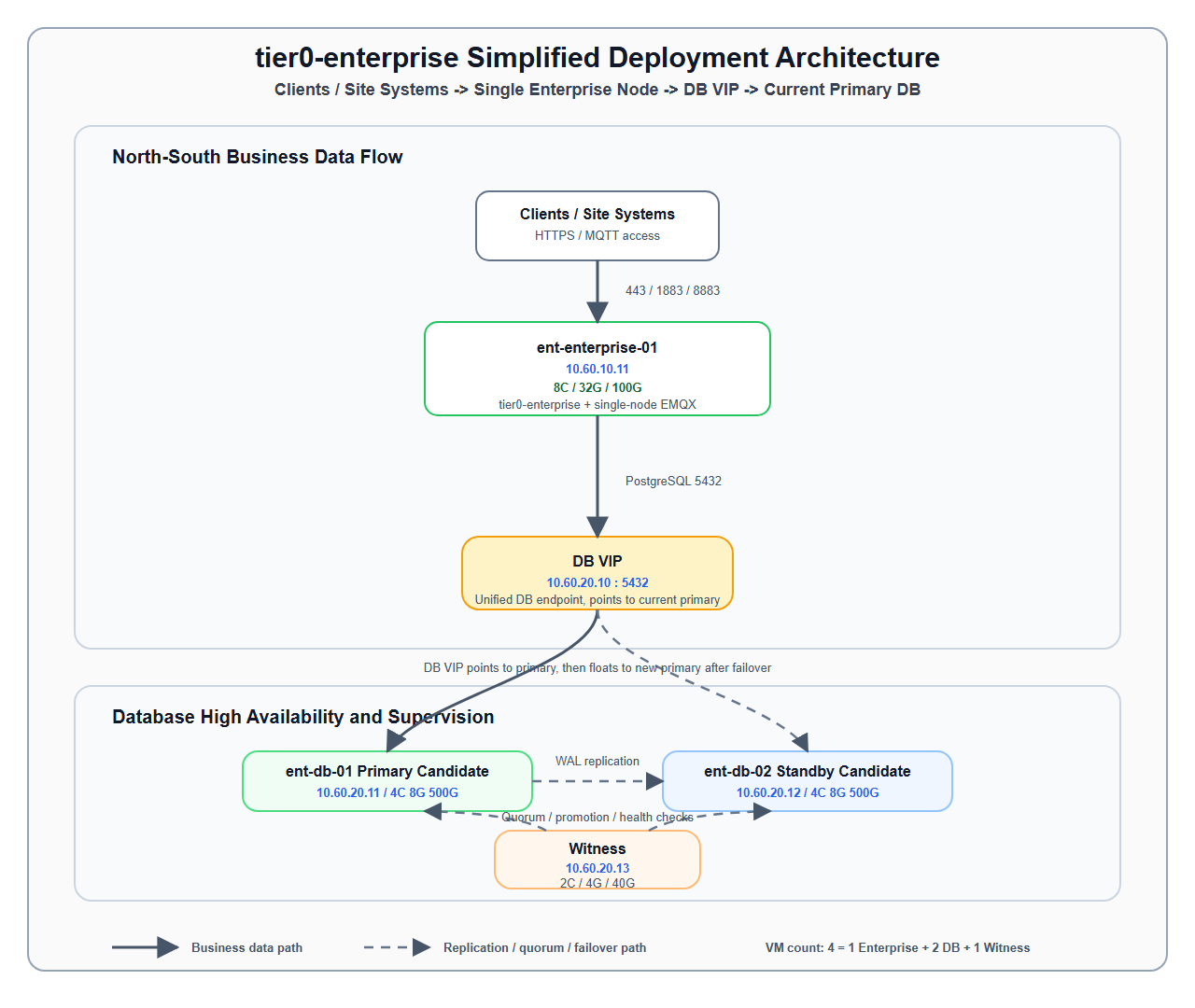
주요 경로:
ent-enterprise-01 → DB VIP → 현재 기본 데이터베이스.tier0-enterprise와 EMQX는 모두 ent-enterprise-01에서 실행합니다.DB VIP를 사용하며, 애플리케이션에서 ent-db-01/02로 직접 접근하는 것은 금지합니다.Witness는 데이터베이스 쿼럼, 승격 및 상태 확인에만 참여하며 업무 경로에는 포함되지 않습니다.| 단계 | 경로 | 설명 |
|---|---|---|
| 정상 접근 | ent-enterprise-01 -> DB VIP -> current primary |
애플리케이션은 항상 10.60.20.10:5432에 연결합니다 |
| 정상 복제 | current primary -> current standby |
PostgreSQL WAL 스트리밍 복제 |
| 정상 감시 | DB-01/DB-02 -> Witness |
repmgrd가 상태를 보고하고 Witness가 쿼럼에 참여합니다 |
| 기본 노드 장애 | standby -> Witness |
대기 노드가 쿼럼 확인을 요청하여 스플릿 브레인을 방지합니다 |
| 대기 노드 승격 | standby promote |
Witness 확인 후 대기 노드를 승격합니다 |
| VIP 이동 | DB VIP -> new primary |
10.60.20.10을 새 기본 노드에 할당합니다 |
| 애플리케이션 복구 | ent-enterprise-01 -> DB VIP -> new primary |
연결 풀이 다시 연결되면 애플리케이션이 복구됩니다 |
| 노드 | 역할 | vCPU | 메모리 | 스토리지 | 권장 시스템 디스크 | 권장 데이터 디스크 | 주요 구성 요소 |
|---|---|---|---|---|---|---|---|
ent-enterprise-01 |
단일 enterprise 노드 | 8 |
32G |
100G |
단일 / 시스템 디스크, 100G |
별도 데이터 디스크 없음 | tier0-enterprise, EMQX, 선택 사항으로 Nginx/HAProxy |
ent-db-01 |
PostgreSQL/TSDB 기본 노드 후보 | 4 |
8G |
500G |
/ 80G |
/pgdata 360G, /pgwal 40G, /backup-staging 20G |
PostgreSQL, TimescaleDB, repmgr, keepalived |
ent-db-02 |
PostgreSQL/TSDB 대기 노드 후보 | 4 |
8G |
500G |
/ 80G |
/pgdata 360G, /pgwal 40G, /backup-staging 20G |
PostgreSQL, TimescaleDB, repmgr, keepalived |
ent-db-witness-01 |
Witness / 쿼럼 감시 | 2 |
4G |
40G |
/ 40G |
별도 계획 없음 | repmgr witness, 모니터링 에이전트, 감사 로그 |
| 분류 | 수량 | 노드별 사양 | vCPU 소계 | 메모리 소계 | 스토리지 소계 |
|---|---|---|---|---|---|
| enterprise 애플리케이션 노드 | 1 |
8C / 32G / 100G |
8C |
32G |
100G |
| PostgreSQL + TimescaleDB 노드 | 2 |
4C / 8G / 500G |
8C |
16G |
1000G |
| Witness 노드 | 1 |
2C / 4G / 40G |
2C |
4G |
40G |
| 합계 | 4 |
- | 18C |
52G |
1140G |
총합:
4대1852G1.14T| 대상 | 방법 | 포트 | 설명 |
|---|---|---|---|
| 모든 가상 머신 | ssh -i ~/.ssh/chen-rsa ops@<IP> |
22/TCP |
통합 키 기반 SSH를 구현한 후 사용합니다. 그전에는 현장 계정을 사용합니다 |
ent-enterprise-01 |
https://10.60.10.11 |
443/TCP |
업무 진입점 |
DB VIP |
psql -h 10.60.20.10 -p 5432 |
5432/TCP |
enterprise 노드와 운영 허용 목록만 허용합니다 |
| 출발지 | 대상 | 포트 | 용도 |
|---|---|---|---|
| 사용자 / 현장 시스템 | ent-enterprise-01 |
80/TCP |
HTTP 진입점 또는 HTTPS 리디렉션, 선택 사항 |
| 사용자 / 현장 시스템 | ent-enterprise-01 |
443/TCP |
HTTPS 업무 진입점 |
| 장치 / 현장 시스템 | ent-enterprise-01 |
1883/TCP |
EMQX MQTT 평문 통신, 선택 사항 |
| 장치 / 현장 시스템 | ent-enterprise-01 |
8883/TCP |
EMQX MQTT TLS, 권장 |
| 장치 / 현장 시스템 | ent-enterprise-01 |
8083/TCP |
MQTT WebSocket, 선택 사항 |
| 장치 / 현장 시스템 | ent-enterprise-01 |
8084/TCP |
MQTT WebSocket TLS, 선택 사항 |
| 운영 네트워크 | ent-enterprise-01 |
18083/TCP |
EMQX Dashboard, 운영 허용 목록만 접근 |
ent-enterprise-01 |
DB VIP |
5432/TCP |
PostgreSQL 업무 접근 |
| 출발지 | 대상 | 포트 | 용도 |
|---|---|---|---|
ent-db-01 |
ent-db-02 |
5432/TCP |
PostgreSQL WAL 스트리밍 복제 |
ent-db-02 |
ent-db-01 |
5432/TCP |
복구 후 역방향 복제 |
ent-db-01/02 |
ent-db-witness-01 |
5432/TCP |
repmgr 메타데이터 / Witness 통신 |
ent-db-01 |
ent-db-02 |
VRRP |
DB VIP 이동. 프로토콜 112를 허용합니다 |
tier0-enterprise와 EMQX를 동일한 ent-enterprise-01 노드에 배포합니다.ent-enterprise-01은 애플리케이션 계층의 단일 장애 지점입니다. 장애 시 수동으로 복구하거나 백업에서 재구축합니다.100G 시스템 디스크 하나만 있으므로 업무 데이터를 장기간 저장하기에 적합하지 않습니다.tier0-enterprise 업무 데이터는 PostgreSQL/TimescaleDB에 저장해야 합니다.ent-enterprise-01에 고정합니다. 예: /data/emqx.16 또는 현장에서 검증된 버전.repmgrd + witness.DB VIP.ent-enterprise-01에서 PgBouncer를 실행하여 데이터베이스 연결 부하를 줄일 수 있습니다.repmgr witness 메타데이터와 감시 로직만 저장합니다.| 포트 / 프로토콜 | 허용 범위 | 용도 |
|---|---|---|
22/TCP |
운영 네트워크에서 가상 머신 4대로 접근 | SSH |
80/TCP |
사용자 네트워크에서 ent-enterprise-01로 접근 |
HTTP 리디렉션 또는 내부 평문 진입점 |
443/TCP |
사용자 네트워크에서 ent-enterprise-01로 접근 |
HTTPS 업무 진입점 |
1883/TCP |
장치 / 현장 시스템에서 ent-enterprise-01로 접근 |
EMQX MQTT 평문 통신, 선택 사항 |
8883/TCP |
장치 / 현장 시스템에서 ent-enterprise-01로 접근 |
EMQX MQTT TLS, 권장 |
8083/TCP |
장치 / 현장 시스템에서 ent-enterprise-01로 접근 |
EMQX WebSocket, 선택 사항 |
8084/TCP |
장치 / 현장 시스템에서 ent-enterprise-01로 접근 |
EMQX WebSocket TLS, 선택 사항 |
18083/TCP |
운영 네트워크에서 ent-enterprise-01로 접근 |
EMQX Dashboard, 허용 목록만 접근 |
5432/TCP |
enterprise에서 DB VIP로 접근; DB/Witness 내부 통신 |
PostgreSQL / repmgr |
112/VRRP |
데이터베이스 노드 간 | DB VIP 이동 |
9100/TCP |
모니터링 시스템에서 가상 머신 4대로 접근 | node exporter, 선택 사항 |
| 장애 시나리오 | 예상 동작 | 업무 영향 |
|---|---|---|
ent-enterprise-01 장애 |
애플리케이션과 EMQX가 모두 중지됩니다. 수동 복구 또는 백업을 통한 재구축이 필요합니다 | 애플리케이션 계층 전체 중단 |
| 현재 DB 기본 노드 장애 | Witness 쿼럼 확인 후 대기 노드가 승격되고 DB VIP가 이동합니다 | 수초에서 수분 동안 쓰기가 중단되며 애플리케이션이 다시 연결해야 합니다 |
| DB 대기 노드 장애 | 기본 노드가 서비스를 계속 제공하고 복제 알림이 발생합니다 | 직접적인 업무 중단은 없지만 DB 핫 스탠바이를 잃습니다 |
| Witness 장애 | 현재 기본 노드가 서비스를 계속 제공하지만 자동 장애 조치의 신뢰성이 낮아집니다 | 직접적인 업무 중단은 없습니다. Witness를 먼저 복구합니다 |
| DB VIP 이동 실패 | 새 기본 노드가 있더라도 통합 진입점에 접근하지 못할 수 있습니다 | 업무가 중단되며 VIP를 수동으로 할당해야 합니다 |
| 점검 항목 | 통과 기준 |
|---|---|
| 가상 머신 4대의 호스트 이름 고정 | hostnamectl이 계획과 일치합니다 |
| 통합 SSH 정상 작동 | 운영 단말에서 키 기반 SSH로 가상 머신 4대 모두에 접근할 수 있습니다 |
| 시간 동기화 | 가상 머신 4대 간 시간 차이가 1s 미만입니다 |
| 방화벽 허용 | 9절의 포트가 정해진 범위에 따라 허용됩니다 |
| enterprise 서비스 정상 | tier0-enterprise 상태 확인을 통과합니다 |
| EMQX 상태 검증 | EMQX 노드, 수신 대기 포트 및 영구 데이터 디렉터리가 정상입니다 |
| enterprise 디스크 사용량 안전 | / 사용률이 70% 미만이며 로그 및 캐시 정리가 구성되어 있습니다 |
| DB 기본/대기 상태 정상 | repmgr cluster show에서 기본 노드, 대기 노드 및 Witness가 정상으로 표시됩니다 |
| DB VIP 정상 작동 | enterprise 노드가 10.60.20.10:5432에 연결할 수 있습니다 |
| DB 기본 노드 장애 조치 훈련 | 대기 노드 승격과 DB VIP 이동이 가능합니다 |
| 백업 복원 훈련 | 테스트 데이터베이스에 백업을 복원할 수 있습니다 |
ent-enterprise-01에 tier0-enterprise를 배포합니다.ent-enterprise-01에 단일 노드 EMQX를 배포합니다.ent-enterprise-01에 장애가 발생하면 전체 업무 서비스를 사용할 수 없습니다.ent-enterprise-01에는 100G 시스템 디스크 하나만 있습니다. 로그, 캐시, 첨부 파일 및 임시 파일의 사용량을 관리해야 합니다.Tier0 Enterprise 고가용성 환경을 위한 참조 배포 계획입니다.
이 V2 계획은 오프라인 또는 프라이빗 환경에 논리적인 Tier0 Enterprise Fleet Center를 배포하기 위한 것입니다. 6대의 머신이 비즈니스, 미들웨어, 데이터베이스, 스토리지, Agent 역할을 나누어 담당합니다. 사용자와 Enterprise 내부 서비스는 항상 고정 VIP 주소로 접속합니다. 하나의 머신 또는 하나의 프록시에 장애가 발생하면 Keepalived, HAProxy, repmgr, RustFS, Fleet Agent가 각자의 계층에서 인계를 수행합니다.
이 계획은 동일 네트워크 세그먼트 안에서 단일 머신 장애를 복구하는 것을 목표로 합니다. 이는 Active/Standby 재해 복구 설계이며, 다중 데이터센터, 합의 기반 선출, 또는 데이터 손실 0을 보장하는 엄격한 고가용성 클러스터가 아닙니다.
설계 목표는 다음과 같습니다.
.env를 변경하지 않습니다.이 계획은 Fleet Center에만 적용됩니다. Branch Enterprise 노드는 일반 단일 머신 배포로 설치되며, 이 6대 Active/Standby 설계에 참여하지 않습니다.
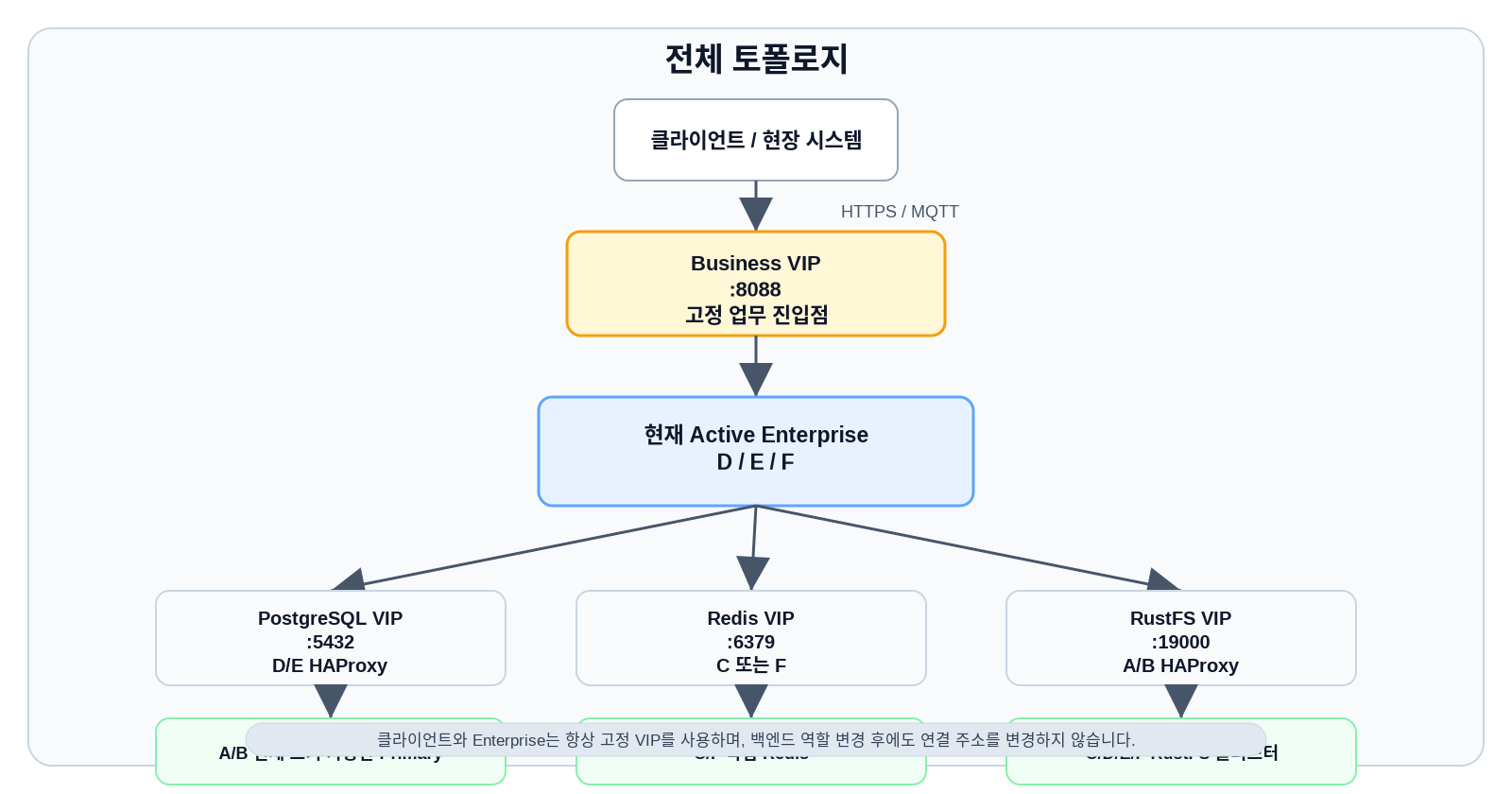
핵심 요청 경로는 다음과 같습니다.
클라이언트 / 현장 시스템 -> Business VIP :8088 -> 현재 Active Enterprise (D / E / F) |-- PostgreSQL VIP :5432 -> D/E HAProxy -> A/B 현재 쓰기 가능한 Primary |-- Redis VIP :6379 -> C 또는 F 독립 Redis `-- RustFS VIP :19000 -> A/B HAProxy -> C/D/E/F RustFS 클러스터4개의 VIP는 비즈니스 설정의 고정 진입점입니다. Enterprise가 노드를 전환하거나 미들웨어 backend 역할이 변경되어도 클라이언트와 Enterprise는 접속 주소를 변경하지 않습니다.
아래 주소는 예시입니다. 구현 전 현장의 동일 IPv4 서브넷에 있는 실제 주소로 교체하십시오. 4개의 VIP는 DHCP, 정적 호스트, 또는 다른 VRRP 인스턴스에서 사용 중이면 안 됩니다.
| 이름 | 예시 IP | 설명 |
|---|---|---|
| deployer-controller | 10.60.10.20 |
독립 deployer. 6대 비즈니스 머신에는 포함하지 않음 |
| ent-ha-01 / A | 10.60.10.11 |
PostgreSQL Primary 및 관련 역할 |
| ent-ha-02 / B | 10.60.10.12 |
PostgreSQL Standby 및 관련 역할 |
| ent-ha-03 / C | 10.60.10.13 |
Witness, Redis-1, RustFS-1 |
| ent-ha-04 / D | 10.60.10.14 |
초기 Active Enterprise 및 관련 역할 |
| ent-ha-05 / E | 10.60.10.15 |
Enterprise Standby 및 관련 역할 |
| ent-ha-06 / F | 10.60.10.16 |
Enterprise Standby 및 관련 역할 |
| Business VIP | 10.60.10.101 |
Enterprise 통합 진입점, 기본값 8088 |
| PostgreSQL VIP | 10.60.10.102 |
데이터베이스 통합 진입점, 기본값 5432 |
| Redis VIP | 10.60.10.103 |
Redis 통합 진입점, 기본값 6379 |
| RustFS VIP | 10.60.10.104 |
S3 통합 진입점, 기본값 19000 |
구현 전에는 비즈니스 NIC 이름, IPv4 prefix, gateway, DNS, NTP, hostname, SSH 사용자, 디스크 mount point, firewall allowlist를 확인하십시오. VIP, node IP, NIC를 스크립트가 추측한 값으로 운영 환경에 직접 사용해서는 안 됩니다.
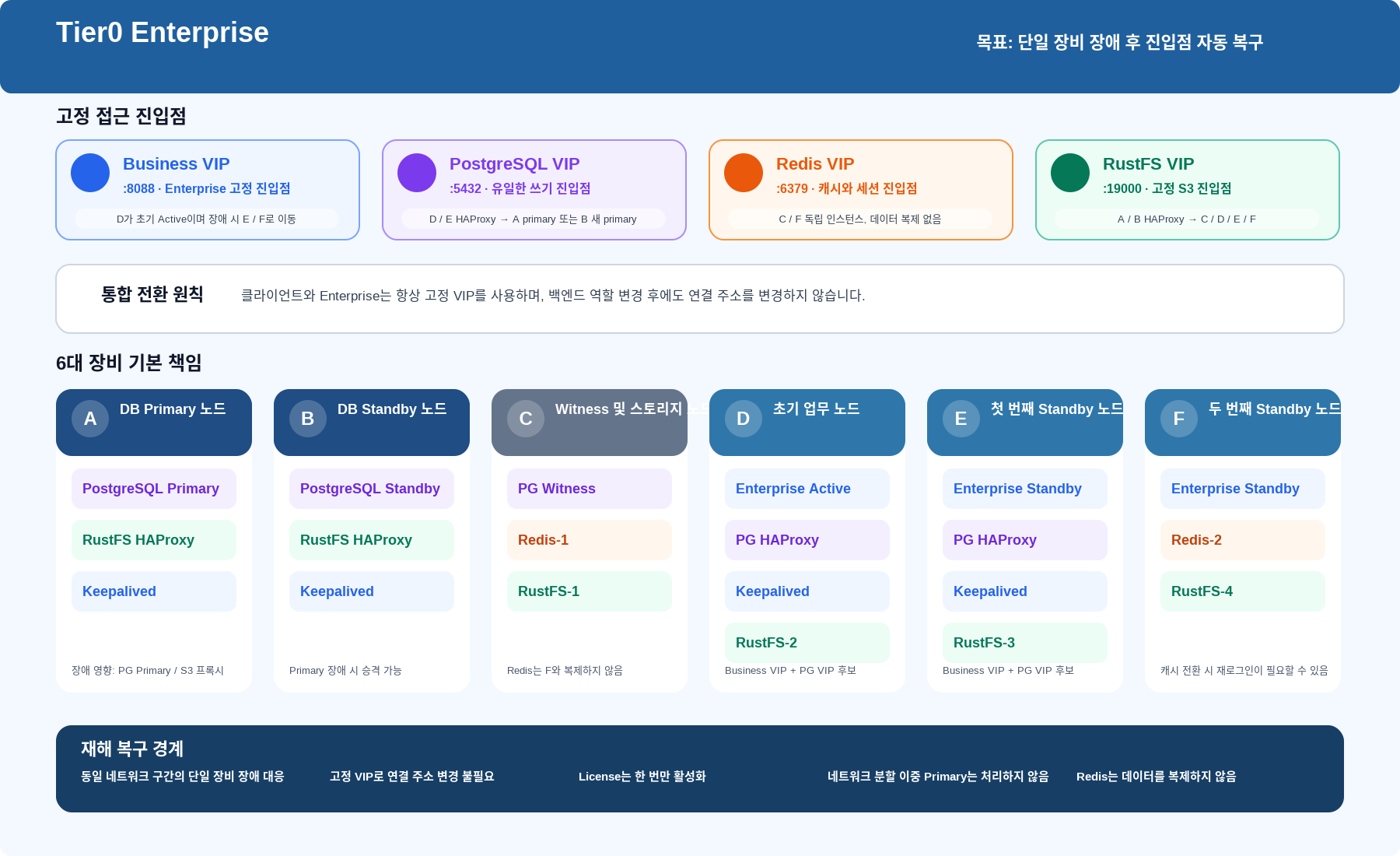
| 머신 | 기본 배포 컴포넌트 | 핵심 책임 |
|---|---|---|
| A | PostgreSQL Primary, RustFS HAProxy, Keepalived | 초기 데이터베이스 Primary, 첫 번째 RustFS proxy 후보 |
| B | PostgreSQL Standby, RustFS HAProxy, Keepalived | Streaming database Standby, 두 번째 RustFS proxy 후보 |
| C | PostgreSQL Witness, Redis-1, RustFS-1 | 데이터베이스 Witness/상태 기록, Redis 및 RustFS 데이터 노드 |
| D | PG HAProxy, Keepalived, RustFS-2, Enterprise, Fleet Agent, rsync | 초기 비즈니스 Active, 첫 번째 PostgreSQL proxy 후보 |
| E | PG HAProxy, Keepalived, RustFS-3, Enterprise, Fleet Agent, rsync | 비즈니스 Standby, 두 번째 PostgreSQL proxy 후보 |
| F | Redis-2, RustFS-4, Enterprise, Fleet Agent, rsync | 비즈니스 Standby, 두 번째 Redis 인스턴스 |
이 할당은 단일 머신 장애 허용과 6대 머신 간 리소스 균형을 위한 것입니다. deployer는 hostname/IP 주소의 자연 순서에 따라 머신을 A-F에 매핑하고 기본 역할을 선택하지만, 최종 할당은 현장 디스크 구성과 장애 도메인을 기준으로 다시 검토해야 합니다.
Enterprise 비즈니스 계층은 Single Active/Standby입니다. 어느 시점이든 Business VIP를 보유한 노드만 비즈니스 요청을 처리합니다. 비즈니스 계층은 하나의 비즈니스 노드 CPU, 메모리, 디스크를 늘리는 수직 확장으로 확장하십시오. Enterprise 노드 수를 곱해서 동시 처리량을 추정하지 마십시오.
| 머신 | 노드 유형 | vCPU | 메모리 | 기본 스토리지 | 디스크 권장 사항 |
|---|---|---|---|---|---|
| A | PostgreSQL Primary 노드 | 8C | 16G | 1T | / 약 80G, 나머지는 PostgreSQL 데이터, WAL, backup staging 용도 |
| B | PostgreSQL Standby 노드 | 8C | 16G | 1T | / 약 80G, 나머지는 PostgreSQL 데이터, WAL, backup staging 용도 |
| C | Witness / middleware 노드 | 4C | 8G | 500G | system, Redis, RustFS data에 고정 mount point 할당 |
| D | 초기 Active Enterprise 노드 | 8C | 32G | 500G | system, containers, Enterprise 동기화 파일, RustFS data에 고정 mount point 할당 |
| E | Standby Enterprise 노드 | 8C | 32G | 500G | D와 동일 |
| F | Standby Enterprise 노드 | 8C | 32G | 500G | D와 동일 |
| 범주 | 수량 | 노드당 사양 | vCPU 소계 | 메모리 소계 | 스토리지 소계 |
|---|---|---|---|---|---|
| PostgreSQL 데이터베이스 노드 | 2 | 8C / 16G / 1T |
16C | 32G | 2T |
| Witness / middleware 노드 | 1 | 4C / 8G / 500G |
4C | 8G | 500G |
| Enterprise 비즈니스 노드 | 3 | 8C / 32G / 500G |
24C | 96G | 1.5T |
| 합계 | 6 | - | 44C | 136G | 4T |
D, E, F는 동일한 Enterprise 구성을 유지합니다.
| 의존성 | 구성 원칙 |
|---|---|
| PostgreSQL | A/B 노드 IP가 아니라 PostgreSQL VIP에 연결 |
| Redis | C/F 노드 IP가 아니라 Redis VIP에 연결 |
| File storage | FILESTORE_DRIVER=s3 사용, S3 endpoint를 RustFS VIP로 지정 |
| Fleet identity | 3개 노드는 하나의 논리 installationId를 공유하고, 각 노드는 고유한 memberId를 가짐 |
| Fleet Agent | 각 Enterprise 노드에서 하나의 process-level Fleet Agent 실행 |
| License | Business VIP를 통해 한 번만 활성화하고, Bundle을 HA fileset에 포함 |
installationId와 memberId는 설치 프로세스에서 생성되고 영속화됩니다. 운영자가 이를 수동으로 만들거나 머신 간에 memberId를 복사해서는 안 됩니다.
| VIP | 후보 노드 | Health 기준 | 인계 결과 |
|---|---|---|---|
| Business VIP | D, E, F | Fleet Agent readiness, 비즈니스 컨테이너 상태, sync generation | Owner만 Enterprise HA 비즈니스 그룹을 시작 |
| PostgreSQL VIP | D, E | HAProxy/Keepalived 상태. HAProxy는 쓰기 가능한 Primary로만 라우팅 | Enterprise는 동일한 데이터베이스 주소 유지 |
| Redis VIP | C, F | Redis PING 및 로컬 서비스 상태 |
다른 독립 인스턴스로 전환. cache/session 손실 가능 |
| RustFS VIP | A, B | HAProxy 및 RustFS backend health | S3 주소는 유지되고 proxy entry만 이동 |
5432 트래픽을 현재 쓰기 가능한 Primary로만 라우팅합니다.Fleet Agent는 PostgreSQL/RustFS에 직접 둘 수 없지만 새 Active 노드에 반드시 있어야 하는 로컬 비즈니스 파일만 동기화합니다.
node_modules동기화는 deployer가 관리하는 비즈니스 노드 간 SSH trust 위에서 system rsync를 사용합니다. 각 release는 완전한 generation/manifest를 생성합니다. Standby 노드는 generation이 완전함을 확인한 뒤에만 인계할 수 있습니다. PostgreSQL data directory, Redis data directory, RustFS data directory는 이 동기화 범위에 포함되지 않습니다.
| Source | Target | Purpose |
|---|---|---|
| 사용자 / 현장 시스템 | Business VIP | Web/API 비즈니스 접근 |
| D/E/F Enterprise | PostgreSQL VIP | 비즈니스 데이터베이스 읽기/쓰기 |
| D/E/F Enterprise | Redis VIP | cache 및 session |
| D/E/F Enterprise | RustFS VIP | S3 object 읽기/쓰기 |
| Deployer controller | A-F | SSH, 배포, 상태 수집, 운영 |
| D/E/F | D/E/F | rsync/SSH 파일 동기화 |
| A/B/C | A/B/C | PostgreSQL streaming replication, repmgr, Witness communication |
| RustFS members/proxies | C/D/E/F | RustFS cluster 및 S3 backend communication |
| 동일 VIP를 공유하는 노드 | 해당 후보 노드 | VRRP advertisement 및 VIP 이동 |
포트는 필요한 최소 source-to-target 관계에 따라 허용하십시오. 모든 관리 포트를 사용자 네트워크에 직접 노출하지 마십시오.
| Port / protocol | 권장 allowlist | Purpose |
|---|---|---|
22/TCP |
Deployer -> A-F; D/E/F 상호 sync | SSH, deployment, rsync |
8088/TCP |
사용자 네트워크 -> Business VIP | Enterprise 비즈니스 진입점 |
5432/TCP |
D/E/F -> PostgreSQL VIP; PG/proxy internal access | PostgreSQL, streaming replication, proxy |
6379/TCP |
D/E/F -> Redis VIP; health-check nodes -> C/F | Redis access 및 health check |
19000/TCP |
D/E/F -> RustFS VIP | Enterprise fixed S3 entry |
9000/TCP |
A/B -> C/D/E/F; RustFS members | RustFS S3 backend/cluster communication. 버전별 확인 필요 |
9001/TCP |
통제된 운영 네트워크 -> RustFS admin entry | 선택적 RustFS admin endpoint. 사용자 네트워크에 노출 금지 |
19731/TCP |
Localhost / Keepalived / 통제된 운영 네트워크 | Fleet Agent HTTP health/control interface |
18080/TCP |
운영 네트워크 -> deployer controller | Deployer HTTPS UI |
112/VRRP |
각 VIP 후보 노드 | Keepalived VIP movement. TCP/UDP가 아니라 IP protocol number |
1883/8883 |
현장 장치 네트워크 -> 비즈니스 진입점, 제품 설정 기준 | MQTT/MQTTS |
| Failure scenario | Expected behavior | Boundary |
|---|---|---|
| D Active 업무 노드 장애 | Business VIP가 E 또는 F로 이동하고 정상 Standby가 fileset generation을 확인한 뒤 업무 그룹을 시작합니다 | 마지막 정상 동기화 후 동기화되지 않은 파일은 손실될 수 있습니다 |
| Fleet Agent 장애 | readiness가 실패하고 이전 업무 그룹이 중지되며 Business VIP가 이동합니다 | Agent를 우회해 컨테이너를 수동으로 시작하지 않습니다 |
| PostgreSQL A Primary 장애 | B가 승격되고 HAProxy가 새 Primary로 라우팅하며 PostgreSQL VIP는 그대로 유지됩니다 | 전환 중 연결이 잠시 실패할 수 있으며 이후 새 Standby를 복구해야 합니다 |
| PostgreSQL HAProxy 한 대 장애 | PostgreSQL VIP가 다른 proxy로 이동합니다 | 데이터베이스 역할은 변하지 않습니다 |
| 현재 Redis 노드 장애 | Redis VIP가 다른 독립 인스턴스로 이동합니다 | 캐시가 손실되고 세션이 만료될 수 있습니다 |
| RustFS 데이터 노드 한 대 장애 | 남은 클러스터 노드가 서비스를 계속합니다 | 허용 범위는 실제 erasure coding과 디스크 상태에 따라 달라집니다 |
| RustFS HAProxy 한 대 장애 | RustFS VIP가 다른 proxy로 이동합니다 | S3 주소는 그대로이며 기존 연결은 재연결이 필요할 수 있습니다 |
| deployer controller 장애 | 실행 중인 데이터 플레인은 계속 작동합니다 | 배포, 중앙 모니터링, 운영을 일시적으로 사용할 수 없고 controller 자체에는 자동 Standby가 없습니다 |
| 네트워크 분리 | 안전한 자동 리더 선출은 보장되지 않습니다 | VIP 소유자나 Active 노드가 두 개 생길 수 있으므로 장애 쪽을 격리하고 수동 복구해야 합니다 |
| 임의의 머신 두 대 동시 장애 | 일괄적인 가용성 보장은 없습니다 | 결과는 두 머신의 역할 조합에 따라 달라지며 시나리오별 검증이 필요합니다 |
네트워크 분리, 동시 다중 노드 장애, 잘못된 VRRP priority, 디스크 가득 참, clock drift, deployer 외부의 수동 변경은 일반 자동 복구 약속 범위 밖이며 운영 절차로 다뤄야 합니다.
| 점검 항목 | 통과 기준 |
|---|---|
| 머신과 역할 | 업무 머신 A–F 여섯 대가 계획과 일치하고 deployer는 별도입니다. |
| SSH와 sudo | deployer가 관리 계정으로 A–F에 비대화식으로 접근할 수 있고 호스트 키를 확인했습니다. |
| 네트워크와 시간 | 여섯 대가 계획된 서브넷에 있고 VIP 네 개는 사용 중이 아닙니다. NIC, 접두사, 시간 동기화가 요구 사항을 충족합니다. |
| Docker/Compose | 여섯 노드가 초기화되었고 이전 컨테이너, 포트, 네트워크, 데이터 디렉터리와 충돌하지 않습니다. |
| 디스크 | PostgreSQL, RustFS, Enterprise fileset이 계획된 마운트 지점을 사용하며 용량과 inode 상태가 정상입니다. |
| PostgreSQL | Primary는 하나이고 Standby는 streaming 중이며 Witness가 온라인입니다. PostgreSQL VIP를 통해 읽고 쓸 수 있습니다. |
| Redis | C/F 인스턴스가 정상이고 Redis VIP를 통한 PING이 성공하며 failover 후 데이터가 복제되지 않는 경계를 수용했습니다. |
| RustFS | 네 노드가 모두 정상이며 RustFS VIP를 통해 객체를 쓰고 읽고 삭제할 수 있습니다. |
| Enterprise | D/E/F의 버전이 같고 Business VIP 소유자만 업무 그룹을 실행합니다. |
| Fleet Agent | Agent 세 대가 온라인이며 readiness, 동기화 기록, generation 상태를 확인할 수 있습니다. |
| License | Cluster License를 Business VIP를 통해 한 번만 활성화했고 failover 후에도 유효합니다. |
| App 동기화 | node_modules를 포함한 가져온 App이 동기화와 failover 후에도 실행됩니다. |
| 방화벽 | 이 계획에 필요한 출발지, 목적지, 프로토콜만 허용합니다. |
| 백업 | PostgreSQL, RustFS, deployer의 백업 계획을 마련하고 복원 테스트를 한 번 이상 완료했습니다. |
node_modules, Flow/Marimo, License fileset 동기화를 확인합니다.이 항목이 바뀌면 VIP, 역할, 스토리지, 장애 경계가 달라질 수 있으므로 구현 전에 계획을 갱신해야 합니다.
현재 계획은 6대 머신, 4개의 고정 VIP, Single Active Enterprise를 중심으로 합니다. 비즈니스 진입점, 데이터베이스 진입점, 캐시 진입점, 객체 스토리지 진입점을 분리합니다. 동일 네트워크 세그먼트 안에서 일반적인 단일 머신 장애를 커버할 수 있고, failover 후 connection configuration 변경, License 재활성화, App 파일 수동 복사 작업을 크게 줄입니다.
동시에 세 가지 경계를 받아들여야 합니다. Redis는 데이터를 복제하지 않고, 비즈니스 fileset은 비동기로 동기화되며, 네트워크 partition에는 consensus arbitration이 없습니다. 따라서 이 계획은 Fleet Center 6대 Single Active Active/Standby 재해 복구 계획으로 정의하는 것이 적합합니다. 외부에 zero interruption, zero data loss, 또는 cross-data-center strict high availability를 약속해서는 안 됩니다.
표준 Tier0 Enterprise deployment를 위한 SLA 권장 사항, high availability 경계, acceptance gate, drill, hardening 항목입니다.
이 문서는 six-VM fully offline deployment에 적용됩니다. 구성은 application / Swarm node 3대, PostgreSQL HA node 2대, witness node 1대입니다.
| Layer | Current Design | High Availability Boundary |
|---|---|---|
| Application runtime | Enterprise New compose는 고정된 tier0_app_active_node에서 실행됩니다. |
backend, redis, EMQX, Marimo, OPC UA Server는 아직 automatic multi-replica service가 아닙니다. |
| HTTP entry | 3개의 application node가 keepalived APP VIP + HAProxy를 실행합니다. | VIP는 float할 수 있습니다. HAProxy는 8088/TCP의 active node로 forward하고 /healthz를 check합니다. |
| MQTT / OPC UA | EMQX는 1883/8883/8083/8084를 사용하고 OPC UA는 4840을 사용합니다. |
이들은 active node에 직접 연결됩니다. TCP VIP proxying에 포함되지 않으므로 protocol-entry HA는 약속하지 않습니다. |
| Database | PostgreSQL / TimescaleDB streaming replication + repmgr + witness + DB VIP. | primary 장애 시 standby를 자동 promote할 수 있습니다. asynchronous replication은 strict zero RPO를 약속할 수 없습니다. |
| Backup and restore | backup-db.sh / restore-db.sh. |
recoverability를 제공하지만 online HA와 동일하지는 않습니다. |
| Service Object | Recommended Statement | Constraints |
|---|---|---|
| Platform HTTP entry | monthly availability 99.5%부터 시작합니다. |
VIP failover는 active application node의 automatic migration과 같지 않습니다. |
| Database access | 운영 목표: RTO <= 2 minutes. |
RPO는 replication lag에 따라 달라집니다. 같은 architecture의 과거 failover test는 약 59-64초였습니다. |
| MQTT / OPC UA | 현재 설계에서는 HA SLA를 약속하지 않습니다. | HAProxy TCP proxying, 별도 VIP 또는 service clustering을 먼저 추가해야 합니다. |
| Backup and restore | Daily backup, major change 전 mandatory backup. | restore time은 data volume과 on-site I/O에 따라 달라집니다. |
99.9% 이상을 주장하기 전에 application automatic migration 또는 multi-replica deployment, protocol-entry HA, monitoring alert, recovery drill을 완료하세요. 계획된 capability를 이미 제공된 capability처럼 설명하지 마세요.
각 deployment 또는 upgrade는 최소한 다음 조건을 만족해야 합니다.
verify-materials.sh가 통과하고 delivery package SHA256 check가 통과합니다.Ready입니다.APP VIP /healthz와 /readyz가 200을 반환하며 home page와 /uns에 접근할 수 있습니다.DB VIP:5432에 접근할 수 있으며 primary, standby, witness topology가 정상입니다.매일 아래 command를 실행합니다.
./bin/verify.sh --site config/site.conf./bin/smoke-business-emqx.sh --site config/site.conf최소한 다음 alert를 설정합니다.
/healthz 또는 /readyz failure.backend, redis, EMQX 같은 key container가 exit하거나 자주 restart됩니다.80% / 90%를 초과합니다.| Drill | Frequency | Verification Criteria |
|---|---|---|
| APP VIP failover | 납품 전 및 분기별 | 현재 VIP node에서 keepalived를 중지한 뒤 /healthz와 /readyz가 복구됩니다. |
| DB primary failure | 납품 전 및 6개월마다 | standby가 promote되고 DB VIP가 복구되며 old primary가 standby로 rebuild됩니다. |
| Database restore | monthly sample 및 major change 전 | backup이 restore 가능합니다. restore 후 verify, smoke check, login verification이 통과합니다. |
| Material verification | package build마다 | source material, package SHA, unpacking verification이 통과합니다. |
verify, smoke check, 실제 login verification을 실행합니다.관련 절차: 운영 Runbook 및 표준 Port 목록.
표준 six-VM offline Tier0 Enterprise deployment를 위한 firewall port list입니다.
아래 table은 Enterprise New six-VM offline deployment를 기준으로 합니다. customer firewall은 최소한으로 필요한 source range에서 오는 traffic만 허용해야 합니다. 이 port들을 public internet에 직접 노출하지 마세요.
| Source | Target | Port | Protocol | Purpose |
|---|---|---|---|---|
| Control host | Six target VMs | 22 | TCP | SSH / Ansible |
| 3개 application node 상호 간 | 3개 application node | 2377 | TCP | Docker Swarm management plane |
| 3개 application node 상호 간 | 3개 application node | 7946 | TCP/UDP | Swarm node discovery |
| 3개 application node 상호 간 | 3개 application node | 4789 | UDP | Swarm overlay |
| 3개 application node | Active application node | 8088 | TCP | HAProxy to Enterprise New backend; application network segment only |
| Business network segment | APP VIP | 80 | TCP | Platform HTTP entry, /healthz, /readyz |
| Business network segment | APP VIP / active application node | 1883 | TCP | MQTT |
| Business network segment | APP VIP / active application node | 8883 | TCP | MQTT TLS |
| Business network segment | APP VIP / active application node | 8083 | TCP | MQTT WebSocket |
| Business network segment | APP VIP / active application node | 8084 | TCP | MQTT WebSocket TLS |
| Business network segment | APP VIP / active application node | 4840 | TCP | OPC UA Server |
| Controlled application network segment | Active application node | 8089 | TCP | Launchpad |
| Dynamic app access network segment | Active application node | 30000-30199 | TCP | App Gateway / dynamic application host ports |
| Application nodes, DB nodes, witness | DB VIP / DB nodes | 5432 | TCP | PostgreSQL / TimescaleDB |
| DB1, DB2, witness | DB1, DB2, witness | 5432 | TCP | Streaming replication / repmgr |
| Application nodes | NFS server | 2049 | TCP/UDP | NFS_ENABLED=true일 때 사용 |
현재 compose deployment는 Redis, Marimo, EMQX Dashboard를 외부에 노출하지 않습니다. 이러한 service는 Docker runtime network 안에서 backend에 의해서만 호출됩니다.
표준 Tier0 Enterprise deployment의 daily inspection, failover, backup, restore, cleanup, troubleshooting 절차.
이 document는 Enterprise New offline application을 기준으로 합니다.
./bin/verify.sh --site config/site.conf./bin/smoke-business-emqx.sh --site config/site.confReady である。APP VIP /healthz と /readyz が 200 を返す。DB VIP:5432 に접속할 수 있다。backend、redis、emqx、marimo、opcua-server が active application node で모두 running 상태이다。active application node で다음 commands를 실행합니다.
cd /opt/tier0-enterprise/tier0-deploybash bin/compose.sh psbash bin/compose.sh logs --tail=200 backendcurl -fsS http://127.0.0.1:8088/healthzcurl -fsS http://127.0.0.1:8088/readyzHealth-check の見方:
healthz failure: まず backend process、image、container logs 를 확인합니다.readyz failure: DB VIP、Redis、database migration logs も確認します。.env の ADMIN_INITIAL_PASSWORD を確認し、その後 backend IAM migration logs と user tables 를 확인합니다.HTTP port だけで deployment success を判断하지 마세요.nc -vz <APP_VIP> 1883nc -vz <APP_VIP> 8883nc -vz <APP_VIP> 8083nc -vz <APP_VIP> 8084nc -vz <APP_VIP> 4840Database nodes で次を실행합니다.
systemctl status tier0-postgresqlsystemctl status tier0-repmgrdsudo -iu postgres psql -Atqc 'select pg_is_in_recovery();'sudo -iu postgres /usr/local/bin/repmgr -f /etc/repmgr.conf cluster showpg_is_in_recovery=false は primary を의미합니다.pg_is_in_recovery=true は standby を의미합니다.test 前に、現在 VIP を保持している node を記録し、次를 확인합니다.
curl -fsS http://<APP_VIP>/healthzcurl -fsS http://<APP_VIP>/readyz現在の VIP node で keepalived を停止した後、別の application node への VIP takeover を確認し、両方の URLs を再テストします。HAProxy backend は active application node の 8088/TCP を指すため、3 台すべての application nodes が active node の port 8088 に到達できる필요합니다.
keepalived を復旧した後、verify.sh と smoke checks を再실행합니다.drill 中に active application containers を停止하지 마세요.
Failure drill の前に backup を作成し、replication が healthy であること를 확인합니다.
./bin/backup-db.sh --site config/site.conf現在の primary で tier0-postgresql を停止した後、repmgr が standby を promote し、DB VIP takeover すること를 확인합니다.target RTO は 2 分以内です。同じ architecture での過去の tests は約 59-64 秒でした。
Backup:
./bin/backup-db.sh --site config/site.confRestore:
./bin/restore-db.sh --site config/site.conf --restore-file /backup/tier0-db/postgres-YYYYmmddTHHMMSS.dump./full-cleanup.sh --env install.env --yes./install.sh --auto --yescd /opt/tier0-enterprise/tier0-deploybash bin/compose.sh logs --tail=300 backendbash bin/compose.sh pscd /opt/tier0-enterprise/tier0-deploybash bin/compose.sh logs --tail=200 emqxsystemctl status tier0-repmgrdtail -100 /var/log/repmgr/repmgr.logsudo -iu postgres psql -Atqc 'show shared_preload_libraries;'./bin/verify-materials.shTier0 OpenAPI v1 · 작업: 28 · 스키마: 82
API 필드 이름, 예제 및 원본 설명은 포함된 영어 OpenAPI 명세를 따릅니다.
Unified Namespace 데이터 읽기, 쓰기 및 관리.
Upload a UNS attachment
Uploads a multipart attachment for a UNS node. Supply a file and at least one of unsId or topic; a valid unsId takes precedence.
curl --request POST 'https://<tier0-host>/openapi/v1/uns/attachments' \
  --header 'x-api-key: <api-key>'
multipart/form-data
| 필드 | 유형 | 필수 | 설명 |
|---|---|---|---|
unsId | integer (int64) | 아니요 | Numeric owner node ID. Supply unsId or topic; a valid unsId takes precedence. |
topic | string | 아니요 | Full owner node path, used when a valid unsId is not supplied. |
fileName | string | 아니요 | Original file name. |
sha256 | string | 아니요 | SHA-256 checksum of the file contents. |
file | string (binary) | 예 | Binary file contents. The multipart field name must be file. |
200 · application/json
{
  "code": 0,
  "msg": "string",
  "data": {
    "unsId": 0,
    "fileName": "string",
    "filePath": "string",
    "fileUrl": "string",
    "contentType": "string"
  }
}200 · application/json
| 필드 | 유형 | 필수 | 설명 |
|---|---|---|---|
code | integer | 아니요 | Response code |
msg | string | 아니요 | Response message |
data | object | 아니요 | UnsAttachmentUploadResp. 스키마 절에서 참조된 스키마를 확인하세요. |
| 상태 | 의미 | 미디어 유형 |
|---|---|---|
200 | A successful response. | application/json |
400 | Correct the request parameters or Content-Type before retrying. | application/json |
401 | Authentication middleware returns plain-text unauthorized. Check API key validity, scope, and owner roles. | text/plain |
403 | Authentication middleware returns plain-text forbidden. Check API key validity, scope, and owner roles. | text/plain |
404 | Resource not found. Verify paths, IDs, and current resource state. | — |
409 | Resource state conflict. Verify paths, IDs, and current resource state. | — |
413 | Request too large. Reduce the request before retrying. | — |
500 | Service error. Investigate the service and confirm the outcome before retrying. | — |
List UNS attachments
Lists attachments for a UNS node or topic. Temporary file URLs can expire and must then be requested again.
curl --request POST 'https://<tier0-host>/openapi/v1/uns/attachments/list' \
  --header 'x-api-key: <api-key>' \
  --header 'Content-Type: application/json' \
  --data '{"unsId":0,"topic":"string","page":0,"size":0,"includeFileUrl":false}'
application/json
| 필드 | 유형 | 필수 | 설명 |
|---|---|---|---|
unsId | integer (int64) | 아니요 | Numeric UNS node ID. |
topic | string | 아니요 | Full UNS topic path. |
page | integer (int64) | 아니요 | Page number, starting at 1. |
size | integer (int64) | 아니요 | Number of attachments per page. |
includeFileUrl | boolean (boolean) | 아니요 | Whether to return temporary file URLs. Defaults to true. |
200 · application/json
{
  "code": 0,
  "msg": "string",
  "data": {
    "unsId": 0,
    "list": [
      "value"
    ],
    "total": 0,
    "page": 0,
    "size": 0
  }
}200 · application/json
| 필드 | 유형 | 필수 | 설명 |
|---|---|---|---|
code | integer | 아니요 | Response code |
msg | string | 아니요 | Response message |
data | object | 아니요 | UnsAttachmentListResp. 스키마 절에서 참조된 스키마를 확인하세요. |
| 상태 | 의미 | 미디어 유형 |
|---|---|---|
200 | A successful response. | application/json |
400 | Correct the request parameters or Content-Type before retrying. | application/json |
401 | Authentication middleware returns plain-text unauthorized. Check API key validity, scope, and owner roles. | text/plain |
403 | Authentication middleware returns plain-text forbidden. Check API key validity, scope, and owner roles. | text/plain |
404 | Resource not found. Verify paths, IDs, and current resource state. | — |
409 | Resource state conflict. Verify paths, IDs, and current resource state. | — |
413 | Request too large. Reduce the request before retrying. | — |
500 | Service error. Investigate the service and confirm the outcome before retrying. | — |
Browse the UNS tree
Returns a UNS subtree. Use an empty path for the workspace root.
curl --request POST 'https://<tier0-host>/openapi/v1/uns/browse' \
  --header 'x-api-key: <api-key>' \
  --header 'Content-Type: application/json' \
  --data '{"path":"string","max_depth":0,"include_metadata":false,"include_leaf_value":false}'
application/json
| 필드 | 유형 | 필수 | 설명 |
|---|---|---|---|
path | string | 아니요 | Root UNS path. Empty means the workspace root. |
max_depth | integer (int64) | 아니요 | Maximum tree depth. Omit or use 0 for the server default. |
include_metadata | boolean (boolean) | 아니요 | Whether returned nodes should include metadata. |
include_leaf_value | boolean (boolean) | 아니요 | Whether returned leaf nodes should include their latest payload. |
200 · application/json
{
  "code": 0,
  "msg": "string",
  "data": {
    "tree": [
      "value"
    ]
  }
}200 · application/json
| 필드 | 유형 | 필수 | 설명 |
|---|---|---|---|
code | integer | 아니요 | Response code |
msg | string | 아니요 | Response message |
data | object | 아니요 | BrowseResp. 스키마 절에서 참조된 스키마를 확인하세요. |
| 상태 | 의미 | 미디어 유형 |
|---|---|---|
200 | A successful response. | application/json |
400 | Correct the request parameters or Content-Type before retrying. | application/json |
401 | Authentication middleware returns plain-text unauthorized. Check API key validity, scope, and owner roles. | text/plain |
403 | Authentication middleware returns plain-text forbidden. Check API key validity, scope, and owner roles. | text/plain |
404 | Resource not found. Verify paths, IDs, and current resource state. | — |
409 | Resource state conflict. Verify paths, IDs, and current resource state. | — |
413 | Request too large. Reduce the request before retrying. | — |
500 | Service error. Investigate the service and confirm the outcome before retrying. | — |
Create UNS nodes
Creates UNS nodes and nested subtrees. Check each item result and use the returned topic in subsequent calls.
curl --request POST 'https://<tier0-host>/openapi/v1/uns/create' \
  --header 'x-api-key: <api-key>' \
  --header 'Content-Type: application/json' \
  --data '{"namespace":[{"name":"value","type":"value","children":"value","topicType":"value","fields":"value"}]}'
application/json
| 필드 | 유형 | 필수 | 설명 |
|---|---|---|---|
namespace | array<object> | 예 | UNS nodes to create. Nest children to create a subtree. |
200 · application/json
{
  "code": 0,
  "msg": "string",
  "data": {
    "success": false,
    "results": [
      "value"
    ]
  }
}200 · application/json
| 필드 | 유형 | 필수 | 설명 |
|---|---|---|---|
code | integer | 아니요 | Response code |
msg | string | 아니요 | Response message |
data | object | 아니요 | CreateResp. 스키마 절에서 참조된 스키마를 확인하세요. |
| 상태 | 의미 | 미디어 유형 |
|---|---|---|
200 | A successful response. | application/json |
400 | Correct the request parameters or Content-Type before retrying. | application/json |
401 | Authentication middleware returns plain-text unauthorized. Check API key validity, scope, and owner roles. | text/plain |
403 | Authentication middleware returns plain-text forbidden. Check API key validity, scope, and owner roles. | text/plain |
404 | Resource not found. Verify paths, IDs, and current resource state. | — |
409 | Resource state conflict. Verify paths, IDs, and current resource state. | — |
413 | Request too large. Reduce the request before retrying. | — |
500 | Service error. Investigate the service and confirm the outcome before retrying. | — |
Delete UNS nodes
Deletes the listed nodes sequentially. By default this is a soft delete; the batch is not rolled back when a later item fails.
curl --request POST 'https://<tier0-host>/openapi/v1/uns/delete' \
  --header 'x-api-key: <api-key>' \
  --header 'Content-Type: application/json' \
  --data '{"topics":["string"],"hard_delete":false}'
application/json
| 필드 | 유형 | 필수 | 설명 |
|---|---|---|---|
topics | array<string> | 예 | UNS topic or path node paths to delete. |
hard_delete | boolean (boolean) | 아니요 | Permanently delete instead of moving nodes to the recycle state. |
200 · application/json
{
  "code": 0,
  "msg": "string",
  "data": {
    "success": false
  }
}200 · application/json
| 필드 | 유형 | 필수 | 설명 |
|---|---|---|---|
code | integer | 아니요 | Response code |
msg | string | 아니요 | Response message |
data | object | 아니요 | OpenapiEmptyResp. 스키마 절에서 참조된 스키마를 확인하세요. |
| 상태 | 의미 | 미디어 유형 |
|---|---|---|
200 | A successful response. | application/json |
400 | Correct the request parameters or Content-Type before retrying. | application/json |
401 | Authentication middleware returns plain-text unauthorized. Check API key validity, scope, and owner roles. | text/plain |
403 | Authentication middleware returns plain-text forbidden. Check API key validity, scope, and owner roles. | text/plain |
404 | Resource not found. Verify paths, IDs, and current resource state. | — |
409 | Resource state conflict. Verify paths, IDs, and current resource state. | — |
413 | Request too large. Reduce the request before retrying. | — |
500 | Service error. Investigate the service and confirm the outcome before retrying. | — |
Query UNS history
Queries historical topic values over an inclusive RFC 3339 time range. Results can be aggregated or sampled.
curl --request POST 'https://<tier0-host>/openapi/v1/uns/history' \
  --header 'x-api-key: <api-key>' \
  --header 'Content-Type: application/json' \
  --data '{"topics":["string"],"start_time":"string","end_time":"string","aggregation":{"interval":"string","function":"string","field":"string","fields":["value"]},"page":0}'
application/json
| 필드 | 유형 | 필수 | 설명 |
|---|---|---|---|
topics | array<string> | 예 | UNS topic paths whose history should be queried. |
start_time | string | 예 | Inclusive query start in RFC 3339 format. |
end_time | string | 예 | Inclusive query end in RFC 3339 format. |
aggregation | object | 아니요 | HistoryAggregation. 스키마 절에서 참조된 스키마를 확인하세요. |
page | integer (int64) | 아니요 | Page number, starting from 1. |
size | integer (int64) | 아니요 | Page size; values above the server maximum are capped. |
200 · application/json
{
  "code": 0,
  "msg": "string",
  "data": {
    "success": false,
    "results": [
      "value"
    ],
    "page": 0,
    "size": 0,
    "total": 0
  }
}200 · application/json
| 필드 | 유형 | 필수 | 설명 |
|---|---|---|---|
code | integer | 아니요 | Response code |
msg | string | 아니요 | Response message |
data | object | 아니요 | HistoryResp. 스키마 절에서 참조된 스키마를 확인하세요. |
| 상태 | 의미 | 미디어 유형 |
|---|---|---|
200 | A successful response. | application/json |
400 | Correct the request parameters or Content-Type before retrying. | application/json |
401 | Authentication middleware returns plain-text unauthorized. Check API key validity, scope, and owner roles. | text/plain |
403 | Authentication middleware returns plain-text forbidden. Check API key validity, scope, and owner roles. | text/plain |
404 | Resource not found. Verify paths, IDs, and current resource state. | — |
409 | Resource state conflict. Verify paths, IDs, and current resource state. | — |
413 | Request too large. Reduce the request before retrying. | — |
500 | Service error. Investigate the service and confirm the outcome before retrying. | — |
Read UNS values
Returns value, quality, and timeStamp (VQT) for each requested topic. A failed topic does not discard successful items in the same batch.
curl --request POST 'https://<tier0-host>/openapi/v1/uns/read' \
  --header 'x-api-key: <api-key>' \
  --header 'Content-Type: application/json' \
  --data '{"topics":["string"],"include_metadata":false,"include_leaf_value":false}'
application/json
| 필드 | 유형 | 필수 | 설명 |
|---|---|---|---|
topics | array<string> | 예 | UNS topic paths to read. |
include_metadata | boolean (boolean) | 아니요 | Whether each result should include UNS node metadata. |
include_leaf_value | boolean (boolean) | 아니요 | Whether leaf nodes should include their latest payload. |
200 · application/json
{
  "code": 0,
  "msg": "string",
  "data": {
    "success": false,
    "results": [
      "value"
    ]
  }
}200 · application/json
| 필드 | 유형 | 필수 | 설명 |
|---|---|---|---|
code | integer | 아니요 | Response code |
msg | string | 아니요 | Response message |
data | object | 아니요 | ReadResp. 스키마 절에서 참조된 스키마를 확인하세요. |
| 상태 | 의미 | 미디어 유형 |
|---|---|---|
200 | A successful response. | application/json |
400 | Correct the request parameters or Content-Type before retrying. | application/json |
401 | Authentication middleware returns plain-text unauthorized. Check API key validity, scope, and owner roles. | text/plain |
403 | Authentication middleware returns plain-text forbidden. Check API key validity, scope, and owner roles. | text/plain |
404 | Resource not found. Verify paths, IDs, and current resource state. | — |
409 | Resource state conflict. Verify paths, IDs, and current resource state. | — |
413 | Request too large. Reduce the request before retrying. | — |
500 | Service error. Investigate the service and confirm the outcome before retrying. | — |
Restore a deleted UNS node
Restores a soft-deleted UNS node. Permanently deleted nodes cannot be restored.
curl --request POST 'https://<tier0-host>/openapi/v1/uns/restore' \
  --header 'x-api-key: <api-key>' \
  --header 'Content-Type: application/json' \
  --data '{"path":"string"}'
application/json
| 필드 | 유형 | 필수 | 설명 |
|---|---|---|---|
path | string | 예 | Full UNS path of the node to restore. Use its path before deletion, not a node ID or HTTP URL. |
200 · application/json
{
  "code": 0,
  "msg": "string",
  "data": {
    "success": false
  }
}200 · application/json
| 필드 | 유형 | 필수 | 설명 |
|---|---|---|---|
code | integer | 아니요 | Response code |
msg | string | 아니요 | Response message |
data | object | 아니요 | OpenapiEmptyResp. 스키마 절에서 참조된 스키마를 확인하세요. |
| 상태 | 의미 | 미디어 유형 |
|---|---|---|
200 | A successful response. | application/json |
400 | Correct the request parameters or Content-Type before retrying. | application/json |
401 | Authentication middleware returns plain-text unauthorized. Check API key validity, scope, and owner roles. | text/plain |
403 | Authentication middleware returns plain-text forbidden. Check API key validity, scope, and owner roles. | text/plain |
404 | Resource not found. Verify paths, IDs, and current resource state. | — |
409 | Resource state conflict. Verify paths, IDs, and current resource state. | — |
413 | Request too large. Reduce the request before retrying. | — |
500 | Service error. Investigate the service and confirm the outcome before retrying. | — |
Search UNS nodes
Searches UNS node names, aliases, and paths, with optional type and path filters.
curl --request POST 'https://<tier0-host>/openapi/v1/uns/search' \
  --header 'x-api-key: <api-key>' \
  --header 'Content-Type: application/json' \
  --data '{"keyword":"string","topicType":"string","path_prefix":"string","include_metadata":false,"include_leaf_value":false}'
application/json
| 필드 | 유형 | 필수 | 설명 |
|---|---|---|---|
keyword | string | 아니요 | Keyword matched against UNS node names, aliases, and paths. |
topicType | string | 아니요 | Topic data category filter: STATE, ACTION, or METRIC. |
path_prefix | string | 아니요 | Only return nodes under this UNS path prefix. |
include_metadata | boolean (boolean) | 아니요 | Whether returned nodes should include metadata. |
include_leaf_value | boolean (boolean) | 아니요 | Whether returned leaf nodes should include their latest payload. |
page | integer (int64) | 아니요 | Page number, starting from 1. |
size | integer (int64) | 아니요 | Page size. |
200 · application/json
{
  "code": 0,
  "msg": "string",
  "data": {
    "objects": [
      "value"
    ],
    "page": 0,
    "size": 0,
    "total": 0
  }
}200 · application/json
| 필드 | 유형 | 필수 | 설명 |
|---|---|---|---|
code | integer | 아니요 | Response code |
msg | string | 아니요 | Response message |
data | object | 아니요 | SearchResp. 스키마 절에서 참조된 스키마를 확인하세요. |
| 상태 | 의미 | 미디어 유형 |
|---|---|---|
200 | A successful response. | application/json |
400 | Correct the request parameters or Content-Type before retrying. | application/json |
401 | Authentication middleware returns plain-text unauthorized. Check API key validity, scope, and owner roles. | text/plain |
403 | Authentication middleware returns plain-text forbidden. Check API key validity, scope, and owner roles. | text/plain |
404 | Resource not found. Verify paths, IDs, and current resource state. | — |
409 | Resource state conflict. Verify paths, IDs, and current resource state. | — |
413 | Request too large. Reduce the request before retrying. | — |
500 | Service error. Investigate the service and confirm the outcome before retrying. | — |
Bind a flow to a UNS node
Binds a flow ID to a UNS node ID.
curl --request POST 'https://<tier0-host>/openapi/v1/uns/unsBindFlow' \
  --header 'x-api-key: <api-key>' \
  --header 'Content-Type: application/json' \
  --data '{"unsId":0,"flowId":0}'
application/json
| 필드 | 유형 | 필수 | 설명 |
|---|---|---|---|
unsId | integer (int64) | 예 | UNS node ID to bind. |
flowId | integer (int64) | 예 | Flow ID to bind. |
200 · application/json
{
  "code": 0,
  "msg": "string",
  "data": {
    "success": false,
    "unsId": 0,
    "flowId": 0
  }
}200 · application/json
| 필드 | 유형 | 필수 | 설명 |
|---|---|---|---|
code | integer | 아니요 | Response code |
msg | string | 아니요 | Response message |
data | object | 아니요 | UnsBindFlowResp. 스키마 절에서 참조된 스키마를 확인하세요. |
| 상태 | 의미 | 미디어 유형 |
|---|---|---|
200 | A successful response. | application/json |
400 | Correct the request parameters or Content-Type before retrying. | application/json |
401 | Authentication middleware returns plain-text unauthorized. Check API key validity, scope, and owner roles. | text/plain |
403 | Authentication middleware returns plain-text forbidden. Check API key validity, scope, and owner roles. | text/plain |
404 | Resource not found. Verify paths, IDs, and current resource state. | — |
409 | Resource state conflict. Verify paths, IDs, and current resource state. | — |
413 | Request too large. Reduce the request before retrying. | — |
500 | Service error. Investigate the service and confirm the outcome before retrying. | — |
Update a UNS node
Updates an existing UNS node. Empty strings, an empty fields array, and an empty extendProperties object retain existing values.
curl --request POST 'https://<tier0-host>/openapi/v1/uns/update' \
  --header 'x-api-key: <api-key>' \
  --header 'Content-Type: application/json' \
  --data '{"path":"string","name":"string","description":"string","displayName":"string","extendProperties":{}}'
application/json
| 필드 | 유형 | 필수 | 설명 |
|---|---|---|---|
path | string | 예 | Existing UNS topic or path node to update. |
name | string | 아니요 | New node name. |
description | string | 아니요 | Updated node description. |
displayName | string | 아니요 | Updated display name. |
extendProperties | object | 아니요 | Updated custom metadata key-value pairs. |
fields | array<object> | 아니요 | Updated payload schema fields. |
alias | string | 아니요 | Updated topic alias. |
enableHistory | boolean (boolean) | 아니요 | Supply true or false to change history storage. Omit to keep the existing setting. |
updateMask | array<string> | 아니요 | Compatibility field ignored by the current Enterprise implementation. It cannot be used to clear fields. |
200 · application/json
{
  "code": 0,
  "msg": "string",
  "data": {
    "success": false
  }
}200 · application/json
| 필드 | 유형 | 필수 | 설명 |
|---|---|---|---|
code | integer | 아니요 | Response code |
msg | string | 아니요 | Response message |
data | object | 아니요 | OpenapiEmptyResp. 스키마 절에서 참조된 스키마를 확인하세요. |
| 상태 | 의미 | 미디어 유형 |
|---|---|---|
200 | A successful response. | application/json |
400 | Correct the request parameters or Content-Type before retrying. | application/json |
401 | Authentication middleware returns plain-text unauthorized. Check API key validity, scope, and owner roles. | text/plain |
403 | Authentication middleware returns plain-text forbidden. Check API key validity, scope, and owner roles. | text/plain |
404 | Resource not found. Verify paths, IDs, and current resource state. | — |
409 | Resource state conflict. Verify paths, IDs, and current resource state. | — |
413 | Request too large. Reduce the request before retrying. | — |
500 | Service error. Investigate the service and confirm the outcome before retrying. | — |
Write UNS values
Writes values to existing TOPIC nodes; wildcards are not supported. `value` must match the node payload schema. **Batch results:** check each `data.results` item, not only HTTP 200. **Retry:** confirm the outcome before retrying a write.
curl --request POST 'https://<tier0-host>/openapi/v1/uns/write' \
  --header 'x-api-key: <api-key>' \
  --header 'Content-Type: application/json' \
  --data '{"writes":[{"topic":"value","value":"value","timeStamp":"value"}],"qos":0,"retain":false}'
application/json
| 필드 | 유형 | 필수 | 설명 |
|---|---|---|---|
writes | array<object> | 예 | Write operations to apply. |
qos | integer (int64) | 아니요 | MQTT QoS: 0, 1, or 2. |
retain | boolean (boolean) | 아니요 | Whether the MQTT message should be retained. |
200 · application/json
{
  "code": 0,
  "msg": "string",
  "data": {
    "success": false,
    "results": [
      "value"
    ]
  }
}200 · application/json
| 필드 | 유형 | 필수 | 설명 |
|---|---|---|---|
code | integer | 아니요 | Response code |
msg | string | 아니요 | Response message |
data | object | 아니요 | WriteResp. 스키마 절에서 참조된 스키마를 확인하세요. |
| 상태 | 의미 | 미디어 유형 |
|---|---|---|
200 | Inspect the success flag of each `data.results` item. HTTP 200 alone does not confirm that every write succeeded. | application/json |
400 | Correct the request parameters or Content-Type before retrying. | application/json |
401 | Authentication middleware returns plain-text unauthorized. Check API key validity, scope, and owner roles. | text/plain |
403 | Authentication middleware returns plain-text forbidden. Check API key validity, scope, and owner roles. | text/plain |
404 | Resource not found. Verify paths, IDs, and current resource state. | — |
409 | Resource state conflict. Verify paths, IDs, and current resource state. | — |
413 | Request too large. Reduce the request before retrying. | — |
500 | Service error. Investigate the service and confirm the outcome before retrying. | — |
저장된 파일 업로드, 다운로드 및 관리.
Create a direct-upload form
Issues an object-store upload form; it does not transfer file contents. Submit every returned post field unchanged with the file.
curl --request POST 'https://<tier0-host>/openapi/v1/assets/files' \
  --header 'x-api-key: <api-key>' \
  --header 'Content-Type: application/json' \
  --data '{"fileName":"string","contentType":"string","size":0,"business":"string","useBy":"string"}'
application/json
| 필드 | 유형 | 필수 | 설명 |
|---|---|---|---|
fileName | string | 예 | Original file name. |
contentType | string | 아니요 | MIME content type. |
size | integer (int64) | 예 | File size in bytes. Business validation requires a value greater than 0 and at most 1 GiB. |
business | string | 아니요 | Business domain or feature associated with the file. |
useBy | string | 아니요 | Optional usage category: user, workspace, or platform. |
visibility | string | 아니요 | File visibility, such as private or public. |
appInstanceId | string | 아니요 | Associated application instance ID. |
sessionId | string | 아니요 | Caller session ID. |
200 · application/json
{
  "code": 0,
  "data": {
    "fileId": 0,
    "filePath": "string",
    "fileUrl": "string",
    "uploadUrl": "string",
    "expiresAt": 0
  },
  "msg": "string"
}200 · application/json
| 필드 | 유형 | 필수 | 설명 |
|---|---|---|---|
code | integer | 아니요 | Response code |
data | object | 아니요 | AssetFileUploadResp. 스키마 절에서 참조된 스키마를 확인하세요. |
msg | string | 아니요 | Response message |
| 상태 | 의미 | 미디어 유형 |
|---|---|---|
200 | A successful response. | application/json |
400 | Correct the request parameters or Content-Type before retrying. | application/json |
401 | Authentication middleware returns plain-text unauthorized. Check API key validity, scope, and owner roles. | text/plain |
403 | Authentication middleware returns plain-text forbidden. Check API key validity, scope, and owner roles. | text/plain |
404 | Resource not found. Verify paths, IDs, and current resource state. | — |
409 | Resource state conflict. Verify paths, IDs, and current resource state. | — |
413 | Request too large. Reduce the request before retrying. | — |
500 | Service error. Investigate the service and confirm the outcome before retrying. | — |
Delete a file
Deletes a file identified by its server-issued storage path.
curl --request POST 'https://<tier0-host>/openapi/v1/assets/files/delete' \
  --header 'x-api-key: <api-key>' \
  --header 'Content-Type: application/json' \
  --data '{"filePath":"string"}'
application/json
| 필드 | 유형 | 필수 | 설명 |
|---|---|---|---|
filePath | string | 예 | Server-issued storage path returned by an upload API. |
200 · application/json
{
  "code": 0,
  "data": {
    "deleted": false
  },
  "msg": "string"
}200 · application/json
| 필드 | 유형 | 필수 | 설명 |
|---|---|---|---|
code | integer | 아니요 | Response code |
data | object | 아니요 | AssetFileDeleteResp. 스키마 절에서 참조된 스키마를 확인하세요. |
msg | string | 아니요 | Response message |
| 상태 | 의미 | 미디어 유형 |
|---|---|---|
200 | A successful response. | application/json |
400 | Correct the request parameters or Content-Type before retrying. | application/json |
401 | Authentication middleware returns plain-text unauthorized. Check API key validity, scope, and owner roles. | text/plain |
403 | Authentication middleware returns plain-text forbidden. Check API key validity, scope, and owner roles. | text/plain |
404 | Resource not found. Verify paths, IDs, and current resource state. | — |
409 | Resource state conflict. Verify paths, IDs, and current resource state. | — |
413 | Request too large. Reduce the request before retrying. | — |
500 | Service error. Investigate the service and confirm the outcome before retrying. | — |
Download a private file
Returns file bytes directly. Do not forward x-api-key or other credentials when a client follows a redirect to a cross-origin storage URL.
| 이름 | 위치 | 유형 | 필수 | 설명 |
|---|---|---|---|---|
filePath | query | string | 예 | Server-issued storage path returned by an upload API. |
responseContentDisposition | query | string | 아니요 | Optional Content-Disposition value for the download response. |
| 상태 | 의미 | 미디어 유형 |
|---|---|---|
302 | Redirect to the final download URL. | — |
400 | Correct the request parameters or Content-Type before retrying. | application/json |
401 | Authentication middleware returns plain-text unauthorized. Check API key validity, scope, and owner roles. | text/plain |
403 | Authentication middleware returns plain-text forbidden. Check API key validity, scope, and owner roles. | text/plain |
404 | Resource not found. Verify paths, IDs, and current resource state. | — |
409 | Resource state conflict. Verify paths, IDs, and current resource state. | — |
413 | Request too large. Reduce the request before retrying. | — |
500 | Service error. Investigate the service and confirm the outcome before retrying. | — |
Abort a multipart upload
Cancels a multipart upload session.
curl --request POST 'https://<tier0-host>/openapi/v1/assets/files/multipart/abort' \
  --header 'x-api-key: <api-key>' \
  --header 'Content-Type: application/json' \
  --data '{"fileKey":"string","uploadId":"string"}'
application/json
| 필드 | 유형 | 필수 | 설명 |
|---|---|---|---|
fileKey | string | 예 | Object-store key used for the multipart upload. |
uploadId | string | 예 | Object-store multipart upload session ID. |
200 · application/json
{
  "code": 0,
  "data": {
    "aborted": 1
  },
  "msg": "string"
}200 · application/json
| 필드 | 유형 | 필수 | 설명 |
|---|---|---|---|
code | integer | 아니요 | Response code |
data | object | 아니요 | AssetFileMultipartAbortResp. 스키마 절에서 참조된 스키마를 확인하세요. |
msg | string | 아니요 | Response message |
| 상태 | 의미 | 미디어 유형 |
|---|---|---|
200 | A successful response. | application/json |
400 | Correct the request parameters or Content-Type before retrying. | application/json |
401 | Authentication middleware returns plain-text unauthorized. Check API key validity, scope, and owner roles. | text/plain |
403 | Authentication middleware returns plain-text forbidden. Check API key validity, scope, and owner roles. | text/plain |
404 | Resource not found. Verify paths, IDs, and current resource state. | — |
409 | Resource state conflict. Verify paths, IDs, and current resource state. | — |
413 | Request too large. Reduce the request before retrying. | — |
500 | Service error. Investigate the service and confirm the outcome before retrying. | — |
Complete a multipart upload
Completes a multipart upload after every uploaded part number and ETag have been supplied.
curl --request POST 'https://<tier0-host>/openapi/v1/assets/files/multipart/complete' \
  --header 'x-api-key: <api-key>' \
  --header 'Content-Type: application/json' \
  --data '{"fileKey":"string","uploadId":"string","parts":[{"partNumber":"value","etag":"value"}]}'
application/json
| 필드 | 유형 | 필수 | 설명 |
|---|---|---|---|
fileKey | string | 예 | Object-store key used for the multipart upload. |
uploadId | string | 예 | Object-store multipart upload session ID. |
parts | array<object> | 예 | Uploaded part numbers and their ETags. |
200 · application/json
{
  "code": 0,
  "data": {
    "filePath": "string",
    "fileUrl": "string",
    "sizeBytes": 0,
    "expiresAt": 0
  },
  "msg": "string"
}200 · application/json
| 필드 | 유형 | 필수 | 설명 |
|---|---|---|---|
code | integer | 아니요 | Response code |
data | object | 아니요 | AssetFileMultipartCompleteResp. 스키마 절에서 참조된 스키마를 확인하세요. |
msg | string | 아니요 | Response message |
| 상태 | 의미 | 미디어 유형 |
|---|---|---|
200 | A successful response. | application/json |
400 | Correct the request parameters or Content-Type before retrying. | application/json |
401 | Authentication middleware returns plain-text unauthorized. Check API key validity, scope, and owner roles. | text/plain |
403 | Authentication middleware returns plain-text forbidden. Check API key validity, scope, and owner roles. | text/plain |
404 | Resource not found. Verify paths, IDs, and current resource state. | — |
409 | Resource state conflict. Verify paths, IDs, and current resource state. | — |
413 | Request too large. Reduce the request before retrying. | — |
500 | Service error. Investigate the service and confirm the outcome before retrying. | — |
Initialize a multipart upload
Creates a multipart upload session and returns its ID, part size, and part count.
curl --request POST 'https://<tier0-host>/openapi/v1/assets/files/multipart/init' \
  --header 'x-api-key: <api-key>' \
  --header 'Content-Type: application/json' \
  --data '{"fileName":"string","contentType":"string","size":0,"partSize":0,"business":"string"}'
application/json
| 필드 | 유형 | 필수 | 설명 |
|---|---|---|---|
fileName | string | 예 | Original file name. |
contentType | string | 아니요 | File MIME type, for example application/octet-stream. |
size | integer (int64) | 예 | Total file size in bytes, greater than 0 and at most 1 GiB. |
partSize | integer (int64) | 아니요 | Preferred part size in bytes. The server may normalize it. |
business | string | 아니요 | Business domain or feature associated with the file. |
useBy | string | 아니요 | Optional usage category: user, workspace, or platform. |
visibility | string | 아니요 | File visibility: private or public. |
appInstanceId | string | 아니요 | Associated application instance ID. |
sessionId | string | 아니요 | Caller session ID. |
bizId | string | 아니요 | Associated business identifier. |
200 · application/json
{
  "code": 0,
  "data": {
    "fileKey": "string",
    "filePath": "string",
    "uploadId": "string",
    "partSize": 0,
    "partCount": 0
  },
  "msg": "string"
}200 · application/json
| 필드 | 유형 | 필수 | 설명 |
|---|---|---|---|
code | integer | 아니요 | Response code |
data | object | 아니요 | AssetFileMultipartInitResp. 스키마 절에서 참조된 스키마를 확인하세요. |
msg | string | 아니요 | Response message |
| 상태 | 의미 | 미디어 유형 |
|---|---|---|
200 | A successful response. | application/json |
400 | Correct the request parameters or Content-Type before retrying. | application/json |
401 | Authentication middleware returns plain-text unauthorized. Check API key validity, scope, and owner roles. | text/plain |
403 | Authentication middleware returns plain-text forbidden. Check API key validity, scope, and owner roles. | text/plain |
404 | Resource not found. Verify paths, IDs, and current resource state. | — |
409 | Resource state conflict. Verify paths, IDs, and current resource state. | — |
413 | Request too large. Reduce the request before retrying. | — |
500 | Service error. Investigate the service and confirm the outcome before retrying. | — |
Create multipart upload URLs
Returns presigned PUT URLs for the requested one-based part numbers.
curl --request POST 'https://<tier0-host>/openapi/v1/assets/files/multipart/part-urls' \
  --header 'x-api-key: <api-key>' \
  --header 'Content-Type: application/json' \
  --data '{"fileKey":"string","uploadId":"string","partNumbers":[0]}'
application/json
| 필드 | 유형 | 필수 | 설명 |
|---|---|---|---|
fileKey | string | 예 | Object-store key used for the multipart upload. |
uploadId | string | 예 | Object-store multipart upload session ID. |
partNumbers | array<integer (int32)> | 예 | One-based part numbers to sign. |
200 · application/json
{
  "code": 0,
  "data": {
    "partUrls": [
      "value"
    ]
  },
  "msg": "string"
}200 · application/json
| 필드 | 유형 | 필수 | 설명 |
|---|---|---|---|
code | integer | 아니요 | Response code |
data | object | 아니요 | AssetFileMultipartPartUrlsResp. 스키마 절에서 참조된 스키마를 확인하세요. |
msg | string | 아니요 | Response message |
| 상태 | 의미 | 미디어 유형 |
|---|---|---|
200 | A successful response. | application/json |
400 | Correct the request parameters or Content-Type before retrying. | application/json |
401 | Authentication middleware returns plain-text unauthorized. Check API key validity, scope, and owner roles. | text/plain |
403 | Authentication middleware returns plain-text forbidden. Check API key validity, scope, and owner roles. | text/plain |
404 | Resource not found. Verify paths, IDs, and current resource state. | — |
409 | Resource state conflict. Verify paths, IDs, and current resource state. | — |
413 | Request too large. Reduce the request before retrying. | — |
500 | Service error. Investigate the service and confirm the outcome before retrying. | — |
Download a public file
Downloads bytes for a file explicitly marked public. An unguessable path is not authorization; do not mark sensitive files public.
| 이름 | 위치 | 유형 | 필수 | 설명 |
|---|---|---|---|---|
filePath | query | string | 예 | Server-issued storage path returned by an upload API. |
responseContentDisposition | query | string | 아니요 | Optional Content-Disposition value for the download response. |
| 상태 | 의미 | 미디어 유형 |
|---|---|---|
200 | Returns file bytes directly. Content-Type depends on the file type; no JSON envelope is used. | — |
400 | Correct the request parameters or Content-Type before retrying. | application/json |
404 | Resource not found. Verify paths, IDs, and current resource state. | — |
409 | Resource state conflict. Verify paths, IDs, and current resource state. | — |
413 | Request too large. Reduce the request before retrying. | — |
500 | Service error. Investigate the service and confirm the outcome before retrying. | — |
Create a temporary file URL
Creates a temporary URL for a file.
| 이름 | 위치 | 유형 | 필수 | 설명 |
|---|---|---|---|---|
filePath | query | string | 예 | Server-issued storage path returned by an upload API. |
expiredSec | query | integer (int64) | 아니요 | Requested temporary URL lifetime in seconds. |
200 · application/json
{
  "code": 0,
  "data": {
    "fileUrl": "string",
    "expiresAt": 0
  },
  "msg": "string"
}200 · application/json
| 필드 | 유형 | 필수 | 설명 |
|---|---|---|---|
code | integer | 아니요 | Response code |
data | object | 아니요 | AssetFileUrlResp. 스키마 절에서 참조된 스키마를 확인하세요. |
msg | string | 아니요 | Response message |
| 상태 | 의미 | 미디어 유형 |
|---|---|---|
200 | A successful response. | application/json |
400 | Correct the request parameters or Content-Type before retrying. | application/json |
401 | Authentication middleware returns plain-text unauthorized. Check API key validity, scope, and owner roles. | text/plain |
403 | Authentication middleware returns plain-text forbidden. Check API key validity, scope, and owner roles. | text/plain |
404 | Resource not found. Verify paths, IDs, and current resource state. | — |
409 | Resource state conflict. Verify paths, IDs, and current resource state. | — |
413 | Request too large. Reduce the request before retrying. | — |
500 | Service error. Investigate the service and confirm the outcome before retrying. | — |
Create a legacy asset upload URL
Legacy compatibility endpoint. The current Enterprise implementation returns an empty uploadUrl; use /assets/files for new integrations.
curl --request POST 'https://<tier0-host>/openapi/v1/assets/upload' \
  --header 'x-api-key: <api-key>' \
  --header 'Content-Type: application/json' \
  --data '{"fileName":"string","sizeBytes":0,"contentType":"string","size":0,"sha256":"string"}'
application/json
| 필드 | 유형 | 필수 | 설명 |
|---|---|---|---|
fileName | string | 예 | Original file name. |
sizeBytes | integer (int64) | 예 | File size in bytes. |
contentType | string | 아니요 | File MIME type, for example application/octet-stream. |
size | integer (int64) | 아니요 | File size in bytes. |
sha256 | string | 아니요 | Optional SHA-256 checksum of the file content. |
storageKey | string | 아니요 | Optional object-store key. Omit it to let the server generate one. |
isPublic | boolean (boolean) | 아니요 | Whether the file should be accessible through the public download endpoint. |
business | string | 아니요 | Business domain or feature that owns the uploaded file. |
useBy | string | 아니요 | Usage scenario or owner category for the uploaded file. |
200 · application/json
{
  "code": 0,
  "msg": "string",
  "data": {
    "uploadUrl": "string",
    "filePath": "string",
    "fileUrl": "string"
  }
}200 · application/json
| 필드 | 유형 | 필수 | 설명 |
|---|---|---|---|
code | integer | 아니요 | Response code |
msg | string | 아니요 | Response message |
data | object | 아니요 | AssetUploadResp. 스키마 절에서 참조된 스키마를 확인하세요. |
| 상태 | 의미 | 미디어 유형 |
|---|---|---|
200 | Legacy upload response. The current Enterprise implementation returns an empty uploadUrl; use /assets/files for new integrations. | application/json |
400 | Correct the request parameters or Content-Type before retrying. | application/json |
401 | Authentication middleware returns plain-text unauthorized. Check API key validity, scope, and owner roles. | text/plain |
403 | Authentication middleware returns plain-text forbidden. Check API key validity, scope, and owner roles. | text/plain |
404 | Resource not found. Verify paths, IDs, and current resource state. | — |
409 | Resource state conflict. Verify paths, IDs, and current resource state. | — |
413 | Request too large. Reduce the request before retrying. | — |
500 | Service error. Investigate the service and confirm the outcome before retrying. | — |
현재 OpenAPI ID 및 권한 확인.
Inspect the current API key identity
Returns the current API-key identity and its effective permissions. Call this before integration work to verify access.
200 · application/json
{
  "code": 0,
  "data": {
    "userID": 0,
    "userName": "string",
    "email": "string",
    "workspaceID": 0,
    "workspaceName": "string"
  },
  "msg": "string"
}200 · application/json
| 필드 | 유형 | 필수 | 설명 |
|---|---|---|---|
code | integer | 아니요 | Response code |
data | object | 아니요 | AuthWhoamiResp. 스키마 절에서 참조된 스키마를 확인하세요. |
msg | string | 아니요 | Response message |
| 상태 | 의미 | 미디어 유형 |
|---|---|---|
200 | A successful response. | application/json |
400 | Correct the request parameters or Content-Type before retrying. | application/json |
401 | Authentication middleware returns plain-text unauthorized. Check API key validity, scope, and owner roles. | text/plain |
403 | Authentication middleware returns plain-text forbidden. Check API key validity, scope, and owner roles. | text/plain |
404 | Resource not found. Verify paths, IDs, and current resource state. | — |
409 | Resource state conflict. Verify paths, IDs, and current resource state. | — |
413 | Request too large. Reduce the request before retrying. | — |
500 | Service error. Investigate the service and confirm the outcome before retrying. | — |
플랫폼 정보 읽기 및 프로젝트 관리.
Get service information
Returns the service name, version, reported capabilities, and configured MQTT broker.
curl --request POST 'https://<tier0-host>/openapi/v1/info' \
  --header 'x-api-key: <api-key>' \
  --header 'Content-Type: application/json' \
  --data '{}'
application/json
OpenAPI에 이 요청 본문의 객체 필드가 선언되어 있지 않습니다.
| 상태 | 의미 | 미디어 유형 |
|---|---|---|
200 | A successful response. | — |
400 | Correct the request parameters or Content-Type before retrying. | application/json |
401 | Authentication middleware returns plain-text unauthorized. Check API key validity, scope, and owner roles. | text/plain |
403 | Authentication middleware returns plain-text forbidden. Check API key validity, scope, and owner roles. | text/plain |
404 | Resource not found. Verify paths, IDs, and current resource state. | — |
409 | Resource state conflict. Verify paths, IDs, and current resource state. | — |
413 | Request too large. Reduce the request before retrying. | — |
500 | Service error. Investigate the service and confirm the outcome before retrying. | — |
List project members
Lists Launchpad project members. URL-encode projectName when it contains special characters.
| 이름 | 위치 | 유형 | 필수 | 설명 |
|---|---|---|---|---|
projectName | path | string | 예 | Project name in the Launchpad URL. URL-encode special characters. |
curl --request POST 'https://<tier0-host>/openapi/v1/launchpad/{projectName}/getMembers' \
  --header 'x-api-key: <api-key>' \
  --header 'Content-Type: application/json' \
  --data '{"roleKey":"string","roles":["string"],"updatedAtStart":"string","updatedAtEnd":"string","page":0}'
application/json
| 필드 | 유형 | 필수 | 설명 |
|---|---|---|---|
roleKey | string | 아니요 | Role key filter. |
roles | array<string> | 아니요 | Role filters or the returned role list, depending on the model. |
updatedAtStart | string | 아니요 | Inclusive update-time lower bound in RFC 3339 format. |
updatedAtEnd | string | 아니요 | Inclusive update-time upper bound in RFC 3339 format. |
page | integer (int64) | 아니요 | Page number, starting at 1. |
size | integer (int64) | 아니요 | Number of members per page. |
200 · application/json
{
  "code": 0,
  "data": {
    "list": [
      "value"
    ],
    "total": 0,
    "page": 0,
    "size": 0
  },
  "msg": "string"
}200 · application/json
| 필드 | 유형 | 필수 | 설명 |
|---|---|---|---|
code | integer | 아니요 | Response code |
data | object | 아니요 | LaunchpadMembersResp. 스키마 절에서 참조된 스키마를 확인하세요. |
msg | string | 아니요 | Response message |
| 상태 | 의미 | 미디어 유형 |
|---|---|---|
200 | A successful response. | application/json |
400 | Correct the request parameters or Content-Type before retrying. | application/json |
401 | Authentication middleware returns plain-text unauthorized. Check API key validity, scope, and owner roles. | text/plain |
403 | Authentication middleware returns plain-text forbidden. Check API key validity, scope, and owner roles. | text/plain |
404 | Resource not found. Verify paths, IDs, and current resource state. | — |
409 | Resource state conflict. Verify paths, IDs, and current resource state. | — |
413 | Request too large. Reduce the request before retrying. | — |
500 | Service error. Investigate the service and confirm the outcome before retrying. | — |
List platform members
Lists platform members with optional keyword, role, status, and update-time filters.
curl --request POST 'https://<tier0-host>/openapi/v1/platform/getMembers' \
  --header 'x-api-key: <api-key>' \
  --header 'Content-Type: application/json' \
  --data '{"keyword":"string","roleKey":"string","roles":["string"],"statuses":["string"],"updatedAtStart":"string"}'
application/json
| 필드 | 유형 | 필수 | 설명 |
|---|---|---|---|
keyword | string | 아니요 | Search keyword. |
roleKey | string | 아니요 | Role key filter. |
roles | array<string> | 아니요 | Role filters or the returned role list, depending on the model. |
statuses | array<string> | 아니요 | Member status filters: active or disabled. |
updatedAtStart | string | 아니요 | Inclusive update-time lower bound in RFC 3339 format. |
updatedAtEnd | string | 아니요 | Inclusive update-time upper bound in RFC 3339 format. |
page | integer (int64) | 아니요 | Page number, starting at 1. |
size | integer (int64) | 아니요 | Number of members per page. |
200 · application/json
{
  "code": 0,
  "data": {
    "list": [
      "value"
    ],
    "total": 0,
    "page": 0,
    "size": 0
  },
  "msg": "string"
}200 · application/json
| 필드 | 유형 | 필수 | 설명 |
|---|---|---|---|
code | integer | 아니요 | Response code |
data | object | 아니요 | PlatformMembersResp. 스키마 절에서 참조된 스키마를 확인하세요. |
msg | string | 아니요 | Response message |
| 상태 | 의미 | 미디어 유형 |
|---|---|---|
200 | A successful response. | application/json |
400 | Correct the request parameters or Content-Type before retrying. | application/json |
401 | Authentication middleware returns plain-text unauthorized. Check API key validity, scope, and owner roles. | text/plain |
403 | Authentication middleware returns plain-text forbidden. Check API key validity, scope, and owner roles. | text/plain |
404 | Resource not found. Verify paths, IDs, and current resource state. | — |
409 | Resource state conflict. Verify paths, IDs, and current resource state. | — |
413 | Request too large. Reduce the request before retrying. | — |
500 | Service error. Investigate the service and confirm the outcome before retrying. | — |
MQTT 자격 증명 생성 및 삭제.
Create an MQTT credential
Creates a normal MQTT credential. The returned password is available only once and must be stored securely immediately.
curl --request POST 'https://<tier0-host>/openapi/v1/mqtt-auth/create' \
  --header 'x-api-key: <api-key>' \
  --header 'Content-Type: application/json' \
  --data '{"name":"string","description":"string","clientIDRandomSuffixEnabled":false}'
application/json
| 필드 | 유형 | 필수 | 설명 |
|---|---|---|---|
name | string | 예 | MQTT credential name. |
description | string | 아니요 | Description of the MQTT credential. |
clientIDRandomSuffixEnabled | boolean | 아니요 | Whether to append a random suffix to the MQTT client ID. |
200 · application/json
{
  "code": 0,
  "data": {
    "id": 0,
    "name": "string",
    "clientID": "string",
    "username": "string",
    "password": "string"
  },
  "msg": "string"
}200 · application/json
| 필드 | 유형 | 필수 | 설명 |
|---|---|---|---|
code | integer | 아니요 | Response code |
data | object | 아니요 | MqttAuthCreateResp. 스키마 절에서 참조된 스키마를 확인하세요. |
msg | string | 아니요 | Response message |
| 상태 | 의미 | 미디어 유형 |
|---|---|---|
200 | A successful response. | application/json |
400 | Correct the request parameters or Content-Type before retrying. | application/json |
401 | Authentication middleware returns plain-text unauthorized. Check API key validity, scope, and owner roles. | text/plain |
403 | Authentication middleware returns plain-text forbidden. Check API key validity, scope, and owner roles. | text/plain |
404 | Resource not found. Verify paths, IDs, and current resource state. | — |
409 | Resource state conflict. Verify paths, IDs, and current resource state. | — |
413 | Request too large. Reduce the request before retrying. | — |
500 | Service error. Investigate the service and confirm the outcome before retrying. | — |
Delete an MQTT credential
Idempotently deletes a normal MQTT credential. System credentials are not deleted.
curl --request POST 'https://<tier0-host>/openapi/v1/mqtt-auth/delete' \
  --header 'x-api-key: <api-key>' \
  --header 'Content-Type: application/json' \
  --data '{"id":0}'
application/json
| 필드 | 유형 | 필수 | 설명 |
|---|---|---|---|
id | integer (int64) | 예 | Resource ID. |
200 · application/json
{
  "code": 0,
  "data": {
    "success": false
  },
  "msg": "string"
}200 · application/json
| 필드 | 유형 | 필수 | 설명 |
|---|---|---|---|
code | integer | 아니요 | Response code |
data | object | 아니요 | MqttAuthDeleteResp. 스키마 절에서 참조된 스키마를 확인하세요. |
msg | string | 아니요 | Response message |
| 상태 | 의미 | 미디어 유형 |
|---|---|---|
200 | A successful response. | application/json |
400 | Correct the request parameters or Content-Type before retrying. | application/json |
401 | Authentication middleware returns plain-text unauthorized. Check API key validity, scope, and owner roles. | text/plain |
403 | Authentication middleware returns plain-text forbidden. Check API key validity, scope, and owner roles. | text/plain |
404 | Resource not found. Verify paths, IDs, and current resource state. | — |
409 | Resource state conflict. Verify paths, IDs, and current resource state. | — |
413 | Request too large. Reduce the request before retrying. | — |
500 | Service error. Investigate the service and confirm the outcome before retrying. | — |
API 필드 이름, 예제 및 원본 설명은 포함된 영어 OpenAPI 명세를 따릅니다.
| 필드 | 유형 | 필수 | 설명 |
|---|---|---|---|
filePath | string | 예 | Server-issued storage path returned by an upload API. |
| 필드 | 유형 | 필수 | 설명 |
|---|---|---|---|
deleted | boolean | 예 | Whether the file was deleted. |
| 필드 | 유형 | 필수 | 설명 |
|---|---|---|---|
fileKey | string | 예 | Object-store key used for the multipart upload. |
uploadId | string | 예 | Object-store multipart upload session ID. |
| 필드 | 유형 | 필수 | 설명 |
|---|---|---|---|
aborted | integer (int32) | 예 | Abort result: 1 = aborted (including idempotent replay success), 2 = not aborted. |
| 필드 | 유형 | 필수 | 설명 |
|---|---|---|---|
fileKey | string | 예 | Object-store key used for the multipart upload. |
uploadId | string | 예 | Object-store multipart upload session ID. |
parts | array<object> | 예 | Uploaded part numbers and their ETags. |
| 필드 | 유형 | 필수 | 설명 |
|---|---|---|---|
filePath | string | 예 | Server-issued storage path returned by an upload API. |
fileUrl | string | 아니요 | File access URL. |
sizeBytes | integer (int64) | 예 | File size in bytes. |
expiresAt | integer (int64) | 아니요 | Expiration time, in Unix milliseconds. |
| 필드 | 유형 | 필수 | 설명 |
|---|---|---|---|
fileName | string | 예 | Original file name. |
contentType | string | 아니요 | File MIME type, for example application/octet-stream. |
size | integer (int64) | 예 | Total file size in bytes, greater than 0 and at most 1 GiB. |
partSize | integer (int64) | 아니요 | Preferred part size in bytes. The server may normalize it. |
business | string | 아니요 | Business domain or feature associated with the file. |
useBy | string | 아니요 | Optional usage category: user, workspace, or platform. |
visibility | string | 아니요 | File visibility: private or public. |
appInstanceId | string | 아니요 | Associated application instance ID. |
sessionId | string | 아니요 | Caller session ID. |
bizId | string | 아니요 | Associated business identifier. |
| 필드 | 유형 | 필수 | 설명 |
|---|---|---|---|
fileKey | string | 예 | Object-store key used for the multipart upload. |
filePath | string | 예 | Server-issued storage path returned by an upload API. |
uploadId | string | 예 | Object-store multipart upload session ID. |
partSize | integer (int64) | 예 | Part size in bytes; the server may normalize it. |
partCount | integer (int64) | 예 | Total number of upload parts. |
expiresAt | integer (int64) | 예 | Expiration time, in Unix milliseconds. |
| 필드 | 유형 | 필수 | 설명 |
|---|---|---|---|
partNumber | integer (int32) | 예 | Part number, starting at 1. |
etag | string | 예 | ETag returned after uploading this part. |
| 필드 | 유형 | 필수 | 설명 |
|---|---|---|---|
partNumber | integer (int32) | 예 | Part number, starting at 1. |
url | string | 예 | Presigned PUT URL for this part. |
expiresAt | integer (int64) | 예 | Expiration time, in Unix milliseconds. |
| 필드 | 유형 | 필수 | 설명 |
|---|---|---|---|
fileKey | string | 예 | Object-store key used for the multipart upload. |
uploadId | string | 예 | Object-store multipart upload session ID. |
partNumbers | array<integer (int32)> | 예 | One-based part numbers to sign. |
| 필드 | 유형 | 필수 | 설명 |
|---|---|---|---|
partUrls | array<object> | 예 | Presigned URLs for the requested parts. |
| 필드 | 유형 | 필수 | 설명 |
|---|---|---|---|
fileName | string | 예 | Original file name. |
contentType | string | 아니요 | MIME content type. |
size | integer (int64) | 예 | File size in bytes. Business validation requires a value greater than 0 and at most 1 GiB. |
business | string | 아니요 | Business domain or feature associated with the file. |
useBy | string | 아니요 | Optional usage category: user, workspace, or platform. |
visibility | string | 아니요 | File visibility, such as private or public. |
appInstanceId | string | 아니요 | Associated application instance ID. |
sessionId | string | 아니요 | Caller session ID. |
| 필드 | 유형 | 필수 | 설명 |
|---|---|---|---|
fileId | integer (int64) | 아니요 | File ID. |
filePath | string | 예 | Server-issued storage path returned by an upload API. |
fileUrl | string | 아니요 | File access URL. |
uploadUrl | string | 예 | Upload URL; the legacy Enterprise endpoint currently returns an empty string. |
expiresAt | integer (int64) | 아니요 | Expiration time, in Unix milliseconds. |
| 필드 | 유형 | 필수 | 설명 |
|---|---|---|---|
fileUrl | string | 예 | File access URL. |
expiresAt | integer (int64) | 아니요 | Expiration time, in Unix milliseconds. |
AssetUploadReq
| 필드 | 유형 | 필수 | 설명 |
|---|---|---|---|
fileName | string | 예 | Original file name. |
sizeBytes | integer (int64) | 예 | File size in bytes. |
contentType | string | 아니요 | File MIME type, for example application/octet-stream. |
size | integer (int64) | 아니요 | File size in bytes. |
sha256 | string | 아니요 | Optional SHA-256 checksum of the file content. |
storageKey | string | 아니요 | Optional object-store key. Omit it to let the server generate one. |
isPublic | boolean (boolean) | 아니요 | Whether the file should be accessible through the public download endpoint. |
business | string | 아니요 | Business domain or feature that owns the uploaded file. |
useBy | string | 아니요 | Usage scenario or owner category for the uploaded file. |
AssetUploadResp
| 필드 | 유형 | 필수 | 설명 |
|---|---|---|---|
uploadUrl | string | 예 | Upload URL; the legacy Enterprise endpoint currently returns an empty string. |
filePath | string | 예 | Server-issued storage path returned by an upload API. |
fileUrl | string | 아니요 | File access URL. |
| 필드 | 유형 | 필수 | 설명 |
|---|---|---|---|
userID | integer (int64) | 예 | Numeric ID of the API key owner. |
userName | string | 예 | User name. |
email | string | 예 | Email address. |
workspaceID | integer (int64) | 예 | Platform workspace ID. |
workspaceName | string | 예 | Workspace name; may be empty in Enterprise. |
apiKeyName | string | 예 | Name of the current API key. |
keyPrefix | string | 예 | API key prefix. |
permissions | array<string> | 예 | Effective permissions of the current identity. |
roles | array<string> | 예 | Role filters or the returned role list, depending on the model. |
keyType | string | 예 | API key ownership type, for example personal. |
BrowseReq
| 필드 | 유형 | 필수 | 설명 |
|---|---|---|---|
path | string | 아니요 | Root UNS path. Empty means the workspace root. |
max_depth | integer (int64) | 아니요 | Maximum tree depth. Omit or use 0 for the server default. |
include_metadata | boolean (boolean) | 아니요 | Whether returned nodes should include metadata. |
include_leaf_value | boolean (boolean) | 아니요 | Whether returned leaf nodes should include their latest payload. |
BrowseResp
| 필드 | 유형 | 필수 | 설명 |
|---|---|---|---|
tree | array<object> | 예 | UNS node tree. |
CreateResp
| 필드 | 유형 | 필수 | 설명 |
|---|---|---|---|
success | boolean (boolean) | 예 | Whether the operation succeeded. |
results | array<object> | 예 | Per-item results. Check success and error for each item. |
| 필드 | 유형 | 필수 | 설명 |
|---|---|---|---|
id | integer (int64) | 예 | Resource ID. |
brokerID | string | 예 | ID of the MQTT broker configuration node injected when the flow is created. |
| 필드 | 유형 | 필수 | 설명 |
|---|---|---|---|
rev | string | 예 | Node-RED canvas revision; may be an empty string. |
flows | array<object> | 예 | Array of Node-RED canvas node objects. |
| 필드 | 유형 | 필수 | 설명 |
|---|---|---|---|
ids | array<integer (int64)> | 예 | Flow IDs to delete. |
| 필드 | 유형 | 필수 | 설명 |
|---|---|---|---|
id | integer (int64) | 예 | Flow ID to deploy. |
flowsJson | string | 예 | Node-RED canvas JSON to deploy. |
| 필드 | 유형 | 필수 | 설명 |
|---|---|---|---|
flowId | string | 예 | Flow identifier. |
| 필드 | 유형 | 필수 | 설명 |
|---|---|---|---|
success | boolean | 예 | Whether the operation succeeded. |
| 필드 | 유형 | 필수 | 설명 |
|---|---|---|---|
id | integer (int64) | 예 | Flow ID. |
| 필드 | 유형 | 필수 | 설명 |
|---|---|---|---|
id | integer (int64) | 예 | Resource ID. |
flowId | string | 예 | Flow identifier. |
flowName | string | 예 | Flow name. |
flowType | string | 예 | Response flow type: source or event. |
flowStatus | string | 예 | Current flow status, for example draft. |
template | string | 예 | Flow template JSON, encoded as a string. |
description | string | 예 | Description. |
isFavorite | integer (int64) | 예 | Favorite state: 1 for favorite, 2 for not favorite. |
currentVersionId | integer (int64) | 예 | Current version ID; 0 if unset. |
currentVersionName | string | 예 | Current version name; empty if unset. |
currentVersionType | string | 예 | Current version type; empty if unset. |
createdTime | integer (int64) | 예 | Creation time, in Unix milliseconds. |
updatedTime | integer (int64) | 예 | Last update time, in Unix milliseconds. |
| 필드 | 유형 | 필수 | 설명 |
|---|---|---|---|
list | array<object> | 예 | Result list. |
| 필드 | 유형 | 필수 | 설명 |
|---|---|---|---|
flowType | string | 예 | Flow category whose Node-RED node catalog should be returned. |
| 필드 | 유형 | 필수 | 설명 |
|---|---|---|---|
nodes | array<object> | 예 | Available Node-RED node sets. |
| 필드 | 유형 | 필수 | 설명 |
|---|---|---|---|
id | integer (int64) | 예 | Flow ID to update. |
flowName | string | 아니요 | Updated flow name. |
description | string | 아니요 | Updated flow description. |
template | string | 아니요 | Updated flow template JSON. |
isFavorite | integer (int64) | 아니요 | Favorite state: 1 for favorite, 2 for not favorite. |
HistoryAggregation
| 필드 | 유형 | 필수 | 설명 |
|---|---|---|---|
interval | string | 예 | Positive aggregation window, such as 1m, 5m, 1h, or 1d. |
function | string | 아니요 | Aggregation function: avg, min, max, sum, count, first, or last. |
field | string | 아니요 | First-level payload field to aggregate. |
fields | array<object> | 아니요 | Per-field aggregation settings. |
HistoryAggregationField
| 필드 | 유형 | 필수 | 설명 |
|---|---|---|---|
name | string | 예 | Payload field to aggregate. |
function | string | 아니요 | Function for this field; defaults to the outer aggregation function. |
HistoryQueryMeta
| 필드 | 유형 | 필수 | 설명 |
|---|---|---|---|
aggregated | boolean (boolean) | 예 | Whether the result was aggregated. |
sampled | boolean (boolean) | 예 | Whether the result was sampled. |
rawTotal | integer (int64) | 예 | Total number of raw records. |
returnedTotal | integer (int64) | 예 | Number of records returned in this response. |
requestedIntervalMs | integer (int64) | 아니요 | Requested aggregation interval in milliseconds. |
actualIntervalMs | integer (int64) | 아니요 | Actual aggregation interval in milliseconds. |
strategy | string | 아니요 | Processing strategy used for the query. |
HistoryReq
| 필드 | 유형 | 필수 | 설명 |
|---|---|---|---|
topics | array<string> | 예 | UNS topic paths whose history should be queried. |
start_time | string | 예 | Inclusive query start in RFC 3339 format. |
end_time | string | 예 | Inclusive query end in RFC 3339 format. |
aggregation | object | 아니요 | HistoryAggregation. 스키마 절에서 참조된 스키마를 확인하세요. |
page | integer (int64) | 아니요 | Page number, starting from 1. |
size | integer (int64) | 아니요 | Page size; values above the server maximum are capped. |
HistoryResp
| 필드 | 유형 | 필수 | 설명 |
|---|---|---|---|
success | boolean (boolean) | 예 | Whether the operation succeeded. |
results | array<object> | 예 | Per-item results. Check success and error for each item. |
page | integer (int64) | 예 | Page number, starting at 1. |
size | integer (int64) | 예 | File size in bytes. |
total | integer (int64) | 예 | Total number of matching records. |
{
  "type": "object",
  "properties": {}
}| 필드 | 유형 | 필수 | 설명 |
|---|---|---|---|
roleKey | string | 아니요 | Role key filter. |
roles | array<string> | 아니요 | Role filters or the returned role list, depending on the model. |
updatedAtStart | string | 아니요 | Inclusive update-time lower bound in RFC 3339 format. |
updatedAtEnd | string | 아니요 | Inclusive update-time upper bound in RFC 3339 format. |
page | integer (int64) | 아니요 | Page number, starting at 1. |
size | integer (int64) | 아니요 | Number of members per page. |
| 필드 | 유형 | 필수 | 설명 |
|---|---|---|---|
memberId | string | 예 | Member identifier. |
userId | string | 예 | User ID. |
userName | string | 아니요 | User name. |
email | string | 아니요 | Email address. |
roles | array<object> | 예 | Role filters or the returned role list, depending on the model. |
updatedAt | string | 아니요 | Last update time. |
| 필드 | 유형 | 필수 | 설명 |
|---|---|---|---|
appId | string | 예 | Application ID, represented as a string. |
appName | string | 예 | Application name. |
| 필드 | 유형 | 필수 | 설명 |
|---|---|---|---|
roleId | string | 예 | Role ID, represented as a string. |
roleKey | string | 예 | Role key filter. |
roleName | string | 아니요 | Role display name. |
description | string | 아니요 | Description. |
memberCount | integer (int64) | 예 | Number of members assigned to the role. |
apps | array<object> | 아니요 | Applications associated with the role. |
| 필드 | 유형 | 필수 | 설명 |
|---|---|---|---|
list | array<object> | 예 | Result list. |
total | integer (int64) | 예 | Total number of matching records. |
page | integer (int64) | 예 | Page number, starting at 1. |
size | integer (int64) | 예 | File size in bytes. |
| 필드 | 유형 | 필수 | 설명 |
|---|---|---|---|
name | string | 예 | MQTT credential name. |
description | string | 아니요 | Description of the MQTT credential. |
clientIDRandomSuffixEnabled | boolean | 아니요 | Whether to append a random suffix to the MQTT client ID. |
| 필드 | 유형 | 필수 | 설명 |
|---|---|---|---|
id | integer (int64) | 예 | Resource ID. |
name | string | 예 | Name. |
clientID | string | 예 | MQTT client ID. |
username | string | 예 | MQTT user name. |
password | string | 예 | Plaintext password. Save it now; it cannot be retrieved again. |
clientIDRandomSuffixEnabled | boolean | 예 | Whether to append a random suffix to the MQTT client ID. |
| 필드 | 유형 | 필수 | 설명 |
|---|---|---|---|
id | integer (int64) | 예 | Resource ID. |
| 필드 | 유형 | 필수 | 설명 |
|---|---|---|---|
success | boolean | 예 | Whether the operation succeeded. |
NamespaceNode
| 필드 | 유형 | 필수 | 설명 |
|---|---|---|---|
name | string | 예 | Node name, up to 63 Unicode characters. In a nested request, this is the name under its parent. |
type | string | 아니요 | Node type: PATH or TOPIC. |
children | array<object> | 아니요 | Child nodes to create under this node. |
topicType | string | 아니요 | Topic data category: STATE, ACTION, or METRIC. |
fields | array<object> | 아니요 | Payload schema fields for TOPIC nodes. |
description | string | 아니요 | Node description, up to 512 Unicode characters. |
displayName | string | 아니요 | Display name shown in clients. |
extendProperties | object | 아니요 | Custom metadata key-value pairs. |
alias | string | 아니요 | Optional topic alias. |
enableHistory | boolean (boolean) | 아니요 | Whether history storage is enabled for this topic. |
NodeCreateReq
| 필드 | 유형 | 필수 | 설명 |
|---|---|---|---|
namespace | array<object> | 예 | UNS nodes to create. Nest children to create a subtree. |
NodeDeleteReq
| 필드 | 유형 | 필수 | 설명 |
|---|---|---|---|
topics | array<string> | 예 | UNS topic or path node paths to delete. |
hard_delete | boolean (boolean) | 아니요 | Permanently delete instead of moving nodes to the recycle state. |
| 필드 | 유형 | 필수 | 설명 |
|---|---|---|---|
id | string | 예 | Resource ID. |
name | string | 예 | Name. |
types | array<string> | 예 | Node-RED node types provided by the node set. |
enabled | boolean | 예 | Whether the node set is enabled. |
module | string | 예 | Node-RED module name. |
version | string | 예 | Service or node module version. |
NodeRestoreReq
| 필드 | 유형 | 필수 | 설명 |
|---|---|---|---|
path | string | 예 | Full UNS path of the node to restore. Use its path before deletion, not a node ID or HTTP URL. |
NodeUpdateReq
| 필드 | 유형 | 필수 | 설명 |
|---|---|---|---|
path | string | 예 | Existing UNS topic or path node to update. |
name | string | 아니요 | New node name. |
description | string | 아니요 | Updated node description. |
displayName | string | 아니요 | Updated display name. |
extendProperties | object | 아니요 | Updated custom metadata key-value pairs. |
fields | array<object> | 아니요 | Updated payload schema fields. |
alias | string | 아니요 | Updated topic alias. |
enableHistory | boolean (boolean) | 아니요 | Supply true or false to change history storage. Omit to keep the existing setting. |
updateMask | array<string> | 아니요 | Compatibility field ignored by the current Enterprise implementation. It cannot be used to clear fields. |
OpenapiCreateResult
| 필드 | 유형 | 필수 | 설명 |
|---|---|---|---|
success | boolean (boolean) | 예 | Whether the operation succeeded. |
topic | string | 예 | Full UNS topic path. |
error | object | 아니요 | OpenapiItemError. 스키마 절에서 참조된 스키마를 확인하세요. |
OpenapiEmptyResp
| 필드 | 유형 | 필수 | 설명 |
|---|---|---|---|
success | boolean (boolean) | 예 | Whether the operation succeeded. |
OpenapiHistoryItem
| 필드 | 유형 | 필수 | 설명 |
|---|---|---|---|
success | boolean (boolean) | 예 | Whether the operation succeeded. |
topic | string | 예 | Full UNS topic path. |
result | object | 아니요 | OpenapiHistoryResult. 스키마 절에서 참조된 스키마를 확인하세요. |
error | object | 아니요 | OpenapiItemError. 스키마 절에서 참조된 스키마를 확인하세요. |
OpenapiHistoryResult
| 필드 | 유형 | 필수 | 설명 |
|---|---|---|---|
values | array<object> | 예 | Historical VQT records. |
meta | object | 아니요 | HistoryQueryMeta. 스키마 절에서 참조된 스키마를 확인하세요. |
OpenapiHistoryValue
| 필드 | 유형 | 필수 | 설명 |
|---|---|---|---|
value | object | 아니요 | Payload value. |
quality | string | 예 | Data quality: Good, GoodNoData, Uncertain, or Bad. |
timeStamp | integer (int64) | 예 | Unix timestamp in milliseconds. Writes use server time when omitted. |
OpenapiItemError
| 필드 | 유형 | 필수 | 설명 |
|---|---|---|---|
code | integer (int64) | 예 | Status code; in an item error, identifies the failure. |
message | string | 예 | Item-level error message. |
OpenapiReadItem
| 필드 | 유형 | 필수 | 설명 |
|---|---|---|---|
success | boolean (boolean) | 예 | Whether the operation succeeded. |
topic | string | 예 | Full UNS topic path. |
result | object | 아니요 | OpenapiVQT. 스키마 절에서 참조된 스키마를 확인하세요. |
error | object | 아니요 | OpenapiItemError. 스키마 절에서 참조된 스키마를 확인하세요. |
metadata | object | 아니요 | OpenapiNodeInfo. 스키마 절에서 참조된 스키마를 확인하세요. |
OpenapiVQT
| 필드 | 유형 | 필수 | 설명 |
|---|---|---|---|
value | object | 아니요 | Payload value. |
quality | string | 예 | Data quality: Good, GoodNoData, Uncertain, or Bad. |
timeStamp | integer (int64) | 예 | Unix timestamp in milliseconds. Writes use server time when omitted. |
OpenapiWriteResult
| 필드 | 유형 | 필수 | 설명 |
|---|---|---|---|
success | boolean (boolean) | 예 | Whether the operation succeeded. |
topic | string | 예 | Full UNS topic path. |
error | object | 아니요 | OpenapiItemError. 스키마 절에서 참조된 스키마를 확인하세요. |
| 필드 | 유형 | 필수 | 설명 |
|---|---|---|---|
keyword | string | 아니요 | Search keyword. |
roleKey | string | 아니요 | Role key filter. |
roles | array<string> | 아니요 | Role filters or the returned role list, depending on the model. |
statuses | array<string> | 아니요 | Member status filters: active or disabled. |
updatedAtStart | string | 아니요 | Inclusive update-time lower bound in RFC 3339 format. |
updatedAtEnd | string | 아니요 | Inclusive update-time upper bound in RFC 3339 format. |
page | integer (int64) | 아니요 | Page number, starting at 1. |
size | integer (int64) | 아니요 | Number of members per page. |
| 필드 | 유형 | 필수 | 설명 |
|---|---|---|---|
userId | string | 예 | User ID. |
userName | string | 아니요 | User name. |
nickName | string | 아니요 | User nickname. |
email | string | 아니요 | Email address. |
status | string | 예 | Platform member status: active or disabled. |
roles | array<object> | 예 | Role filters or the returned role list, depending on the model. |
updatedAt | string | 예 | Last update time. |
| 필드 | 유형 | 필수 | 설명 |
|---|---|---|---|
roleId | string | 예 | Role ID, represented as a string. |
roleKey | string | 예 | Role key filter. |
roleName | string | 아니요 | Role display name. |
description | string | 아니요 | Description. |
| 필드 | 유형 | 필수 | 설명 |
|---|---|---|---|
list | array<object> | 예 | Result list. |
total | integer (int64) | 예 | Total number of matching records. |
page | integer (int64) | 예 | Page number, starting at 1. |
size | integer (int64) | 예 | File size in bytes. |
ReadReq
| 필드 | 유형 | 필수 | 설명 |
|---|---|---|---|
topics | array<string> | 예 | UNS topic paths to read. |
include_metadata | boolean (boolean) | 아니요 | Whether each result should include UNS node metadata. |
include_leaf_value | boolean (boolean) | 아니요 | Whether leaf nodes should include their latest payload. |
ReadResp
| 필드 | 유형 | 필수 | 설명 |
|---|---|---|---|
success | boolean (boolean) | 예 | Whether the operation succeeded. |
results | array<object> | 예 | Per-item results. Check success and error for each item. |
SchemaField
| 필드 | 유형 | 필수 | 설명 |
|---|---|---|---|
name | string | 예 | Payload field name. |
type | string | 예 | Payload field type: INTEGER, LONG, DOUBLE, FLOAT, STRING, BOOLEAN, or DATETIME. |
unit | string | 아니요 | Optional engineering unit. |
SearchReq
| 필드 | 유형 | 필수 | 설명 |
|---|---|---|---|
keyword | string | 아니요 | Keyword matched against UNS node names, aliases, and paths. |
topicType | string | 아니요 | Topic data category filter: STATE, ACTION, or METRIC. |
path_prefix | string | 아니요 | Only return nodes under this UNS path prefix. |
include_metadata | boolean (boolean) | 아니요 | Whether returned nodes should include metadata. |
include_leaf_value | boolean (boolean) | 아니요 | Whether returned leaf nodes should include their latest payload. |
page | integer (int64) | 아니요 | Page number, starting from 1. |
size | integer (int64) | 아니요 | Page size. |
SearchResp
| 필드 | 유형 | 필수 | 설명 |
|---|---|---|---|
objects | array<object> | 예 | Matching UNS nodes. |
page | integer (int64) | 예 | Page number, starting at 1. |
size | integer (int64) | 예 | File size in bytes. |
total | integer (int64) | 예 | Total number of matching records. |
UnsAttachmentInfo
| 필드 | 유형 | 필수 | 설명 |
|---|---|---|---|
unsId | integer (int64) | 예 | Numeric UNS node ID. |
fileName | string | 아니요 | Original file name. |
filePath | string | 예 | Server-issued storage path returned by an upload API. |
fileUrl | string | 아니요 | File access URL. |
contentType | string | 아니요 | File MIME type, for example application/octet-stream. |
size | integer (int64) | 아니요 | File size in bytes. |
sha256 | string | 아니요 | SHA-256 checksum of the file contents. |
createdAt | integer (int64) | 아니요 | Creation time, in Unix milliseconds. |
fileUrlExpiresAt | integer (int64) | 아니요 | File URL expiration time, in Unix milliseconds. |
UnsAttachmentListReq
| 필드 | 유형 | 필수 | 설명 |
|---|---|---|---|
unsId | integer (int64) | 아니요 | Numeric UNS node ID. |
topic | string | 아니요 | Full UNS topic path. |
page | integer (int64) | 아니요 | Page number, starting at 1. |
size | integer (int64) | 아니요 | Number of attachments per page. |
includeFileUrl | boolean (boolean) | 아니요 | Whether to return temporary file URLs. Defaults to true. |
UnsAttachmentListResp
| 필드 | 유형 | 필수 | 설명 |
|---|---|---|---|
unsId | integer (int64) | 예 | Numeric UNS node ID. |
list | array<object> | 예 | Result list. |
total | integer (int64) | 예 | Total number of matching records. |
page | integer (int64) | 예 | Page number, starting at 1. |
size | integer (int64) | 예 | File size in bytes. |
UnsAttachmentUploadReq
| 필드 | 유형 | 필수 | 설명 |
|---|---|---|---|
unsId | integer (int64) | 아니요 | Numeric owner node ID. Supply unsId or topic; a valid unsId takes precedence. |
topic | string | 아니요 | Full owner node path, used when a valid unsId is not supplied. |
fileName | string | 아니요 | Original file name. |
sha256 | string | 아니요 | SHA-256 checksum of the file contents. |
file | string (binary) | 예 | Binary file contents. The multipart field name must be file. |
UnsAttachmentUploadResp
| 필드 | 유형 | 필수 | 설명 |
|---|---|---|---|
unsId | integer (int64) | 예 | Numeric UNS node ID. |
fileName | string | 아니요 | Original file name. |
filePath | string | 예 | Server-issued storage path returned by an upload API. |
fileUrl | string | 아니요 | File access URL. |
contentType | string | 아니요 | File MIME type, for example application/octet-stream. |
size | integer (int64) | 아니요 | File size in bytes. |
sha256 | string | 아니요 | SHA-256 checksum of the file contents. |
createdAt | integer (int64) | 아니요 | Creation time, in Unix milliseconds. |
fileUrlExpiresAt | integer (int64) | 아니요 | File URL expiration time, in Unix milliseconds. |
UnsBindFlowReq
| 필드 | 유형 | 필수 | 설명 |
|---|---|---|---|
unsId | integer (int64) | 예 | UNS node ID to bind. |
flowId | integer (int64) | 예 | Flow ID to bind. |
UnsBindFlowResp
| 필드 | 유형 | 필수 | 설명 |
|---|---|---|---|
success | boolean (boolean) | 예 | Whether the operation succeeded. |
unsId | integer (int64) | 예 | Numeric UNS node ID. |
flowId | integer (int64) | 예 | Flow identifier. |
WriteItem
| 필드 | 유형 | 필수 | 설명 |
|---|---|---|---|
topic | string | 예 | UNS topic path to write. |
value | object | 아니요 | Payload value to write. |
timeStamp | integer (int64) | 아니요 | Optional Unix timestamp in milliseconds. Omit it to use server time. |
WriteReq
| 필드 | 유형 | 필수 | 설명 |
|---|---|---|---|
writes | array<object> | 예 | Write operations to apply. |
qos | integer (int64) | 아니요 | MQTT QoS: 0, 1, or 2. |
retain | boolean (boolean) | 아니요 | Whether the MQTT message should be retained. |
WriteResp
| 필드 | 유형 | 필수 | 설명 |
|---|---|---|---|
success | boolean (boolean) | 예 | Whether the operation succeeded. |
results | array<object> | 예 | Per-item results. Check success and error for each item. |