はじめに
最適な製品を選ぶ
Edge、Cloud、Enterprise から適切な Tier0 エディションを選びます。
各製品の詳しい機能は料金ページで確認し、用途に合うエディションを選んでください。
- UNS 上でアプリを構築 — Enterprise に Tier0 アプリを構築・デプロイします。
- インストール — 選んだエディションのセットアップ手順に従います。
Edge、Cloud、Enterprise から適切な Tier0 エディションを選びます。
各製品の詳しい機能は料金ページで確認し、用途に合うエディションを選んでください。
エディション別に Tier0 をインストールします。
Tier0 には 3 つのエディションがあります。
要件に最も合うエディションを選ぶには、最適なバージョンを選ぶ を参照してください。
Tier0 Cloud を試す前に、トライアルアカウントを申請してください。
sha256sum -c tier0-enterprise-offline-standard-YYYYmmddTHHMMSS.tar.gz.sha256tar -xzf tier0-enterprise-offline-standard-YYYYmmddTHHMMSS.tar.gzcd tier0-enterprise-offline-standard-YYYYmmddTHHMMSSinstall.env を編集し、デプロイを開始します。
vi install.envbash install.sh./install.sh --check-only./full-cleanup.sh --env install.env --yesこのコマンドは、VM、OS、インストール済み Docker ソフトウェアを残したまま、Tier0 のランタイムデータとデータベースバックアップを削除します。
runtime/install-reports/<timestamp>/deployment-report.mdレポートに FAIL 項目がある場合は、プロジェクトを引き渡さず、先にサポートに連絡してください。
Unified Namespace モデル:Metric、State、Action、および UNS が工場データを保存する方法。
Tier0 では、工場データは UNS(Unified Namespace)の考え方に基づき、明確なツリー構造のモデルとして整理され、統一されたデータ基盤を形成します。
  %%{init: {"flowchart": {"defaultRenderer": "elk", "nodeSpacing": 32, "rankSpacing": 48, "diagramPadding": 8}}}%%
  flowchart TB
  source["データソース / コンシューマー"]
  subgraph UNS["Unified Namespace"]
      direction LR
      Model["Model<br/>path、topic、payload を定義"]
      Broker["Broker<br/>データ交換を処理"]
      Storage["ストレージ<br/>データを永続化"]
      Model <--> Broker
      Broker --> Storage
  end
  source <-- "MQTT / API" --> UNS
  classDef broker fill:#F7FAF2,stroke:#D8E6B8,stroke-width:1px,color:#2A2A2A,stroke-dasharray:5 5
class Broker broker %%{init: {
"themeVariables": {
"fontSize": "14pt"
},
"flowchart": {
"defaultRenderer": "elk",
"nodeSpacing": 40,
"rankSpacing": 56,
"diagramPadding": 8
}
}}%%
flowchart LR
subgraph Model["モデルタイプ"]
direction TB
metric["Metric<br/>高頻度の数値データ"]
state["State<br/>現在の事実または状態"]
action["Action<br/>コマンドまたは要求操作"]
end
subgraph Storage["ストレージ"]
direction TB
tsdb["TSDB<br/>Metric 履歴の時系列ストレージ"]
jsonb["JSONB<br/>State と Action のドキュメントストレージ"]
end
metric --> tsdb
state --> jsonb
action --> jsonbUNS broker は、データモデルに基づいて MQTT または OpenAPI 経由でデータを受信、送信するプラットフォームコンポーネントです。
産業データは変化頻度と用途が異なるため、Tier0 は UNS model を 3 つの固定 type に分けます。
| Type | Object | Example |
|---|---|---|
METRIC |
継続的に収集され、時系列保存が必要な高頻度データ向けに設計されています。 | Machine temperature/pressure/voltage |
STATE |
変化頻度が比較的低く、object の現在状態または事実を表すデータ向けに設計されています。 | Machine operational status |
ACTION |
外部システムまたは operator が実行すべき内容を記録する低頻度の command data 向けに設計されています。 | Start batch, stop machine |
各 UNS model には path、topic、payload が含まれます。これらが一緒になって、business context を持ち産業データを運ぶ tree 構造を形成します。
たとえば、UNS 内の model は次のような tree になります。
Factory_A └── Site_01 └── SMT_Line_1 └── Metric └── Machine_001Factory_A/Site_01/SMT_Line_1/Metric/Machine_001.{ "temperature": 85, "vibration": 2.8} Factory_A └── ERP └── ProductionOrders └── State └── OrderListFactory_A/ERP/ProductionOrders/State/OrderList.{ "orders": "0123569876", "updated_at": "2026-07-13"}Tier0 は PostgreSQL を使ってデータを保存します。データ type によって変化速度と保存要件が異なります。
| Data Type | Storage | Description |
|---|---|---|
METRIC |
TSDB | 温度や圧力などの高頻度測定値に最適化されています。各 topic には default field として timestamp と quality が含まれます。 |
STATE |
PostgreSQL | machine または system state を柔軟な JSONB 形式で保存します。 |
ACTION |
PostgreSQL | command または action を柔軟な JSONB 形式で保存します。 |
アプリ向けの外部データを接続し、Tier0 でモデル化・統合します。
Tier0 はカスタムアプリのデータ基盤を作ります。アプリから業務データを受け取り、既存のシステムやデバイスに接続し、アプリで使える統一モデルにデータを統合します。
すべてのデータは Namespace 配下の Tables にモデル化され、データ型に応じて整理されます。
flowchart TB
  namespace["Namespace"] --> table["Table"]
  table --> record["Record テーブル<br/>リレーショナルデータ"]
  table --> sample["Sample テーブル<br/>時系列データ"]
  classDef t0accent fill:#B2ED1D,stroke:#73B200,color:#171717
  class table t0accent
業務データはアプリの利用または外部システムから取得します。時系列データは主に接続したデバイスから取得します。
flowchart LR
  app["アプリ"] -->|"業務データ"| record["Record"]
  stream["Stream"] -->|"デバイスデータ"| sample["Sample"]
  classDef t0accent fill:#B2ED1D,stroke:#73B200,color:#171717
  class record,sample t0accent
flowchart LR
  source["Source<br/>サーバーに接続"] --> stream["Stream<br/>収集と処理"]
  classDef t0accent fill:#B2ED1D,stroke:#73B200,color:#171717
  class source,stream t0accent
プロンプトで明示しない限り、Agent がアプリの業務ロジックからデータモデルを自動生成します。
センターノードから、接続されたエッジノード上のデータをシームレスに管理します。
Tier0 のエッジとセンターの連携により、エッジデバイスでデータを収集し、センタープラットフォームで管理できます。
まず、センターノードで Fleet ノードを作成します。
センターノードで生成されたトークンを使用して、各エッジノードを接続します。
MQTT と API で UNS データを操作し、API リファレンスを参照します。
MQTT と API を通じて UNS データを操作できます。
Tier0 で生成した認証情報を使って MQTT クライアントを UNS broker に接続できます。
Connect > Source > MQTT Device で MQTT 認証情報を生成し、記録します。
{ "Host": "mqtt.tier0.dev", "Port": 1883, "Client ID": "<generated client ID>", "Username": "<generated username>", "Password": "<generated password>"}{ "Protocol": "mqtt://", "Host": "mqtt.tier0.dev", "Port": 1883, "Username": "<generated username>", "Password": "<generated password>"}mqtt in ノードから始めます。mqtt in ノードに次の情報でサーバーを追加します。
{ {/* under Connection */} "Server": "mqtt://mqtt.tier0.dev", "Port": 1883, "Client ID": "<generated clientId>", {/* under Security */} "Username": "<generated username>", "Password": "<generated password>"}https://<your-tier0-host>/openapi/v2x-api-key ヘッダーに指定します。POST /uns/metadata:find — Tables を一覧表示して Table ID を取得
const base = "https://your-tier0-host/openapi/v2";const response = await fetch(`${base}/uns/metadata:find`, { method: "POST", headers: { "content-type": "application/json", "x-api-key": "your-api-key" }, body: JSON.stringify({"kind": "collection", "filter": {}, "page": {"mode": "offset", "page": 1, "size": 20}}),});const result = await response.json();if (!response.ok || result.code !== 0) throw new Error(result.error?.code || result.msg);console.log(result.data.items);import requests
response = requests.post( "https://your-tier0-host/openapi/v2/uns/metadata:find", headers={"x-api-key": "your-api-key"}, json={"kind": "collection", "filter": {}, "page": {"mode": "offset", "page": 1, "size": 20}}, timeout=30,)response.raise_for_status()result = response.json()if result["code"] != 0: raise RuntimeError(result.get("error", result.get("msg")))print(result["data"]["items"])curl --fail-with-body -X POST "https://your-tier0-host/openapi/v2/uns/metadata:find" \ -H "content-type: application/json" \ -H "x-api-key: your-api-key" \ -d '{"kind": "collection", "filter": {}, "page": {"mode": "offset", "page": 1, "size": 20}}'POST /uns/collections/{collectionId}/records:find — Records を一覧表示して Record ID を取得
const base = "https://your-tier0-host/openapi/v2";const collectionId = "your-collection-id";const response = await fetch(`${base}/uns/collections/${encodeURIComponent(collectionId)}/records:find`, { method: "POST", headers: { "content-type": "application/json", "x-api-key": "your-api-key" }, body: JSON.stringify({"limit": 20}),});const result = await response.json();if (!response.ok || result.code !== 0) throw new Error(result.error?.code || result.msg);console.log(result.data);import requests
response = requests.post( "https://your-tier0-host/openapi/v2/uns/collections/your-collection-id/records:find", headers={"x-api-key": "your-api-key"}, json={"limit": 20}, timeout=30,)response.raise_for_status()result = response.json()if result["code"] != 0: raise RuntimeError(result.get("error", result.get("msg")))print(result["data"])curl --fail-with-body -X POST "https://your-tier0-host/openapi/v2/uns/collections/your-collection-id/records:find" \ -H "content-type: application/json" \ -H "x-api-key: your-api-key" \ -d '{"limit": 20}'POST /uns/collections/{collectionId}/samples:latest — Record の最新 Sample を取得
const base = "https://your-tier0-host/openapi/v2";const collectionId = "your-collection-id";const response = await fetch(`${base}/uns/collections/${encodeURIComponent(collectionId)}/samples:latest`, { method: "POST", headers: { "content-type": "application/json", "x-api-key": "your-api-key" }, body: JSON.stringify({"recordIds": ["record_123"]}),});const result = await response.json();if (!response.ok || result.code !== 0) throw new Error(result.error?.code || result.msg);console.log(result.data);import requests
response = requests.post( "https://your-tier0-host/openapi/v2/uns/collections/your-collection-id/samples:latest", headers={"x-api-key": "your-api-key"}, json={"recordIds": ["record_123"]}, timeout=30,)response.raise_for_status()result = response.json()if result["code"] != 0: raise RuntimeError(result.get("error", result.get("msg")))print(result["data"])curl --fail-with-body -X POST "https://your-tier0-host/openapi/v2/uns/collections/your-collection-id/samples:latest" \ -H "content-type: application/json" \ -H "x-api-key: your-api-key" \ -d '{"recordIds": ["record_123"]}'POST /uns/collections/{collectionId}/samples:find — 指定期間の Samples を取得
const base = "https://your-tier0-host/openapi/v2";const collectionId = "your-collection-id";const response = await fetch(`${base}/uns/collections/${encodeURIComponent(collectionId)}/samples:find`, { method: "POST", headers: { "content-type": "application/json", "x-api-key": "your-api-key" }, body: JSON.stringify({"recordIds": ["record_123"], "from": 1792454400000, "to": 1792540800000, "filter": {"temperature": {"$gt": 20}}, "limit": 20}),});const result = await response.json();if (!response.ok || result.code !== 0) throw new Error(result.error?.code || result.msg);console.log(result.data);import requests
response = requests.post( "https://your-tier0-host/openapi/v2/uns/collections/your-collection-id/samples:find", headers={"x-api-key": "your-api-key"}, json={"recordIds": ["record_123"], "from": 1792454400000, "to": 1792540800000, "filter": {"temperature": {"$gt": 20}}, "limit": 20}, timeout=30,)response.raise_for_status()result = response.json()if result["code"] != 0: raise RuntimeError(result.get("error", result.get("msg")))print(result["data"])curl --fail-with-body -X POST "https://your-tier0-host/openapi/v2/uns/collections/your-collection-id/samples:find" \ -H "content-type: application/json" \ -H "x-api-key: your-api-key" \ -d '{"recordIds": ["record_123"], "from": 1792454400000, "to": 1792540800000, "filter": {"temperature": {"$gt": 20}}, "limit": 20}'AI との対話でカスタム産業アプリを構築します。
AI との対話でカスタム産業アプリを構築します。アプリは工場データを利用でき、ロールによるアクセス制御、バージョン管理、外部へのデプロイ機能を備えます。
アプリの目的、機能、外部データが必要かどうかを示します。
工場技術者向けの設備保全アプリを作成してください。設備の状態監視、保全依頼、修理状況の追跡を可能にしてください。xxx table のアラーム記録と保全履歴を使ってください。アプリはロールベースアクセス制御(RBAC)でメンバーのアクセスと操作を管理します。
完成したアプリは Preview ページから外部環境や Tier0 Enterprise 向けにエクスポートできます。
デジタルツインの構築 — 工場データを運用状況の可視化に活用します。
ライブ UNS データを 3D モデルにバインドし、完全な工場シーンとして組み立てて Digital Twin 可視化を行います。
Tier0 に接続された工場データは、リアルな動きと環境を持つ Digital Twin として可視化できます。流れは、データを 3D モデルへマッピングし、その後モデルを組み合わせて完全な工場シーンを構築する形です。
共有できるのはインスタンスのみで、モデル単位またはシーン単位で共有できます。
MCP を介して AI Agent を Tier0 に接続します。
MCP を介して AI Agent を Tier0 に接続します。Agent は付与された権限の範囲でプラットフォーム API を検索して使用できます。
 WorkBuddy
{ "Authorization": "Bearer <your-personal-api-key>" }whoami を実行させ、接続を確認します。codex mcp add tier0 --url https://your-tier0-url/mcp --oauth-client-registration dcrcodex mcp login tier0 --oauth-client-registration dcrwhoami を実行させ、接続を確認します。| MCP ツール | 用途 |
|---|---|
whoami |
ID と権限を確認します。 |
docs |
API ドキュメントを読みます。 |
search |
API 操作を探します。 |
execute |
API 操作を呼び出します。 |
まず docs と search で操作を探し、次に execute で呼び出します。例:
Workspace の `Plant/Line1/Metric/Temperature` の現在値を読み取ってください。工場データの操作 — Tier0 が工場データを整理、提供する方法を確認します。
Demo UNS の設計:topic explosion の回避と payload structure のベストプラクティス。
物理的な場所を持つ機械や設備の産業データは、通常 ISA-95 標準に基づいてモデル化します。
Enterprise (Level 4)└── Site (Level 3/4) └── Area (Level 3) └── Work Center / Process Cell (Level 2/3) └── Equipment / Unit (Level 1/2) └── Control Module / Device (Level 0/1)DemoFactory└── Site_01 └── Production └── Line_01 └── WorkOrderExecution ├── Metric │ ├── Target_Qty │ ├── Produced_Qty │ ├── Defect_Qty │ └── Completion_Rate └── State ├── CurrentWorkOrder └── WorkOrderStatus{ "namespace": [ { "name": "DemoFactory", "alias": "DemoFactory_9e50bbcd833d", "type": "PATH", "children": [ { "name": "Site_01", "alias": "DemoFactory__6d1fcad14e86", "type": "PATH", "children": [ { "name": "Production", "alias": "__Site_01_Pro_91523d2ad304", "type": "PATH", "children": [ { "name": "Line_01", "alias": "__Production__acd5841c1ada", "type": "PATH", "children": [ { "name": "WorkOrderExecution", "alias": "__Line_01_Wor_54904ff56e91", "type": "PATH", "children": [ { "name": "Metric", "alias": "metric_233fd84305c4", "type": "PATH", "children": [ { "name": "Target_Qty", "alias": "Target_Qty_8646b092e543", "type": "TOPIC", "topicType": "METRIC", "description": "Target quantity for the current Work Order.", "fields": [ { "name": "production_order_id", "type": "STRING" }, { "name": "plan_id", "type": "STRING" }, { "name": "plan_number", "type": "STRING" }, { "name": "work_order_id", "type": "STRING" }, { "name": "value", "type": "DOUBLE" }, { "name": "unit", "type": "STRING" }, { "name": "timestamp", "type": "DATETIME" } ], "enableHistory": "TRUE", "mockData": "FALSE" }, { "name": "Produced_Qty", "alias": "Produced_Qty_1f8cd3e11f77", "type": "TOPIC", "topicType": "METRIC", "description": "Produced quantity for the current Work Order.", "fields": [ { "name": "production_order_id", "type": "STRING" }, { "name": "plan_id", "type": "STRING" }, { "name": "plan_number", "type": "STRING" }, { "name": "work_order_id", "type": "STRING" }, { "name": "value", "type": "DOUBLE" }, { "name": "unit", "type": "STRING" }, { "name": "timestamp", "type": "DATETIME" } ], "enableHistory": "TRUE", "mockData": "FALSE" }, { "name": "Defect_Qty", "alias": "Defect_Qty_b48fb3563ec1", "type": "TOPIC", "topicType": "METRIC", "description": "Defect quantity for the current Work Order.", "fields": [ { "name": "production_order_id", "type": "STRING" }, { "name": "plan_id", "type": "STRING" }, { "name": "plan_number", "type": "STRING" }, { "name": "work_order_id", "type": "STRING" }, { "name": "value", "type": "DOUBLE" }, { "name": "unit", "type": "STRING" }, { "name": "timestamp", "type": "DATETIME" } ], "enableHistory": "TRUE", "mockData": "FALSE" }, { "name": "Completion_Rate", "alias": "Completion_R_7294e38e1530", "type": "TOPIC", "topicType": "METRIC", "description": "Completion percentage for the current Work Order.", "fields": [ { "name": "production_order_id", "type": "STRING" }, { "name": "plan_id", "type": "STRING" }, { "name": "plan_number", "type": "STRING" }, { "name": "work_order_id", "type": "STRING" }, { "name": "value", "type": "DOUBLE" }, { "name": "unit", "type": "STRING" }, { "name": "timestamp", "type": "DATETIME" } ], "enableHistory": "TRUE", "mockData": "FALSE" } ] }, { "name": "State", "alias": "state_539a0f331fe0", "type": "PATH", "children": [ { "name": "CurrentWorkOrder", "alias": "CurrentWorkO_a638320784dd", "type": "TOPIC", "topicType": "STATE", "description": "Current active Work Order on Line_01.", "fields": [ { "name": "production_order_id", "type": "STRING" }, { "name": "plan_id", "type": "STRING" }, { "name": "plan_number", "type": "STRING" }, { "name": "work_order_id", "type": "STRING" }, { "name": "target_line", "type": "STRING" }, { "name": "workstation", "type": "STRING" }, { "name": "product_code", "type": "STRING" }, { "name": "target_qty", "type": "DOUBLE" }, { "name": "unit", "type": "STRING" }, { "name": "started_at", "type": "DATETIME" }, { "name": "updated_at", "type": "DATETIME" } ], "enableHistory": "TRUE", "mockData": "FALSE" }, { "name": "WorkOrderStatus", "alias": "WorkOrderSta_e24e3bf113d1", "type": "TOPIC", "topicType": "STATE", "description": "Execution status of the current Work Order.", "fields": [ { "name": "production_order_id", "type": "STRING" }, { "name": "plan_id", "type": "STRING" }, { "name": "plan_number", "type": "STRING" }, { "name": "work_order_id", "type": "STRING" }, { "name": "status", "type": "STRING" }, { "name": "reason", "type": "STRING" }, { "name": "updated_at", "type": "DATETIME" } ], "enableHistory": "TRUE", "mockData": "FALSE" } ] } ] } ] } ] } ] } ] } ]}ERP の生産注文や作業指示計画など、業務計画やプロセスオブジェクトについては、業務コンテキストに沿ってデータをモデル化します。
Factory / Business Domain / Business Object / Topic Type / TopicBusiness Domain:データが属する業務プロセスまたはシステムを確認します。
ERPMESWMSQMSEAMLIMSPlanningInventoryMaintenanceQualityLogistics...Business Object:業務ドメインで管理される中心オブジェクトです。
ProductionOrdersWorkOrderPlanMaterialInventoryQualityInspectionMaintenanceOrdersPurchaseOrdersShipments...Topic Type:Metric、Action、State からデータタイプを選択します。
| Topic Type | Used for | Examples |
|---|---|---|
| STATE | 現在の状態または現在の事実 | 作業指示の状態、注文状態、設備状態 |
| METRIC | 継続的に変化する数値 | 温度、速度、生産量、OEE、エネルギー消費 |
| ACTION | 外部実行者へのコマンド | 設備起動、設備停止、アラームリセット、作業指示の払い出し要求 |
DemoFactory└── ERP ├── ProductionOrders │ └── State │ ├── UpsertProductionOrder │ └── OrderList └── WorkOrderPlan ├── Metric │ └── SplitCount └── State ├── PlanStatus └── WorkOrderList{ "namespace": [ { "name": "DemoFactory", "alias": "DemoFactory_f925c1ec5041", "type": "PATH", "children": [ { "name": "ERP", "alias": "DemoFactory__e504805b1973", "type": "PATH", "children": [ { "name": "ProductionOrders", "alias": "__ERP_Product_1e7984ac3a1d", "type": "PATH", "children": [ { "name": "State", "alias": "state_c2616c8698fa", "type": "PATH", "children": [ { "name": "UpsertProductionOrder", "alias": "UpsertProduc_d5f166da35c6", "type": "TOPIC", "topicType": "STATE", "description": "Event for creating or updating a Production Order from WOM or ERP simulation.", "fields": [ { "name": "event_id", "type": "STRING" }, { "name": "event_type", "type": "STRING" }, { "name": "source", "type": "STRING" }, { "name": "production_order_id", "type": "STRING" }, { "name": "order_number", "type": "STRING" }, { "name": "product_code", "type": "STRING" }, { "name": "planned_qty", "type": "DOUBLE" }, { "name": "unit", "type": "STRING" }, { "name": "status", "type": "STRING" }, { "name": "due_date", "type": "DATETIME" }, { "name": "updated_at", "type": "DATETIME" } ], "enableHistory": "TRUE", "mockData": "FALSE" }, { "name": "OrderList", "alias": "OrderList_11fbca51a2bd", "type": "TOPIC", "topicType": "STATE", "description": "Retained compatibility snapshot of current Production Orders.", "fields": [ { "name": "orders", "type": "STRING" }, { "name": "updated_at", "type": "DATETIME" } ], "enableHistory": "TRUE", "mockData": "FALSE" } ] } ] }, { "name": "WorkOrderPlan", "alias": "__ERP_WorkOrd_19f04960daf5", "type": "PATH", "children": [ { "name": "Metric", "alias": "metric_17258b809a4f", "type": "PATH", "children": [ { "name": "SplitCount", "alias": "SplitCount_032e86f5fbfc", "type": "TOPIC", "topicType": "METRIC", "description": "Number of executable Work Orders generated from a Work Order Plan.", "fields": [ { "name": "production_order_id", "type": "STRING" }, { "name": "plan_id", "type": "STRING" }, { "name": "plan_number", "type": "STRING" }, { "name": "split_count", "type": "INTEGER" }, { "name": "updated_at", "type": "DATETIME" } ], "enableHistory": "TRUE", "mockData": "FALSE" } ] }, { "name": "State", "alias": "state_884cee548bf7", "type": "PATH", "children": [ { "name": "PlanStatus", "alias": "PlanStatus_2e21c1327c49", "type": "TOPIC", "topicType": "STATE", "description": "Current lifecycle status of a Work Order Plan.", "fields": [ { "name": "production_order_id", "type": "STRING" }, { "name": "plan_id", "type": "STRING" }, { "name": "plan_number", "type": "STRING" }, { "name": "status", "type": "STRING" }, { "name": "updated_at", "type": "DATETIME" } ], "enableHistory": "TRUE", "mockData": "FALSE" }, { "name": "WorkOrderList", "alias": "WorkOrderLis_887b92f26fc2", "type": "TOPIC", "topicType": "STATE", "description": "Split result list generated from a sent Work Order Plan.", "fields": [ { "name": "production_order_id", "type": "STRING" }, { "name": "plan_id", "type": "STRING" }, { "name": "plan_number", "type": "STRING" }, { "name": "split_count", "type": "INTEGER" }, { "name": "lines", "type": "STRING" }, { "name": "updated_at", "type": "DATETIME" } ], "enableHistory": "TRUE", "mockData": "FALSE" } ] } ] } ] } ] } ]}topic payload を設計するときは、消費されるデータと書き戻されるデータの両方を考慮します。
Action
Action payload には、データが Tier0 データベースに保存された時刻を記録する _timestamp が自動的に含まれます。
{ "light_turn_on": true, "height_adjust": 12.5, "_timestamp": "2026-07-10T10:00:00Z"}{ "water_pump_off": true, "window_close": true, "_timestamp": "2026-07-10T10:00:00Z"}Metric
Metric payload には、Tier0 データベースへの保存時刻を記録する _timestamp と、データ品質を表す _quality が自動的に含まれます。
{ "production_order_id": "PO-20260710-001", "plan_id": "PLAN-001", "plan_number": "WOP-20260710-001", "split_count": 3, "updated_at": "2026-07-10T10:00:00Z", "_timestamp": "2026-07-10T10:00:00Z", "_quality": "Good"}{ "production_order_id": "PO-20260710-001", "plan_id": "PLAN-001", "plan_number": "WOP-20260710-001", "work_order_id": "WO-001", "value": 1200, "unit": "pcs", "timestamp": "2026-07-10T10:00:00Z", "_timestamp": "2026-07-10T10:00:00Z", "_quality": "Good"}State
State payload には、データが Tier0 データベースに保存された時刻を記録する _timestamp が自動的に含まれます。
{ "event_id": "EVT-001", "event_type": "UPSERT", "source": "ERP", "production_order_id": "PO-20260710-001", "order_number": "PO-001", "product_code": "SKU-1001", "planned_qty": 1200, "unit": "pcs", "status": "Released", "due_date": "2026-07-12T00:00:00Z", "updated_at": "2026-07-10T10:00:00Z", "_timestamp": "2026-07-10T10:00:00Z"}{ "production_order_id": "PO-20260710-001", "plan_id": "PLAN-001", "plan_number": "WOP-20260710-001", "work_order_id": "WO-001", "status": "Running", "reason": "In production", "updated_at": "2026-07-10T10:00:00Z", "_timestamp": "2026-07-10T10:00:00Z"}Tier0 は、topic の増えすぎを防ぐために Metric、Action、State の 3 種類を使用します。
高頻度リアルタイムデータには Metric を使う
高頻度の測定値やテレメトリは、各信号の詳細ごとに namespace を広げるのではなく Metric に配置します。
Factory_A└── SMT_Line_1 └── Machine_001 ├── Temperature_Value ├── Temperature_Unit ├── Temperature_Status └── Speed_ValueFactory_A└── SMT_Line_1 └── Metric └── Machine_001Model fields:
{ "temperature": 80, "temperature_unit": "Celsius", "temperature_status": "Normal", "speed": 300}低頻度ステータスデータには State を使う
低頻度の状態、スナップショット、現在の業務状態は State に配置します。ジョブ、バッチ、注文などの変化するエンティティごとに新しい topic を作らないようにします。
低頻度アクションデータには Action を使う
コマンド、リクエスト、オペレーター操作は Action に配置します。action の入力はパラメータごとに topic を作るのではなく、topic のフィールドとして保持します。
Tier0 は OPC UA、Modbus、MQTT など、さまざまな産業用プロトコルへの接続に対応しています。
{ "name": "ua", "description": "", "protocol": "opcua", "endpoint": "opc.tcp://220.184.175.73:4841/demo/", "runtimeLocation": "local", "opcua": { "securityMode": "None", "securityPolicy": "None" }}サーバーアドレスとユニット ID のみが必要です。
{ "name": "modbus", "description": "", "protocol": "modbus-tcp", "endpoint": "tcp://220.184.175.73:1502", "runtimeLocation": "local", "modbus": { "unitId": 1 }}Tier0 は、デバイスからデータを受信する MQTT Broker としても、外部 MQTT Broker に接続するクライアントとしても使用できます。
Broker として:
クライアントとして:サードパーティーの Broker に接続します。
{"name": "111","description": "","protocol": "mqtt","endpoint": "mqtt://220.184.175.73:1883","runtimeLocation": "local","mqtt": { "clientId": "tier0UxxxxxxxxuwQVfi"}}Tier0 は、外部からアクセスできる HTTP サーバーとしても、他の HTTP サーバーの API を呼び出すクライアントとしても使用できます。
サーバーとして:
クライアントとして:サードパーティーの HTTP サーバーに接続します。
{ "name": "222", "description": "", "protocol": "http-api", "endpoint": "http://220.184.175.73:8088/api/telemetry", "runtimeLocation": "local", "role": "client", "http": { "authentication": "none" }}{ "name": "eee", "description": "", "protocol": "edge-sql", "endpoint": "mysql://hzoffice.tier0.dev:3307/demo_factory", "runtimeLocation": "local", "sql": { "queries": { "query1": "SELECT * FROM telemetry ORDER BY id DESC LIMIT 5" }, "tlsMode": "verify-full" }, "credentialRef": "ref_9ce47b8778xxxxxxxx7dad49a86dbad"}Tier0 の ID、データアクセス、デプロイの可用性、復旧に関する制御の概要。
Tier0 は、次の 2 つの側面からデータの安全性を確保します。
| エディション | セキュリティの範囲 |
|---|---|
| Cloud | プラットフォームへのアクセス制御と、認証が必要な MQTT および API へのアクセスを提供します。 |
| Enterprise | プラットフォームとデータへのアクセス制御に加え、プライベート環境向けのデプロイの可用性、バックアップ、復旧を提供します。 |
| Edge(オープンソース) | ローカルでのデータ接続とモデリングに使用します。内蔵 MQTT ブローカーは認証なしのサブスクリプションを許可します。 |
各エディションの位置付けについては、最適な製品の選択を参照してください。
| 対象 | Tier0 の仕組み | 詳細 |
|---|---|---|
| プラットフォームへのアクセス |
|
ユーザー管理 |
| Agent のアクセス | Agent は MCP を介して接続し、付与された権限の範囲でプラットフォームを操作します。 | Agent を接続する |
| アプリケーションへのアクセス | Tier0 は RBAC を使用してアプリケーションへのアクセスを制御します。 | アクセス制御 |
| アクセス方法 | Tier0 の仕組み | 詳細 |
|---|---|---|
| MQTT |
|
MQTT 認証情報と接続 |
| REST API | データへのアクセスには Tier0 が生成したキーが必要です。 | API リファレンス |
Enterprise は現在、センターノード向けに 2 つのデプロイ計画を提供しています。
| 計画 | 可用性の境界 | 詳細 |
|---|---|---|
| 標準デプロイ |
|
標準デプロイ計画 |
| 高可用デプロイ |
|
高可用デプロイ計画 |
Enterprise はデータベースのバックアップと復旧を提供します。復旧後はデプロイ状態を確認し、基本機能を検証して、プラットフォームにサインインできることを確認してください。
UNS Agent を使い、データモデリング、データ接続、データイベントを含むワークフローを構築します。
データモデル、接続、イベントを複数のモジュールで順番に作る代わりに、UNS Agent が会話を通じてワークフローを処理します。
混合タンクは材料を混ぜながら加熱します。データモデルを構築し、温度、水位、ヒーター状態を収集して、タンクの過熱を判定しアラームを発生させます。
flowchart RL
  source["Source Flow<br/>(データソース接続)"]
  event["Event Flow<br/>(イベントロジックとアラーム)"]
  uns["UNS<br/>(モデリング)"]

  source -->|"混合タンクデータ"| uns
  event -->|"アラームデータ"| uns

  classDef t0accent fill:#EFFFD2,stroke:#8AC926,stroke-width:1px,color:#18230B
  classDef t0node fill:#F8FAFC,stroke:#CBD5E1,stroke-width:1px,color:#111827
  class uns t0accent
  class source,event t0node
UNS で full_access を指定して UNS Agent との会話を開始します。
UNS モデルを構築するためのプロンプトを入力します。
混合タンクの温度、水位、ヒーター状態を表すデータモデルを作成します。温度と水位は 1 つの metric topic に、ヒーター状態は 1 つの state topic に配置してください。モデルが完成したことを確認したら、対応するデータをモデルに接続するプロンプトを入力します。
この 2 つの topic にデータを送信する Source Flow を作成し、妥当なデータをシミュレートしてください。次のロジックでイベントを作成するプロンプトを入力します。
次のアラームロジックの Event Flow を作成してください: - Warning:level < 20 かつ heater_status = true のときに発生。 - Critical:level < 15、temperature > 90、heater_status = true のときに発生。 - level > 25 または heater_status = false のとき、アクティブなアラームをクリア。既存の UNS モデル配下にアラーム結果を受け取る新しい topic を作成してください。出力にはアラームレベル、メッセージ、アクティブ状態、タイムスタンプを含めます。UNS で結果を確認します。
UNS データを 3D モデルとシーンでリアルタイムに表示します。
Tier0 のデジタルツイン機能では、リアルな 3D シーンとモデルで UNS のライブデータを表示できます。 この例では、次の設備を含む作業場を再現します。
機械の動作を制御するデータ、機械の状態や作業場の環境を示すデータを含め、すべてを UNS に収集します。
UNS にデータモデルを構築します。
{"namespace": [ { "name": "Metric", "alias": "metric_151a7edd68bf4269a229", "type": "PATH", "children": [ { "name": "RobotArm", "alias": "Robot_0_9d5dc450dc1f4c0c9a86", "type": "TOPIC", "topicType": "METRIC", "extendProperties": { "J0_Cur": "0" }, "fields": [ { "name": "J1_Cur", "type": "FLOAT" }, { "name": "J1_Init", "type": "FLOAT" }, { "name": "J2_Cur", "type": "FLOAT" }, { "name": "J2_Init", "type": "FLOAT" }, { "name": "J3_Cur", "type": "FLOAT" }, { "name": "J3_Init", "type": "FLOAT" }, { "name": "J4_Cur", "type": "FLOAT" }, { "name": "J4_Init", "type": "FLOAT" }, { "name": "J5_Cur", "type": "FLOAT" }, { "name": "J5_Init", "type": "FLOAT" }, { "name": "J6_Cur", "type": "FLOAT" }, { "name": "J6_Init", "type": "FLOAT" }, { "name": "Model_Name", "type": "STRING" }, { "name": "Max_Payload_kg", "type": "FLOAT" }, { "name": "Reach_Radius_mm", "type": "FLOAT" }, { "name": "Gripper_Force_N", "type": "FLOAT" } ], "enableHistory": "TRUE", "mockData": "FALSE" }, { "name": "ProLathe-01", "alias": "ProLathe_ef325e0a9db047d6abac", "type": "TOPIC", "topicType": "METRIC", "fields": [ { "name": "J_Changer_Cur", "type": "FLOAT" }, { "name": "J_Door_Cur", "type": "FLOAT" }, { "name": "J_Finger_Cur", "type": "FLOAT" }, { "name": "J_Spindle_Cur", "type": "FLOAT" }, { "name": "J_TailStock_Cur", "type": "FLOAT" }, { "name": "J_X_Cur", "type": "FLOAT" }, { "name": "J_Y_Cur", "type": "FLOAT" }, { "name": "J_Z_Cur", "type": "FLOAT" }, { "name": "Model_Name", "type": "STRING" }, { "name": "Max_Placement_Rate_cph", "type": "INTEGER" }, { "name": "Placement_Speed_cph", "type": "INTEGER" }, { "name": "Feeder_Usage_pct", "type": "INTEGER" }, { "name": "Machine_State_code", "type": "INTEGER" } ], "enableHistory": "FALSE", "mockData": "FALSE" }, { "name": "ProLathe-02", "alias": "ProLathe2_ef325e0a9db047d6abac", "type": "TOPIC", "topicType": "METRIC", "fields": [ { "name": "J_Changer_Cur", "type": "FLOAT" }, { "name": "J_Door_Cur", "type": "FLOAT" }, { "name": "J_Finger_Cur", "type": "FLOAT" }, { "name": "J_Spindle_Cur", "type": "FLOAT" }, { "name": "J_TailStock_Cur", "type": "FLOAT" }, { "name": "J_X_Cur", "type": "FLOAT" }, { "name": "J_Y_Cur", "type": "FLOAT" }, { "name": "J_Z_Cur", "type": "FLOAT" }, { "name": "Model_Name", "type": "STRING" }, { "name": "Max_Placement_Rate_cph", "type": "INTEGER" }, { "name": "Placement_Speed_cph", "type": "INTEGER" }, { "name": "Feeder_Usage_pct", "type": "INTEGER" }, { "name": "Machine_State_code", "type": "INTEGER" } ], "enableHistory": "FALSE", "mockData": "FALSE" }, { "name": "AGV", "alias": "AGV_7eddee0054a0", "type": "TOPIC", "topicType": "METRIC", "fields": [ { "name": "Position_X_Cur", "type": "FLOAT" }, { "name": "Position_X_Init", "type": "FLOAT" }, { "name": "Position_Y_Cur", "type": "FLOAT" }, { "name": "Position_Y_Init", "type": "FLOAT" }, { "name": "Rotation_Y_Cur", "type": "FLOAT" }, { "name": "Rotation_Y_Init", "type": "FLOAT" }, { "name": "Tray_Height_Cur", "type": "FLOAT" }, { "name": "Tray_Height_Init", "type": "FLOAT" }, { "name": "State_Cur", "type": "STRING" }, { "name": "State_Init", "type": "STRING" }, { "name": "Position_Z_Cur", "type": "FLOAT" }, { "name": "Position_Z_Init", "type": "FLOAT" }, { "name": "Model_Name", "type": "STRING" }, { "name": "Max_Load_kg", "type": "FLOAT" }, { "name": "Task_Progress_pct", "type": "INTEGER" }, { "name": "Remaining_Distance_m", "type": "FLOAT" }, { "name": "AGV_State_code", "type": "INTEGER" } ], "enableHistory": "FALSE", "mockData": "FALSE" }, { "name": "RobotArm-1", "alias": "RobotArm_1_b9f06e21346d", "type": "TOPIC", "topicType": "METRIC", "fields": [ { "name": "J1_Cur", "type": "FLOAT" }, { "name": "J1_Init", "type": "FLOAT" }, { "name": "J2_Cur", "type": "FLOAT" }, { "name": "J2_Init", "type": "FLOAT" }, { "name": "J3_Cur", "type": "FLOAT" }, { "name": "J3_Init", "type": "FLOAT" }, { "name": "J4_Cur", "type": "FLOAT" }, { "name": "J4_Init", "type": "FLOAT" }, { "name": "J5_Cur", "type": "FLOAT" }, { "name": "J5_Init", "type": "FLOAT" }, { "name": "J6_Cur", "type": "FLOAT" }, { "name": "J6_Init", "type": "FLOAT" } ], "enableHistory": "TRUE", "mockData": "FALSE" } ] }, { "name": "State", "alias": "state_3912d0df3fee", "type": "PATH", "children": [ { "name": "RawMaterialStorage", "alias": "RawMaterialS_c3307f680405", "type": "TOPIC", "topicType": "STATE", "fields": [ { "name": "StockAmount", "type": "INTEGER" } ], "enableHistory": "FALSE", "mockData": "FALSE" }, { "name": "ProductStorage", "alias": "ProductStora_3c145f140bd9", "type": "TOPIC", "topicType": "STATE", "fields": [ { "name": "StockAmount", "type": "INTEGER" } ], "enableHistory": "FALSE", "mockData": "FALSE" }, { "name": "InboundBuffer", "alias": "LoaderBuffer_9feece9b3231", "type": "TOPIC", "topicType": "STATE", "fields": [ { "name": "Amount", "type": "INTEGER" } ], "enableHistory": "FALSE", "mockData": "FALSE" }, { "name": "OutboundBuffer", "alias": "OutboundBuff_75433b98fde6", "type": "TOPIC", "topicType": "STATE", "fields": [ { "name": "Amount", "type": "INTEGER" } ], "enableHistory": "FALSE", "mockData": "FALSE" } ] }]}Source Flow でデータソースを UNS モデルに接続します。
[ { "id": "03933a7eb1a7b992", "type": "function", "z": "8daeb61ebd9e5f52", "name": "Cache Data", "func": "const CONFIG = {\n fields: ['Joint_1', 'Joint_2', 'Joint_3', 'Joint_4', 'Joint_5', 'Joint_6'],\n payloadFields: {\n value: 'CurrentValue',\n initialValue: 'InitialValue',\n name: 'Name',\n timeStamp: 'timeStamp',\n time_stamp: 'time_stamp',\n quality: 'quality'\n }\n};\n\nlet cache = flow.get('dataCache') || { instant: {}, metadata: {} };\n\nconst topicParts = msg.topic.split('/');\nconst fieldName = topicParts[topicParts.length - 1];\n\nlet payload = msg.payload;\nif (typeof payload === 'string') {\n try {\n payload = JSON.parse(payload);\n } catch (e) {\n return null;\n }\n}\n\nlet value = payload[CONFIG.payloadFields.value];\nif (value === undefined) return null;\n\nconst metadata = {\n timeStamp: payload[CONFIG.payloadFields.timeStamp],\n time_stamp: payload[CONFIG.payloadFields.time_stamp],\n quality: payload[CONFIG.payloadFields.quality],\n name: payload[CONFIG.payloadFields.name],\n initialValue: payload[CONFIG.payloadFields.initialValue]\n};\n\nif (CONFIG.fields.includes(fieldName)) {\n cache.instant[fieldName] = value;\n cache.metadata[fieldName] = metadata;\n} else {\n return null;\n}\n\nflow.set('dataCache', cache);\nreturn null;", "outputs": 0, "timeout": "", "noerr": 0, "initialize": "", "finalize": "", "libs": [], "x": 880, "y": 500, "wires": [] }, { "id": "0c4dbdcbe5e3db92", "type": "mqtt in", "z": "8daeb61ebd9e5f52", "name": "Subscribe Joint_1~6", "topic": "FactorySim_Supos/Flow_Group__1/MechEquips/Transporter_Kawasaki_BX100N/Motor_Joints/+", "qos": "1", "datatype": "auto", "broker": "c11decb07a68083d", "nl": false, "rap": true, "rh": 0, "inputs": 0, "x": 610, "y": 480, "wires": [ [ "03933a7eb1a7b992" ] ] }, { "id": "ba42bca5aa9dc561", "type": "inject", "z": "8daeb61ebd9e5f52", "name": "100ms Timer", "props": [ { "p": "payload" }, { "vt": "str", "p": "topic" } ], "repeat": "0.1", "crontab": "", "once": true, "onceDelay": "0.1", "topic": "", "payload": "", "payloadType": "date", "x": 520, "y": 600, "wires": [ [ "0fc94449c377ad9a" ] ] }, { "id": "0fc94449c377ad9a", "type": "function", "z": "8daeb61ebd9e5f52", "name": "Aggregate & Publish (Flat)", "func": "const CONFIG = {\n fieldMapping: {\n 'Joint_1': 'J1',\n 'Joint_2': 'J2',\n 'Joint_3': 'J3',\n 'Joint_4': 'J4',\n 'Joint_5': 'J5',\n 'Joint_6': 'J6'\n },\n missingStrategy: 'lastValue',\n outputTopic: 'robot/state',\n windowMs: 100\n};\n\nconst FIELDS = Object.keys(CONFIG.fieldMapping);\n\nlet cache = flow.get('dataCache') || { instant: {}, metadata: {} };\nlet lastValues = flow.get('lastValues') || {};\nlet lastMetadata = flow.get('lastMetadata') || {};\n\nlet output = {\n timestamp: new Date().toISOString()\n};\n\nfor (const field of FIELDS) {\n const shortName = CONFIG.fieldMapping[field];\n \n if (cache.instant[field] !== undefined) {\n output[shortName + '_Cur'] = cache.instant[field];\n output[shortName + '_Init'] = cache.metadata[field] ? cache.metadata[field].initialValue : 0;\n output[shortName + '_Qly'] = cache.metadata[field] ? cache.metadata[field].quality : 0;\n \n lastValues[field] = cache.instant[field];\n lastMetadata[field] = cache.metadata[field];\n } else {\n let fallbackValue = CONFIG.missingStrategy === 'lastValue' \n ? (lastValues[field] !== undefined ? lastValues[field] : 0) \n : 0;\n \n output[shortName + '_Cur'] = fallbackValue;\n output[shortName + '_Init'] = lastMetadata[field] ? lastMetadata[field].initialValue : 0;\n output[shortName + '_Qly'] = -1;\n }\n}\n\nmsg.payload = output;\nmsg.topic = CONFIG.outputTopic;\n\nflow.set('dataCache', { instant: {}, metadata: {} });\nflow.set('lastValues', lastValues);\nflow.set('lastMetadata', lastMetadata);\n\nreturn msg;", "outputs": 1, "timeout": "", "noerr": 0, "initialize": "", "finalize": "", "libs": [], "x": 760, "y": 600, "wires": [ [ "c9eee2264fe78846", "a685279629e73d9a", "4ce075fda1d3d993", "8e8779918eab6f89" ] ] }, { "id": "c9eee2264fe78846", "type": "mqtt out", "z": "8daeb61ebd9e5f52", "name": "Publish robot/state", "topic": "Metric/RobotArm", "qos": "1", "retain": "false", "respTopic": "", "contentType": "", "userProps": "", "correl": "", "expiry": "", "broker": "9836929a70c74929", "x": 1070, "y": 540, "wires": [] }, { "id": "c11decb07a68083d", "type": "mqtt-broker", "name": "supos-demo.supos.app", "broker": "supos-demo.supos.app", "port": 1883, "clientid": "", "autoConnect": true, "usetls": false, "protocolVersion": 4, "keepalive": 60, "cleansession": true, "autoUnsubscribe": true, "birthTopic": "", "birthQos": "0", "birthRetain": "false", "birthPayload": "", "birthMsg": {}, "closeTopic": "", "closeQos": "0", "closeRetain": "false", "closePayload": "", "closeMsg": {}, "willTopic": "", "willQos": "0", "willRetain": "false", "willPayload": "", "willMsg": {}, "userProps": "", "sessionExpiry": "" }, { "id": "9836929a70c74929", "type": "mqtt-broker", "z": "8daeb61ebd9e5f52", "name": "emqx", "broker": "mqtt.pre.tier0.dev", "port": "1883", "clientid": "336462685553088&336463047745872", "autoConnect": true, "usetls": false, "protocolVersion": "4", "keepalive": "60", "cleansession": true, "autoUnsubscribe": true, "birthTopic": "", "birthQos": "0", "birthRetain": "false", "birthPayload": "", "birthMsg": {}, "closeTopic": "", "closeQos": "0", "closeRetain": "false", "closePayload": "", "closeMsg": {}, "willTopic": "", "willQos": "0", "willRetain": "false", "willPayload": "", "willMsg": {}, "userProps": "", "sessionExpiry": "" }][ { "id": "fa46cf31be8d751e", "type": "tab", "label": "Metric/AGV", "disabled": false, "info": "" }, { "id": "1f0e9d8c7b6a5a41", "type": "mqtt in", "z": "fa46cf31be8d751e", "name": "Subscribe AGV telemetry", "topic": "FactorySim_Supos/Flow_Group__1/MechEquips/AGV_zOnron/Motor_Joints/+", "qos": "1", "datatype": "auto", "broker": "c11decb07a68083d", "nl": false, "rap": true, "rh": 0, "inputs": 0, "x": 190, "y": 380, "wires": [ [ "2a1b3c4d5e6f7081" ] ] }, { "id": "2a1b3c4d5e6f7081", "type": "function", "z": "fa46cf31be8d751e", "name": "Cache AGV telemetry", "func": "const CONFIG = {\n fields: [\n 'Position_X',\n 'Position_Y',\n 'Position_Z',\n 'Rotation_Y',\n 'Tray_Height',\n 'State'\n ],\n payloadFields: {\n value: 'CurrentValue',\n initialValue: 'InitialValue',\n name: 'Name',\n timeStamp: 'timeStamp',\n timeStampAlt: 'time_stamp'\n }\n};\n\nlet cache = flow.get('agvDataCache') || { instant: {}, metadata: {} };\n\nconst topicParts = (msg.topic || '').split('/');\nconst fieldName = topicParts[topicParts.length - 1];\nif (!CONFIG.fields.includes(fieldName)) {\n return null;\n}\n\nlet payload = msg.payload;\nif (typeof payload === 'string') {\n try {\n payload = JSON.parse(payload);\n } catch (error) {\n return null;\n }\n}\n\nif (typeof payload !== 'object' || payload === null) {\n return null;\n}\n\nconst currentValue = payload[CONFIG.payloadFields.value];\nif (currentValue === undefined) {\n return null;\n}\n\ncache.instant[fieldName] = currentValue;\ncache.metadata[fieldName] = {\n name: payload[CONFIG.payloadFields.name] || fieldName,\n initialValue: payload[CONFIG.payloadFields.initialValue],\n timeStamp: payload[CONFIG.payloadFields.timeStampAlt] ?? payload[CONFIG.payloadFields.timeStamp] ?? 0\n};\n\nflow.set('agvDataCache', cache);\nreturn null;", "outputs": 0, "timeout": "", "noerr": 0, "initialize": "", "finalize": "", "libs": [], "x": 470, "y": 380, "wires": [] }, { "id": "3b2c1d0e9f8a7b61", "type": "inject", "z": "fa46cf31be8d751e", "name": "100ms Timer", "props": [ { "p": "payload" }, { "p": "topic", "vt": "str" } ], "repeat": "0.1", "crontab": "", "once": true, "onceDelay": "0.1", "topic": "", "payload": "", "payloadType": "date", "x": 150, "y": 500, "wires": [ [ "4c3d2e1f0a9b8c71" ] ] }, { "id": "4c3d2e1f0a9b8c71", "type": "function", "z": "fa46cf31be8d751e", "name": "Aggregate AGV UNS payload", "func": "const CONFIG = {\n fields: [\n 'Position_X',\n 'Position_Y',\n 'Position_Z',\n 'Rotation_Y',\n 'Tray_Height',\n 'State'\n ],\n outputTopic: 'Metric/AGV',\n defaultNumeric: 0,\n defaultString: ''\n};\n\nlet cache = flow.get('agvDataCache') || { instant: {}, metadata: {} };\nlet lastValues = flow.get('agvLastValues') || {};\nlet lastMetadata = flow.get('agvLastMetadata') || {};\nlet lastTimestamp = flow.get('agvLastTimestamp') || 0;\n\nlet output = {};\nlet candidateTimestamps = [];\n\nfor (const field of CONFIG.fields) {\n const hasCurrentFrameValue = Object.prototype.hasOwnProperty.call(cache.instant, field);\n const metadata = hasCurrentFrameValue ? cache.metadata[field] : lastMetadata[field];\n const currentValue = hasCurrentFrameValue ? cache.instant[field] : lastValues[field];\n const isStringField = field === 'State';\n\n output[field + '_Cur'] = currentValue !== undefined\n ? currentValue\n : (isStringField ? CONFIG.defaultString : CONFIG.defaultNumeric);\n output[field + '_Init'] = metadata && metadata.initialValue !== undefined\n ? metadata.initialValue\n : (isStringField ? CONFIG.defaultString : CONFIG.defaultNumeric);\n\n if (hasCurrentFrameValue) {\n lastValues[field] = cache.instant[field];\n lastMetadata[field] = cache.metadata[field];\n\n const rawTime = cache.metadata[field] ? Number(cache.metadata[field].timeStamp) : NaN;\n if (!Number.isNaN(rawTime)) {\n candidateTimestamps.push(rawTime);\n }\n }\n}\n\nif (candidateTimestamps.length > 0) {\n lastTimestamp = Math.max(...candidateTimestamps);\n}\n\noutput.timestamp = lastTimestamp;\n\nmsg.topic = CONFIG.outputTopic;\nmsg.payload = output;\n\nflow.set('agvDataCache', { instant: {}, metadata: {} });\nflow.set('agvLastValues', lastValues);\nflow.set('agvLastMetadata', lastMetadata);\nflow.set('agvLastTimestamp', lastTimestamp);\n\nreturn msg;", "outputs": 1, "timeout": "", "noerr": 0, "initialize": "", "finalize": "", "libs": [], "x": 460, "y": 500, "wires": [ [ "6d5e4f3a2b1c0d91", "7c6b5a4d3e2f1098" ] ] }, { "id": "6d5e4f3a2b1c0d91", "type": "mqtt out", "z": "fa46cf31be8d751e", "name": "Publish Metric/AGV", "topic": "Metric/AGV", "qos": "1", "retain": "false", "respTopic": "", "contentType": "", "userProps": "", "correl": "", "expiry": "", "broker": "f2d431c2d2264341", "x": 710, "y": 400, "wires": [] }, { "id": "7c6b5a4d3e2f1098", "type": "debug", "z": "fa46cf31be8d751e", "name": "Debug AGV payload", "active": true, "tosidebar": true, "console": false, "complete": "payload", "targetType": "msg", "statusVal": "", "statusType": "auto", "x": 740, "y": 580, "wires": [] }, { "id": "c11decb07a68083d", "type": "mqtt-broker", "name": "supos-demo.supos.app", "broker": "supos-demo.supos.app", "port": 1883, "clientid": "", "autoConnect": true, "usetls": false, "protocolVersion": 4, "keepalive": 60, "cleansession": true, "autoUnsubscribe": true, "birthTopic": "", "birthQos": "0", "birthRetain": "false", "birthPayload": "", "birthMsg": {}, "closeTopic": "", "closeQos": "0", "closeRetain": "false", "closePayload": "", "closeMsg": {}, "willTopic": "", "willQos": "0", "willRetain": "false", "willPayload": "", "willMsg": {}, "userProps": "", "sessionExpiry": "" }, { "id": "f2d431c2d2264341", "type": "mqtt-broker", "z": "fa46cf31be8d751e", "name": "emqx", "broker": "mqtt.pre.tier0.dev", "port": "1883", "clientid": "336462685553088&341668146888752", "autoConnect": true, "usetls": false, "protocolVersion": "4", "keepalive": "60", "cleansession": true, "autoUnsubscribe": true, "birthTopic": "", "birthQos": "0", "birthRetain": "false", "birthPayload": "", "birthMsg": {}, "closeTopic": "", "closeQos": "0", "closeRetain": "false", "closePayload": "", "closeMsg": {}, "willTopic": "", "willQos": "0", "willRetain": "false", "willPayload": "", "willMsg": {}, "userProps": "", "sessionExpiry": "" }][ { "id": "88fed08889390f28", "type": "tab", "label": "Metric/ProLathe-01", "disabled": false, "info": "" }, { "id": "f2bae08de3b55bb0", "type": "mqtt in", "z": "88fed08889390f28", "name": "Subscribe ProLathe joints", "topic": "FactorySim_Supos/Flow_Group__1/MechEquips/porcess_prolathe_gs_260ms_1/Motor_Joints/+", "qos": "1", "datatype": "auto", "broker": "6f8ade8021b85933", "nl": false, "rap": true, "rh": 0, "inputs": 0, "x": 590, "y": 340, "wires": [ [ "ac84eab3cf5bb664", "8a8a5572465dac5b" ] ] }, { "id": "ac84eab3cf5bb664", "type": "function", "z": "88fed08889390f28", "name": "Cache Data", "func": "const CONFIG = {\n fields: [\"JointChanger\", \"JointDoors\", \"JointFinger\", \"JointSpindle\", \"JointTailStock\", \"Joint_X\", \"Joint_Y\", \"Joint_Z\"],\n payloadFields: {\n value: 'CurrentValue',\n initialValue: 'InitialValue',\n name: 'Name',\n timeStamp: 'timeStamp',\n time_stamp: 'time_stamp',\n quality: 'quality'\n }\n};\n\nlet cache = flow.get('dataCache') || { instant: {}, metadata: {} };\n\nconst topicParts = msg.topic.split('/');\nconst fieldName = topicParts[topicParts.length - 1];\n\nlet payload = msg.payload;\nif (typeof payload === 'string') {\n try {\n payload = JSON.parse(payload);\n } catch (e) {\n return null;\n }\n}\n\nlet value = payload[CONFIG.payloadFields.value];\nif (value === undefined) return null;\n\nconst metadata = {\n timeStamp: payload[CONFIG.payloadFields.timeStamp],\n time_stamp: payload[CONFIG.payloadFields.time_stamp],\n quality: payload[CONFIG.payloadFields.quality],\n name: payload[CONFIG.payloadFields.name],\n initialValue: payload[CONFIG.payloadFields.initialValue]\n};\n\nif (CONFIG.fields.includes(fieldName)) {\n cache.instant[fieldName] = value;\n cache.metadata[fieldName] = metadata;\n} else {\n return null;\n}\n\nflow.set('dataCache', cache);\nreturn null;", "outputs": 0, "timeout": "", "noerr": 0, "initialize": "", "finalize": "", "libs": [], "x": 860, "y": 360, "wires": [] }, { "id": "ca4b6b2146df5093", "type": "inject", "z": "88fed08889390f28", "name": "100ms Timer", "props": [ { "p": "payload" }, { "vt": "str", "p": "topic" } ], "repeat": "0.1", "crontab": "", "once": true, "onceDelay": "0.1", "topic": "", "payload": "", "payloadType": "date", "x": 500, "y": 460, "wires": [ [ "e47cbdc7b7dae23f" ] ] }, { "id": "e47cbdc7b7dae23f", "type": "function", "z": "88fed08889390f28", "name": "Aggregate & Publish (Flat)", "func": "const CONFIG = {\n fieldMapping: {\n \"JointChanger\": \"J_Changer\",\n \"JointDoors\": \"J_Door\",\n \"JointFinger\": \"J_Finger\",\n \"JointSpindle\": \"J_Spindle\",\n \"JointTailStock\": \"J_TailStock\",\n \"Joint_X\": \"J_X\",\n \"Joint_Y\": \"J_Y\",\n \"Joint_Z\": \"J_Z\"\n},\n missingStrategy: 'lastValue',\n outputTopic: \"Metric/porcess_prolathe_gs_260ms_1\",\n windowMs: 100\n};\n\nconst FIELDS = Object.keys(CONFIG.fieldMapping);\n\nlet cache = flow.get('dataCache') || { instant: {}, metadata: {} };\nlet lastValues = flow.get('lastValues') || {};\nlet lastMetadata = flow.get('lastMetadata') || {};\nlet output = {};\n\noutput.timestamp = new Date().toISOString();\n\nfor (const field of FIELDS) {\n const shortName = CONFIG.fieldMapping[field];\n\n if (cache.instant[field] !== undefined) {\n output[shortName + '_Cur'] = Number(cache.instant[field]);\n output[shortName + '_Init'] = cache.metadata[field] && cache.metadata[field].initialValue !== undefined\n ? Number(cache.metadata[field].initialValue)\n : 0;\n lastValues[field] = cache.instant[field];\n lastMetadata[field] = cache.metadata[field] || {};\n } else {\n let fallbackValue = CONFIG.missingStrategy === 'lastValue'\n ? (lastValues[field] !== undefined ? lastValues[field] : 0)\n : 0;\n output[shortName + '_Cur'] = Number(fallbackValue);\n output[shortName + '_Init'] = lastMetadata[field] && lastMetadata[field].initialValue !== undefined\n ? Number(lastMetadata[field].initialValue)\n : 0;\n }\n}\n\nmsg.payload = output;\nmsg.topic = CONFIG.outputTopic;\n\nflow.set('dataCache', { instant: {}, metadata: {} });\nflow.set('lastValues', lastValues);\nflow.set('lastMetadata', lastMetadata);\n\nreturn msg;", "outputs": 1, "timeout": "", "noerr": 0, "initialize": "", "finalize": "", "libs": [], "x": 740, "y": 460, "wires": [ [ "ad22bd2f8b228324" ] ] }, { "id": "ad22bd2f8b228324", "type": "mqtt out", "z": "88fed08889390f28", "name": "Metric/Prolathe", "topic": "Metric/ProLathe-01", "qos": "1", "retain": "false", "respTopic": "", "contentType": "", "userProps": "", "correl": "", "expiry": "", "broker": "c14ef68b0e3b48ac", "x": 1060, "y": 360, "wires": [] }, { "id": "8a8a5572465dac5b", "type": "debug", "z": "88fed08889390f28", "name": "Debug Output", "active": true, "tosidebar": true, "console": false, "complete": "payload", "statusVal": "", "statusType": "auto", "x": 980, "y": 540, "wires": [] }, { "id": "6f8ade8021b85933", "type": "mqtt-broker", "name": "supos-demo.supos.app", "broker": "supos-demo.supos.app", "port": 1883, "clientid": "", "autoConnect": true, "usetls": false, "protocolVersion": 4, "keepalive": 60, "cleansession": true, "autoUnsubscribe": true, "birthTopic": "", "birthQos": "0", "birthRetain": "false", "birthPayload": "", "birthMsg": {}, "closeTopic": "", "closeQos": "0", "closeRetain": "false", "closePayload": "", "closeMsg": {}, "willTopic": "", "willQos": "0", "willRetain": "false", "willPayload": "", "willMsg": {}, "userProps": "", "sessionExpiry": "" }, { "id": "c14ef68b0e3b48ac", "type": "mqtt-broker", "z": "88fed08889390f28", "name": "emqx", "broker": "mqtt.pre.tier0.dev", "port": "1883", "clientid": "336462685553088&337035452420768", "autoConnect": true, "usetls": false, "protocolVersion": "4", "keepalive": "60", "cleansession": true, "autoUnsubscribe": true, "birthTopic": "", "birthQos": "0", "birthRetain": "false", "birthPayload": "", "birthMsg": {}, "closeTopic": "", "closeQos": "0", "closeRetain": "false", "closePayload": "", "closeMsg": {}, "willTopic": "", "willQos": "0", "willRetain": "false", "willPayload": "", "willMsg": {}, "userProps": "", "sessionExpiry": "" }][ { "id": "c974bfc5fbc79b0e", "type": "tab", "label": "Metric/ProLathe-02", "disabled": false, "info": "" }, { "id": "2ff367f08cbe470f", "type": "mqtt in", "z": "c974bfc5fbc79b0e", "name": "Subscribe ProLathe joints", "topic": "FactorySim_Supos/Flow_Group__1/MechEquips/porcess_prolathe_gs_260ms_2/Motor_Joints/+", "qos": "1", "datatype": "auto", "broker": "6f8ade8021b85933", "nl": false, "rap": true, "rh": 0, "inputs": 0, "x": 590, "y": 340, "wires": [ [ "7c54f7852fb5430e" ] ] }, { "id": "7c54f7852fb5430e", "type": "function", "z": "c974bfc5fbc79b0e", "name": "Cache Data", "func": "const CONFIG = {\n fields: [\"JointChanger\", \"JointDoors\", \"JointFinger\", \"JointSpindle\", \"JointTailStock\", \"Joint_X\", \"Joint_Y\", \"Joint_Z\"],\n payloadFields: {\n value: 'CurrentValue',\n initialValue: 'InitialValue',\n name: 'Name',\n timeStamp: 'timeStamp',\n time_stamp: 'time_stamp',\n quality: 'quality'\n }\n};\n\nlet cache = flow.get('dataCache') || { instant: {}, metadata: {} };\n\nconst topicParts = msg.topic.split('/');\nconst fieldName = topicParts[topicParts.length - 1];\n\nlet payload = msg.payload;\nif (typeof payload === 'string') {\n try {\n payload = JSON.parse(payload);\n } catch (e) {\n return null;\n }\n}\n\nlet value = payload[CONFIG.payloadFields.value];\nif (value === undefined) return null;\n\nconst metadata = {\n timeStamp: payload[CONFIG.payloadFields.timeStamp],\n time_stamp: payload[CONFIG.payloadFields.time_stamp],\n quality: payload[CONFIG.payloadFields.quality],\n name: payload[CONFIG.payloadFields.name],\n initialValue: payload[CONFIG.payloadFields.initialValue]\n};\n\nif (CONFIG.fields.includes(fieldName)) {\n cache.instant[fieldName] = value;\n cache.metadata[fieldName] = metadata;\n} else {\n return null;\n}\n\nflow.set('dataCache', cache);\nreturn null;", "outputs": 0, "timeout": "", "noerr": 0, "initialize": "", "finalize": "", "libs": [], "x": 860, "y": 360, "wires": [] }, { "id": "a69b0f994c614213", "type": "inject", "z": "c974bfc5fbc79b0e", "name": "100ms Timer", "props": [ { "p": "payload" }, { "vt": "str", "p": "topic" } ], "repeat": "0.1", "crontab": "", "once": true, "onceDelay": "0.1", "topic": "", "payload": "", "payloadType": "date", "x": 500, "y": 460, "wires": [ [ "a182dc40725e4801" ] ] }, { "id": "a182dc40725e4801", "type": "function", "z": "c974bfc5fbc79b0e", "name": "Aggregate & Publish (Flat)", "func": "const CONFIG = {\n fieldMapping: {\n \"JointChanger\": \"J_Changer\",\n \"JointDoors\": \"J_Door\",\n \"JointFinger\": \"J_Finger\",\n \"JointSpindle\": \"J_Spindle\",\n \"JointTailStock\": \"J_TailStock\",\n \"Joint_X\": \"J_X\",\n \"Joint_Y\": \"J_Y\",\n \"Joint_Z\": \"J_Z\"\n},\n missingStrategy: 'lastValue',\n outputTopic: \"Metric/porcess_prolathe_gs_260ms_2\",\n windowMs: 100\n};\n\nconst FIELDS = Object.keys(CONFIG.fieldMapping);\n\nlet cache = flow.get('dataCache') || { instant: {}, metadata: {} };\nlet lastValues = flow.get('lastValues') || {};\nlet lastMetadata = flow.get('lastMetadata') || {};\nlet output = {};\n\noutput.timestamp = new Date().toISOString();\n\nfor (const field of FIELDS) {\n const shortName = CONFIG.fieldMapping[field];\n\n if (cache.instant[field] !== undefined) {\n output[shortName + '_Cur'] = Number(cache.instant[field]);\n output[shortName + '_Init'] = cache.metadata[field] && cache.metadata[field].initialValue !== undefined\n ? Number(cache.metadata[field].initialValue)\n : 0;\n lastValues[field] = cache.instant[field];\n lastMetadata[field] = cache.metadata[field] || {};\n } else {\n let fallbackValue = CONFIG.missingStrategy === 'lastValue'\n ? (lastValues[field] !== undefined ? lastValues[field] : 0)\n : 0;\n output[shortName + '_Cur'] = Number(fallbackValue);\n output[shortName + '_Init'] = lastMetadata[field] && lastMetadata[field].initialValue !== undefined\n ? Number(lastMetadata[field].initialValue)\n : 0;\n }\n}\n\nmsg.payload = output;\n\nmsg.payload.Model_Name = \"Turbo\";\nmsg.payload.Max_Carry_Weight_kg = 15.0;\n\nmsg.topic = CONFIG.outputTopic;\n\nflow.set('dataCache', { instant: {}, metadata: {} });\nflow.set('lastValues', lastValues);\nflow.set('lastMetadata', lastMetadata);\n\nreturn msg;", "outputs": 1, "timeout": "", "noerr": 0, "initialize": "", "finalize": "", "libs": [], "x": 740, "y": 460, "wires": [ [ "b4e1817aa3744ab9", "84c88149d8d24eae" ] ] }, { "id": "b4e1817aa3744ab9", "type": "mqtt out", "z": "c974bfc5fbc79b0e", "name": "Metric/Prolathe2", "topic": "Metric/ProLathe-02", "qos": "1", "retain": "false", "respTopic": "", "contentType": "", "userProps": "", "correl": "", "expiry": "", "broker": "6befe0f78bf64759", "x": 1060, "y": 360, "wires": [] }, { "id": "84c88149d8d24eae", "type": "debug", "z": "c974bfc5fbc79b0e", "name": "Debug Output", "active": true, "tosidebar": true, "console": false, "complete": "payload", "statusVal": "", "statusType": "auto", "x": 980, "y": 540, "wires": [] }, { "id": "6f8ade8021b85933", "type": "mqtt-broker", "name": "supos-demo.supos.app", "broker": "supos-demo.supos.app", "port": 1883, "clientid": "", "autoConnect": true, "usetls": false, "protocolVersion": 4, "keepalive": 60, "cleansession": true, "autoUnsubscribe": true, "birthTopic": "", "birthQos": "0", "birthRetain": "false", "birthPayload": "", "birthMsg": {}, "closeTopic": "", "closeQos": "0", "closeRetain": "false", "closePayload": "", "closeMsg": {}, "willTopic": "", "willQos": "0", "willRetain": "false", "willPayload": "", "willMsg": {}, "userProps": "", "sessionExpiry": "" }, { "id": "6befe0f78bf64759", "type": "mqtt-broker", "z": "c974bfc5fbc79b0e", "name": "emqx", "broker": "mqtt.pre.tier0.dev", "port": "1883", "clientid": "336462685553088&338098843755632", "autoConnect": true, "usetls": false, "protocolVersion": "4", "keepalive": "60", "cleansession": true, "autoUnsubscribe": true, "birthTopic": "", "birthQos": "0", "birthRetain": "false", "birthPayload": "", "birthMsg": {}, "closeTopic": "", "closeQos": "0", "closeRetain": "false", "closePayload": "", "closeMsg": {}, "willTopic": "", "willQos": "0", "willRetain": "false", "willPayload": "", "willMsg": {}, "userProps": "", "sessionExpiry": "" }]Tier0 API への接続、応答の確認、安全な書き込み再試行。
https://<your-tier0-host>/openapi/v2x-api-key リクエストヘッダーに Tier0 API キーを指定します。/uns/ リクエストでは HTTP ステータスと応答本文の両方を確認します。成功時は 2xx かつ code: 0 で、結果は data にあります。error.code を確認し、調査用に requestId を保存します。200 でも各項目を確認します。一部の項目だけ失敗する場合があります。error.execution を確認し、未開始、ロールバック済み、コミット済み、結果不明のいずれかを判断します。error.retry.safe が true の場合に限り、同じ冪等キーで同一リクエストを再試行します。待機時間が示された場合は、error.retry.afterMs または Retry-After ヘッダー以上待ちます。CLI と Agent Skill のコマンドリファレンス。
tier0 コマンドで使用できます。--json生の JSON を出力--debugHTTP リクエスト/レスポンス詳細を出力tier0 doctorローカル Tier0 CLI の接続と認証を診断tier0 doctortier0 doctortier0 config設定を表示または更新tier0 config--base-url--api-key--langtier0 configtier0 config --base-url https://tier0.devtier0 config --api-key sk-per-xxxxxxtier0 loginDevice Flow で認証tier0 login--no-wait--setup-code--base-url--no-wait を指定しない場合、CLI は最大 10 分間、5 秒ごとにポーリングします。--no-wait --json を指定すると、CLI は verification_url、setup_code、expires_in を返します。tier0 logintier0 login --no-wait --jsontier0 login --setup-code <setup_code>tier0 apiAPI endpoint を直接呼び出すtier0 api <endpoint>--body--body-file--method--dry-run--body と --body-file は同時に指定できません。tier0 api /openapi/v1/uns/browse --body '{"path":"/"}'tier0 api /openapi/v1/uns/read --body '{"topics":["demo"]}'tier0 api /openapi/v1/uns/write --body-file body.jsontier0 upgradeCLI を最新バージョンにアップグレードtier0 upgrade--dry-run-v, --versiontier0 upgradetier0 upgrade --dry-runtier0 uninstalltier0 CLI をアンインストールtier0 uninstall--purge--remove-skills--keep-skillstier0 uninstalltier0 uninstall --purgetier0 uninstall --remove-skillstier0 uninstall --purge --remove-skillstier0 versionバージョンを表示tier0 versiontier0 versiontier0 skills installCLI に内蔵された Skill をインストールまたは修復tier0 skills install--force--no-synctier0 skills installtier0 skills install --forcetier0 skills listインストール済み skills を一覧表示エイリアス: lstier0 skills listtier0 skills listtier0 skills updateskills を最新バージョンに更新エイリアス: upgradetier0 skills update--dry-runtier0 skills updatetier0 skills update --dry-runtier0 skills versionskills のバージョン情報を表示エイリアス: vertier0 skills versiontier0 skills versiontier0 skills status有効な Skill と内蔵 Skill の状態を表示tier0 skills statustier0 skills statustier0 skills sync有効な Skill を検出された AI agents に同期tier0 skills synctier0 skills synctier0 auth whoami現在の API key の識別情報を表示tier0 auth whoamitier0 auth whoamitier0 auth whoami --jsontier0 uns browseUNS namespace ツリーを参照tier0 uns browse-p, --path-d, --max-depth--include-metadata--include-leaf-valuetier0 uns browsetier0 uns browse --path /devicestier0 uns browse --path / --max-depth 2tier0 uns searchUNS topics を検索tier0 uns search-k, --keyword--path-prefix--topic-type--page-l, --size--include-metadata--include-leaf-valuetier0 uns search --keyword temptier0 uns search --path-prefix /devices --size 50tier0 uns search --keyword temp --include-metadatatier0 uns readUNS topics の現在値を読み取るtier0 uns read [topic...]tier0 uns read --topic <topic>-t, --topic--include-metadata--include-leaf-value--topic で少なくとも 1 つの topic が必要です。tier0 uns read demotier0 uns read --topic demotier0 uns read temp humiditytier0 uns read --topic sensor1 --include-metadatatier0 uns writeUNS topic に値を書き込むtier0 uns write-t, --topic-v, --value-f, --file--qos--retain--dry-run--value と --file は同時に指定できません。tier0 uns write --topic demo --value '{"temp":25}'tier0 uns write --topic demo --file payload.jsontier0 uns write --topic sensor1 --value '{"on":true}' --qos 1 --retaintier0 uns historytopics の履歴データを照会tier0 uns history-t, --topic--start--end--page-l, --size--interval--fn--fieldtier0 uns history -t demo --start -1htier0 uns history -t demo --start -24h --end now --fn avg --interval 1htier0 uns history -t demo --start 2026-01-01T00:00:00Z --end 2026-01-02T00:00:00Ztier0 uns createUNS namespace ノードを作成tier0 uns create-t, --topic--parent--type-d, --display-name--description--alias-f, --file--topic-type--fields--fields-file--dry-run--file を使用しない場合、--topic と --type が必要です。--fields と --fields-file は同時に指定できません。tier0 uns create --topic Plant/Line1/Metric/Temperature --type topictier0 uns create --parent Factory1/Line1/Station1 --topic Metric/ProductionCount --type topictier0 uns create --topic Plant/Line1 --type path --display-name 'Line 1'tier0 uns create --file namespace.jsontier0 uns updateUNS topic のメタデータを更新tier0 uns update-p, --path-n, --name--alias--description--clear-description-d, --display-name--extend-properties--fields--fields-file--update-mask--dry-run--description と --clear-description は同時に指定できません。--fields と --fields-file は同時に指定できません。tier0 uns update --path Plant/Line1/Metric/Temperature --display-name 'Line 1 Temp'tier0 uns update --path Plant/Line1 --description 'Production line 1' --update-mask descriptiontier0 uns update --path Plant/Line1/Metric/Temperature --fields '[{"name":"temp","type":"float","unit":"C"}]' --update-mask fieldstier0 uns deleteUNS ノードを削除tier0 uns delete-p, --path--hard-y, --yes--dry-run--hard は元に戻せません。--dry-run を使用しない限り、高リスク操作には --yes が必要です。tier0 uns delete --path factory/line1/sensor/temp --yestier0 uns delete --path factory/line1/sensor/temp --path factory/line1/sensor/humi --yestier0 uns delete --path factory/line1/sensor/temp --hard --yestier0 uns restore履歴から topic を復元tier0 uns restore-p, --path-y, --yes--dry-run--dry-run を使用しない限り、高リスク操作には --yes が必要です。tier0 uns restore --path Plant/Line1/Metric/Temperature --yestier0 flow listflows を一覧表示エイリアス: lstier0 flow list-k, --keyword-t, --type--source--event--source と --event は同時に指定できません。--type は --source または --event と同時に指定できません。tier0 flow listtier0 flow list --source --jsontier0 flow getflow の詳細を取得tier0 flow get --id <id>tier0 flow get <id>--id--id または位置引数で正の Flow ID を指定する必要があります。tier0 flow get --id 1 --jsontier0 flow get 1 --jsontier0 flow create新しい flow を作成tier0 flow create-n, --name-t, --type--source--event--desc--template--template-file--dry-run--type、--source、--event のいずれか 1 つだけを使用してください。--template と --template-file は同時に指定できません。tier0 flow create --name "modbus-collector" --source --desc "Modbus TCP collector"tier0 flow create --name "alert-handler" --event --desc "Temperature alarm processor"tier0 flow updateflow メタデータを更新tier0 flow update --id <id>tier0 flow update <id>--id-n, --name--desc--template--template-file--favorite--unfavorite--dry-run--id または位置引数で正の Flow ID を指定する必要があります。--template と --template-file は同時に指定できません。--favorite と --unfavorite は同時に指定できません。tier0 flow update --id 1 --name "line1-collector"tier0 flow update --id 1 --favoritetier0 flow dataNode-RED canvas JSON を取得tier0 flow data --id <id>tier0 flow data <id>--id-o, --out--id または位置引数で正の Flow ID を指定する必要があります。tier0 flow data --id 1 --out flows.jsontier0 flow deployNode-RED canvas JSON をデプロイtier0 flow deploy --id <id>tier0 flow deploy <id>--id--flows-json-f, --flows-file-y, --yes--dry-run--id または位置引数で正の Flow ID を指定する必要があります。--flows-json と --flows-file は同時に指定できません。--dry-run を使用しない限り、高リスク操作には --yes が必要です。tier0 flow deploy --id 1 -f flows.json --dry-run --jsontier0 flow deploy --id 1 -f flows.json --yestier0 flow deleteflow を削除エイリアス: del, rmtier0 flow delete --id <id>tier0 flow delete <id>[,<id>...]--id-y, --yes--dry-run--dry-run を使用しない限り、高リスク操作には --yes が必要です。tier0 flow delete --id 1 --yestier0 flow nodes利用可能な Node-RED ノードタイプを一覧表示tier0 flow nodes [source|event]tier0 flow nodes --type <SourceFlow|EventFlow>tier0 flow nodes --sourcetier0 flow nodes --event-t, --type--source--event--source と --event は同時に指定できません。--source または --event と併用しないでください。tier0 flow nodes source --jsontier0 flow nodes --source --jsontier0 flow nodes --event --jsontier0 assets uploadTier0 object storage にファイルをアップロードtier0 assets upload <local-file>--business--use-by--visibility--app-instance-id--session-id--multipart-size--concurrency--resume--aborttier0 assets upload ./report.csvtier0 assets upload ./report.csv --visibility public --business attachmenttier0 assets upload ./report.csv --use-by workspace --visibility privatetier0 assets upload ./large-backup.tar.gztier0 assets upload ./large-backup.tar.gz --resumetier0 assets upload ./large-backup.tar.gz --aborttier0 assets upload ./large-backup.tar.gz --multipart-size 20MB --concurrency 8tier0 assets downloadTier0 object storage からファイルをダウンロードtier0 assets download--file-path-o, --output--content-dispositiontier0 assets download --file-path workspace/.../report.csv -o ./report.csvtier0 assets download --file-path workspace/.../report.csvtier0 assets urlTier0 object storage のファイルアクセス URL を取得tier0 assets url--file-path--expired-sec--content-dispositiontier0 assets url --file-path workspace/.../report.csvtier0 assets url --file-path workspace/.../report.csv --expired-sec 300tier0 assets deleteTier0 object storage のファイルを削除tier0 assets delete--file-path-y, --yes--dry-run--dry-run を使用しない限り、高リスク操作には --yes が必要です。tier0 assets delete --file-path workspace/.../report.csv --dry-run --jsontier0 assets delete --file-path workspace/.../report.csv --yesTier0 Builder に組み込まれた AI Skills のリファレンス。
Tier0 Builder Skills リポジトリの feature/cloud-new-architecture-migration ブランチには現在、要件、アプリ構築、プラットフォーム整合、ブラウザー機能、レスポンシブ設計、プレビュー障害に対応する 6 つの Skill があります。
app-srs産業向けアプリの要件定義の入口です。依頼から SRS を作成し、PRD を変換し、既存の SRS を改訂します。業務上の役割、ワークフロー、状態、検証、例外を整理し、初回リリースの範囲を定め、既定で specs/spec.md に保存します。要件だけが求められた場合や確認が必要な場合を除き、新規アプリは app-builder に引き継ぎます。
$app-srs を使って自動車部品工場の品質異常管理システムを設計してください。app-builder要件または specs/spec.md から動作する初回アプリを構築するか、既存アプリに大きな業務機能を追加します。必要なら先に app-srs で SRS を作成します。通常のフィールド、文言、スタイル、局所的な UI 修正には完全な Builder ワークフローは不要です。
機能の入口と操作経路、実データと状態変更、検証とロール権限、ビルド・プレビュー・対話操作を確認します。適切な一覧ページでは対象スキャフォールドの MetaListPage を実際のサービスと権限に接続します。
$app-builder を使って specs/spec.md から初回バージョンを構築してください。align-platform-appインポートしたアプリを Tier0 スキャフォールドへ移行するか、既存アプリを現在の契約に合わせます。古い Tier0 アプリ、独自 SQL データベースやブラウザー保存を使うアプリ、全面更新または限定的なプラットフォーム修正が必要なアプリが対象です。
クラウドアーキテクチャのスキャフォールドの正確なコミットと比較し、業務動作を保ちながらランタイム、ルーティング、Gateway ロール、プラットフォーム契約を合わせます。クラウドへの全面移行では、アプリ独自の永続レコードを @tier0/sdk-v2 で Tier0 UNS tables に移します。元のデータベースにある履歴レコードが必要なら、UNS 側へ別途インポートします。ビルドと実行時の動作を検証してから package.json にスキャフォールドのバージョンを記録します。
$align-platform-app を使い、業務コードを維持して最新の Tier0 スキャフォールドに合わせてください。browser-platform-capabilitiesQR/バーコード読み取り、写真撮影、位置情報、録音、ファイル読み取り、クリップボードを扱います。対象デバイスに適したブラウザー API と代替手段を選び、安全なコンテキスト、権限、iframe/WebView の制約を確認します。キャンセルや失敗時にはフォーム入力を保持し、代替データがライブ取得と異なる場合はその違いを明示します。成功、拒否、再試行、後片付けを検証します。
$browser-platform-capabilities を使って点検フォームに写真撮影とファイルアップロードの代替手段を追加してください。responsive-craft複雑なブレークポイント、連動する固定・スクロール領域、複数画面幅での監査とプレビューを扱います。単純なはみ出しや切れた操作部品は直接修正できます。audit は既存レイアウトの監査と修正、build は新規構築、preview は複数幅のライブプレビューです。
$responsive-craft audit を使ってダッシュボードのモバイルレイアウトを修正してください。$responsive-craft preview で 375、768、1024、1440 px を表示してください。preview-runtime-stability管理されたプレビューのインストール、起動、準備状態、ロール、ポート、HMR の障害を診断します。業務機能は構築しません。依存関係・ロックファイルのエラー(npm ERESOLVE を含む)、Vite/TanStack Start の起動、5173 の競合、/api/health、プレビューのロール、artifact.toml、HMR の全ページ再読み込みなどが対象です。最初の関連エラーを読み、確認できた原因を修正し、必要な場合だけ再起動して、元の障害、ヘルスチェック、対象ルートを検証します。
$preview-runtime-stability を使って「Preview loading timed out」を調査してください。app-srs。新規アプリは通常 app-builder に引き継ぎます。app-builder。align-platform-app。browser-platform-capabilities。responsive-craft。管理されたプレビューの障害:preview-runtime-stability。Tier0 はメンバー資格、ライセンス、カスタムユーザーアカウントを通じて、お客様によるプラットフォームへのアクセスとユーザー権限の管理を可能にします。
Tier0 では、エディションごとに異なる方法でユーザー権限とアクセスを管理します。
Workspace のオーナーまたは既存のメンバーは、電話番号またはメールアドレスを使って新しいメンバーを招待できます。
新しいメンバーは、招待コードまたは招待リンクを受け取った後、アカウントを登録して Workspace に参加します。
招待時に新しいメンバーのシート種別(Operator または Builder)を設定し、利用できる機能の範囲を決めます。
アカウント登録には 2 段階の確認が必要です。
管理者はデフォルトのアカウントで初めてサインインした後、パスワードを変更し、設定でユーザーアカウントを追加してロールを割り当てます。
管理者は、アカウントの割り当てによってプラットフォームを利用できるユーザーを決定し、ロールの割り当てによって各アカウントがアクセスできる機能を決定します。
| 操作 | 実行できるユーザー | 説明 |
|---|---|---|
| シート種別の変更 | 作成者 / Builder |
|
| Workspace の削除 | 作成者 | Workspace を削除すると、すべてのデータが直ちに消去され、復元できません。 |
| Workspace の移譲 | 作成者 | — |
| メンバーの削除 | 作成者 / Builder |
|
| アカウントの削除 | すべてのメンバー |
|
Admin はパスワードのリセット、ユーザーロールの編集、アカウントの無効化、アカウントの削除を行えます。
初期デフォルトアカウントのロールは編集できず、このアカウントを無効化または削除することもできません。
アカウントを削除すると、すべてのデータが直ちに消去され、復元できません。
Tier0 Cloud の本番 SaaS サービスにおけるネットワーク境界、テナント分離、データ保護、セキュリティ運用について説明します。
適用範囲: AWS シンガポールリージョンにデプロイされた Tier0 Cloud の本番 SaaS サービス。
文書日付: 2026 年 10 月 22 日
Tier0 Cloud は、ネットワークアクセス制御、テナント分離、ID とアクセスの管理、データ暗号化、バックアップと復旧によって、ネットワーク攻撃や不正アクセスのリスクを低減します。本書では、プラットフォームのセキュリティ対策と、セキュリティインシデントが他のテナント、プラットフォーム内部のサービス、お客様のネットワークへ波及することを抑える制御の境界について説明します。
Tier0 Cloud の公開 Web および API へのアクセスは TLS で暗号化され、統一されたエッジ入口とアプリケーションゲートウェイを経由します。主要サービスの入口ではオリジンへのアクセスを検証し、検証要件を満たさない直接アクセスを拒否することで、エッジ入口を迂回したオリジンへのアクセスリスクを低減します。
本番環境は、クラウドアカウント、ネットワーク、クラスター、データベースの各層で開発環境およびステージング環境から分離され、アクセス認証情報も個別に管理されます。本番環境への管理アクセスには、認証済みの専用ネットワーク経路を使用します。
テナントのワークロードは個別の Kubernetes 名前空間で実行され、専用ノードプールとスケジューリング制約によって、プラットフォームのサービスおよび管理コンポーネントから分離されます。この仕組みは、テナントのアプリケーションとプラットフォームのコンポーネントが直接接触する範囲を制限し、あるアプリケーションでセキュリティインシデントが発生した場合の他のサービスへの影響を低減します。
テナントの名前空間に対する受信・送信通信には、デフォルトで拒否し、明示的なルールでのみ許可するネットワークポリシーを適用します。プラットフォームがポリシーを自動的に設定・同期し、クラスターのネットワークコンポーネントが適用します。
受信通信は、同一テナントのワークロードと、必要な業務機能を担うプラットフォームサービスからの通信に限定されます。送信通信は、クラスター内の DNS 名前解決、同一テナントのサービス、指定されたプラットフォームゲートウェイ、メッセージングサービス、割り当てられたデータベースエンドポイントに対して、ルールに従って許可されます。パブリックインターネットへのアクセスもネットワークポリシーの制約を受けます。明示的に許可された業務上の依存先を除き、プライベートネットワークアドレスへのアクセスを制限し、クラウドインスタンスのメタデータアドレスへの直接アクセスを遮断します。
これらの対策は、許可されていないテナント間接続や、テナントのワークロードからプラットフォーム内部ネットワークへのラテラルムーブメントを制限します。あるテナントのアプリケーションでセキュリティインシデントが発生しても、それだけで他のテナントやプラットフォームの管理コンポーネントへのアクセス権限が付与されることはありません。許可済みの業務接続にも、対応するネットワークルールと ID・アクセス制御が適用されます。
テナントのアプリケーションデータは、データベース層で論理的に分離されます。個別のデータベース単位が割り当てられる場合は、ネットワークアクセスルールによって接続元も制限されます。
プラットフォームはサービスの役割に応じてアクセス権限を設定し、各ワークロードがアクセスできるリソースを必要な機能の範囲に限定します。ネットワーク分離と ID に基づく認可を組み合わせることで、影響を受けたワークロードがアクセスできるリソースの範囲を制限します。
本節のテナント分離対策は、Tier0 Cloud のプラットフォーム内部に適用されます。お客様がコネクター、ゲートウェイ、その他の連携方式で内部システムを接続する場合、お客様のネットワークへのアクセス境界は、実際の接続方式、ルーティング、ファイアウォールルール、使用する認証情報に付与された権限にも依存します。
接続時には、業務に必要な宛先アドレス、ポート、アカウント権限だけを許可し、接続コンポーネントと他の内部システムをネットワーク上で分離してください。プラットフォーム内部の分離は、お客様側のネットワークアクセス制御を代替するものではありません。双方が具体的な接続構成に基づいてアクセス範囲を決定・検証し、許可済みの接続を経由して他の内部システムへ影響が波及するリスクを抑える必要があります。
プラットフォームは、データの転送、保存、アクセスに対して次の保護対策を実施します。
Tier0 Cloud は、本番データベースと、バックアップ対象に含まれるサービス単位のデータベースをバックアップします。バックアップデータはアクセスが制限された専用のオブジェクトストレージに保存され、対応する保持ポリシーに従って管理されます。
バックアップジョブには専用の ID を使用し、指定された保存先で必要な読み取り・書き込み操作だけを許可します。バックアップオブジェクトの削除権限は付与しません。保持期限が切れたバックアップはストレージのライフサイクルルールで削除し、バックアップ用の認証情報が漏えいした場合に復旧用データが削除されるリスクを低減します。
バックアップ完了後は整合性を確認し、分離された環境でのリストア検証によってバックアップが利用可能であることを確認します。アプリケーション設定はバージョン管理し、ビルド成果物は非公開のコンテナーイメージレジストリに保存することで、サービスの復旧とバージョンのロールバックを支援します。
本番環境への管理アクセスには、個人ごとに割り当てられた ID を使用し、最小権限の原則に従って権限を付与します。機密性の高い操作を行うコンソールの ID には、多要素認証を必須とします。
日常点検には、ワークロードの状態、ログ、イベントを参照できる制限付きの読み取り専用 ID を使用します。この ID では、機密性の高い認証情報の読み取り、リソースの変更、リモートコマンドの実行はできません。本番環境の変更には、個別に認可された ID と手順を使用します。
インフラストラクチャ設定、デプロイマニフェスト、運用スクリプトはバージョン管理します。本番環境の変更では、目的、影響範囲、検証手順、ロールバック計画を明確にし、実行者の ID、設定差分、検証結果を記録して、追跡と復旧を可能にします。
プラットフォームは、本番環境の稼働メトリクス、ログ、健全性情報を集約し、異常アラートを運用対応チャネルへ送信します。監視対象には、サービスの可用性、エラー率、データベースの健全性、証明書の有効期限、バックアップジョブの状態、クラスターの稼働状態が含まれます。
セキュリティインシデントが発生した場合は、影響範囲の封じ込めを優先し、関連するログ、設定、発生から対応までの時系列記録を保全します。必要な隔離と調査を完了した後にサービスを復旧し、その後、振り返りと是正措置の進捗管理を行います。インシデント対応中の本番環境の変更も、所定の手順に従って認可・記録します。
セキュリティ評価、お客様によるデューデリジェンス、脆弱性の疑いについては、Tier0 の担当者またはセキュリティチームにお問い合わせください。非公開のアーキテクチャや制御の詳細は、適切な秘密保持の取り決めの下で提供できる場合があります。初回のお問い合わせには、アクセス認証情報、秘密鍵、お客様の機密データを含めないでください。
ISA-95 で物理資産と制御システムをモデル化するための参照階層。
ISA-95 の設備階層は、組織内の物理資産と制御システムがどのように構造化されるかを示します。
次の階層に分かれます:
Tier0 Enterprise の 4 台の仮想マシンによる標準デプロイの参考構成。
簡易構成では Docker Swarm を使用せず、単一の enterprise アプリケーションノードを配置します。仮想マシンは合計 4 台です。
1 台の enterprise ノードで tier0-enterprise + EMQX を実行します。2 台のデータベースノードで PostgreSQL + TimescaleDB のプライマリ/スタンバイクラスターを構成します。1 台の Witness ノードがデータベースの監視、クォーラム判定、フェイルオーバーに参加します。簡易構成はデプロイの複雑さを低減します。一方、アプリケーション層と EMQX は単一障害点となります。DB VIP + Witness による高可用性を維持するのはデータベース層のみです。
以下の IP アドレスは計画用のプレースホルダーです。実装前に現場の実際のネットワークに合わせて置き換えてください。
| 種別 | 名前 | 計画 IP | 説明 |
|---|---|---|---|
| アプリケーションノード | ent-enterprise-01 |
10.60.10.11 |
tier0-enterprise + EMQX を実行する単一の enterprise ノード |
| 論理エンドポイント | DB VIP |
10.60.20.10 |
現在のプライマリのみを指す共通データベースエンドポイント |
| データベースノード | ent-db-01 |
10.60.20.11 |
PostgreSQL + TimescaleDB のプライマリ候補 |
| データベースノード | ent-db-02 |
10.60.20.12 |
PostgreSQL + TimescaleDB のスタンバイ候補 |
| クォーラムノード | ent-db-witness-01 |
10.60.20.13 |
repmgr witness/データベースのクォーラム監視 |
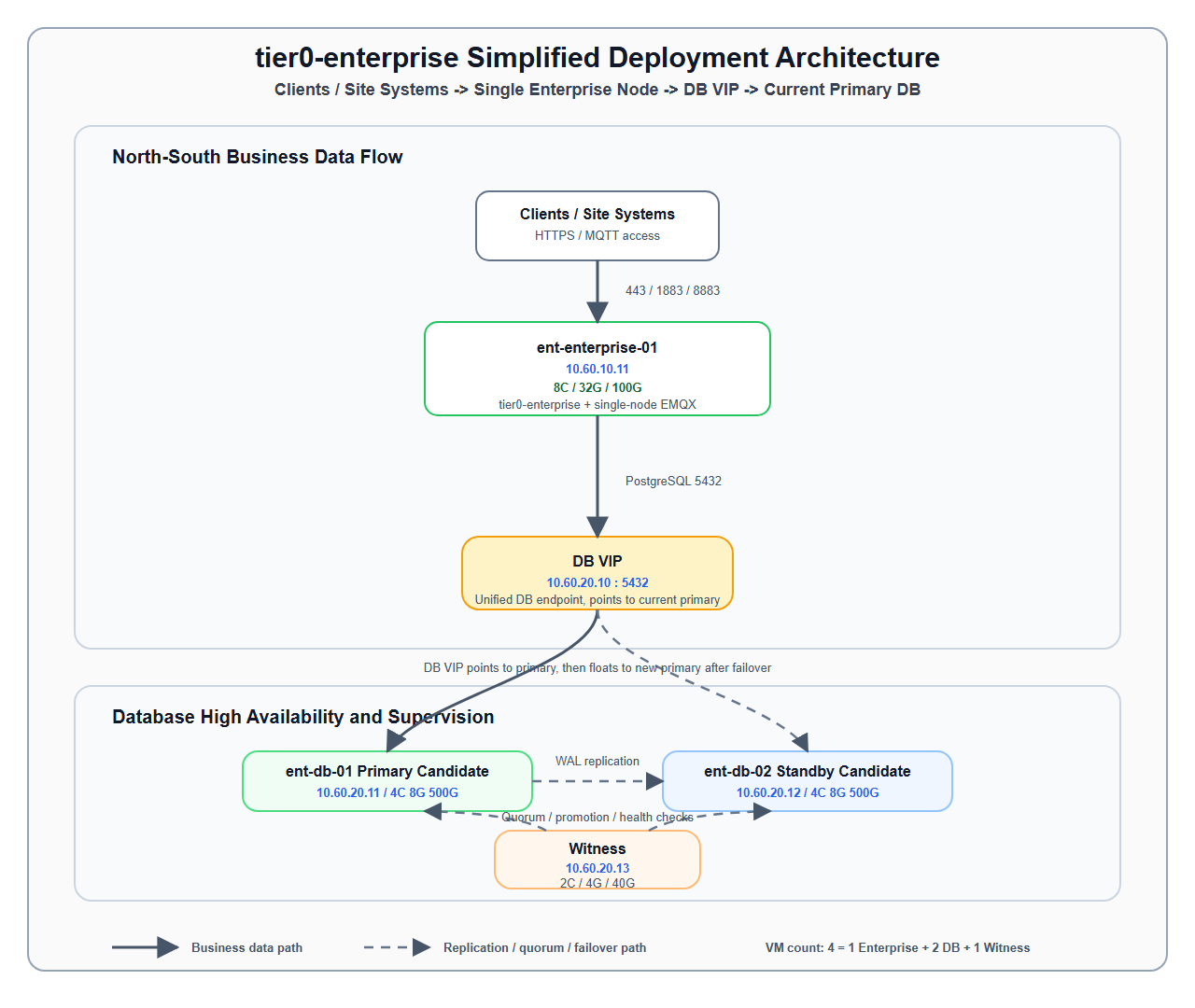
主要な経路:
ent-enterprise-01 → DB VIP → 現在のプライマリデータベース。tier0-enterprise と EMQX は、どちらも ent-enterprise-01 上で実行します。DB VIP を使用し、アプリケーションから ent-db-01/02 への直接アクセスは禁止します。Witness はデータベースのクォーラム判定、昇格、健全性確認のみに参加し、業務経路には含まれません。| フェーズ | 経路 | 説明 |
|---|---|---|
| 通常のアクセス | ent-enterprise-01 -> DB VIP -> current primary |
アプリケーションは常に 10.60.20.10:5432 に接続します |
| 通常のレプリケーション | current primary -> current standby |
PostgreSQL WAL ストリーミングレプリケーション |
| 通常の監視 | DB-01/DB-02 -> Witness |
repmgrd が状態を報告し、Witness がクォーラム判定に参加します |
| プライマリ障害 | standby -> Witness |
スタンバイがクォーラム確認を要求し、スプリットブレインを防止します |
| スタンバイの昇格 | standby promote |
Witness の確認後にスタンバイを昇格させます |
| VIP の移動 | DB VIP -> new primary |
10.60.20.10 を新しいプライマリに割り当てます |
| アプリケーションの復旧 | ent-enterprise-01 -> DB VIP -> new primary |
接続プールの再接続後にアプリケーションが復旧します |
| ノード | 役割 | vCPU | メモリー | ストレージ | システムディスクの推奨構成 | データディスクの推奨構成 | 主要コンポーネント |
|---|---|---|---|---|---|---|---|
ent-enterprise-01 |
単一の enterprise ノード | 8 |
32G |
100G |
単一の / システムディスク、100G |
個別のデータディスクなし | tier0-enterprise、EMQX、任意で Nginx/HAProxy |
ent-db-01 |
PostgreSQL/TSDB のプライマリ候補 | 4 |
8G |
500G |
/ 80G |
/pgdata 360G、/pgwal 40G、/backup-staging 20G |
PostgreSQL、TimescaleDB、repmgr、keepalived |
ent-db-02 |
PostgreSQL/TSDB のスタンバイ候補 | 4 |
8G |
500G |
/ 80G |
/pgdata 360G、/pgwal 40G、/backup-staging 20G |
PostgreSQL、TimescaleDB、repmgr、keepalived |
ent-db-witness-01 |
Witness/クォーラム監視 | 2 |
4G |
40G |
/ 40G |
個別の割り当てなし | repmgr witness、監視エージェント、監査ログ |
| 分類 | 台数 | ノードごとの仕様 | vCPU 小計 | メモリー小計 | ストレージ小計 |
|---|---|---|---|---|---|
| enterprise アプリケーションノード | 1 |
8C / 32G / 100G |
8C |
32G |
100G |
| PostgreSQL + TimescaleDB ノード | 2 |
4C / 8G / 500G |
8C |
16G |
1000G |
| Witness ノード | 1 |
2C / 4G / 40G |
2C |
4G |
40G |
| 合計 | 4 |
- | 18C |
52G |
1140G |
合計値:
4 台1852G1.14T| 対象 | 方法 | ポート | 説明 |
|---|---|---|---|
| すべての仮想マシン | ssh -i ~/.ssh/chen-rsa ops@<IP> |
22/TCP |
共通の鍵認証による SSH を実装後に使用します。それまでは現場のアカウントを使用します |
ent-enterprise-01 |
https://10.60.10.11 |
443/TCP |
業務用エンドポイント |
DB VIP |
psql -h 10.60.20.10 -p 5432 |
5432/TCP |
enterprise ノードと運用の許可リストのみ許可します |
| 接続元 | 接続先 | ポート | 用途 |
|---|---|---|---|
| ユーザー/現場システム | ent-enterprise-01 |
80/TCP |
HTTP 入口または HTTPS リダイレクト、任意 |
| ユーザー/現場システム | ent-enterprise-01 |
443/TCP |
HTTPS の業務用入口 |
| デバイス/現場システム | ent-enterprise-01 |
1883/TCP |
EMQX MQTT 平文通信、任意 |
| デバイス/現場システム | ent-enterprise-01 |
8883/TCP |
EMQX MQTT TLS、推奨 |
| デバイス/現場システム | ent-enterprise-01 |
8083/TCP |
MQTT WebSocket、任意 |
| デバイス/現場システム | ent-enterprise-01 |
8084/TCP |
MQTT WebSocket TLS、任意 |
| 運用ネットワーク | ent-enterprise-01 |
18083/TCP |
EMQX Dashboard、運用の許可リストのみ |
ent-enterprise-01 |
DB VIP |
5432/TCP |
PostgreSQL の業務アクセス |
| 接続元 | 接続先 | ポート | 用途 |
|---|---|---|---|
ent-db-01 |
ent-db-02 |
5432/TCP |
PostgreSQL WAL ストリーミングレプリケーション |
ent-db-02 |
ent-db-01 |
5432/TCP |
復旧後の逆方向レプリケーション |
ent-db-01/02 |
ent-db-witness-01 |
5432/TCP |
repmgr メタデータ/Witness 通信 |
ent-db-01 |
ent-db-02 |
VRRP |
DB VIP の移動。プロトコル 112 を許可します |
tier0-enterprise と EMQX を同一の ent-enterprise-01 ノードにデプロイします。ent-enterprise-01 はアプリケーション層の単一障害点です。障害時は手動で復旧するか、バックアップから再構築します。100G のシステムディスクが 1 台しかないため、業務データの長期保存には適しません。tier0-enterprise の業務データは PostgreSQL/TimescaleDB に保存する必要があります。ent-enterprise-01 上に固定します。例:/data/emqx。16 または現場で検証済みのバージョン。repmgrd + witness。DB VIP。ent-enterprise-01 上で PgBouncer を実行し、データベースへの接続負荷を低減できます。repmgr witness のメタデータと監視ロジックのみを保持します。| ポート/プロトコル | 許可範囲 | 用途 |
|---|---|---|
22/TCP |
運用ネットワークから 4 台の仮想マシン | SSH |
80/TCP |
ユーザーネットワークから ent-enterprise-01 |
HTTP リダイレクトまたは内部の平文通信入口 |
443/TCP |
ユーザーネットワークから ent-enterprise-01 |
HTTPS の業務用入口 |
1883/TCP |
デバイス/現場システムから ent-enterprise-01 |
EMQX MQTT 平文通信、任意 |
8883/TCP |
デバイス/現場システムから ent-enterprise-01 |
EMQX MQTT TLS、推奨 |
8083/TCP |
デバイス/現場システムから ent-enterprise-01 |
EMQX WebSocket、任意 |
8084/TCP |
デバイス/現場システムから ent-enterprise-01 |
EMQX WebSocket TLS、任意 |
18083/TCP |
運用ネットワークから ent-enterprise-01 |
EMQX Dashboard、許可リストのみ |
5432/TCP |
enterprise から DB VIP、DB/Witness 内部 |
PostgreSQL/repmgr |
112/VRRP |
データベースノード間 | DB VIP の移動 |
9100/TCP |
監視システムから 4 台の仮想マシン | node exporter、任意 |
| 障害シナリオ | 想定される動作 | 業務への影響 |
|---|---|---|
ent-enterprise-01 の障害 |
アプリケーションと EMQX が停止し、手動復旧またはバックアップからの再構築が必要です | アプリケーション層が全面停止します |
| 現在の DB プライマリの障害 | Witness のクォーラム確認後にスタンバイが昇格し、DB VIP が移動します | 数秒から数分の書き込み中断。アプリケーションの再接続が必要です |
| DB スタンバイの障害 | プライマリは稼働を継続し、レプリケーションのアラートが発生します | 直接の業務停止はありませんが、DB のホットスタンバイを失います |
| Witness の障害 | 現在のプライマリは稼働を継続しますが、自動フェイルオーバーの信頼性が低下します | 直接の業務停止はありません。Witness を優先して復旧します |
| DB VIP の移動失敗 | 新しいプライマリが存在しても、共通の入口に到達できない場合があります | 業務が停止します。VIP の手動割り当てが必要です |
| 確認項目 | 合格基準 |
|---|---|
| 4 台の仮想マシンのホスト名が固定されている | hostnamectl が計画と一致します |
| 共通の SSH 接続が利用できる | 運用端末から鍵認証で 4 台すべてにアクセスできます |
| 時刻同期 | 4 台間の時刻差が 1s 未満です |
| ファイアウォールが許可されている | 第 9 節のポートが定められた範囲で許可されています |
| enterprise サービスが正常である | tier0-enterprise のヘルスチェックに合格します |
| EMQX の状態が検証されている | EMQX ノード、待ち受けポート、永続化ディレクトリが正常です |
| enterprise のディスク使用率が安全な範囲にある | / の使用率が 70% 未満で、ログとキャッシュのクリーンアップが設定されています |
| DB のプライマリ/スタンバイが正常である | repmgr cluster show でプライマリ、スタンバイ、Witness が正常です |
| DB VIP が利用できる | enterprise ノードから 10.60.20.10:5432 に接続できます |
| DB プライマリのフェイルオーバー訓練 | スタンバイの昇格と DB VIP の移動ができます |
| バックアップのリストア訓練 | テスト用データベースへバックアップをリストアできます |
ent-enterprise-01 に tier0-enterprise をデプロイします。ent-enterprise-01 に単一ノードの EMQX をデプロイします。ent-enterprise-01 が停止すると、業務サービス全体が利用できなくなります。ent-enterprise-01 のシステムディスクは 100G の 1 台のみです。ログ、キャッシュ、添付ファイル、一時ファイルの使用量を管理する必要があります。Tier0 Enterprise の高可用性環境向けリファレンスデプロイ計画。
この V2 計画は、オフラインまたはプライベート環境に論理的な Tier0 Enterprise Fleet Center をデプロイするためのものです。6 台のマシンが、業務、ミドルウェア、データベース、ストレージ、Agent の役割を分担します。ユーザーと Enterprise 内部サービスは常に固定 VIP アドレスに接続します。1 台のマシンまたは 1 つのプロキシに障害が発生した場合、Keepalived、HAProxy、repmgr、RustFS、Fleet Agent がそれぞれのレイヤーで引き継ぎます。
この計画は、同一ネットワークセグメント内の単一マシン障害からの復旧を対象にしています。これは Active/Standby の災害復旧設計であり、複数データセンター、合意ベースの選出、またはデータ損失ゼロを保証する厳密な高可用性クラスターではありません。
設計目標は次のとおりです。
.env を変更しない。この計画は Fleet Center のみに適用されます。Branch Enterprise ノードは通常の単一マシンデプロイとしてインストールされ、この 6 台 Active/Standby 設計には参加しません。
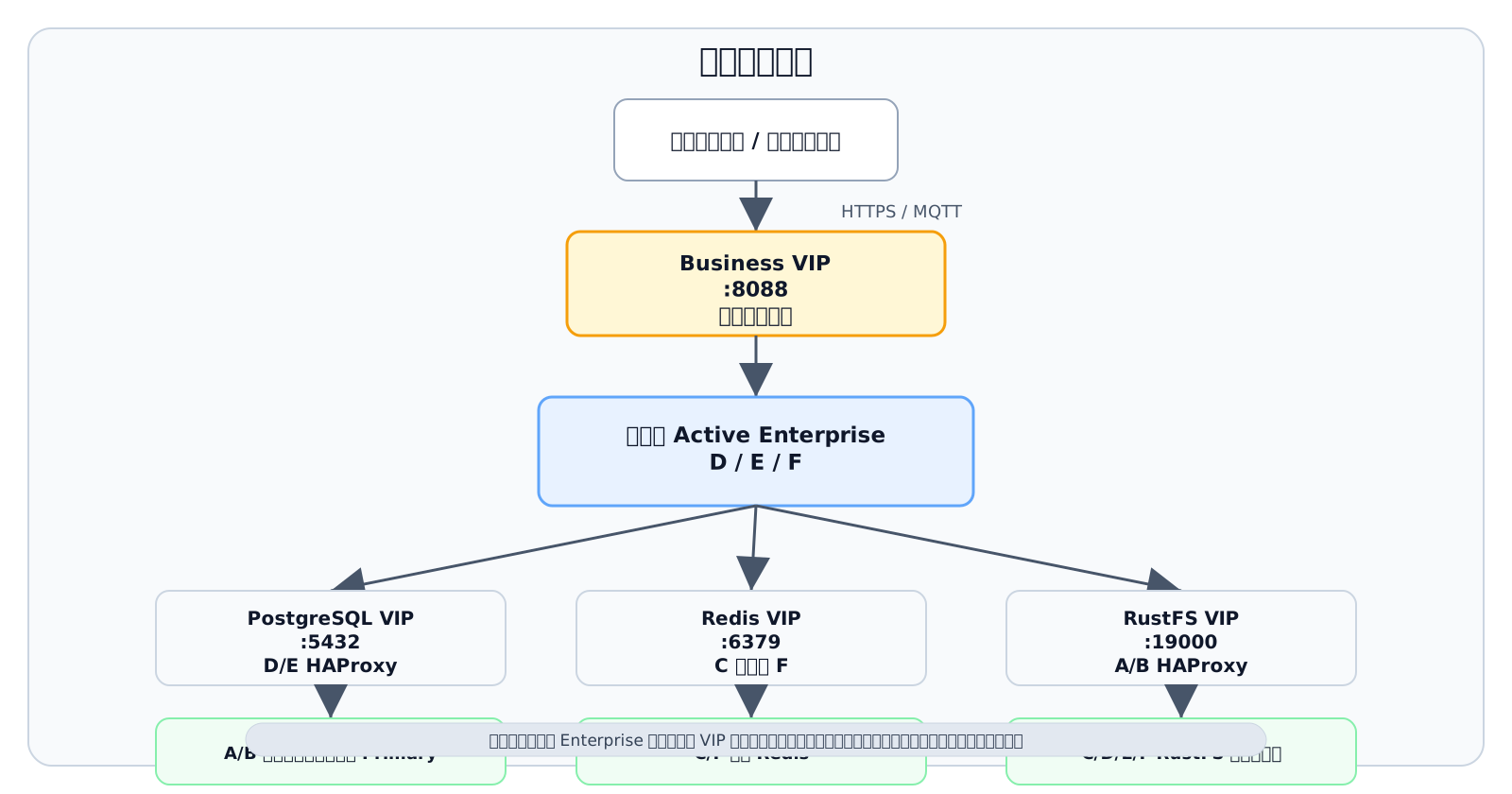
主要なリクエスト経路は次のとおりです。
クライアント / 現場システム -> Business VIP :8088 -> 現在の Active Enterprise (D / E / F) |-- PostgreSQL VIP :5432 -> D/E HAProxy -> A/B の現在の書き込み可能 Primary |-- Redis VIP :6379 -> C または F の独立 Redis `-- RustFS VIP :19000 -> A/B HAProxy -> C/D/E/F RustFS クラスター4 つの VIP は業務設定内の固定入口です。Enterprise がノードを切り替えたり、ミドルウェアのバックエンドロールが変わったりしても、クライアントと Enterprise は接続アドレスを変更しません。
次のアドレスは例です。実装前に、現場の同一 IPv4 サブネット内の実アドレスに置き換えてください。4 つの VIP は DHCP、静的ホスト、または他の VRRP インスタンスで使用されていてはいけません。
| 名前 | 例 IP | 説明 |
|---|---|---|
| deployer-controller | 10.60.10.20 |
独立 deployer。6 台の業務マシンには含めない |
| ent-ha-01 / A | 10.60.10.11 |
PostgreSQL Primary と関連ロール |
| ent-ha-02 / B | 10.60.10.12 |
PostgreSQL Standby と関連ロール |
| ent-ha-03 / C | 10.60.10.13 |
Witness、Redis-1、RustFS-1 |
| ent-ha-04 / D | 10.60.10.14 |
初期 Active Enterprise と関連ロール |
| ent-ha-05 / E | 10.60.10.15 |
Enterprise Standby と関連ロール |
| ent-ha-06 / F | 10.60.10.16 |
Enterprise Standby と関連ロール |
| Business VIP | 10.60.10.101 |
Enterprise 統一入口、デフォルト 8088 |
| PostgreSQL VIP | 10.60.10.102 |
データベース統一入口、デフォルト 5432 |
| Redis VIP | 10.60.10.103 |
Redis 統一入口、デフォルト 6379 |
| RustFS VIP | 10.60.10.104 |
S3 統一入口、デフォルト 19000 |
実装前に、業務 NIC 名、IPv4 プレフィックス、ゲートウェイ、DNS、NTP、ホスト名、SSH ユーザー、ディスクマウントポイント、ファイアウォール許可リストを確認してください。VIP、ノード IP、NIC をスクリプトで推測して本番に直接使用してはいけません。
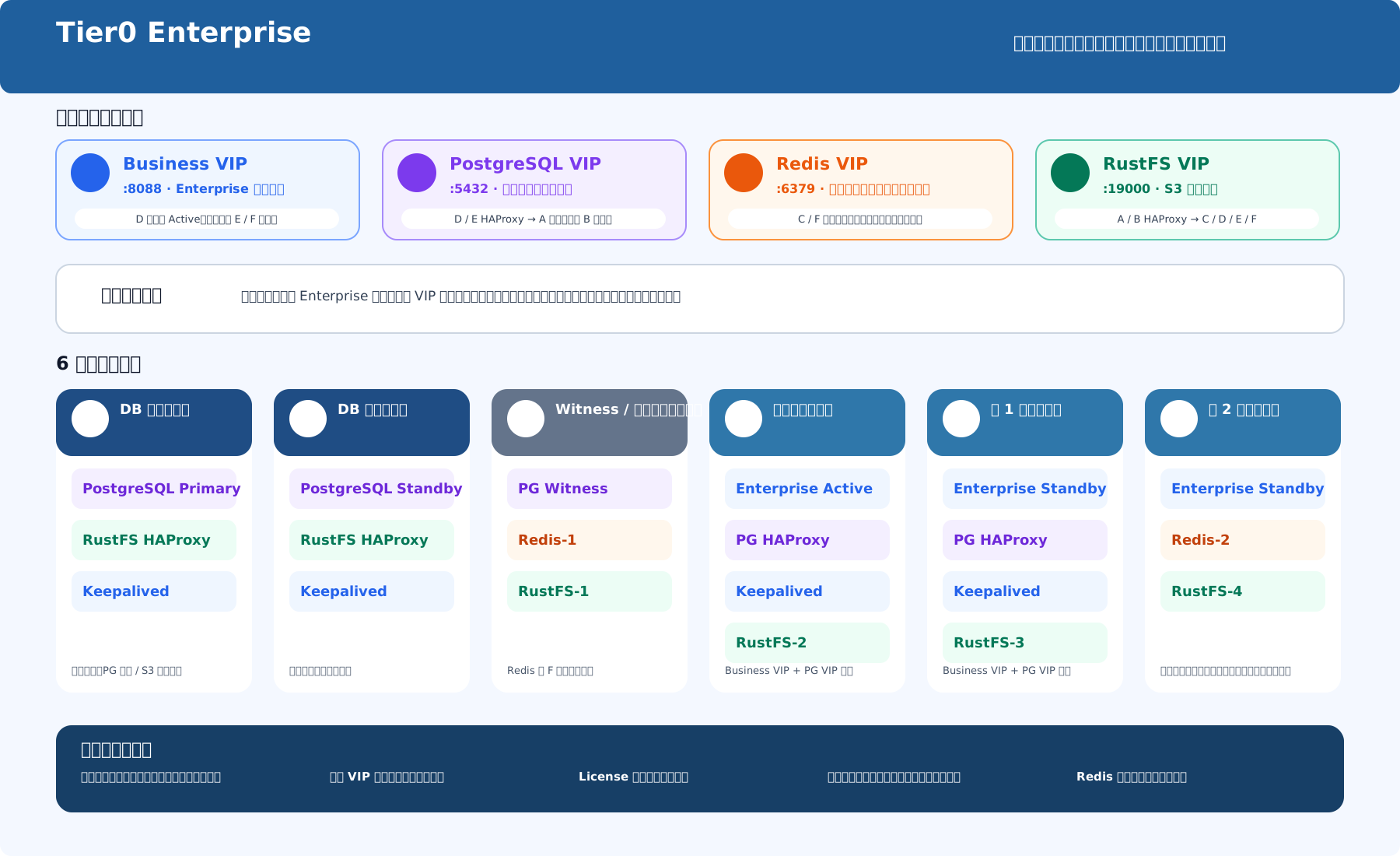
| マシン | デフォルトでデプロイするコンポーネント | 主な責務 |
|---|---|---|
| A | PostgreSQL Primary、RustFS HAProxy、Keepalived | 初期データベース Primary、1 番目の RustFS プロキシ候補 |
| B | PostgreSQL Standby、RustFS HAProxy、Keepalived | ストリーミング Standby、2 番目の RustFS プロキシ候補 |
| C | PostgreSQL Witness、Redis-1、RustFS-1 | データベース Witness/状態記録、Redis と RustFS のデータノード |
| D | PG HAProxy、Keepalived、RustFS-2、Enterprise、Fleet Agent、rsync | 初期業務 Active、1 番目の PostgreSQL プロキシ候補 |
| E | PG HAProxy、Keepalived、RustFS-3、Enterprise、Fleet Agent、rsync | 業務 Standby、2 番目の PostgreSQL プロキシ候補 |
| F | Redis-2、RustFS-4、Enterprise、Fleet Agent、rsync | 業務 Standby、2 番目の Redis インスタンス |
この割り当ては単一マシン障害への耐性と、6 台全体のリソースバランスを目的としています。deployer はホスト名/IP アドレスの自然順でマシンを A-F に対応付け、デフォルトロールを選択しますが、最終割り当ては現場のディスク構成と障害ドメインに照らして確認する必要があります。
Enterprise 業務レイヤーは Single Active/Standby です。任意の時点で、Business VIP を保持するノードだけが業務リクエストを処理します。業務レイヤーの拡張は、1 台の業務ノードの CPU、メモリ、ディスクを増強する垂直拡張で行います。Enterprise ノード数を掛け算して同時処理能力を見積もらないでください。
| マシン | ノード種別 | vCPU | メモリ | 基本ストレージ | ディスク推奨 |
|---|---|---|---|---|---|
| A | PostgreSQL Primary ノード | 8C | 16G | 1T | / は約 80G、残りは PostgreSQL データ、WAL、バックアップ staging 用 |
| B | PostgreSQL Standby ノード | 8C | 16G | 1T | / は約 80G、残りは PostgreSQL データ、WAL、バックアップ staging 用 |
| C | Witness / ミドルウェアノード | 4C | 8G | 500G | システム、Redis、RustFS データ用の固定マウントポイントを割り当てる |
| D | 初期 Active Enterprise ノード | 8C | 32G | 500G | システム、コンテナ、Enterprise 同期ファイル、RustFS データ用の固定マウントポイントを割り当てる |
| E | Standby Enterprise ノード | 8C | 32G | 500G | D と同じ |
| F | Standby Enterprise ノード | 8C | 32G | 500G | D と同じ |
| カテゴリー | 台数 | 1 台あたり仕様 | vCPU 小計 | メモリ小計 | ストレージ小計 |
|---|---|---|---|---|---|
| PostgreSQL データベースノード | 2 | 8C / 16G / 1T |
16C | 32G | 2T |
| Witness / ミドルウェアノード | 1 | 4C / 8G / 500G |
4C | 8G | 500G |
| Enterprise 業務ノード | 3 | 8C / 32G / 500G |
24C | 96G | 1.5T |
| 合計 | 6 | - | 44C | 136G | 4T |
D、E、F は同じ Enterprise 構成を保持します。
| 依存先 | 構成方針 |
|---|---|
| PostgreSQL | A/B ノード IP ではなく PostgreSQL VIP に接続する |
| Redis | C/F ノード IP ではなく Redis VIP に接続する |
| File storage | FILESTORE_DRIVER=s3 を使用し、S3 endpoint を RustFS VIP に向ける |
| Fleet identity | 3 ノードが 1 つの論理 installationId を共有し、各ノードは独自の memberId を持つ |
| Fleet Agent | 各 Enterprise ノードで 1 つのプロセスレベル Fleet Agent を実行する |
| License | Business VIP 経由で 1 回だけアクティベートし、Bundle を HA fileset に含める |
installationId と memberId はインストールプロセスで生成、永続化されます。運用者が手動で作成したり、マシン間で memberId をコピーしたりしないでください。
| VIP | 候補ノード | ヘルス判定 | 引き継ぎ結果 |
|---|---|---|---|
| Business VIP | D, E, F | Fleet Agent readiness、業務コンテナ状態、同期 generation | Owner だけが Enterprise HA 業務グループを起動する |
| PostgreSQL VIP | D, E | HAProxy/Keepalived 状態。HAProxy は書き込み可能 Primary のみにルーティングする | Enterprise は同じデータベースアドレスを使い続ける |
| Redis VIP | C, F | Redis PING とローカルサービス状態 |
もう一方の独立インスタンスへ切り替わる。キャッシュ/セッションは失われる可能性がある |
| RustFS VIP | A, B | HAProxy と RustFS backend のヘルス | S3 アドレスを変えずにプロキシ入口だけが移動する |
5432 トラフィックを現在の書き込み可能 Primary のみにルーティングする。Fleet Agent は、PostgreSQL/RustFS に直接置けないが、新しい Active ノードに存在する必要があるローカル業務ファイルだけを同期します。
node_modules同期は、deployer が管理する業務ノード間の SSH trust 上で system rsync を使用します。各リリースは完全な generation/manifest を作成します。Standby ノードは generation が完全であることを確認してからのみ引き継げます。PostgreSQL データディレクトリ、Redis データディレクトリ、RustFS データディレクトリはこの同期範囲に含まれません。
| Source | Target | Purpose |
|---|---|---|
| ユーザー / 現場システム | Business VIP | Web/API 業務アクセス |
| D/E/F Enterprise | PostgreSQL VIP | 業務データベースの読み書き |
| D/E/F Enterprise | Redis VIP | キャッシュとセッション |
| D/E/F Enterprise | RustFS VIP | S3 オブジェクトの読み書き |
| Deployer controller | A-F | SSH、デプロイ、状態収集、運用 |
| D/E/F | D/E/F | rsync/SSH ファイル同期 |
| A/B/C | A/B/C | PostgreSQL streaming replication、repmgr、Witness 通信 |
| RustFS members/proxies | C/D/E/F | RustFS クラスターと S3 backend 通信 |
| 同じ VIP を共有するノード | 対応する候補ノード | VRRP advertisement と VIP 移動 |
ポートは、必要最小限の source-to-target 関係で許可してください。すべての管理ポートをユーザーネットワークへ直接公開しないでください。
| Port / protocol | 推奨許可範囲 | 用途 |
|---|---|---|
22/TCP |
Deployer -> A-F; D/E/F 相互同期 | SSH、デプロイ、rsync |
8088/TCP |
ユーザーネットワーク -> Business VIP | Enterprise 業務入口 |
5432/TCP |
D/E/F -> PostgreSQL VIP; PG/proxy 内部アクセス | PostgreSQL、streaming replication、proxy |
6379/TCP |
D/E/F -> Redis VIP; health-check nodes -> C/F | Redis アクセスとヘルスチェック |
19000/TCP |
D/E/F -> RustFS VIP | Enterprise 固定 S3 入口 |
9000/TCP |
A/B -> C/D/E/F; RustFS members | RustFS S3 backend/cluster 通信。バージョンごとに確認 |
9001/TCP |
管理対象運用ネットワーク -> RustFS admin entry | 任意の RustFS admin endpoint。ユーザーネットワークへ公開しない |
19731/TCP |
Localhost / Keepalived / 管理対象運用ネットワーク | Fleet Agent HTTP health/control interface |
18080/TCP |
運用ネットワーク -> deployer controller | Deployer HTTPS UI |
112/VRRP |
各 VIP の候補ノード | Keepalived VIP 移動。TCP/UDP ではなく IP プロトコル番号 |
1883/8883 |
現場デバイスネットワーク -> 業務入口。製品設定に従う | MQTT/MQTTS |
| 障害シナリオ | 期待される動作 | 境界 |
|---|---|---|
| D Active 業務ノード障害 | Business VIP が E または F に移動し、正常な Standby が fileset generation を確認してから業務グループを起動する | 最後の正常な同期後に未同期のファイルは失われる可能性がある |
| Fleet Agent 障害 | readiness が失敗し、旧業務グループが停止して Business VIP が移動する | Agent を迂回して手動でコンテナーを起動しない |
| PostgreSQL A Primary 障害 | B が昇格し、HAProxy が新 Primary にルーティングする。PostgreSQL VIP は変わらない | 切り替え中は接続が一時的に失敗する。後で新しい Standby を復旧する |
| PostgreSQL HAProxy 1 台の障害 | PostgreSQL VIP がもう一方の proxy へ移動する | データベースの役割は変わらない |
| 現在の Redis ノード障害 | Redis VIP がもう一方の独立 Redis インスタンスへ移動する | キャッシュが失われ、セッションが無効になる可能性がある |
| RustFS データノード 1 台の障害 | 残りのクラスターノードがサービスを継続する | 許容範囲は実際の erasure coding とディスクの状態に依存する |
| RustFS HAProxy 1 台の障害 | RustFS VIP がもう一方の proxy へ移動する | S3 アドレスは変わらず、既存の接続は再接続が必要になる場合がある |
| deployer controller 障害 | 稼働中のデータプレーンは継続する | デプロイ、集中監視、運用が一時的に利用できず、controller 自体には自動 Standby がない |
| ネットワーク分断 | 安全な自動リーダー選出は保証されない | VIP Owner または Active が二重になる可能性があり、障害側を隔離して手動で復旧する |
| 任意の 2 台が同時に障害 | 一律の可用性保証はない | 結果は 2 台の役割の組み合わせに依存し、シナリオごとの検証が必要 |
ネットワーク分断、複数ノード同時障害、誤った VRRP priority、ディスク満杯、時刻ずれ、deployer 外の手動変更は通常の自動復旧保証の範囲外であり、運用手順で扱う必要があります。
| 確認項目 | 合格基準 |
|---|---|
| マシンと役割 | 6 台の業務マシン A~F が計画と一致し、deployer は分離されている。 |
| SSH と sudo | deployer が管理されたアカウントで A~F に対話なしでアクセスでき、ホストキーを確認済み。 |
| ネットワークと時刻 | 6 台は計画されたサブネットにあり、4 つの VIP は未使用。NIC、プレフィックス、時刻同期が要件を満たす。 |
| Docker/Compose | 6 台すべて初期化済みで、古いコンテナー、ポート、ネットワーク、データディレクトリとの競合がない。 |
| ディスク | PostgreSQL、RustFS、Enterprise fileset が計画されたマウントポイントを使用し、容量と inode に問題がない。 |
| PostgreSQL | Primary が 1 台、Standby は streaming 中、Witness は稼働中で、PostgreSQL VIP 経由で読み書きできる。 |
| Redis | C/F のインスタンスが正常で、Redis VIP 経由の PING に成功し、切り替え後にデータが複製されない境界を了承済み。 |
| RustFS | 4 ノードが正常で、RustFS VIP 経由でオブジェクトを書き込み、読み取り、削除できる。 |
| Enterprise | D/E/F のバージョンが一致し、Business VIP の所有者だけが業務グループを実行する。 |
| Fleet Agent | 3 台の Agent が稼働し、readiness、同期履歴、generation の状態を確認できる。 |
| License | Cluster License が Business VIP 経由で 1 回だけ有効化され、切り替え後も有効。 |
| App 同期 | node_modules を含むインポート済み App が同期と切り替え後も動作する。 |
| ファイアウォール | この計画で必要な送信元、宛先、プロトコルのみ許可されている。 |
| バックアップ | PostgreSQL、RustFS、deployer のバックアップ計画があり、少なくとも 1 回の復元テストを完了している。 |
node_modules、Flow/Marimo、License fileset の同期を検証する。これらが変わると VIP、役割、ストレージ、障害時の境界に影響する可能性があるため、実装前に計画を更新してください。
現在の計画は、6 台のマシン、4 つの固定 VIP、Single Active Enterprise を中心にしています。業務入口、データベース入口、キャッシュ入口、オブジェクトストレージ入口を分離します。同一ネットワークセグメント内で一般的な単一マシン障害をカバーでき、フェイルオーバー後に接続構成を変更したり、License を再アクティベートしたり、App ファイルを手動コピーしたりする作業を大幅に減らします。
同時に、3 つの境界を受け入れる必要があります。Redis はデータをレプリケートせず、業務 fileset は非同期で同期され、ネットワーク分断には合意仲裁がありません。したがって、この計画は Fleet Center 6 台 Single Active Active/Standby 災害復旧計画 として定義するのが適切です。ゼロ中断、ゼロデータ損失、またはデータセンター間の厳密な高可用性を外部に約束してはいけません。
標準 Tier0 Enterprise デプロイの SLA 推奨、高可用性境界、受け入れ条件、訓練、強化項目です。
このドキュメントは、3 台のアプリケーション / Swarm ノード、2 台の PostgreSQL HA ノード、1 台の witness ノードで構成される 6 VM 完全オフラインデプロイに適用されます。
| レイヤー | 現在の設計 | 高可用性の境界 |
|---|---|---|
| アプリケーションランタイム | Enterprise New compose は固定の tier0_app_active_node 上で実行されます。 |
backend、redis、EMQX、SourceFlow、EventFlow、Marimo、OPC UA Server はまだ自動マルチレプリカサービスではありません。 |
| HTTP 入口 | 3 台のアプリケーションノードで keepalived APP VIP + HAProxy を実行します。 | VIP は浮動できます。HAProxy はアクティブノードの 8088/TCP に転送し、/healthz を確認します。 |
| MQTT / OPC UA | EMQX は 1883/8883/8083/8084、OPC UA は 4840 を使用します。 |
これらはアクティブノードへ直接接続します。TCP VIP プロキシには含まれないため、プロトコル入口の HA は保証されません。 |
| データベース | PostgreSQL / TimescaleDB ストリーミングレプリケーション + repmgr + witness + DB VIP。 | primary 障害時に standby を自動昇格できます。非同期レプリケーションは厳密なゼロ RPO を保証できません。 |
| バックアップと復元 | backup-db.sh / restore-db.sh。 |
復旧性を提供しますが、オンライン HA と同じではありません。 |
| サービス対象 | 推奨表現 | 制約 |
|---|---|---|
| プラットフォーム HTTP 入口 | 月間可用性 99.5% から開始します。 |
VIP フェイルオーバーはアクティブアプリケーションノードの自動移行と同じではありません。 |
| データベースアクセス | 運用目標:RTO <= 2 minutes。 |
RPO はレプリケーション遅延に依存します。同じアーキテクチャでの過去フェイルオーバーテストは約 59-64 秒でした。 |
| MQTT / OPC UA | 現在の設計では HA SLA を約束しません。 | 先に HAProxy TCP proxy、専用 VIP、またはサービスクラスタリングを追加する必要があります。 |
| バックアップと復元 | 毎日バックアップ。大きな変更前は必須。 | 復元時間はデータ量と現地 I/O に依存します。 |
99.9% 以上を主張する前に、アプリケーションの自動移行またはマルチレプリカデプロイ、プロトコル入口の HA、監視アラート、復旧訓練を完了してください。計画中の機能を納品済み機能として記述しないでください。
各デプロイまたはアップグレードでは、少なくとも以下を満たす必要があります。
verify-materials.sh が成功し、デリバリーパッケージの SHA256 チェックが通る。Ready である。APP VIP /healthz と /readyz が 200 を返し、ホームページと /uns にアクセスできる。DB VIP:5432 にアクセスでき、primary、standby、witness の topology が正常である。毎日以下を実行します。
./bin/verify.sh --site config/site.conf./bin/smoke-business-emqx.sh --site config/site.conf少なくとも以下のアラートを設定します。
/healthz または /readyz の失敗。backend、redis、EMQX などの重要コンテナの終了または頻繁な再起動。80% / 90% を超過。| 訓練 | 頻度 | 検証基準 |
|---|---|---|
| APP VIP failover | デリバリー前および四半期ごと。 | 現在の VIP ノードで keepalived を停止した後、/healthz と /readyz が復旧する。 |
| DB primary 障害 | デリバリー前および半年ごと。 | standby が昇格し、DB VIP が復旧し、旧 primary が standby として再構築される。 |
| データベース復元 | 毎月のサンプル確認、および大きな変更前。 | バックアップが復元可能であること。復元後に verify、スモークチェック、ログイン検証が通過すること。 |
| 資材検証 | すべてのパッケージビルド。 | source material、package SHA、展開検証が通る。 |
verify、smoke check、実ログイン検証を実行します。関連手順: 運用 Runbook と 標準ポート一覧。
標準的な 6 VM オフライン Tier0 Enterprise デプロイ向けのファイアウォールポート一覧。
次の表は Enterprise New の 6 VM オフラインデプロイを前提にしています。顧客側ファイアウォールでは、必要最小限の送信元範囲からの通信のみを許可してください。これらのポートを公開インターネットへ直接公開しないでください。
| 送信元 | 宛先 | ポート | プロトコル | 用途 |
|---|---|---|---|---|
| 制御ホスト | 6 台の対象 VM | 22 | TCP | SSH / Ansible |
| 3 台のアプリケーションノード相互 | 3 台のアプリケーションノード | 2377 | TCP | Docker Swarm 管理プレーン |
| 3 台のアプリケーションノード相互 | 3 台のアプリケーションノード | 7946 | TCP/UDP | Swarm ノード検出 |
| 3 台のアプリケーションノード相互 | 3 台のアプリケーションノード | 4789 | UDP | Swarm overlay |
| 3 台のアプリケーションノード | アクティブなアプリケーションノード | 8088 | TCP | HAProxy から Enterprise New バックエンドへ。アプリケーションネットワークセグメントのみ |
| ビジネスネットワークセグメント | APP VIP | 80 | TCP | プラットフォーム HTTP 入口、/healthz、/readyz |
| ビジネスネットワークセグメント | APP VIP / アクティブなアプリケーションノード | 1883 | TCP | MQTT |
| ビジネスネットワークセグメント | APP VIP / アクティブなアプリケーションノード | 8883 | TCP | MQTT TLS |
| ビジネスネットワークセグメント | APP VIP / アクティブなアプリケーションノード | 8083 | TCP | MQTT WebSocket |
| ビジネスネットワークセグメント | APP VIP / アクティブなアプリケーションノード | 8084 | TCP | MQTT WebSocket TLS |
| ビジネスネットワークセグメント | APP VIP / アクティブなアプリケーションノード | 4840 | TCP | OPC UA Server |
| 制御されたアプリケーションネットワークセグメント | アクティブなアプリケーションノード | 8089 | TCP | Launchpad |
| 動的アプリケーションアクセスネットワークセグメント | アクティブなアプリケーションノード | 30000-30199 | TCP | App Gateway / 動的アプリケーションのホストポート |
| アプリケーションノード、DB ノード、Witness | DB VIP / DB ノード | 5432 | TCP | PostgreSQL / TimescaleDB |
| DB1、DB2、Witness | DB1、DB2、Witness | 5432 | TCP | Streaming replication / repmgr |
| アプリケーションノード | NFS server | 2049 | TCP/UDP | NFS_ENABLED=true の場合に使用 |
現在の compose デプロイでは、Redis、SourceFlow、EventFlow、Marimo、EMQX Dashboard は外部に公開されません。これらのサービスは Docker runtime ネットワーク内の backend からのみ呼び出されます。
標準 Tier0 Enterprise deployment の daily inspection、failover、backup、restore、cleanup、troubleshooting 手順。
この document は Enterprise New offline application を前提にしています。
./bin/verify.sh --site config/site.conf./bin/smoke-business-emqx.sh --site config/site.confReady である。APP VIP /healthz と /readyz が 200 を返す。DB VIP:5432 にアクセスできる。backend、redis、emqx、sourceflow、eventflow、marimo、opcua-server が active application node ですべて running である。active application node で次の commands を実行します。
cd /opt/tier0-enterprise/tier0-deploybash bin/compose.sh psbash bin/compose.sh logs --tail=200 backendcurl -fsS http://127.0.0.1:8088/healthzcurl -fsS http://127.0.0.1:8088/readyzHealth-check の見方:
healthz failure: まず backend process、image、container logs を確認します。readyz failure: DB VIP、Redis、database migration logs も確認します。.env の ADMIN_INITIAL_PASSWORD を確認し、その後 backend IAM migration logs と user tables を確認します。HTTP port だけで deployment success を判断しないでください。nc -vz <APP_VIP> 1883nc -vz <APP_VIP> 8883nc -vz <APP_VIP> 8083nc -vz <APP_VIP> 8084nc -vz <APP_VIP> 4840Database nodes で次を実行します。
systemctl status tier0-postgresqlsystemctl status tier0-repmgrdsudo -iu postgres psql -Atqc 'select pg_is_in_recovery();'sudo -iu postgres /usr/local/bin/repmgr -f /etc/repmgr.conf cluster showpg_is_in_recovery=false は primary を意味します。pg_is_in_recovery=true は standby を意味します。test 前に、現在 VIP を保持している node を記録し、次を確認します。
curl -fsS http://<APP_VIP>/healthzcurl -fsS http://<APP_VIP>/readyz現在の VIP node で keepalived を停止した後、別の application node への VIP takeover を確認し、両方の URLs を再テストします。HAProxy backend は active application node の 8088/TCP を指すため、3 台すべての application nodes が active node の port 8088 に到達できる必要があります。
keepalived を復旧した後、verify.sh と smoke checks を再実行します。drill 中に active application containers を停止しないでください。
Failure drill の前に backup を作成し、replication が healthy であることを確認します。
./bin/backup-db.sh --site config/site.conf現在の primary で tier0-postgresql を停止した後、repmgr が standby を promote し、DB VIP takeover することを確認します。target RTO は 2 分以内です。同じ architecture での過去の tests は約 59-64 秒でした。
Backup:
./bin/backup-db.sh --site config/site.confRestore:
./bin/restore-db.sh --site config/site.conf --restore-file /backup/tier0-db/postgres-YYYYmmddTHHMMSS.dump./full-cleanup.sh --env install.env --yes./install.sh --auto --yescd /opt/tier0-enterprise/tier0-deploybash bin/compose.sh logs --tail=300 backendbash bin/compose.sh pscd /opt/tier0-enterprise/tier0-deploybash bin/compose.sh logs --tail=200 emqxsystemctl status tier0-repmgrdtail -100 /var/log/repmgr/repmgr.logsudo -iu postgres psql -Atqc 'show shared_preload_libraries;'./bin/verify-materials.shTier0 OpenAPI v1 · 操作: 36 · スキーマ: 85
API のフィールド名、例、元の説明は、同梱の英語版 OpenAPI 仕様に従います。
Unified Namespace のデータの読み取り、書き込み、管理。
Upload a UNS attachment
Uploads a multipart attachment for a UNS node. Supply a file and at least one of unsId or topic; a valid unsId takes precedence.
curl --request POST 'https://<tier0-host>/openapi/v1/uns/attachments' \
  --header 'x-api-key: <api-key>'
multipart/form-data
| フィールド | 型 | 必須 | 説明 |
|---|---|---|---|
unsId | integer (int64) | いいえ | Numeric owner node ID. Supply unsId or topic; a valid unsId takes precedence. |
topic | string | いいえ | Full owner node path, used when a valid unsId is not supplied. |
fileName | string | いいえ | Original file name. |
sha256 | string | いいえ | SHA-256 checksum of the file contents. |
file | string (binary) | はい | Binary file contents. The multipart field name must be file. |
200 · application/json
{
  "code": 0,
  "msg": "string",
  "data": {
    "unsId": 0,
    "fileName": "string",
    "filePath": "string",
    "fileUrl": "string",
    "contentType": "string"
  }
}200 · application/json
| フィールド | 型 | 必須 | 説明 |
|---|---|---|---|
code | integer | いいえ | Response code |
msg | string | いいえ | Response message |
data | object | いいえ | UnsAttachmentUploadResp. スキーマの章で参照先のスキーマを確認してください。 |
| ステータス | 意味 | メディアタイプ |
|---|---|---|
200 | A successful response. | application/json |
400 | Correct the request parameters or Content-Type before retrying. | application/json |
401 | Authentication middleware returns plain-text unauthorized. Check API key validity, scope, and owner roles. | text/plain |
403 | Authentication middleware returns plain-text forbidden. Check API key validity, scope, and owner roles. | text/plain |
404 | Resource not found. Verify paths, IDs, and current resource state. | — |
409 | Resource state conflict. Verify paths, IDs, and current resource state. | — |
413 | Request too large. Reduce the request before retrying. | — |
500 | Service error. Investigate the service and confirm the outcome before retrying. | — |
List UNS attachments
Lists attachments for a UNS node or topic. Temporary file URLs can expire and must then be requested again.
curl --request POST 'https://<tier0-host>/openapi/v1/uns/attachments/list' \
  --header 'x-api-key: <api-key>' \
  --header 'Content-Type: application/json' \
  --data '{"unsId":0,"topic":"string","page":0,"size":0,"includeFileUrl":false}'
application/json
| フィールド | 型 | 必須 | 説明 |
|---|---|---|---|
unsId | integer (int64) | いいえ | Numeric UNS node ID. |
topic | string | いいえ | Full UNS topic path. |
page | integer (int64) | いいえ | Page number, starting at 1. |
size | integer (int64) | いいえ | Number of attachments per page. |
includeFileUrl | boolean (boolean) | いいえ | Whether to return temporary file URLs. Defaults to true. |
200 · application/json
{
  "code": 0,
  "msg": "string",
  "data": {
    "unsId": 0,
    "list": [
      "value"
    ],
    "total": 0,
    "page": 0,
    "size": 0
  }
}200 · application/json
| フィールド | 型 | 必須 | 説明 |
|---|---|---|---|
code | integer | いいえ | Response code |
msg | string | いいえ | Response message |
data | object | いいえ | UnsAttachmentListResp. スキーマの章で参照先のスキーマを確認してください。 |
| ステータス | 意味 | メディアタイプ |
|---|---|---|
200 | A successful response. | application/json |
400 | Correct the request parameters or Content-Type before retrying. | application/json |
401 | Authentication middleware returns plain-text unauthorized. Check API key validity, scope, and owner roles. | text/plain |
403 | Authentication middleware returns plain-text forbidden. Check API key validity, scope, and owner roles. | text/plain |
404 | Resource not found. Verify paths, IDs, and current resource state. | — |
409 | Resource state conflict. Verify paths, IDs, and current resource state. | — |
413 | Request too large. Reduce the request before retrying. | — |
500 | Service error. Investigate the service and confirm the outcome before retrying. | — |
Browse the UNS tree
Returns a UNS subtree. Use an empty path for the workspace root.
curl --request POST 'https://<tier0-host>/openapi/v1/uns/browse' \
  --header 'x-api-key: <api-key>' \
  --header 'Content-Type: application/json' \
  --data '{"path":"string","max_depth":0,"include_metadata":false,"include_leaf_value":false}'
application/json
| フィールド | 型 | 必須 | 説明 |
|---|---|---|---|
path | string | いいえ | Root UNS path. Empty means the workspace root. |
max_depth | integer (int64) | いいえ | Maximum tree depth. Omit or use 0 for the server default. |
include_metadata | boolean (boolean) | いいえ | Whether returned nodes should include metadata. |
include_leaf_value | boolean (boolean) | いいえ | Whether returned leaf nodes should include their latest payload. |
200 · application/json
{
  "code": 0,
  "msg": "string",
  "data": {
    "tree": [
      "value"
    ]
  }
}200 · application/json
| フィールド | 型 | 必須 | 説明 |
|---|---|---|---|
code | integer | いいえ | Response code |
msg | string | いいえ | Response message |
data | object | いいえ | BrowseResp. スキーマの章で参照先のスキーマを確認してください。 |
| ステータス | 意味 | メディアタイプ |
|---|---|---|
200 | A successful response. | application/json |
400 | Correct the request parameters or Content-Type before retrying. | application/json |
401 | Authentication middleware returns plain-text unauthorized. Check API key validity, scope, and owner roles. | text/plain |
403 | Authentication middleware returns plain-text forbidden. Check API key validity, scope, and owner roles. | text/plain |
404 | Resource not found. Verify paths, IDs, and current resource state. | — |
409 | Resource state conflict. Verify paths, IDs, and current resource state. | — |
413 | Request too large. Reduce the request before retrying. | — |
500 | Service error. Investigate the service and confirm the outcome before retrying. | — |
Create UNS nodes
Creates UNS nodes and nested subtrees. Check each item result and use the returned topic in subsequent calls.
curl --request POST 'https://<tier0-host>/openapi/v1/uns/create' \
  --header 'x-api-key: <api-key>' \
  --header 'Content-Type: application/json' \
  --data '{"namespace":[{"name":"value","type":"value","children":"value","topicType":"value","fields":"value"}]}'
application/json
| フィールド | 型 | 必須 | 説明 |
|---|---|---|---|
namespace | array<object> | はい | UNS nodes to create. Nest children to create a subtree. |
200 · application/json
{
  "code": 0,
  "msg": "string",
  "data": {
    "success": false,
    "results": [
      "value"
    ]
  }
}200 · application/json
| フィールド | 型 | 必須 | 説明 |
|---|---|---|---|
code | integer | いいえ | Response code |
msg | string | いいえ | Response message |
data | object | いいえ | CreateResp. スキーマの章で参照先のスキーマを確認してください。 |
| ステータス | 意味 | メディアタイプ |
|---|---|---|
200 | A successful response. | application/json |
400 | Correct the request parameters or Content-Type before retrying. | application/json |
401 | Authentication middleware returns plain-text unauthorized. Check API key validity, scope, and owner roles. | text/plain |
403 | Authentication middleware returns plain-text forbidden. Check API key validity, scope, and owner roles. | text/plain |
404 | Resource not found. Verify paths, IDs, and current resource state. | — |
409 | Resource state conflict. Verify paths, IDs, and current resource state. | — |
413 | Request too large. Reduce the request before retrying. | — |
500 | Service error. Investigate the service and confirm the outcome before retrying. | — |
Delete UNS nodes
Deletes the listed nodes sequentially. By default this is a soft delete; the batch is not rolled back when a later item fails.
curl --request POST 'https://<tier0-host>/openapi/v1/uns/delete' \
  --header 'x-api-key: <api-key>' \
  --header 'Content-Type: application/json' \
  --data '{"topics":["string"],"hard_delete":false}'
application/json
| フィールド | 型 | 必須 | 説明 |
|---|---|---|---|
topics | array<string> | はい | UNS topic or path node paths to delete. |
hard_delete | boolean (boolean) | いいえ | Permanently delete instead of moving nodes to the recycle state. |
200 · application/json
{
  "code": 0,
  "msg": "string",
  "data": {
    "success": false
  }
}200 · application/json
| フィールド | 型 | 必須 | 説明 |
|---|---|---|---|
code | integer | いいえ | Response code |
msg | string | いいえ | Response message |
data | object | いいえ | OpenapiEmptyResp. スキーマの章で参照先のスキーマを確認してください。 |
| ステータス | 意味 | メディアタイプ |
|---|---|---|
200 | A successful response. | application/json |
400 | Correct the request parameters or Content-Type before retrying. | application/json |
401 | Authentication middleware returns plain-text unauthorized. Check API key validity, scope, and owner roles. | text/plain |
403 | Authentication middleware returns plain-text forbidden. Check API key validity, scope, and owner roles. | text/plain |
404 | Resource not found. Verify paths, IDs, and current resource state. | — |
409 | Resource state conflict. Verify paths, IDs, and current resource state. | — |
413 | Request too large. Reduce the request before retrying. | — |
500 | Service error. Investigate the service and confirm the outcome before retrying. | — |
Query UNS history
Queries historical topic values over an inclusive RFC 3339 time range. Results can be aggregated or sampled.
curl --request POST 'https://<tier0-host>/openapi/v1/uns/history' \
  --header 'x-api-key: <api-key>' \
  --header 'Content-Type: application/json' \
  --data '{"topics":["string"],"start_time":"string","end_time":"string","aggregation":{"interval":"string","function":"string","field":"string","fields":["value"]},"page":0}'
application/json
| フィールド | 型 | 必須 | 説明 |
|---|---|---|---|
topics | array<string> | はい | UNS topic paths whose history should be queried. |
start_time | string | はい | Inclusive query start in RFC 3339 format. |
end_time | string | はい | Inclusive query end in RFC 3339 format. |
aggregation | object | いいえ | HistoryAggregation. スキーマの章で参照先のスキーマを確認してください。 |
page | integer (int64) | いいえ | Page number, starting from 1. |
size | integer (int64) | いいえ | Page size; values above the server maximum are capped. |
200 · application/json
{
  "code": 0,
  "msg": "string",
  "data": {
    "success": false,
    "results": [
      "value"
    ],
    "page": 0,
    "size": 0,
    "total": 0
  }
}200 · application/json
| フィールド | 型 | 必須 | 説明 |
|---|---|---|---|
code | integer | いいえ | Response code |
msg | string | いいえ | Response message |
data | object | いいえ | HistoryResp. スキーマの章で参照先のスキーマを確認してください。 |
| ステータス | 意味 | メディアタイプ |
|---|---|---|
200 | A successful response. | application/json |
400 | Correct the request parameters or Content-Type before retrying. | application/json |
401 | Authentication middleware returns plain-text unauthorized. Check API key validity, scope, and owner roles. | text/plain |
403 | Authentication middleware returns plain-text forbidden. Check API key validity, scope, and owner roles. | text/plain |
404 | Resource not found. Verify paths, IDs, and current resource state. | — |
409 | Resource state conflict. Verify paths, IDs, and current resource state. | — |
413 | Request too large. Reduce the request before retrying. | — |
500 | Service error. Investigate the service and confirm the outcome before retrying. | — |
Read UNS values
Returns value, quality, and timeStamp (VQT) for each requested topic. A failed topic does not discard successful items in the same batch.
curl --request POST 'https://<tier0-host>/openapi/v1/uns/read' \
  --header 'x-api-key: <api-key>' \
  --header 'Content-Type: application/json' \
  --data '{"topics":["string"],"include_metadata":false,"include_leaf_value":false}'
application/json
| フィールド | 型 | 必須 | 説明 |
|---|---|---|---|
topics | array<string> | はい | UNS topic paths to read. |
include_metadata | boolean (boolean) | いいえ | Whether each result should include UNS node metadata. |
include_leaf_value | boolean (boolean) | いいえ | Whether leaf nodes should include their latest payload. |
200 · application/json
{
  "code": 0,
  "msg": "string",
  "data": {
    "success": false,
    "results": [
      "value"
    ]
  }
}200 · application/json
| フィールド | 型 | 必須 | 説明 |
|---|---|---|---|
code | integer | いいえ | Response code |
msg | string | いいえ | Response message |
data | object | いいえ | ReadResp. スキーマの章で参照先のスキーマを確認してください。 |
| ステータス | 意味 | メディアタイプ |
|---|---|---|
200 | A successful response. | application/json |
400 | Correct the request parameters or Content-Type before retrying. | application/json |
401 | Authentication middleware returns plain-text unauthorized. Check API key validity, scope, and owner roles. | text/plain |
403 | Authentication middleware returns plain-text forbidden. Check API key validity, scope, and owner roles. | text/plain |
404 | Resource not found. Verify paths, IDs, and current resource state. | — |
409 | Resource state conflict. Verify paths, IDs, and current resource state. | — |
413 | Request too large. Reduce the request before retrying. | — |
500 | Service error. Investigate the service and confirm the outcome before retrying. | — |
Restore a deleted UNS node
Restores a soft-deleted UNS node. Permanently deleted nodes cannot be restored.
curl --request POST 'https://<tier0-host>/openapi/v1/uns/restore' \
  --header 'x-api-key: <api-key>' \
  --header 'Content-Type: application/json' \
  --data '{"path":"string"}'
application/json
| フィールド | 型 | 必須 | 説明 |
|---|---|---|---|
path | string | はい | Full UNS path of the node to restore. Use its path before deletion, not a node ID or HTTP URL. |
200 · application/json
{
  "code": 0,
  "msg": "string",
  "data": {
    "success": false
  }
}200 · application/json
| フィールド | 型 | 必須 | 説明 |
|---|---|---|---|
code | integer | いいえ | Response code |
msg | string | いいえ | Response message |
data | object | いいえ | OpenapiEmptyResp. スキーマの章で参照先のスキーマを確認してください。 |
| ステータス | 意味 | メディアタイプ |
|---|---|---|
200 | A successful response. | application/json |
400 | Correct the request parameters or Content-Type before retrying. | application/json |
401 | Authentication middleware returns plain-text unauthorized. Check API key validity, scope, and owner roles. | text/plain |
403 | Authentication middleware returns plain-text forbidden. Check API key validity, scope, and owner roles. | text/plain |
404 | Resource not found. Verify paths, IDs, and current resource state. | — |
409 | Resource state conflict. Verify paths, IDs, and current resource state. | — |
413 | Request too large. Reduce the request before retrying. | — |
500 | Service error. Investigate the service and confirm the outcome before retrying. | — |
Search UNS nodes
Searches UNS node names, aliases, and paths, with optional type and path filters.
curl --request POST 'https://<tier0-host>/openapi/v1/uns/search' \
  --header 'x-api-key: <api-key>' \
  --header 'Content-Type: application/json' \
  --data '{"keyword":"string","topicType":"string","path_prefix":"string","include_metadata":false,"include_leaf_value":false}'
application/json
| フィールド | 型 | 必須 | 説明 |
|---|---|---|---|
keyword | string | いいえ | Keyword matched against UNS node names, aliases, and paths. |
topicType | string | いいえ | Topic data category filter: STATE, ACTION, or METRIC. |
path_prefix | string | いいえ | Only return nodes under this UNS path prefix. |
include_metadata | boolean (boolean) | いいえ | Whether returned nodes should include metadata. |
include_leaf_value | boolean (boolean) | いいえ | Whether returned leaf nodes should include their latest payload. |
page | integer (int64) | いいえ | Page number, starting from 1. |
size | integer (int64) | いいえ | Page size. |
200 · application/json
{
  "code": 0,
  "msg": "string",
  "data": {
    "objects": [
      "value"
    ],
    "page": 0,
    "size": 0,
    "total": 0
  }
}200 · application/json
| フィールド | 型 | 必須 | 説明 |
|---|---|---|---|
code | integer | いいえ | Response code |
msg | string | いいえ | Response message |
data | object | いいえ | SearchResp. スキーマの章で参照先のスキーマを確認してください。 |
| ステータス | 意味 | メディアタイプ |
|---|---|---|
200 | A successful response. | application/json |
400 | Correct the request parameters or Content-Type before retrying. | application/json |
401 | Authentication middleware returns plain-text unauthorized. Check API key validity, scope, and owner roles. | text/plain |
403 | Authentication middleware returns plain-text forbidden. Check API key validity, scope, and owner roles. | text/plain |
404 | Resource not found. Verify paths, IDs, and current resource state. | — |
409 | Resource state conflict. Verify paths, IDs, and current resource state. | — |
413 | Request too large. Reduce the request before retrying. | — |
500 | Service error. Investigate the service and confirm the outcome before retrying. | — |
Bind a flow to a UNS node
Binds a flow ID to a UNS node ID.
curl --request POST 'https://<tier0-host>/openapi/v1/uns/unsBindFlow' \
  --header 'x-api-key: <api-key>' \
  --header 'Content-Type: application/json' \
  --data '{"unsId":0,"flowId":0}'
application/json
| フィールド | 型 | 必須 | 説明 |
|---|---|---|---|
unsId | integer (int64) | はい | UNS node ID to bind. |
flowId | integer (int64) | はい | Flow ID to bind. |
200 · application/json
{
  "code": 0,
  "msg": "string",
  "data": {
    "success": false,
    "unsId": 0,
    "flowId": 0
  }
}200 · application/json
| フィールド | 型 | 必須 | 説明 |
|---|---|---|---|
code | integer | いいえ | Response code |
msg | string | いいえ | Response message |
data | object | いいえ | UnsBindFlowResp. スキーマの章で参照先のスキーマを確認してください。 |
| ステータス | 意味 | メディアタイプ |
|---|---|---|
200 | A successful response. | application/json |
400 | Correct the request parameters or Content-Type before retrying. | application/json |
401 | Authentication middleware returns plain-text unauthorized. Check API key validity, scope, and owner roles. | text/plain |
403 | Authentication middleware returns plain-text forbidden. Check API key validity, scope, and owner roles. | text/plain |
404 | Resource not found. Verify paths, IDs, and current resource state. | — |
409 | Resource state conflict. Verify paths, IDs, and current resource state. | — |
413 | Request too large. Reduce the request before retrying. | — |
500 | Service error. Investigate the service and confirm the outcome before retrying. | — |
Update a UNS node
Updates an existing UNS node. Empty strings, an empty fields array, and an empty extendProperties object retain existing values.
curl --request POST 'https://<tier0-host>/openapi/v1/uns/update' \
  --header 'x-api-key: <api-key>' \
  --header 'Content-Type: application/json' \
  --data '{"path":"string","name":"string","description":"string","displayName":"string","extendProperties":{}}'
application/json
| フィールド | 型 | 必須 | 説明 |
|---|---|---|---|
path | string | はい | Existing UNS topic or path node to update. |
name | string | いいえ | New node name. |
description | string | いいえ | Updated node description. |
displayName | string | いいえ | Updated display name. |
extendProperties | object | いいえ | Updated custom metadata key-value pairs. |
fields | array<object> | いいえ | Updated payload schema fields. |
alias | string | いいえ | Updated topic alias. |
enableHistory | boolean (boolean) | いいえ | Supply true or false to change history storage. Omit to keep the existing setting. |
updateMask | array<string> | いいえ | Compatibility field ignored by the current Enterprise implementation. It cannot be used to clear fields. |
200 · application/json
{
  "code": 0,
  "msg": "string",
  "data": {
    "success": false
  }
}200 · application/json
| フィールド | 型 | 必須 | 説明 |
|---|---|---|---|
code | integer | いいえ | Response code |
msg | string | いいえ | Response message |
data | object | いいえ | OpenapiEmptyResp. スキーマの章で参照先のスキーマを確認してください。 |
| ステータス | 意味 | メディアタイプ |
|---|---|---|
200 | A successful response. | application/json |
400 | Correct the request parameters or Content-Type before retrying. | application/json |
401 | Authentication middleware returns plain-text unauthorized. Check API key validity, scope, and owner roles. | text/plain |
403 | Authentication middleware returns plain-text forbidden. Check API key validity, scope, and owner roles. | text/plain |
404 | Resource not found. Verify paths, IDs, and current resource state. | — |
409 | Resource state conflict. Verify paths, IDs, and current resource state. | — |
413 | Request too large. Reduce the request before retrying. | — |
500 | Service error. Investigate the service and confirm the outcome before retrying. | — |
Write UNS values
Writes values to existing TOPIC nodes; wildcards are not supported. `value` must match the node payload schema. **Batch results:** check each `data.results` item, not only HTTP 200. **Retry:** confirm the outcome before retrying a write.
curl --request POST 'https://<tier0-host>/openapi/v1/uns/write' \
  --header 'x-api-key: <api-key>' \
  --header 'Content-Type: application/json' \
  --data '{"writes":[{"topic":"value","value":"value","timeStamp":"value"}],"qos":0,"retain":false}'
application/json
| フィールド | 型 | 必須 | 説明 |
|---|---|---|---|
writes | array<object> | はい | Write operations to apply. |
qos | integer (int64) | いいえ | MQTT QoS: 0, 1, or 2. |
retain | boolean (boolean) | いいえ | Whether the MQTT message should be retained. |
200 · application/json
{
  "code": 0,
  "msg": "string",
  "data": {
    "success": false,
    "results": [
      "value"
    ]
  }
}200 · application/json
| フィールド | 型 | 必須 | 説明 |
|---|---|---|---|
code | integer | いいえ | Response code |
msg | string | いいえ | Response message |
data | object | いいえ | WriteResp. スキーマの章で参照先のスキーマを確認してください。 |
| ステータス | 意味 | メディアタイプ |
|---|---|---|
200 | Inspect the success flag of each `data.results` item. HTTP 200 alone does not confirm that every write succeeded. | application/json |
400 | Correct the request parameters or Content-Type before retrying. | application/json |
401 | Authentication middleware returns plain-text unauthorized. Check API key validity, scope, and owner roles. | text/plain |
403 | Authentication middleware returns plain-text forbidden. Check API key validity, scope, and owner roles. | text/plain |
404 | Resource not found. Verify paths, IDs, and current resource state. | — |
409 | Resource state conflict. Verify paths, IDs, and current resource state. | — |
413 | Request too large. Reduce the request before retrying. | — |
500 | Service error. Investigate the service and confirm the outcome before retrying. | — |
保存されたファイルのアップロード、ダウンロード、管理。
Create a direct-upload form
Issues an object-store upload form; it does not transfer file contents. Submit every returned post field unchanged with the file.
curl --request POST 'https://<tier0-host>/openapi/v1/assets/files' \
  --header 'x-api-key: <api-key>' \
  --header 'Content-Type: application/json' \
  --data '{"fileName":"string","contentType":"string","size":0,"business":"string","useBy":"string"}'
application/json
| フィールド | 型 | 必須 | 説明 |
|---|---|---|---|
fileName | string | はい | Original file name. |
contentType | string | いいえ | MIME content type. |
size | integer (int64) | はい | File size in bytes. Business validation requires a value greater than 0 and at most 1 GiB. |
business | string | いいえ | Business domain or feature associated with the file. |
useBy | string | いいえ | Optional usage category: user, workspace, or platform. |
visibility | string | いいえ | File visibility, such as private or public. |
appInstanceId | string | いいえ | Associated application instance ID. |
sessionId | string | いいえ | Caller session ID. |
200 · application/json
{
  "code": 0,
  "data": {
    "fileId": 0,
    "filePath": "string",
    "fileUrl": "string",
    "uploadUrl": "string",
    "expiresAt": 0
  },
  "msg": "string"
}200 · application/json
| フィールド | 型 | 必須 | 説明 |
|---|---|---|---|
code | integer | いいえ | Response code |
data | object | いいえ | AssetFileUploadResp. スキーマの章で参照先のスキーマを確認してください。 |
msg | string | いいえ | Response message |
| ステータス | 意味 | メディアタイプ |
|---|---|---|
200 | A successful response. | application/json |
400 | Correct the request parameters or Content-Type before retrying. | application/json |
401 | Authentication middleware returns plain-text unauthorized. Check API key validity, scope, and owner roles. | text/plain |
403 | Authentication middleware returns plain-text forbidden. Check API key validity, scope, and owner roles. | text/plain |
404 | Resource not found. Verify paths, IDs, and current resource state. | — |
409 | Resource state conflict. Verify paths, IDs, and current resource state. | — |
413 | Request too large. Reduce the request before retrying. | — |
500 | Service error. Investigate the service and confirm the outcome before retrying. | — |
Delete a file
Deletes a file identified by its server-issued storage path.
curl --request POST 'https://<tier0-host>/openapi/v1/assets/files/delete' \
  --header 'x-api-key: <api-key>' \
  --header 'Content-Type: application/json' \
  --data '{"filePath":"string"}'
application/json
| フィールド | 型 | 必須 | 説明 |
|---|---|---|---|
filePath | string | はい | Server-issued storage path returned by an upload API. |
200 · application/json
{
  "code": 0,
  "data": {
    "deleted": false
  },
  "msg": "string"
}200 · application/json
| フィールド | 型 | 必須 | 説明 |
|---|---|---|---|
code | integer | いいえ | Response code |
data | object | いいえ | AssetFileDeleteResp. スキーマの章で参照先のスキーマを確認してください。 |
msg | string | いいえ | Response message |
| ステータス | 意味 | メディアタイプ |
|---|---|---|
200 | A successful response. | application/json |
400 | Correct the request parameters or Content-Type before retrying. | application/json |
401 | Authentication middleware returns plain-text unauthorized. Check API key validity, scope, and owner roles. | text/plain |
403 | Authentication middleware returns plain-text forbidden. Check API key validity, scope, and owner roles. | text/plain |
404 | Resource not found. Verify paths, IDs, and current resource state. | — |
409 | Resource state conflict. Verify paths, IDs, and current resource state. | — |
413 | Request too large. Reduce the request before retrying. | — |
500 | Service error. Investigate the service and confirm the outcome before retrying. | — |
Download a private file
Returns file bytes directly. Do not forward x-api-key or other credentials when a client follows a redirect to a cross-origin storage URL.
| 名前 | 場所 | 型 | 必須 | 説明 |
|---|---|---|---|---|
filePath | query | string | はい | Server-issued storage path returned by an upload API. |
responseContentDisposition | query | string | いいえ | Optional Content-Disposition value for the download response. |
| ステータス | 意味 | メディアタイプ |
|---|---|---|
302 | Redirect to the final download URL. | — |
400 | Correct the request parameters or Content-Type before retrying. | application/json |
401 | Authentication middleware returns plain-text unauthorized. Check API key validity, scope, and owner roles. | text/plain |
403 | Authentication middleware returns plain-text forbidden. Check API key validity, scope, and owner roles. | text/plain |
404 | Resource not found. Verify paths, IDs, and current resource state. | — |
409 | Resource state conflict. Verify paths, IDs, and current resource state. | — |
413 | Request too large. Reduce the request before retrying. | — |
500 | Service error. Investigate the service and confirm the outcome before retrying. | — |
Abort a multipart upload
Cancels a multipart upload session.
curl --request POST 'https://<tier0-host>/openapi/v1/assets/files/multipart/abort' \
  --header 'x-api-key: <api-key>' \
  --header 'Content-Type: application/json' \
  --data '{"fileKey":"string","uploadId":"string"}'
application/json
| フィールド | 型 | 必須 | 説明 |
|---|---|---|---|
fileKey | string | はい | Object-store key used for the multipart upload. |
uploadId | string | はい | Object-store multipart upload session ID. |
200 · application/json
{
  "code": 0,
  "data": {
    "aborted": 1
  },
  "msg": "string"
}200 · application/json
| フィールド | 型 | 必須 | 説明 |
|---|---|---|---|
code | integer | いいえ | Response code |
data | object | いいえ | AssetFileMultipartAbortResp. スキーマの章で参照先のスキーマを確認してください。 |
msg | string | いいえ | Response message |
| ステータス | 意味 | メディアタイプ |
|---|---|---|
200 | A successful response. | application/json |
400 | Correct the request parameters or Content-Type before retrying. | application/json |
401 | Authentication middleware returns plain-text unauthorized. Check API key validity, scope, and owner roles. | text/plain |
403 | Authentication middleware returns plain-text forbidden. Check API key validity, scope, and owner roles. | text/plain |
404 | Resource not found. Verify paths, IDs, and current resource state. | — |
409 | Resource state conflict. Verify paths, IDs, and current resource state. | — |
413 | Request too large. Reduce the request before retrying. | — |
500 | Service error. Investigate the service and confirm the outcome before retrying. | — |
Complete a multipart upload
Completes a multipart upload after every uploaded part number and ETag have been supplied.
curl --request POST 'https://<tier0-host>/openapi/v1/assets/files/multipart/complete' \
  --header 'x-api-key: <api-key>' \
  --header 'Content-Type: application/json' \
  --data '{"fileKey":"string","uploadId":"string","parts":[{"partNumber":"value","etag":"value"}]}'
application/json
| フィールド | 型 | 必須 | 説明 |
|---|---|---|---|
fileKey | string | はい | Object-store key used for the multipart upload. |
uploadId | string | はい | Object-store multipart upload session ID. |
parts | array<object> | はい | Uploaded part numbers and their ETags. |
200 · application/json
{
  "code": 0,
  "data": {
    "filePath": "string",
    "fileUrl": "string",
    "sizeBytes": 0,
    "expiresAt": 0
  },
  "msg": "string"
}200 · application/json
| フィールド | 型 | 必須 | 説明 |
|---|---|---|---|
code | integer | いいえ | Response code |
data | object | いいえ | AssetFileMultipartCompleteResp. スキーマの章で参照先のスキーマを確認してください。 |
msg | string | いいえ | Response message |
| ステータス | 意味 | メディアタイプ |
|---|---|---|
200 | A successful response. | application/json |
400 | Correct the request parameters or Content-Type before retrying. | application/json |
401 | Authentication middleware returns plain-text unauthorized. Check API key validity, scope, and owner roles. | text/plain |
403 | Authentication middleware returns plain-text forbidden. Check API key validity, scope, and owner roles. | text/plain |
404 | Resource not found. Verify paths, IDs, and current resource state. | — |
409 | Resource state conflict. Verify paths, IDs, and current resource state. | — |
413 | Request too large. Reduce the request before retrying. | — |
500 | Service error. Investigate the service and confirm the outcome before retrying. | — |
Initialize a multipart upload
Creates a multipart upload session and returns its ID, part size, and part count.
curl --request POST 'https://<tier0-host>/openapi/v1/assets/files/multipart/init' \
  --header 'x-api-key: <api-key>' \
  --header 'Content-Type: application/json' \
  --data '{"fileName":"string","contentType":"string","size":0,"partSize":0,"business":"string"}'
application/json
| フィールド | 型 | 必須 | 説明 |
|---|---|---|---|
fileName | string | はい | Original file name. |
contentType | string | いいえ | File MIME type, for example application/octet-stream. |
size | integer (int64) | はい | Total file size in bytes, greater than 0 and at most 1 GiB. |
partSize | integer (int64) | いいえ | Preferred part size in bytes. The server may normalize it. |
business | string | いいえ | Business domain or feature associated with the file. |
useBy | string | いいえ | Optional usage category: user, workspace, or platform. |
visibility | string | いいえ | File visibility: private or public. |
appInstanceId | string | いいえ | Associated application instance ID. |
sessionId | string | いいえ | Caller session ID. |
bizId | string | いいえ | Associated business identifier. |
200 · application/json
{
  "code": 0,
  "data": {
    "fileKey": "string",
    "filePath": "string",
    "uploadId": "string",
    "partSize": 0,
    "partCount": 0
  },
  "msg": "string"
}200 · application/json
| フィールド | 型 | 必須 | 説明 |
|---|---|---|---|
code | integer | いいえ | Response code |
data | object | いいえ | AssetFileMultipartInitResp. スキーマの章で参照先のスキーマを確認してください。 |
msg | string | いいえ | Response message |
| ステータス | 意味 | メディアタイプ |
|---|---|---|
200 | A successful response. | application/json |
400 | Correct the request parameters or Content-Type before retrying. | application/json |
401 | Authentication middleware returns plain-text unauthorized. Check API key validity, scope, and owner roles. | text/plain |
403 | Authentication middleware returns plain-text forbidden. Check API key validity, scope, and owner roles. | text/plain |
404 | Resource not found. Verify paths, IDs, and current resource state. | — |
409 | Resource state conflict. Verify paths, IDs, and current resource state. | — |
413 | Request too large. Reduce the request before retrying. | — |
500 | Service error. Investigate the service and confirm the outcome before retrying. | — |
Create multipart upload URLs
Returns presigned PUT URLs for the requested one-based part numbers.
curl --request POST 'https://<tier0-host>/openapi/v1/assets/files/multipart/part-urls' \
  --header 'x-api-key: <api-key>' \
  --header 'Content-Type: application/json' \
  --data '{"fileKey":"string","uploadId":"string","partNumbers":[0]}'
application/json
| フィールド | 型 | 必須 | 説明 |
|---|---|---|---|
fileKey | string | はい | Object-store key used for the multipart upload. |
uploadId | string | はい | Object-store multipart upload session ID. |
partNumbers | array<integer (int32)> | はい | One-based part numbers to sign. |
200 · application/json
{
  "code": 0,
  "data": {
    "partUrls": [
      "value"
    ]
  },
  "msg": "string"
}200 · application/json
| フィールド | 型 | 必須 | 説明 |
|---|---|---|---|
code | integer | いいえ | Response code |
data | object | いいえ | AssetFileMultipartPartUrlsResp. スキーマの章で参照先のスキーマを確認してください。 |
msg | string | いいえ | Response message |
| ステータス | 意味 | メディアタイプ |
|---|---|---|
200 | A successful response. | application/json |
400 | Correct the request parameters or Content-Type before retrying. | application/json |
401 | Authentication middleware returns plain-text unauthorized. Check API key validity, scope, and owner roles. | text/plain |
403 | Authentication middleware returns plain-text forbidden. Check API key validity, scope, and owner roles. | text/plain |
404 | Resource not found. Verify paths, IDs, and current resource state. | — |
409 | Resource state conflict. Verify paths, IDs, and current resource state. | — |
413 | Request too large. Reduce the request before retrying. | — |
500 | Service error. Investigate the service and confirm the outcome before retrying. | — |
Download a public file
Downloads bytes for a file explicitly marked public. An unguessable path is not authorization; do not mark sensitive files public.
| 名前 | 場所 | 型 | 必須 | 説明 |
|---|---|---|---|---|
filePath | query | string | はい | Server-issued storage path returned by an upload API. |
responseContentDisposition | query | string | いいえ | Optional Content-Disposition value for the download response. |
| ステータス | 意味 | メディアタイプ |
|---|---|---|
200 | Returns file bytes directly. Content-Type depends on the file type; no JSON envelope is used. | — |
400 | Correct the request parameters or Content-Type before retrying. | application/json |
404 | Resource not found. Verify paths, IDs, and current resource state. | — |
409 | Resource state conflict. Verify paths, IDs, and current resource state. | — |
413 | Request too large. Reduce the request before retrying. | — |
500 | Service error. Investigate the service and confirm the outcome before retrying. | — |
Create a temporary file URL
Creates a temporary URL for a file.
| 名前 | 場所 | 型 | 必須 | 説明 |
|---|---|---|---|---|
filePath | query | string | はい | Server-issued storage path returned by an upload API. |
expiredSec | query | integer (int64) | いいえ | Requested temporary URL lifetime in seconds. |
200 · application/json
{
  "code": 0,
  "data": {
    "fileUrl": "string",
    "expiresAt": 0
  },
  "msg": "string"
}200 · application/json
| フィールド | 型 | 必須 | 説明 |
|---|---|---|---|
code | integer | いいえ | Response code |
data | object | いいえ | AssetFileUrlResp. スキーマの章で参照先のスキーマを確認してください。 |
msg | string | いいえ | Response message |
| ステータス | 意味 | メディアタイプ |
|---|---|---|
200 | A successful response. | application/json |
400 | Correct the request parameters or Content-Type before retrying. | application/json |
401 | Authentication middleware returns plain-text unauthorized. Check API key validity, scope, and owner roles. | text/plain |
403 | Authentication middleware returns plain-text forbidden. Check API key validity, scope, and owner roles. | text/plain |
404 | Resource not found. Verify paths, IDs, and current resource state. | — |
409 | Resource state conflict. Verify paths, IDs, and current resource state. | — |
413 | Request too large. Reduce the request before retrying. | — |
500 | Service error. Investigate the service and confirm the outcome before retrying. | — |
Create a legacy asset upload URL
Legacy compatibility endpoint. The current Enterprise implementation returns an empty uploadUrl; use /assets/files for new integrations.
curl --request POST 'https://<tier0-host>/openapi/v1/assets/upload' \
  --header 'x-api-key: <api-key>' \
  --header 'Content-Type: application/json' \
  --data '{"fileName":"string","sizeBytes":0,"contentType":"string","size":0,"sha256":"string"}'
application/json
| フィールド | 型 | 必須 | 説明 |
|---|---|---|---|
fileName | string | はい | Original file name. |
sizeBytes | integer (int64) | はい | File size in bytes. |
contentType | string | いいえ | File MIME type, for example application/octet-stream. |
size | integer (int64) | いいえ | File size in bytes. |
sha256 | string | いいえ | Optional SHA-256 checksum of the file content. |
storageKey | string | いいえ | Optional object-store key. Omit it to let the server generate one. |
isPublic | boolean (boolean) | いいえ | Whether the file should be accessible through the public download endpoint. |
business | string | いいえ | Business domain or feature that owns the uploaded file. |
useBy | string | いいえ | Usage scenario or owner category for the uploaded file. |
200 · application/json
{
  "code": 0,
  "msg": "string",
  "data": {
    "uploadUrl": "string",
    "filePath": "string",
    "fileUrl": "string"
  }
}200 · application/json
| フィールド | 型 | 必須 | 説明 |
|---|---|---|---|
code | integer | いいえ | Response code |
msg | string | いいえ | Response message |
data | object | いいえ | AssetUploadResp. スキーマの章で参照先のスキーマを確認してください。 |
| ステータス | 意味 | メディアタイプ |
|---|---|---|
200 | Legacy upload response. The current Enterprise implementation returns an empty uploadUrl; use /assets/files for new integrations. | application/json |
400 | Correct the request parameters or Content-Type before retrying. | application/json |
401 | Authentication middleware returns plain-text unauthorized. Check API key validity, scope, and owner roles. | text/plain |
403 | Authentication middleware returns plain-text forbidden. Check API key validity, scope, and owner roles. | text/plain |
404 | Resource not found. Verify paths, IDs, and current resource state. | — |
409 | Resource state conflict. Verify paths, IDs, and current resource state. | — |
413 | Request too large. Reduce the request before retrying. | — |
500 | Service error. Investigate the service and confirm the outcome before retrying. | — |
現在の OpenAPI の ID と権限の確認。
Inspect the current API key identity
Returns the current API-key identity and its effective permissions. Call this before integration work to verify access.
200 · application/json
{
  "code": 0,
  "data": {
    "userID": 0,
    "userName": "string",
    "email": "string",
    "workspaceID": 0,
    "workspaceName": "string"
  },
  "msg": "string"
}200 · application/json
| フィールド | 型 | 必須 | 説明 |
|---|---|---|---|
code | integer | いいえ | Response code |
data | object | いいえ | AuthWhoamiResp. スキーマの章で参照先のスキーマを確認してください。 |
msg | string | いいえ | Response message |
| ステータス | 意味 | メディアタイプ |
|---|---|---|
200 | A successful response. | application/json |
400 | Correct the request parameters or Content-Type before retrying. | application/json |
401 | Authentication middleware returns plain-text unauthorized. Check API key validity, scope, and owner roles. | text/plain |
403 | Authentication middleware returns plain-text forbidden. Check API key validity, scope, and owner roles. | text/plain |
404 | Resource not found. Verify paths, IDs, and current resource state. | — |
409 | Resource state conflict. Verify paths, IDs, and current resource state. | — |
413 | Request too large. Reduce the request before retrying. | — |
500 | Service error. Investigate the service and confirm the outcome before retrying. | — |
Source Flow と Event Flow の定義の管理。
Create a flow
Creates a SourceFlow or EventFlow and returns its numeric resource ID.
curl --request POST 'https://<tier0-host>/openapi/v1/flow/create' \
  --header 'x-api-key: <api-key>' \
  --header 'Content-Type: application/json' \
  --data '{"flowName":"string","flowType":"string","description":"string","template":"string"}'
application/json
| フィールド | 型 | 必須 | 説明 |
|---|---|---|---|
flowName | string | はい | Flow name, up to 63 Unicode characters. |
flowType | string | はい | Flow category: SourceFlow or EventFlow. |
description | string | いいえ | Flow description. |
template | string | いいえ | Optional flow template JSON. |
200 · application/json
{
  "code": 0,
  "data": {
    "id": 0,
    "brokerID": "string"
  },
  "msg": "string"
}200 · application/json
| フィールド | 型 | 必須 | 説明 |
|---|---|---|---|
code | integer | いいえ | Response code |
data | object | いいえ | FlowCreateResp. スキーマの章で参照先のスキーマを確認してください。 |
msg | string | いいえ | Response message |
| ステータス | 意味 | メディアタイプ |
|---|---|---|
200 | A successful response. | application/json |
400 | Correct the request parameters or Content-Type before retrying. | application/json |
401 | Authentication middleware returns plain-text unauthorized. Check API key validity, scope, and owner roles. | text/plain |
403 | Authentication middleware returns plain-text forbidden. Check API key validity, scope, and owner roles. | text/plain |
404 | Resource not found. Verify paths, IDs, and current resource state. | — |
409 | Resource state conflict. Verify paths, IDs, and current resource state. | — |
413 | Request too large. Reduce the request before retrying. | — |
500 | Service error. Investigate the service and confirm the outcome before retrying. | — |
Delete flows
Deletes the listed flows sequentially; earlier deletions are not rolled back when a later item fails.
curl --request POST 'https://<tier0-host>/openapi/v1/flow/delete' \
  --header 'x-api-key: <api-key>' \
  --header 'Content-Type: application/json' \
  --data '{"ids":[0]}'
application/json
| フィールド | 型 | 必須 | 説明 |
|---|---|---|---|
ids | array<integer (int64)> | はい | Flow IDs to delete. |
200 · application/json
{
  "code": 0,
  "data": {
    "success": false
  },
  "msg": "string"
}200 · application/json
| フィールド | 型 | 必須 | 説明 |
|---|---|---|---|
code | integer | いいえ | Response code |
data | object | いいえ | FlowEmptyResp. スキーマの章で参照先のスキーマを確認してください。 |
msg | string | いいえ | Response message |
| ステータス | 意味 | メディアタイプ |
|---|---|---|
200 | A successful response. | application/json |
400 | Correct the request parameters or Content-Type before retrying. | application/json |
401 | Authentication middleware returns plain-text unauthorized. Check API key validity, scope, and owner roles. | text/plain |
403 | Authentication middleware returns plain-text forbidden. Check API key validity, scope, and owner roles. | text/plain |
404 | Resource not found. Verify paths, IDs, and current resource state. | — |
409 | Resource state conflict. Verify paths, IDs, and current resource state. | — |
413 | Request too large. Reduce the request before retrying. | — |
500 | Service error. Investigate the service and confirm the outcome before retrying. | — |
Deploy a flow
Deploys a complete Node-RED canvas JSON string to a flow.
curl --request POST 'https://<tier0-host>/openapi/v1/flow/deploy' \
  --header 'x-api-key: <api-key>' \
  --header 'Content-Type: application/json' \
  --data '{"id":0,"flowsJson":"string"}'
application/json
| フィールド | 型 | 必須 | 説明 |
|---|---|---|---|
id | integer (int64) | はい | Flow ID to deploy. |
flowsJson | string | はい | Node-RED canvas JSON to deploy. |
200 · application/json
{
  "code": 0,
  "data": {
    "flowId": "string"
  },
  "msg": "string"
}200 · application/json
| フィールド | 型 | 必須 | 説明 |
|---|---|---|---|
code | integer | いいえ | Response code |
data | object | いいえ | FlowDeployResp. スキーマの章で参照先のスキーマを確認してください。 |
msg | string | いいえ | Response message |
| ステータス | 意味 | メディアタイプ |
|---|---|---|
200 | A successful response. | application/json |
400 | Correct the request parameters or Content-Type before retrying. | application/json |
401 | Authentication middleware returns plain-text unauthorized. Check API key validity, scope, and owner roles. | text/plain |
403 | Authentication middleware returns plain-text forbidden. Check API key validity, scope, and owner roles. | text/plain |
404 | Resource not found. Verify paths, IDs, and current resource state. | — |
409 | Resource state conflict. Verify paths, IDs, and current resource state. | — |
413 | Request too large. Reduce the request before retrying. | — |
500 | Service error. Investigate the service and confirm the outcome before retrying. | — |
Get flow canvas data
Returns the Node-RED canvas revision and node objects for a flow.
curl --request POST 'https://<tier0-host>/openapi/v1/flow/flowdata' \
  --header 'x-api-key: <api-key>' \
  --header 'Content-Type: application/json' \
  --data '{"id":0}'
application/json
| フィールド | 型 | 必須 | 説明 |
|---|---|---|---|
id | integer (int64) | はい | Flow ID. |
200 · application/json
{
  "code": 0,
  "data": {
    "rev": "string",
    "flows": [
      "value"
    ]
  },
  "msg": "string"
}200 · application/json
| フィールド | 型 | 必須 | 説明 |
|---|---|---|---|
code | integer | いいえ | Response code |
data | object | いいえ | FlowDataResp. スキーマの章で参照先のスキーマを確認してください。 |
msg | string | いいえ | Response message |
| ステータス | 意味 | メディアタイプ |
|---|---|---|
200 | A successful response. | application/json |
400 | Correct the request parameters or Content-Type before retrying. | application/json |
401 | Authentication middleware returns plain-text unauthorized. Check API key validity, scope, and owner roles. | text/plain |
403 | Authentication middleware returns plain-text forbidden. Check API key validity, scope, and owner roles. | text/plain |
404 | Resource not found. Verify paths, IDs, and current resource state. | — |
409 | Resource state conflict. Verify paths, IDs, and current resource state. | — |
413 | Request too large. Reduce the request before retrying. | — |
500 | Service error. Investigate the service and confirm the outcome before retrying. | — |
Get a flow
Returns flow metadata for a numeric flow ID.
curl --request POST 'https://<tier0-host>/openapi/v1/flow/get' \
  --header 'x-api-key: <api-key>' \
  --header 'Content-Type: application/json' \
  --data '{"id":0}'
application/json
| フィールド | 型 | 必須 | 説明 |
|---|---|---|---|
id | integer (int64) | はい | Flow ID. |
200 · application/json
{
  "code": 0,
  "data": {
    "id": 0,
    "flowId": "string",
    "flowName": "string",
    "flowType": "string",
    "flowStatus": "string"
  },
  "msg": "string"
}200 · application/json
| フィールド | 型 | 必須 | 説明 |
|---|---|---|---|
code | integer | いいえ | Response code |
data | object | いいえ | FlowInfo. スキーマの章で参照先のスキーマを確認してください。 |
msg | string | いいえ | Response message |
| ステータス | 意味 | メディアタイプ |
|---|---|---|
200 | A successful response. | application/json |
400 | Correct the request parameters or Content-Type before retrying. | application/json |
401 | Authentication middleware returns plain-text unauthorized. Check API key validity, scope, and owner roles. | text/plain |
403 | Authentication middleware returns plain-text forbidden. Check API key validity, scope, and owner roles. | text/plain |
404 | Resource not found. Verify paths, IDs, and current resource state. | — |
409 | Resource state conflict. Verify paths, IDs, and current resource state. | — |
413 | Request too large. Reduce the request before retrying. | — |
500 | Service error. Investigate the service and confirm the outcome before retrying. | — |
List flows
Lists flows, optionally filtered by a keyword or flow category.
curl --request POST 'https://<tier0-host>/openapi/v1/flow/list' \
  --header 'x-api-key: <api-key>' \
  --header 'Content-Type: application/json' \
  --data '{"keyword":"string","flowType":"string"}'
application/json
| フィールド | 型 | 必須 | 説明 |
|---|---|---|---|
keyword | string | いいえ | Keyword matched against flow names and descriptions. |
flowType | string | いいえ | Flow category filter: SourceFlow or EventFlow. |
200 · application/json
{
  "code": 200,
  "msg": "success",
  "data": {
    "list": [
      {
        "id": 101,
        "flowId": "flow-101",
        "flowName": "Line 1 collector",
        "flowType": "source",
        "flowStatus": "draft",
        "template": "[]",
        "description": "Collects line telemetry",
        "isFavorite": 2,
        "currentVersionId": 0,
        "currentVersionName": "",
        "currentVersionType": "",
        "createdTime": 1788134400000,
        "updatedTime": 1788134400000
      }
    ]
  }
}200 · application/json
| フィールド | 型 | 必須 | 説明 |
|---|---|---|---|
code | integer | いいえ | Response code |
data | object | いいえ | FlowListResp. スキーマの章で参照先のスキーマを確認してください。 |
msg | string | いいえ | Response message |
| ステータス | 意味 | メディアタイプ |
|---|---|---|
200 | A successful response. | application/json |
400 | Correct the request parameters or Content-Type before retrying. | application/json |
401 | Authentication middleware returns plain-text unauthorized. Check API key validity, scope, and owner roles. | text/plain |
403 | Authentication middleware returns plain-text forbidden. Check API key validity, scope, and owner roles. | text/plain |
404 | Resource not found. Verify paths, IDs, and current resource state. | — |
409 | Resource state conflict. Verify paths, IDs, and current resource state. | — |
413 | Request too large. Reduce the request before retrying. | — |
500 | Service error. Investigate the service and confirm the outcome before retrying. | — |
List available flow node types
Returns the Node-RED node sets available for a flow category.
curl --request POST 'https://<tier0-host>/openapi/v1/flow/nodes' \
  --header 'x-api-key: <api-key>' \
  --header 'Content-Type: application/json' \
  --data '{"flowType":"string"}'
application/json
| フィールド | 型 | 必須 | 説明 |
|---|---|---|---|
flowType | string | はい | Flow category whose Node-RED node catalog should be returned. |
200 · application/json
{
  "code": 0,
  "data": {
    "nodes": [
      "value"
    ]
  },
  "msg": "string"
}200 · application/json
| フィールド | 型 | 必須 | 説明 |
|---|---|---|---|
code | integer | いいえ | Response code |
data | object | いいえ | FlowNodesResp. スキーマの章で参照先のスキーマを確認してください。 |
msg | string | いいえ | Response message |
| ステータス | 意味 | メディアタイプ |
|---|---|---|
200 | A successful response. | application/json |
400 | Correct the request parameters or Content-Type before retrying. | application/json |
401 | Authentication middleware returns plain-text unauthorized. Check API key validity, scope, and owner roles. | text/plain |
403 | Authentication middleware returns plain-text forbidden. Check API key validity, scope, and owner roles. | text/plain |
404 | Resource not found. Verify paths, IDs, and current resource state. | — |
409 | Resource state conflict. Verify paths, IDs, and current resource state. | — |
413 | Request too large. Reduce the request before retrying. | — |
500 | Service error. Investigate the service and confirm the outcome before retrying. | — |
Update a flow
Updates flow metadata and settings for a numeric flow ID.
curl --request POST 'https://<tier0-host>/openapi/v1/flow/update' \
  --header 'x-api-key: <api-key>' \
  --header 'Content-Type: application/json' \
  --data '{"id":0,"flowName":"string","description":"string","template":"string","isFavorite":0}'
application/json
| フィールド | 型 | 必須 | 説明 |
|---|---|---|---|
id | integer (int64) | はい | Flow ID to update. |
flowName | string | いいえ | Updated flow name. |
description | string | いいえ | Updated flow description. |
template | string | いいえ | Updated flow template JSON. |
isFavorite | integer (int64) | いいえ | Favorite state: 1 for favorite, 2 for not favorite. |
200 · application/json
{
  "code": 0,
  "data": {
    "success": false
  },
  "msg": "string"
}200 · application/json
| フィールド | 型 | 必須 | 説明 |
|---|---|---|---|
code | integer | いいえ | Response code |
data | object | いいえ | FlowEmptyResp. スキーマの章で参照先のスキーマを確認してください。 |
msg | string | いいえ | Response message |
| ステータス | 意味 | メディアタイプ |
|---|---|---|
200 | A successful response. | application/json |
400 | Correct the request parameters or Content-Type before retrying. | application/json |
401 | Authentication middleware returns plain-text unauthorized. Check API key validity, scope, and owner roles. | text/plain |
403 | Authentication middleware returns plain-text forbidden. Check API key validity, scope, and owner roles. | text/plain |
404 | Resource not found. Verify paths, IDs, and current resource state. | — |
409 | Resource state conflict. Verify paths, IDs, and current resource state. | — |
413 | Request too large. Reduce the request before retrying. | — |
500 | Service error. Investigate the service and confirm the outcome before retrying. | — |
プラットフォーム情報の読み取りとプロジェクトの管理。
Get service information
Returns the service name, version, reported capabilities, and configured MQTT broker.
curl --request POST 'https://<tier0-host>/openapi/v1/info' \
  --header 'x-api-key: <api-key>' \
  --header 'Content-Type: application/json' \
  --data '{}'
application/json
OpenAPI では、このリクエストボディのオブジェクトフィールドが宣言されていません。
| ステータス | 意味 | メディアタイプ |
|---|---|---|
200 | A successful response. | — |
400 | Correct the request parameters or Content-Type before retrying. | application/json |
401 | Authentication middleware returns plain-text unauthorized. Check API key validity, scope, and owner roles. | text/plain |
403 | Authentication middleware returns plain-text forbidden. Check API key validity, scope, and owner roles. | text/plain |
404 | Resource not found. Verify paths, IDs, and current resource state. | — |
409 | Resource state conflict. Verify paths, IDs, and current resource state. | — |
413 | Request too large. Reduce the request before retrying. | — |
500 | Service error. Investigate the service and confirm the outcome before retrying. | — |
List project members
Lists Launchpad project members. URL-encode projectName when it contains special characters.
| 名前 | 場所 | 型 | 必須 | 説明 |
|---|---|---|---|---|
projectName | path | string | はい | Project name in the Launchpad URL. URL-encode special characters. |
curl --request POST 'https://<tier0-host>/openapi/v1/launchpad/{projectName}/getMembers' \
  --header 'x-api-key: <api-key>' \
  --header 'Content-Type: application/json' \
  --data '{"roleKey":"string","roles":["string"],"updatedAtStart":"string","updatedAtEnd":"string","page":0}'
application/json
| フィールド | 型 | 必須 | 説明 |
|---|---|---|---|
roleKey | string | いいえ | Role key filter. |
roles | array<string> | いいえ | Role filters or the returned role list, depending on the model. |
updatedAtStart | string | いいえ | Inclusive update-time lower bound in RFC 3339 format. |
updatedAtEnd | string | いいえ | Inclusive update-time upper bound in RFC 3339 format. |
page | integer (int64) | いいえ | Page number, starting at 1. |
size | integer (int64) | いいえ | Number of members per page. |
200 · application/json
{
  "code": 0,
  "data": {
    "list": [
      "value"
    ],
    "total": 0,
    "page": 0,
    "size": 0
  },
  "msg": "string"
}200 · application/json
| フィールド | 型 | 必須 | 説明 |
|---|---|---|---|
code | integer | いいえ | Response code |
data | object | いいえ | LaunchpadMembersResp. スキーマの章で参照先のスキーマを確認してください。 |
msg | string | いいえ | Response message |
| ステータス | 意味 | メディアタイプ |
|---|---|---|
200 | A successful response. | application/json |
400 | Correct the request parameters or Content-Type before retrying. | application/json |
401 | Authentication middleware returns plain-text unauthorized. Check API key validity, scope, and owner roles. | text/plain |
403 | Authentication middleware returns plain-text forbidden. Check API key validity, scope, and owner roles. | text/plain |
404 | Resource not found. Verify paths, IDs, and current resource state. | — |
409 | Resource state conflict. Verify paths, IDs, and current resource state. | — |
413 | Request too large. Reduce the request before retrying. | — |
500 | Service error. Investigate the service and confirm the outcome before retrying. | — |
List platform members
Lists platform members with optional keyword, role, status, and update-time filters.
curl --request POST 'https://<tier0-host>/openapi/v1/platform/getMembers' \
  --header 'x-api-key: <api-key>' \
  --header 'Content-Type: application/json' \
  --data '{"keyword":"string","roleKey":"string","roles":["string"],"statuses":["string"],"updatedAtStart":"string"}'
application/json
| フィールド | 型 | 必須 | 説明 |
|---|---|---|---|
keyword | string | いいえ | Search keyword. |
roleKey | string | いいえ | Role key filter. |
roles | array<string> | いいえ | Role filters or the returned role list, depending on the model. |
statuses | array<string> | いいえ | Member status filters: active or disabled. |
updatedAtStart | string | いいえ | Inclusive update-time lower bound in RFC 3339 format. |
updatedAtEnd | string | いいえ | Inclusive update-time upper bound in RFC 3339 format. |
page | integer (int64) | いいえ | Page number, starting at 1. |
size | integer (int64) | いいえ | Number of members per page. |
200 · application/json
{
  "code": 0,
  "data": {
    "list": [
      "value"
    ],
    "total": 0,
    "page": 0,
    "size": 0
  },
  "msg": "string"
}200 · application/json
| フィールド | 型 | 必須 | 説明 |
|---|---|---|---|
code | integer | いいえ | Response code |
data | object | いいえ | PlatformMembersResp. スキーマの章で参照先のスキーマを確認してください。 |
msg | string | いいえ | Response message |
| ステータス | 意味 | メディアタイプ |
|---|---|---|
200 | A successful response. | application/json |
400 | Correct the request parameters or Content-Type before retrying. | application/json |
401 | Authentication middleware returns plain-text unauthorized. Check API key validity, scope, and owner roles. | text/plain |
403 | Authentication middleware returns plain-text forbidden. Check API key validity, scope, and owner roles. | text/plain |
404 | Resource not found. Verify paths, IDs, and current resource state. | — |
409 | Resource state conflict. Verify paths, IDs, and current resource state. | — |
413 | Request too large. Reduce the request before retrying. | — |
500 | Service error. Investigate the service and confirm the outcome before retrying. | — |
MQTT 認証情報の作成と削除。
Create an MQTT credential
Creates a normal MQTT credential. The returned password is available only once and must be stored securely immediately.
curl --request POST 'https://<tier0-host>/openapi/v1/mqtt-auth/create' \
  --header 'x-api-key: <api-key>' \
  --header 'Content-Type: application/json' \
  --data '{"name":"string","description":"string","clientIDRandomSuffixEnabled":false}'
application/json
| フィールド | 型 | 必須 | 説明 |
|---|---|---|---|
name | string | はい | MQTT credential name. |
description | string | いいえ | Description of the MQTT credential. |
clientIDRandomSuffixEnabled | boolean | いいえ | Whether to append a random suffix to the MQTT client ID. |
200 · application/json
{
  "code": 0,
  "data": {
    "id": 0,
    "name": "string",
    "clientID": "string",
    "username": "string",
    "password": "string"
  },
  "msg": "string"
}200 · application/json
| フィールド | 型 | 必須 | 説明 |
|---|---|---|---|
code | integer | いいえ | Response code |
data | object | いいえ | MqttAuthCreateResp. スキーマの章で参照先のスキーマを確認してください。 |
msg | string | いいえ | Response message |
| ステータス | 意味 | メディアタイプ |
|---|---|---|
200 | A successful response. | application/json |
400 | Correct the request parameters or Content-Type before retrying. | application/json |
401 | Authentication middleware returns plain-text unauthorized. Check API key validity, scope, and owner roles. | text/plain |
403 | Authentication middleware returns plain-text forbidden. Check API key validity, scope, and owner roles. | text/plain |
404 | Resource not found. Verify paths, IDs, and current resource state. | — |
409 | Resource state conflict. Verify paths, IDs, and current resource state. | — |
413 | Request too large. Reduce the request before retrying. | — |
500 | Service error. Investigate the service and confirm the outcome before retrying. | — |
Delete an MQTT credential
Idempotently deletes a normal MQTT credential. System credentials are not deleted.
curl --request POST 'https://<tier0-host>/openapi/v1/mqtt-auth/delete' \
  --header 'x-api-key: <api-key>' \
  --header 'Content-Type: application/json' \
  --data '{"id":0}'
application/json
| フィールド | 型 | 必須 | 説明 |
|---|---|---|---|
id | integer (int64) | はい | Resource ID. |
200 · application/json
{
  "code": 0,
  "data": {
    "success": false
  },
  "msg": "string"
}200 · application/json
| フィールド | 型 | 必須 | 説明 |
|---|---|---|---|
code | integer | いいえ | Response code |
data | object | いいえ | MqttAuthDeleteResp. スキーマの章で参照先のスキーマを確認してください。 |
msg | string | いいえ | Response message |
| ステータス | 意味 | メディアタイプ |
|---|---|---|
200 | A successful response. | application/json |
400 | Correct the request parameters or Content-Type before retrying. | application/json |
401 | Authentication middleware returns plain-text unauthorized. Check API key validity, scope, and owner roles. | text/plain |
403 | Authentication middleware returns plain-text forbidden. Check API key validity, scope, and owner roles. | text/plain |
404 | Resource not found. Verify paths, IDs, and current resource state. | — |
409 | Resource state conflict. Verify paths, IDs, and current resource state. | — |
413 | Request too large. Reduce the request before retrying. | — |
500 | Service error. Investigate the service and confirm the outcome before retrying. | — |
API のフィールド名、例、元の説明は、同梱の英語版 OpenAPI 仕様に従います。
| フィールド | 型 | 必須 | 説明 |
|---|---|---|---|
filePath | string | はい | Server-issued storage path returned by an upload API. |
| フィールド | 型 | 必須 | 説明 |
|---|---|---|---|
deleted | boolean | はい | Whether the file was deleted. |
| フィールド | 型 | 必須 | 説明 |
|---|---|---|---|
fileKey | string | はい | Object-store key used for the multipart upload. |
uploadId | string | はい | Object-store multipart upload session ID. |
| フィールド | 型 | 必須 | 説明 |
|---|---|---|---|
aborted | integer (int32) | はい | Abort result: 1 = aborted (including idempotent replay success), 2 = not aborted. |
| フィールド | 型 | 必須 | 説明 |
|---|---|---|---|
fileKey | string | はい | Object-store key used for the multipart upload. |
uploadId | string | はい | Object-store multipart upload session ID. |
parts | array<object> | はい | Uploaded part numbers and their ETags. |
| フィールド | 型 | 必須 | 説明 |
|---|---|---|---|
filePath | string | はい | Server-issued storage path returned by an upload API. |
fileUrl | string | いいえ | File access URL. |
sizeBytes | integer (int64) | はい | File size in bytes. |
expiresAt | integer (int64) | いいえ | Expiration time, in Unix milliseconds. |
| フィールド | 型 | 必須 | 説明 |
|---|---|---|---|
fileName | string | はい | Original file name. |
contentType | string | いいえ | File MIME type, for example application/octet-stream. |
size | integer (int64) | はい | Total file size in bytes, greater than 0 and at most 1 GiB. |
partSize | integer (int64) | いいえ | Preferred part size in bytes. The server may normalize it. |
business | string | いいえ | Business domain or feature associated with the file. |
useBy | string | いいえ | Optional usage category: user, workspace, or platform. |
visibility | string | いいえ | File visibility: private or public. |
appInstanceId | string | いいえ | Associated application instance ID. |
sessionId | string | いいえ | Caller session ID. |
bizId | string | いいえ | Associated business identifier. |
| フィールド | 型 | 必須 | 説明 |
|---|---|---|---|
fileKey | string | はい | Object-store key used for the multipart upload. |
filePath | string | はい | Server-issued storage path returned by an upload API. |
uploadId | string | はい | Object-store multipart upload session ID. |
partSize | integer (int64) | はい | Part size in bytes; the server may normalize it. |
partCount | integer (int64) | はい | Total number of upload parts. |
expiresAt | integer (int64) | はい | Expiration time, in Unix milliseconds. |
| フィールド | 型 | 必須 | 説明 |
|---|---|---|---|
partNumber | integer (int32) | はい | Part number, starting at 1. |
etag | string | はい | ETag returned after uploading this part. |
| フィールド | 型 | 必須 | 説明 |
|---|---|---|---|
partNumber | integer (int32) | はい | Part number, starting at 1. |
url | string | はい | Presigned PUT URL for this part. |
expiresAt | integer (int64) | はい | Expiration time, in Unix milliseconds. |
| フィールド | 型 | 必須 | 説明 |
|---|---|---|---|
fileKey | string | はい | Object-store key used for the multipart upload. |
uploadId | string | はい | Object-store multipart upload session ID. |
partNumbers | array<integer (int32)> | はい | One-based part numbers to sign. |
| フィールド | 型 | 必須 | 説明 |
|---|---|---|---|
partUrls | array<object> | はい | Presigned URLs for the requested parts. |
| フィールド | 型 | 必須 | 説明 |
|---|---|---|---|
fileName | string | はい | Original file name. |
contentType | string | いいえ | MIME content type. |
size | integer (int64) | はい | File size in bytes. Business validation requires a value greater than 0 and at most 1 GiB. |
business | string | いいえ | Business domain or feature associated with the file. |
useBy | string | いいえ | Optional usage category: user, workspace, or platform. |
visibility | string | いいえ | File visibility, such as private or public. |
appInstanceId | string | いいえ | Associated application instance ID. |
sessionId | string | いいえ | Caller session ID. |
| フィールド | 型 | 必須 | 説明 |
|---|---|---|---|
fileId | integer (int64) | いいえ | File ID. |
filePath | string | はい | Server-issued storage path returned by an upload API. |
fileUrl | string | いいえ | File access URL. |
uploadUrl | string | はい | Upload URL; the legacy Enterprise endpoint currently returns an empty string. |
expiresAt | integer (int64) | いいえ | Expiration time, in Unix milliseconds. |
| フィールド | 型 | 必須 | 説明 |
|---|---|---|---|
fileUrl | string | はい | File access URL. |
expiresAt | integer (int64) | いいえ | Expiration time, in Unix milliseconds. |
AssetUploadReq
| フィールド | 型 | 必須 | 説明 |
|---|---|---|---|
fileName | string | はい | Original file name. |
sizeBytes | integer (int64) | はい | File size in bytes. |
contentType | string | いいえ | File MIME type, for example application/octet-stream. |
size | integer (int64) | いいえ | File size in bytes. |
sha256 | string | いいえ | Optional SHA-256 checksum of the file content. |
storageKey | string | いいえ | Optional object-store key. Omit it to let the server generate one. |
isPublic | boolean (boolean) | いいえ | Whether the file should be accessible through the public download endpoint. |
business | string | いいえ | Business domain or feature that owns the uploaded file. |
useBy | string | いいえ | Usage scenario or owner category for the uploaded file. |
AssetUploadResp
| フィールド | 型 | 必須 | 説明 |
|---|---|---|---|
uploadUrl | string | はい | Upload URL; the legacy Enterprise endpoint currently returns an empty string. |
filePath | string | はい | Server-issued storage path returned by an upload API. |
fileUrl | string | いいえ | File access URL. |
| フィールド | 型 | 必須 | 説明 |
|---|---|---|---|
userID | integer (int64) | はい | Numeric ID of the API key owner. |
userName | string | はい | User name. |
email | string | はい | Email address. |
workspaceID | integer (int64) | はい | Platform workspace ID. |
workspaceName | string | はい | Workspace name; may be empty in Enterprise. |
apiKeyName | string | はい | Name of the current API key. |
keyPrefix | string | はい | API key prefix. |
permissions | array<string> | はい | Effective permissions of the current identity. |
roles | array<string> | はい | Role filters or the returned role list, depending on the model. |
keyType | string | はい | API key ownership type, for example personal. |
BrowseReq
| フィールド | 型 | 必須 | 説明 |
|---|---|---|---|
path | string | いいえ | Root UNS path. Empty means the workspace root. |
max_depth | integer (int64) | いいえ | Maximum tree depth. Omit or use 0 for the server default. |
include_metadata | boolean (boolean) | いいえ | Whether returned nodes should include metadata. |
include_leaf_value | boolean (boolean) | いいえ | Whether returned leaf nodes should include their latest payload. |
BrowseResp
| フィールド | 型 | 必須 | 説明 |
|---|---|---|---|
tree | array<object> | はい | UNS node tree. |
CreateResp
| フィールド | 型 | 必須 | 説明 |
|---|---|---|---|
success | boolean (boolean) | はい | Whether the operation succeeded. |
results | array<object> | はい | Per-item results. Check success and error for each item. |
| フィールド | 型 | 必須 | 説明 |
|---|---|---|---|
flowName | string | はい | Flow name, up to 63 Unicode characters. |
flowType | string | はい | Flow category: SourceFlow or EventFlow. |
description | string | いいえ | Flow description. |
template | string | いいえ | Optional flow template JSON. |
| フィールド | 型 | 必須 | 説明 |
|---|---|---|---|
id | integer (int64) | はい | Resource ID. |
brokerID | string | はい | ID of the MQTT broker configuration node injected when the flow is created. |
| フィールド | 型 | 必須 | 説明 |
|---|---|---|---|
rev | string | はい | Node-RED canvas revision; may be an empty string. |
flows | array<object> | はい | Array of Node-RED canvas node objects. |
| フィールド | 型 | 必須 | 説明 |
|---|---|---|---|
ids | array<integer (int64)> | はい | Flow IDs to delete. |
| フィールド | 型 | 必須 | 説明 |
|---|---|---|---|
id | integer (int64) | はい | Flow ID to deploy. |
flowsJson | string | はい | Node-RED canvas JSON to deploy. |
| フィールド | 型 | 必須 | 説明 |
|---|---|---|---|
flowId | string | はい | Flow identifier. |
| フィールド | 型 | 必須 | 説明 |
|---|---|---|---|
success | boolean | はい | Whether the operation succeeded. |
| フィールド | 型 | 必須 | 説明 |
|---|---|---|---|
id | integer (int64) | はい | Flow ID. |
| フィールド | 型 | 必須 | 説明 |
|---|---|---|---|
id | integer (int64) | はい | Resource ID. |
flowId | string | はい | Flow identifier. |
flowName | string | はい | Flow name. |
flowType | string | はい | Response flow type: source or event. |
flowStatus | string | はい | Current flow status, for example draft. |
template | string | はい | Flow template JSON, encoded as a string. |
description | string | はい | Description. |
isFavorite | integer (int64) | はい | Favorite state: 1 for favorite, 2 for not favorite. |
currentVersionId | integer (int64) | はい | Current version ID; 0 if unset. |
currentVersionName | string | はい | Current version name; empty if unset. |
currentVersionType | string | はい | Current version type; empty if unset. |
createdTime | integer (int64) | はい | Creation time, in Unix milliseconds. |
updatedTime | integer (int64) | はい | Last update time, in Unix milliseconds. |
| フィールド | 型 | 必須 | 説明 |
|---|---|---|---|
keyword | string | いいえ | Keyword matched against flow names and descriptions. |
flowType | string | いいえ | Flow category filter: SourceFlow or EventFlow. |
| フィールド | 型 | 必須 | 説明 |
|---|---|---|---|
list | array<object> | はい | Result list. |
| フィールド | 型 | 必須 | 説明 |
|---|---|---|---|
flowType | string | はい | Flow category whose Node-RED node catalog should be returned. |
| フィールド | 型 | 必須 | 説明 |
|---|---|---|---|
nodes | array<object> | はい | Available Node-RED node sets. |
| フィールド | 型 | 必須 | 説明 |
|---|---|---|---|
id | integer (int64) | はい | Flow ID to update. |
flowName | string | いいえ | Updated flow name. |
description | string | いいえ | Updated flow description. |
template | string | いいえ | Updated flow template JSON. |
isFavorite | integer (int64) | いいえ | Favorite state: 1 for favorite, 2 for not favorite. |
HistoryAggregation
| フィールド | 型 | 必須 | 説明 |
|---|---|---|---|
interval | string | はい | Positive aggregation window, such as 1m, 5m, 1h, or 1d. |
function | string | いいえ | Aggregation function: avg, min, max, sum, count, first, or last. |
field | string | いいえ | First-level payload field to aggregate. |
fields | array<object> | いいえ | Per-field aggregation settings. |
HistoryAggregationField
| フィールド | 型 | 必須 | 説明 |
|---|---|---|---|
name | string | はい | Payload field to aggregate. |
function | string | いいえ | Function for this field; defaults to the outer aggregation function. |
HistoryQueryMeta
| フィールド | 型 | 必須 | 説明 |
|---|---|---|---|
aggregated | boolean (boolean) | はい | Whether the result was aggregated. |
sampled | boolean (boolean) | はい | Whether the result was sampled. |
rawTotal | integer (int64) | はい | Total number of raw records. |
returnedTotal | integer (int64) | はい | Number of records returned in this response. |
requestedIntervalMs | integer (int64) | いいえ | Requested aggregation interval in milliseconds. |
actualIntervalMs | integer (int64) | いいえ | Actual aggregation interval in milliseconds. |
strategy | string | いいえ | Processing strategy used for the query. |
HistoryReq
| フィールド | 型 | 必須 | 説明 |
|---|---|---|---|
topics | array<string> | はい | UNS topic paths whose history should be queried. |
start_time | string | はい | Inclusive query start in RFC 3339 format. |
end_time | string | はい | Inclusive query end in RFC 3339 format. |
aggregation | object | いいえ | HistoryAggregation. スキーマの章で参照先のスキーマを確認してください。 |
page | integer (int64) | いいえ | Page number, starting from 1. |
size | integer (int64) | いいえ | Page size; values above the server maximum are capped. |
HistoryResp
| フィールド | 型 | 必須 | 説明 |
|---|---|---|---|
success | boolean (boolean) | はい | Whether the operation succeeded. |
results | array<object> | はい | Per-item results. Check success and error for each item. |
page | integer (int64) | はい | Page number, starting at 1. |
size | integer (int64) | はい | File size in bytes. |
total | integer (int64) | はい | Total number of matching records. |
{
  "type": "object",
  "properties": {}
}| フィールド | 型 | 必須 | 説明 |
|---|---|---|---|
roleKey | string | いいえ | Role key filter. |
roles | array<string> | いいえ | Role filters or the returned role list, depending on the model. |
updatedAtStart | string | いいえ | Inclusive update-time lower bound in RFC 3339 format. |
updatedAtEnd | string | いいえ | Inclusive update-time upper bound in RFC 3339 format. |
page | integer (int64) | いいえ | Page number, starting at 1. |
size | integer (int64) | いいえ | Number of members per page. |
| フィールド | 型 | 必須 | 説明 |
|---|---|---|---|
memberId | string | はい | Member identifier. |
userId | string | はい | User ID. |
userName | string | いいえ | User name. |
email | string | いいえ | Email address. |
roles | array<object> | はい | Role filters or the returned role list, depending on the model. |
updatedAt | string | いいえ | Last update time. |
| フィールド | 型 | 必須 | 説明 |
|---|---|---|---|
appId | string | はい | Application ID, represented as a string. |
appName | string | はい | Application name. |
| フィールド | 型 | 必須 | 説明 |
|---|---|---|---|
roleId | string | はい | Role ID, represented as a string. |
roleKey | string | はい | Role key filter. |
roleName | string | いいえ | Role display name. |
description | string | いいえ | Description. |
memberCount | integer (int64) | はい | Number of members assigned to the role. |
apps | array<object> | いいえ | Applications associated with the role. |
| フィールド | 型 | 必須 | 説明 |
|---|---|---|---|
list | array<object> | はい | Result list. |
total | integer (int64) | はい | Total number of matching records. |
page | integer (int64) | はい | Page number, starting at 1. |
size | integer (int64) | はい | File size in bytes. |
| フィールド | 型 | 必須 | 説明 |
|---|---|---|---|
name | string | はい | MQTT credential name. |
description | string | いいえ | Description of the MQTT credential. |
clientIDRandomSuffixEnabled | boolean | いいえ | Whether to append a random suffix to the MQTT client ID. |
| フィールド | 型 | 必須 | 説明 |
|---|---|---|---|
id | integer (int64) | はい | Resource ID. |
name | string | はい | Name. |
clientID | string | はい | MQTT client ID. |
username | string | はい | MQTT user name. |
password | string | はい | Plaintext password. Save it now; it cannot be retrieved again. |
clientIDRandomSuffixEnabled | boolean | はい | Whether to append a random suffix to the MQTT client ID. |
| フィールド | 型 | 必須 | 説明 |
|---|---|---|---|
id | integer (int64) | はい | Resource ID. |
| フィールド | 型 | 必須 | 説明 |
|---|---|---|---|
success | boolean | はい | Whether the operation succeeded. |
NamespaceNode
| フィールド | 型 | 必須 | 説明 |
|---|---|---|---|
name | string | はい | Node name, up to 63 Unicode characters. In a nested request, this is the name under its parent. |
type | string | いいえ | Node type: PATH or TOPIC. |
children | array<object> | いいえ | Child nodes to create under this node. |
topicType | string | いいえ | Topic data category: STATE, ACTION, or METRIC. |
fields | array<object> | いいえ | Payload schema fields for TOPIC nodes. |
description | string | いいえ | Node description, up to 512 Unicode characters. |
displayName | string | いいえ | Display name shown in clients. |
extendProperties | object | いいえ | Custom metadata key-value pairs. |
alias | string | いいえ | Optional topic alias. |
enableHistory | boolean (boolean) | いいえ | Whether history storage is enabled for this topic. |
NodeCreateReq
| フィールド | 型 | 必須 | 説明 |
|---|---|---|---|
namespace | array<object> | はい | UNS nodes to create. Nest children to create a subtree. |
NodeDeleteReq
| フィールド | 型 | 必須 | 説明 |
|---|---|---|---|
topics | array<string> | はい | UNS topic or path node paths to delete. |
hard_delete | boolean (boolean) | いいえ | Permanently delete instead of moving nodes to the recycle state. |
| フィールド | 型 | 必須 | 説明 |
|---|---|---|---|
id | string | はい | Resource ID. |
name | string | はい | Name. |
types | array<string> | はい | Node-RED node types provided by the node set. |
enabled | boolean | はい | Whether the node set is enabled. |
module | string | はい | Node-RED module name. |
version | string | はい | Service or node module version. |
NodeRestoreReq
| フィールド | 型 | 必須 | 説明 |
|---|---|---|---|
path | string | はい | Full UNS path of the node to restore. Use its path before deletion, not a node ID or HTTP URL. |
NodeUpdateReq
| フィールド | 型 | 必須 | 説明 |
|---|---|---|---|
path | string | はい | Existing UNS topic or path node to update. |
name | string | いいえ | New node name. |
description | string | いいえ | Updated node description. |
displayName | string | いいえ | Updated display name. |
extendProperties | object | いいえ | Updated custom metadata key-value pairs. |
fields | array<object> | いいえ | Updated payload schema fields. |
alias | string | いいえ | Updated topic alias. |
enableHistory | boolean (boolean) | いいえ | Supply true or false to change history storage. Omit to keep the existing setting. |
updateMask | array<string> | いいえ | Compatibility field ignored by the current Enterprise implementation. It cannot be used to clear fields. |
OpenapiCreateResult
| フィールド | 型 | 必須 | 説明 |
|---|---|---|---|
success | boolean (boolean) | はい | Whether the operation succeeded. |
topic | string | はい | Full UNS topic path. |
error | object | いいえ | OpenapiItemError. スキーマの章で参照先のスキーマを確認してください。 |
OpenapiEmptyResp
| フィールド | 型 | 必須 | 説明 |
|---|---|---|---|
success | boolean (boolean) | はい | Whether the operation succeeded. |
OpenapiHistoryItem
| フィールド | 型 | 必須 | 説明 |
|---|---|---|---|
success | boolean (boolean) | はい | Whether the operation succeeded. |
topic | string | はい | Full UNS topic path. |
result | object | いいえ | OpenapiHistoryResult. スキーマの章で参照先のスキーマを確認してください。 |
error | object | いいえ | OpenapiItemError. スキーマの章で参照先のスキーマを確認してください。 |
OpenapiHistoryResult
| フィールド | 型 | 必須 | 説明 |
|---|---|---|---|
values | array<object> | はい | Historical VQT records. |
meta | object | いいえ | HistoryQueryMeta. スキーマの章で参照先のスキーマを確認してください。 |
OpenapiHistoryValue
| フィールド | 型 | 必須 | 説明 |
|---|---|---|---|
value | object | いいえ | Payload value. |
quality | string | はい | Data quality: Good, GoodNoData, Uncertain, or Bad. |
timeStamp | integer (int64) | はい | Unix timestamp in milliseconds. Writes use server time when omitted. |
OpenapiItemError
| フィールド | 型 | 必須 | 説明 |
|---|---|---|---|
code | integer (int64) | はい | Status code; in an item error, identifies the failure. |
message | string | はい | Item-level error message. |
OpenapiNodeInfo
| フィールド | 型 | 必須 | 説明 |
|---|---|---|---|
id | integer (int64) | はい | Resource ID. |
path | string | はい | Full UNS node path. |
name | string | はい | Name. |
type | string | はい | Node type: PATH or TOPIC. |
topicType | string | はい | Topic category: STATE, ACTION, or METRIC. |
description | string | いいえ | Description. |
displayName | string | いいえ | Display name. |
extendProperties | object | いいえ | Custom node metadata as key-value pairs. |
fields | array<object> | いいえ | Payload field definitions. |
children | array<object> | いいえ | Child nodes under this node. |
alias | string | いいえ | Node alias. |
enableHistory | boolean (boolean) | いいえ | Whether history storage is enabled. |
bindFlowID | integer (int64) | いいえ | Bound Source Flow ID. 0 means no Source Flow is bound. |
bindEventFlowID | integer (int64) | いいえ | Bound Event Flow ID. 0 means no Event Flow is bound. |
payload | object | いいえ | OpenapiVQT. スキーマの章で参照先のスキーマを確認してください。 |
OpenapiReadItem
| フィールド | 型 | 必須 | 説明 |
|---|---|---|---|
success | boolean (boolean) | はい | Whether the operation succeeded. |
topic | string | はい | Full UNS topic path. |
result | object | いいえ | OpenapiVQT. スキーマの章で参照先のスキーマを確認してください。 |
error | object | いいえ | OpenapiItemError. スキーマの章で参照先のスキーマを確認してください。 |
metadata | object | いいえ | OpenapiNodeInfo. スキーマの章で参照先のスキーマを確認してください。 |
OpenapiVQT
| フィールド | 型 | 必須 | 説明 |
|---|---|---|---|
value | object | いいえ | Payload value. |
quality | string | はい | Data quality: Good, GoodNoData, Uncertain, or Bad. |
timeStamp | integer (int64) | はい | Unix timestamp in milliseconds. Writes use server time when omitted. |
OpenapiWriteResult
| フィールド | 型 | 必須 | 説明 |
|---|---|---|---|
success | boolean (boolean) | はい | Whether the operation succeeded. |
topic | string | はい | Full UNS topic path. |
error | object | いいえ | OpenapiItemError. スキーマの章で参照先のスキーマを確認してください。 |
| フィールド | 型 | 必須 | 説明 |
|---|---|---|---|
keyword | string | いいえ | Search keyword. |
roleKey | string | いいえ | Role key filter. |
roles | array<string> | いいえ | Role filters or the returned role list, depending on the model. |
statuses | array<string> | いいえ | Member status filters: active or disabled. |
updatedAtStart | string | いいえ | Inclusive update-time lower bound in RFC 3339 format. |
updatedAtEnd | string | いいえ | Inclusive update-time upper bound in RFC 3339 format. |
page | integer (int64) | いいえ | Page number, starting at 1. |
size | integer (int64) | いいえ | Number of members per page. |
| フィールド | 型 | 必須 | 説明 |
|---|---|---|---|
userId | string | はい | User ID. |
userName | string | いいえ | User name. |
nickName | string | いいえ | User nickname. |
email | string | いいえ | Email address. |
status | string | はい | Platform member status: active or disabled. |
roles | array<object> | はい | Role filters or the returned role list, depending on the model. |
updatedAt | string | はい | Last update time. |
| フィールド | 型 | 必須 | 説明 |
|---|---|---|---|
roleId | string | はい | Role ID, represented as a string. |
roleKey | string | はい | Role key filter. |
roleName | string | いいえ | Role display name. |
description | string | いいえ | Description. |
| フィールド | 型 | 必須 | 説明 |
|---|---|---|---|
list | array<object> | はい | Result list. |
total | integer (int64) | はい | Total number of matching records. |
page | integer (int64) | はい | Page number, starting at 1. |
size | integer (int64) | はい | File size in bytes. |
ReadReq
| フィールド | 型 | 必須 | 説明 |
|---|---|---|---|
topics | array<string> | はい | UNS topic paths to read. |
include_metadata | boolean (boolean) | いいえ | Whether each result should include UNS node metadata. |
include_leaf_value | boolean (boolean) | いいえ | Whether leaf nodes should include their latest payload. |
ReadResp
| フィールド | 型 | 必須 | 説明 |
|---|---|---|---|
success | boolean (boolean) | はい | Whether the operation succeeded. |
results | array<object> | はい | Per-item results. Check success and error for each item. |
SchemaField
| フィールド | 型 | 必須 | 説明 |
|---|---|---|---|
name | string | はい | Payload field name. |
type | string | はい | Payload field type: INTEGER, LONG, DOUBLE, FLOAT, STRING, BOOLEAN, or DATETIME. |
unit | string | いいえ | Optional engineering unit. |
SearchReq
| フィールド | 型 | 必須 | 説明 |
|---|---|---|---|
keyword | string | いいえ | Keyword matched against UNS node names, aliases, and paths. |
topicType | string | いいえ | Topic data category filter: STATE, ACTION, or METRIC. |
path_prefix | string | いいえ | Only return nodes under this UNS path prefix. |
include_metadata | boolean (boolean) | いいえ | Whether returned nodes should include metadata. |
include_leaf_value | boolean (boolean) | いいえ | Whether returned leaf nodes should include their latest payload. |
page | integer (int64) | いいえ | Page number, starting from 1. |
size | integer (int64) | いいえ | Page size. |
SearchResp
| フィールド | 型 | 必須 | 説明 |
|---|---|---|---|
objects | array<object> | はい | Matching UNS nodes. |
page | integer (int64) | はい | Page number, starting at 1. |
size | integer (int64) | はい | File size in bytes. |
total | integer (int64) | はい | Total number of matching records. |
UnsAttachmentInfo
| フィールド | 型 | 必須 | 説明 |
|---|---|---|---|
unsId | integer (int64) | はい | Numeric UNS node ID. |
fileName | string | いいえ | Original file name. |
filePath | string | はい | Server-issued storage path returned by an upload API. |
fileUrl | string | いいえ | File access URL. |
contentType | string | いいえ | File MIME type, for example application/octet-stream. |
size | integer (int64) | いいえ | File size in bytes. |
sha256 | string | いいえ | SHA-256 checksum of the file contents. |
createdAt | integer (int64) | いいえ | Creation time, in Unix milliseconds. |
fileUrlExpiresAt | integer (int64) | いいえ | File URL expiration time, in Unix milliseconds. |
UnsAttachmentListReq
| フィールド | 型 | 必須 | 説明 |
|---|---|---|---|
unsId | integer (int64) | いいえ | Numeric UNS node ID. |
topic | string | いいえ | Full UNS topic path. |
page | integer (int64) | いいえ | Page number, starting at 1. |
size | integer (int64) | いいえ | Number of attachments per page. |
includeFileUrl | boolean (boolean) | いいえ | Whether to return temporary file URLs. Defaults to true. |
UnsAttachmentListResp
| フィールド | 型 | 必須 | 説明 |
|---|---|---|---|
unsId | integer (int64) | はい | Numeric UNS node ID. |
list | array<object> | はい | Result list. |
total | integer (int64) | はい | Total number of matching records. |
page | integer (int64) | はい | Page number, starting at 1. |
size | integer (int64) | はい | File size in bytes. |
UnsAttachmentUploadReq
| フィールド | 型 | 必須 | 説明 |
|---|---|---|---|
unsId | integer (int64) | いいえ | Numeric owner node ID. Supply unsId or topic; a valid unsId takes precedence. |
topic | string | いいえ | Full owner node path, used when a valid unsId is not supplied. |
fileName | string | いいえ | Original file name. |
sha256 | string | いいえ | SHA-256 checksum of the file contents. |
file | string (binary) | はい | Binary file contents. The multipart field name must be file. |
UnsAttachmentUploadResp
| フィールド | 型 | 必須 | 説明 |
|---|---|---|---|
unsId | integer (int64) | はい | Numeric UNS node ID. |
fileName | string | いいえ | Original file name. |
filePath | string | はい | Server-issued storage path returned by an upload API. |
fileUrl | string | いいえ | File access URL. |
contentType | string | いいえ | File MIME type, for example application/octet-stream. |
size | integer (int64) | いいえ | File size in bytes. |
sha256 | string | いいえ | SHA-256 checksum of the file contents. |
createdAt | integer (int64) | いいえ | Creation time, in Unix milliseconds. |
fileUrlExpiresAt | integer (int64) | いいえ | File URL expiration time, in Unix milliseconds. |
UnsBindFlowReq
| フィールド | 型 | 必須 | 説明 |
|---|---|---|---|
unsId | integer (int64) | はい | UNS node ID to bind. |
flowId | integer (int64) | はい | Flow ID to bind. |
UnsBindFlowResp
| フィールド | 型 | 必須 | 説明 |
|---|---|---|---|
success | boolean (boolean) | はい | Whether the operation succeeded. |
unsId | integer (int64) | はい | Numeric UNS node ID. |
flowId | integer (int64) | はい | Flow identifier. |
WriteItem
| フィールド | 型 | 必須 | 説明 |
|---|---|---|---|
topic | string | はい | UNS topic path to write. |
value | object | いいえ | Payload value to write. |
timeStamp | integer (int64) | いいえ | Optional Unix timestamp in milliseconds. Omit it to use server time. |
WriteReq
| フィールド | 型 | 必須 | 説明 |
|---|---|---|---|
writes | array<object> | はい | Write operations to apply. |
qos | integer (int64) | いいえ | MQTT QoS: 0, 1, or 2. |
retain | boolean (boolean) | いいえ | Whether the MQTT message should be retained. |
WriteResp
| フィールド | 型 | 必須 | 説明 |
|---|---|---|---|
success | boolean (boolean) | はい | Whether the operation succeeded. |
results | array<object> | はい | Per-item results. Check success and error for each item. |